
OpenAI introduces ChatGPT Work, an agent designed to complete tasks.
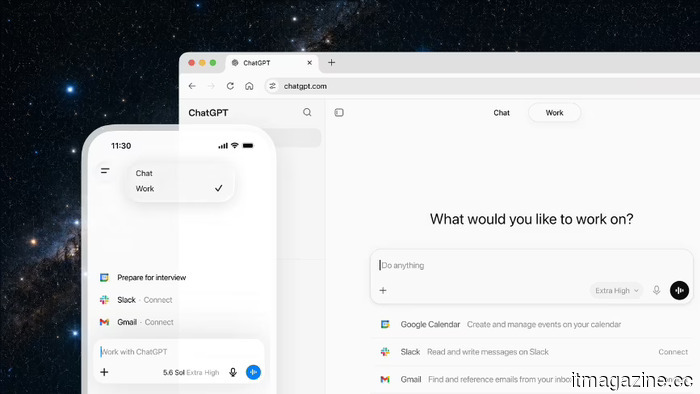
OpenAI has spent the past two years informing users that ChatGPT can answer nearly any question. With its latest release, the company aims for ChatGPT to take a more proactive role. They have introduced ChatGPT Work, an integrated agent within ChatGPT that can perform actions across a user’s applications and files, remain engaged with a project for extended periods, and transform goals into accomplished tasks.
According to OpenAI, this agent can compile information from an individual’s apps and workflows to generate finished documents such as spreadsheets, presentations, and web applications, breaking down intricate projects into manageable steps it can execute autonomously.
Powered by GPT-5.6, the latest model released the same day as part of a extensive rollout that passed US government testing, OpenAI claims this makes ChatGPT cutting-edge in reasoning through multi-step tasks and producing materials that adhere to a user’s established templates and reference files.
The foundational engine is Codex. With this technology integrated, OpenAI indicates that ChatGPT can effectively accomplish real work across web, mobile, and desktop platforms. The company highlights that over five million users engage with Codex weekly, and more than a million utilize it for tasks beyond software development. This evolution reflects the company’s decision to merge ChatGPT and Codex under the leadership of co-founder Greg Brockman.
How it Works
The suggested entry point involves tasks with which the user is already familiar: analyzing monthly budget variances, converting source material into marketing briefs, or preparing for sales meetings. Users can track the agent's progress, respond to its inquiries, adjust its course, and approve key actions as it works.
The agent can also manage entire workflows from a single request. For instance, OpenAI illustrates how to transform customer research into a campaign brief, use that brief to create marketing assets, and then modify those assets for different markets while maintaining context throughout each step.
The advantage is that context does not need to be reiterated at every phase since the agent retains it across the entire process.
OpenAI draws on early adopters to showcase the diversity of applications. They mention that Angela Ferrante, head of enterprise marketing at Zapier, employed ChatGPT Work to establish a repeatable system for reviewing thousands of leads monthly, tracing customer interactions via the company’s CRM and email, identifying breakdowns in follow-ups, and generating a weekly executive dashboard highlighting seven-figure potential sales.
Work Anywhere, Go Further on Desktop
ChatGPT Work is optimized for use across various devices. OpenAI states that a user can initiate a task from their phone, review a draft while on the move, check the progress of a lengthy workflow between meetings, and then continue the same work on a desktop.
The desktop app is where the strategy becomes evident. Here, ChatGPT can access local files and applications directly, and a new integrated browser allows it to gather information from websites and online tools in one centralized location. OpenAI is merging its Codex app into this new ChatGPT desktop interface, which combines Chat, Work, and Codex functionalities.
Codex also receives new features, including inline editing within differences, pull-request reviews in a side panel, enhanced computing efficiency powered by GPT-5.6, and support for multiple repositories within a single project.
Plugins, Sites, and Scheduled Work
To begin, users connect their existing tools via plugins, linking ChatGPT to platforms such as Slack, Microsoft Teams, Google Drive, SharePoint, email, calendars, CRMs, and project management tools. ChatGPT determines when to use a plugin automatically, or a user can direct it to a specific app by typing “@” followed by the app name, with a new unified directory consolidating plugins in one location.
OpenAI is also introducing public beta access to Sites in ChatGPT, which allows users to turn their work or ideas into an interactive website or web application that can be shared via URL. The company suggests its use for live dashboards, project tracking, launch calendars, prototypes, internal portals, and interactive reports, noting that ChatGPT can keep them updated as the underlying data changes.
Scheduled Tasks automate the repetitive elements, allowing ChatGPT to carry out an action once, repeat it at scheduled intervals, or respond to events as they occur while monitoring for changes over time through connected apps and the browser.
Examples from OpenAI include refreshing a recurring meeting agenda using new updates from Slack, checking dashboards each morning and summarizing changes, and updating a presentation based on new feedback received via email. Throughout, the company emphasizes that the user maintains control over what the agent can access, its frequency of check-ins, and when it requires approval to act.
Browser and Computer Use
On desktop, the integrated browser enables ChatGPT to research markets, compare sources, extract information from websites, and edit files from Google Workspace and Microsoft 365 within the application. The Computer Use feature further allows ChatGPT to operate a user’s computer on their behalf, clicking, typing, and transferring files among various applications, tools, and browsers,
Other articles
 Tencent is negotiating to become the largest shareholder of Manus.
Tencent is discussing acquiring the largest stake in the AI agent startup Manus as Chinese investors seek to reverse Meta’s obstructed $2 billion acquisition.
Tencent is negotiating to become the largest shareholder of Manus.
Tencent is discussing acquiring the largest stake in the AI agent startup Manus as Chinese investors seek to reverse Meta’s obstructed $2 billion acquisition.
 SAP avoids an EU antitrust penalty by expanding its support market.
The European Commission has approved SAP’s pledges to facilitate customer transitions or the termination of support contracts, thereby concluding an antitrust investigation without imposing a penalty.
SAP avoids an EU antitrust penalty by expanding its support market.
The European Commission has approved SAP’s pledges to facilitate customer transitions or the termination of support contracts, thereby concluding an antitrust investigation without imposing a penalty.
 The UN's digital agency has introduced a program aimed at ensuring the reliability of AI agents.
The ITU is establishing a focus group aimed at ensuring AI agents remain identifiable and under human oversight, which was initiated at the AI for Good Summit held in Geneva.
The UN's digital agency has introduced a program aimed at ensuring the reliability of AI agents.
The ITU is establishing a focus group aimed at ensuring AI agents remain identifiable and under human oversight, which was initiated at the AI for Good Summit held in Geneva.
 OpenAI introduces ChatGPT Work, an agent designed to complete tasks.
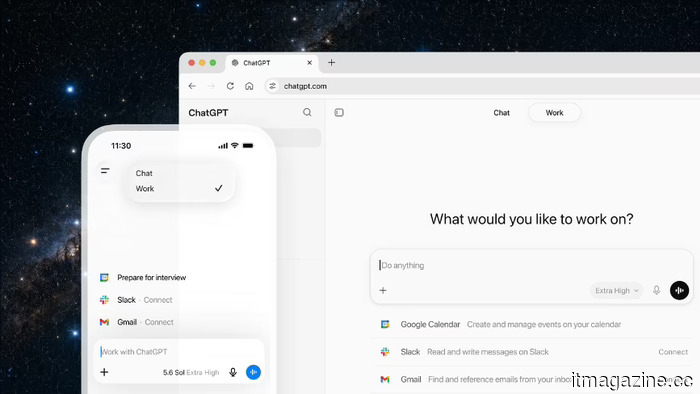
OpenAI has introduced ChatGPT Work, an agent powered by GPT-5.6 that interacts with your applications and files, executes scheduled tasks, and can remain engaged with a project for extended periods.
OpenAI introduces ChatGPT Work, an agent designed to complete tasks.
OpenAI has introduced ChatGPT Work, an agent powered by GPT-5.6 that interacts with your applications and files, executes scheduled tasks, and can remain engaged with a project for extended periods.
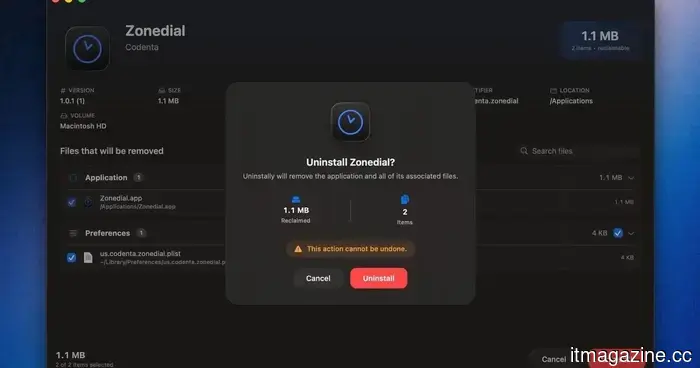 This open-source application for Mac detects the leftover junk files from the apps you've uninstalled.
This native macOS application can detect remnants of uninstalled applications and transfer user-domain files to the Trash for a more secure cleanup.
This open-source application for Mac detects the leftover junk files from the apps you've uninstalled.
This native macOS application can detect remnants of uninstalled applications and transfer user-domain files to the Trash for a more secure cleanup.
 GIGABYTE delights gamers with a new WOLED monitor.
The company GIGABYTE, which usually keeps hardware enthusiasts entertained, has announced the launch of its new gaming monitor GO27Q24G. This 27-inch beauty is frameless and aims to fulfill all the needs of the modern esports player.
GIGABYTE delights gamers with a new WOLED monitor.
The company GIGABYTE, which usually keeps hardware enthusiasts entertained, has announced the launch of its new gaming monitor GO27Q24G. This 27-inch beauty is frameless and aims to fulfill all the needs of the modern esports player.
OpenAI introduces ChatGPT Work, an agent designed to complete tasks.
OpenAI has introduced ChatGPT Work, an agent powered by GPT-5.6 that operates across your applications and files, executes scheduled tasks, and can remain engaged with a project for extended periods.