
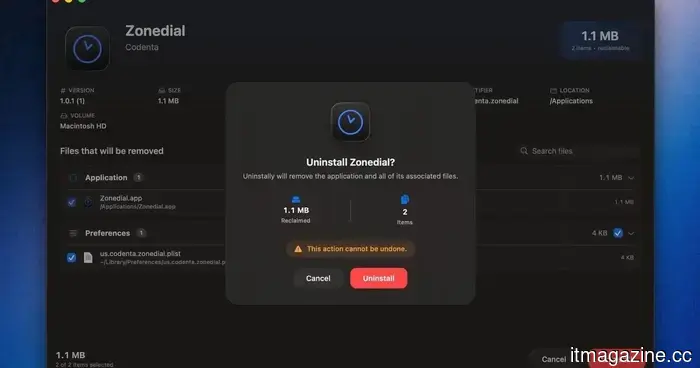
This open-source application for Mac detects the leftover junk files from the apps you've uninstalled.
Uninstalling applications on macOS is generally straightforward: you simply drag an app to the Trash, empty it, and you're done. However, a frustrating aspect is that many applications leave behind remnants—support files, caches, preferences, containers, and logs—even after deletion. This lingering data can be bothersome, particularly when it remains long after the app itself has been removed.
For years, AppCleaner by FreeMacSoft has been a popular choice to address this issue, and it continues to perform well. Recently, however, I discovered a new open-source alternative called Uninstally by Codenta, which tackles the same fundamental issue. It effectively uninstalls Mac apps along with their associated support files, caches, preferences, containers, logs, and other residual elements.
How does Uninstally operate?
Uninstally can be accessed directly from Finder. After enabling its Finder extension, you can right-click any .app bundle and select “Uninstall with Uninstally.” Instead of launching a separate application, it brings up a confirmation window to simplify the process.
Uninstally in Finder menu Codenta on GitHub
What sets it apart is how it identifies related files. Uninstally utilizes the app’s bundle identifier and helper namespaces to locate leftover items within the Library hierarchy, rather than merely searching for folders with the same name. Prior to removal, it displays the app name, icon, reclaimable storage amount, count of items found, and allows you to review or deselect matched files.
What else enhances its utility?
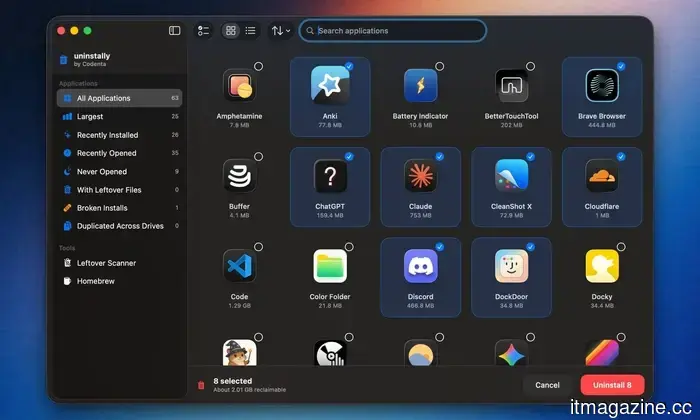
There is also a standalone app browser for more intentional cleaning. This feature lets you search through installed applications, toggle between grid and list views, and filter by the largest apps, recently installed apps, never opened apps, faulty installs, duplicated apps, and those with leftover files.
Codenta on GitHub
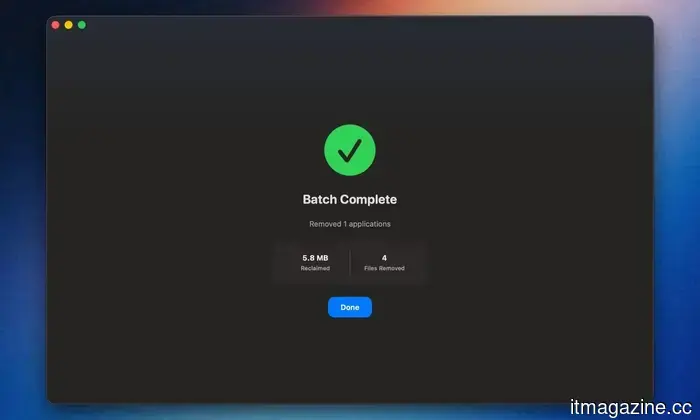
Uninstally includes a leftover scanner for applications that you have previously uninstalled. Instead of manually searching through Library folders, you can scan for orphaned support files, caches, containers, preferences, logs, and old installers all in one place.
It also accommodates Homebrew casks and formulae, indicates dependency relationships, and can remove Homebrew leftovers through an optional zap cleanup. Files in the user domain are moved to the Trash, while privileged items will prompt for administrator access. You can download Uninstally from Codenta’s website or its GitHub repository.
Other articles
 GIGABYTE delights gamers with a new WOLED monitor.
The company GIGABYTE, which usually keeps hardware enthusiasts entertained, has announced the launch of its new gaming monitor GO27Q24G. This 27-inch beauty is frameless and aims to fulfill all the needs of the modern esports player.
GIGABYTE delights gamers with a new WOLED monitor.
The company GIGABYTE, which usually keeps hardware enthusiasts entertained, has announced the launch of its new gaming monitor GO27Q24G. This 27-inch beauty is frameless and aims to fulfill all the needs of the modern esports player.
 Tencent is negotiating to become the largest shareholder of Manus.
Tencent is discussing acquiring the largest stake in the AI agent startup Manus as Chinese investors seek to reverse Meta’s obstructed $2 billion acquisition.
Tencent is negotiating to become the largest shareholder of Manus.
Tencent is discussing acquiring the largest stake in the AI agent startup Manus as Chinese investors seek to reverse Meta’s obstructed $2 billion acquisition.
 Fidji Simo resigns from her position as the second-in-command at OpenAI.
Fidji Simo, the applications chief at OpenAI, is transitioning to a part-time advisory position after a chronic illness has worsened while she was on medical leave.
Fidji Simo resigns from her position as the second-in-command at OpenAI.
Fidji Simo, the applications chief at OpenAI, is transitioning to a part-time advisory position after a chronic illness has worsened while she was on medical leave.
 GIGABYTE delights gamers with a new WOLED monitor.
The company GIGABYTE, which usually keeps hardware enthusiasts entertained, has announced the launch of its new gaming monitor GO27Q24G. This 27-inch beauty is frameless and aims to fulfill all the needs of the modern esports player.
GIGABYTE delights gamers with a new WOLED monitor.
The company GIGABYTE, which usually keeps hardware enthusiasts entertained, has announced the launch of its new gaming monitor GO27Q24G. This 27-inch beauty is frameless and aims to fulfill all the needs of the modern esports player.
 Fraimic's E Ink art frame creates artwork based on your voice and does so in a stunning manner.
Fraimic's voice-to-art E Ink canvas allows you to vocalize a prompt, create AI-generated artwork using GPT Image 2.0, and showcase it in a paper-like Spectra 6 frame, all without needing a subscription.
Fraimic's E Ink art frame creates artwork based on your voice and does so in a stunning manner.
Fraimic's voice-to-art E Ink canvas allows you to vocalize a prompt, create AI-generated artwork using GPT Image 2.0, and showcase it in a paper-like Spectra 6 frame, all without needing a subscription.
 OpenAI introduces ChatGPT Work, an agent designed to complete tasks.
OpenAI has introduced ChatGPT Work, an agent powered by GPT-5.6 that interacts with your applications and files, executes scheduled tasks, and can remain engaged with a project for extended periods.
OpenAI introduces ChatGPT Work, an agent designed to complete tasks.
OpenAI has introduced ChatGPT Work, an agent powered by GPT-5.6 that interacts with your applications and files, executes scheduled tasks, and can remain engaged with a project for extended periods.
This open-source application for Mac detects the leftover junk files from the apps you've uninstalled.
This native macOS application can detect remnants of uninstalled applications and transfer user-domain files to the Trash for a more secure cleanup.