

Introducing the ArtWorkout app: Your personal coach for mastering drawing skills.
iPad users looking for a drawing app tailored for beginners often encounter applications that fail to meet their specific requirements, or worse, lead to confusion. Complicated interfaces, intricate brush options, and inadequate compatibility with tools like Apple Pencils can create significant obstacles for novices trying to use the app as a learning tool.
This is where guided drawing applications like ArtWorkout distinguish themselves.
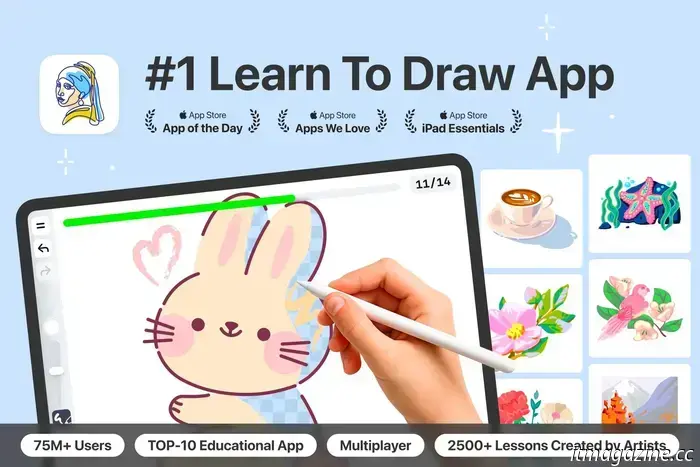
As an iPad drawing app designed for newcomers, ArtWorkout provides a structured and ready-made pathway for anyone eager to learn. With its step-by-step lessons, design optimized for styluses, and a real-time progress bar that tracks each stroke, the app aims to help brand new users establish a drawing habit that fits seamlessly into daily life.
What qualities make an app “good” for drawing instruction?
A robust iPad drawing app for beginners should effectively lower the entry barriers. This involves offering a clean, intuitive workspace along with guidance that navigates users through each aspect of the experience, ensuring that newcomers are never uncertain about the purpose of various tools or the sequence of steps.
An effective design, characterized by clear and consistent visual indicators, a gradual learning progression, and minimal interface distractions, greatly aids users in concentrating on the drawing process rather than searching for features within the app. When an app excels at these fundamentals, it transforms a tablet into an environment where practice feels accessible rather than daunting.
ArtWorkout was developed with these principles in mind, merging structured guidance with real-time feedback, akin to having a personal trainer, which helps learners remain focused throughout each drawing stage.
Created by developer Aleksandr Ulitin, the app is designed to provide drawing beginners with a clear direction from the onset of each lesson. Its interface guides users through each segment of the drawing process, beginning with simple guiding lines that define the basic shape, before progressing to details, colors, and shading. Additionally, it features a green-and-red progress bar that responds to every stroke, making it easy to assess how well the drawing aligns with the intended outcome.
With over 2,500 tutorials and features like the Lesson of the Day and themed categories such as kawaii characters, animals, human figures, landscapes, classic art, and shading exercises, the app provides users with both simple and diverse entry points to ensure they always have something new to practice.
Inside ArtWorkout’s stroke evaluation system
A key characteristic of ArtWorkout is its real-time stroke evaluation system, which offers learners immediate feedback on the formation of each line on the screen. This instant guidance is particularly valuable on iPads and similar devices, where comprehending stroke direction, angle, and overall flow plays a crucial role in learning to draw with confidence.
The evaluation system analyzes the complete formation of every stroke, comparing it against the intended shape, allowing it to detect even minor differences in proportion, direction, or placement. It monitors the angle and curvature of the user’s line as it evolves, noting subtle (and more obvious) deviations from what the exercise requires. These measurements are displayed in a dynamic progress bar indicating how accurately the stroke matches the guide. If inaccuracies surpass the correct components, the app prompts users to repeat the step.
By providing such visible feedback, the app enables learners to track their progress as they draw, rather than simply informing them of whether they completed the exercise correctly or incorrectly afterward. Consequently, each stroke becomes both a practice attempt and a small lesson in improvement.
How does ArtWorkout interact with Apple Pencil or tablet styluses?
The combination of the Apple Pencil and ArtWorkout’s precision system works particularly well on tablets, as the Pencil’s sensitivity to pressure and tilt enables the app to detect subtle changes in line weight, stability, and motion that beginners may overlook.
For those still mastering hand control, this fine-tuned detection can effectively guide them in developing stronger drawing habits, allowing them to visually understand what feels right and where they start to stray.
On iPads, the low-latency response of the Apple Pencil ensures that these interactions are smooth enough for the feedback to become almost seamless with the drawing process. This also applies to stylus-compatible Android tablets, providing the accuracy system with the consistent data necessary to remain useful without being intrusive.
Encouraging users to make drawing part of their routines
The core concept behind ArtWorkout is that cultivating a drawing habit on an iPad becomes simpler (and more fulfilling) when each session feels manageable.
ArtWorkout facilitates this by offering brief lessons that integrate seamlessly into a daily routine: instead of aimlessly scrolling during a 15-minute break, users can use that time to practice line control and acquire minor skills that accumulate over time. Through repeated sessions, these quick exercises are designed to help build a steady drawing habit, bolstered by visible progress that users can observe developing over time.
The app also fosters a sense of community through its Multiplayer Mode, which allows users to participate in live drawing sessions with people globally. This creates a shared activity, a low-pressure environment where both beginners and experienced artists can sketch together and enjoy the experience.
Together,
Other articles
 LG brings back its Wallpaper design as the thinnest wireless OLED TV in the world, and it looks remarkable.
The LG OLED evo W6 reintroduces the minimalist Wallpaper TV aesthetic with advanced display technology, a completely wireless design, and a variety of helpful AI features as well.
LG brings back its Wallpaper design as the thinnest wireless OLED TV in the world, and it looks remarkable.
The LG OLED evo W6 reintroduces the minimalist Wallpaper TV aesthetic with advanced display technology, a completely wireless design, and a variety of helpful AI features as well.
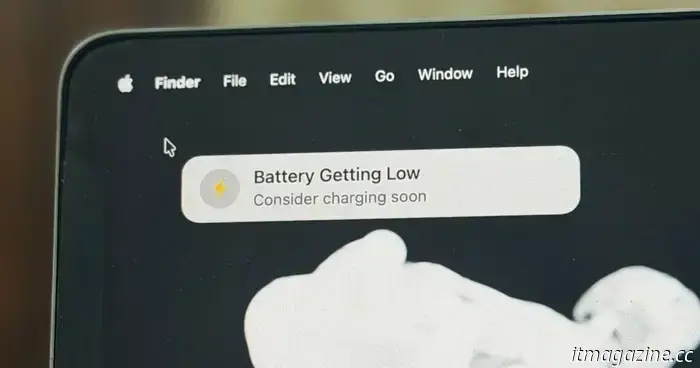 I discovered a small application that can help prevent low-battery work problems on MacBooks.
Plug That In is a Menu Bar utility that monitors your MacBook's battery level and delivers unmistakable audiovisual alerts when the battery is low.
I discovered a small application that can help prevent low-battery work problems on MacBooks.
Plug That In is a Menu Bar utility that monitors your MacBook's battery level and delivers unmistakable audiovisual alerts when the battery is low.
 Samsung's latest Micro RGB TV is oversized and designed to resemble a large window pane.
Samsung is introducing a new 130-inch Micro RGB TV to its lineup, which also features new anti-reflective display technology.
Samsung's latest Micro RGB TV is oversized and designed to resemble a large window pane.
Samsung is introducing a new 130-inch Micro RGB TV to its lineup, which also features new anti-reflective display technology.
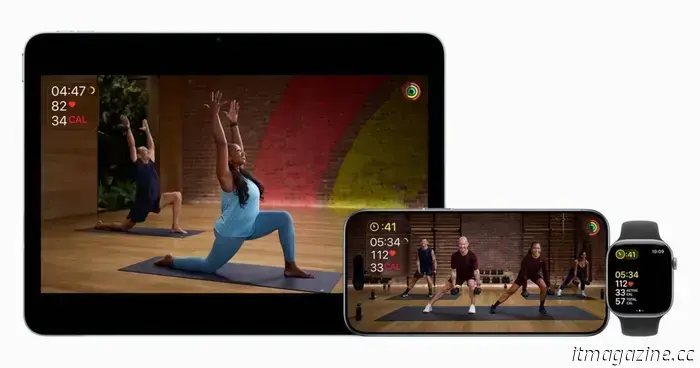 Apple Fitness+ introduces new workout programs designed to assist you in achieving your fitness objectives for 2026.
Apple has launched a new collection of Apple Fitness+ content designed to assist users in reaching their fitness objectives in 2026.
Apple Fitness+ introduces new workout programs designed to assist you in achieving your fitness objectives for 2026.
Apple has launched a new collection of Apple Fitness+ content designed to assist users in reaching their fitness objectives in 2026.
 You might never need to recharge a smart lock again.
Lockin’s V7 Max smart lock employs wireless optical charging and features triple biometric security, completely removing the need for batteries and ensuring dependable, maintenance-free home protection.
You might never need to recharge a smart lock again.
Lockin’s V7 Max smart lock employs wireless optical charging and features triple biometric security, completely removing the need for batteries and ensuring dependable, maintenance-free home protection.
-like-a-pro.jpg) Introducing the humanoid robot that plays tennis (nearly) at a professional level.
If you find yourself in need of a tennis partner to hit some balls with, UBTECH Robotics' Walker S2 humanoid robot might be the solution. A recent video from the Chinese technology firm demonstrates the Walker S2 skillfully handling a tennis racket, maneuvering around the court and seemingly making impressive shots.
Introducing the humanoid robot that plays tennis (nearly) at a professional level.
If you find yourself in need of a tennis partner to hit some balls with, UBTECH Robotics' Walker S2 humanoid robot might be the solution. A recent video from the Chinese technology firm demonstrates the Walker S2 skillfully handling a tennis racket, maneuvering around the court and seemingly making impressive shots.
Introducing the ArtWorkout app: Your personal coach for mastering drawing skills.
iPad users looking for a drawing app aimed at beginners may frequently encounter applications that don’t quite meet their unique requirements or, even worse, can lead to confusion. Complicated interfaces, intricate brush menus, and inadequate compatibility with tablet accessories like Apple Pencils can pose significant challenges for newcomers eager to utilize […]