
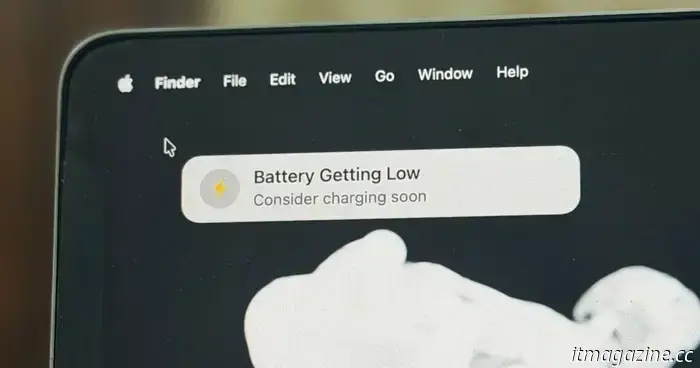
I discovered a small application that can help prevent low-battery work problems on MacBooks.
I’ve lost track of how many times my laptop has shut down in the middle of my work. There have been times when I simply overlooked the low battery notification. Sometimes, I noticed the alert but forgot to plug in the charger.
During my latest ordeal, I was working with just 7% battery while comfortably seated in a bean bag. I thought I could finish my current task before rushing to get the power bank. I misjudged my speed, and my MacBook Air shut down while I was still working. Fortunately, cloud sync preserved my progress.
However, not everyone is as fortunate with their work software. To put it simply, people like me require a more constant – and noticeable – reminder when the battery is low. Luckily, I recently discovered a lightweight Mac utility that’s perfect for those anxious low-power moments.
This is a lifesaver.
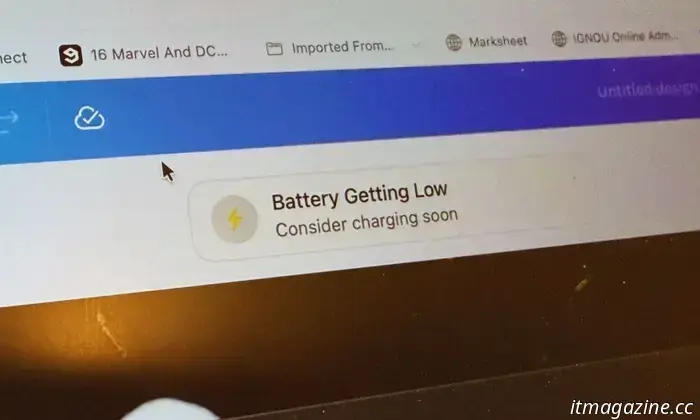
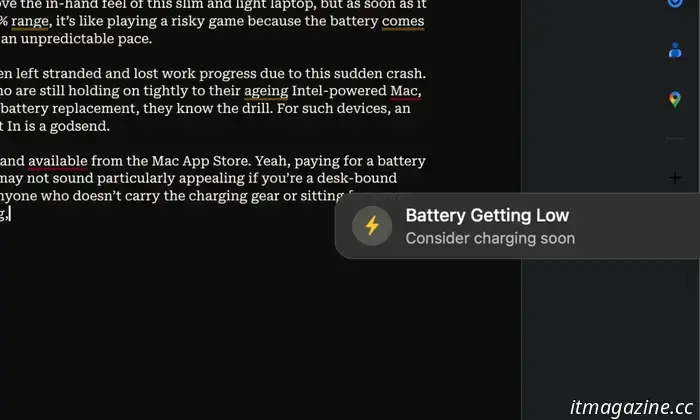
The app is called Plug That In: Battery Monitor, and it manages low battery reminders in a unique way. Instead of using a pop-up notification banner or flashing an icon in a cluttered menu bar, it links the power alert to the touchpad or mouse cursor.
Wherever your cursor goes, the battery level alert follows along. Additionally, it plays a sound alert to ensure that even if your work doesn’t involve cursor movement, or the cursor is resting on an external display you’re not focusing on, you still receive an audible reminder.
The concept behind Plug That In is quite straightforward: make it impossible to overlook a low battery alert. While it may seem a bit annoying, the developer has implemented the idea in a minimalist yet thoughtful way.
To start, the app functions entirely as a menu bar utility, akin to Loook for eye health and the Maccy clipboard app. It’s under 2 MB in size, so it won’t take up much storage or slow down your system. Plus, it doesn’t require any invasive permissions to operate, so think of it as a silent guardian for your Mac's low battery with minimal resource impact.
You might consider an app that simply attaches a low battery alert to the cursor as a basic utility. However, Plug That In offers considerable customization if you want to enhance its standard alert functionalities.
Highly customizable
First, you can configure it to start automatically when the system boots up. You can choose to display just the app’s icon in the menu bar, the battery percentage, or both. Now, let's focus on the main low battery alerts.
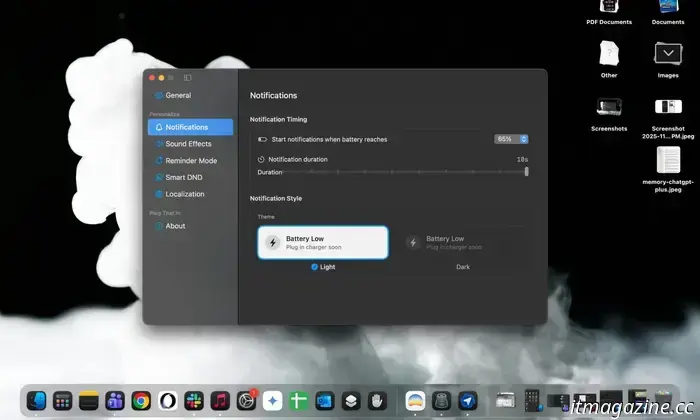
You can select the specific battery level at which the app starts sending audio-visual alerts. You can set this threshold anywhere from 5% to 80%, with increments of 5%. By default, alerts are triggered at the 30% mark.
Users can also adjust the length of notifications, which can last from 1 to 10 seconds. If you’re deeply focused, you can opt to disable audio alerts and rely solely on visual cues.
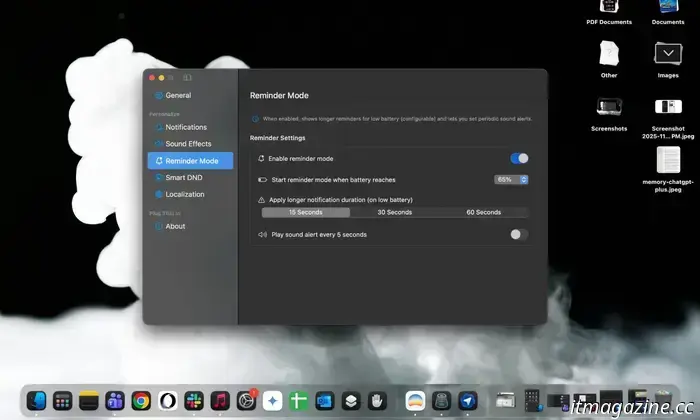
There’s also a dedicated Reminder mode that functions like an urgency phase. The standard notifications are less disruptive, while the Reminders activate when the battery is running low.
After specifying the battery level for these Reminders, you can control how long the visual notification stays on the screen, with options of 15, 30, or 60 seconds. Importantly, you can set sounds to play every 5 seconds, making it nearly impossible to miss the reminders.
A thoughtful addition
The idea of having a visual alert accompany the cursor along with beeps certainly serves as a strong prompt to plug in the charger. However, you likely don’t want it to interrupt your workflow, especially if you’re in the midst of a video call, presentation, or phone call that’s routed through your iPhone.
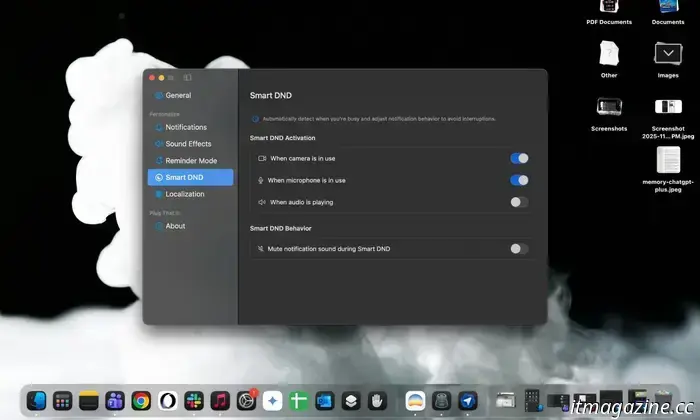
For such situations, Plug That In includes a Smart DND feature. This lets you disable low battery alerts when the camera is active. Additionally, you can mute the alerts when the microphone is in use for calls or recordings or when media playback is occurring.
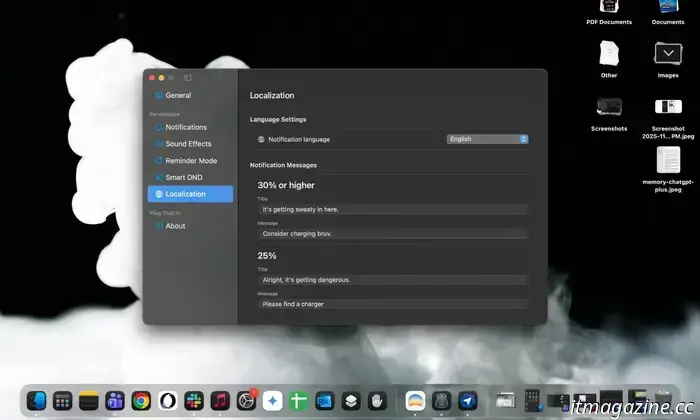
What I appreciate most is the localization system. For battery levels between 5% and 30%—spaced evenly in 5% increments—you can create a custom title and message for each low battery reminder. You can have fun with them or escalate the urgency with each drop.
You might believe you don’t need this app, and that criticism is somewhat valid. MacBooks are known for their impressive battery life, and with 20% remaining, you can often work for a few more hours.
However, workflows can vary widely. If you primarily engage in web-based tasks, a slight delay might be manageable. But if you’re involved in video editing, AI tasks, or workflows with significant background activity, battery depletion can occur rapidly.
The challenge is even greater with older MacBooks that have diminishing battery life. A newer device might last for an hour or two on 5-10%, but an older battery that has seen years of use simply can’t manage that.
Moreover, due to local throttling

Other articles
 Introducing the ArtWorkout app: Your personal coach for mastering drawing skills.
iPad users looking for a drawing app aimed at beginners may frequently encounter applications that don’t quite meet their unique requirements or, even worse, can lead to confusion. Complicated interfaces, intricate brush menus, and inadequate compatibility with tablet accessories like Apple Pencils can pose significant challenges for newcomers eager to utilize […]
Introducing the ArtWorkout app: Your personal coach for mastering drawing skills.
iPad users looking for a drawing app aimed at beginners may frequently encounter applications that don’t quite meet their unique requirements or, even worse, can lead to confusion. Complicated interfaces, intricate brush menus, and inadequate compatibility with tablet accessories like Apple Pencils can pose significant challenges for newcomers eager to utilize […]
 You might never need to recharge a smart lock again.
Lockin’s V7 Max smart lock employs wireless optical charging and features triple biometric security, completely removing the need for batteries and ensuring dependable, maintenance-free home protection.
You might never need to recharge a smart lock again.
Lockin’s V7 Max smart lock employs wireless optical charging and features triple biometric security, completely removing the need for batteries and ensuring dependable, maintenance-free home protection.
 SwitchBot's latest device, MindClip, is designed to transform your note-taking experience.
At CES 2026, SwitchBot has joined the AI note-taking trend with its MindClip, a wearable device intended for capturing notes without the need for hands.
SwitchBot's latest device, MindClip, is designed to transform your note-taking experience.
At CES 2026, SwitchBot has joined the AI note-taking trend with its MindClip, a wearable device intended for capturing notes without the need for hands.
-like-a-pro.jpg) Introducing the humanoid robot that plays tennis (nearly) at a professional level.
If you find yourself in need of a tennis partner to hit some balls with, UBTECH Robotics' Walker S2 humanoid robot might be the solution. A recent video from the Chinese technology firm demonstrates the Walker S2 skillfully handling a tennis racket, maneuvering around the court and seemingly making impressive shots.
Introducing the humanoid robot that plays tennis (nearly) at a professional level.
If you find yourself in need of a tennis partner to hit some balls with, UBTECH Robotics' Walker S2 humanoid robot might be the solution. A recent video from the Chinese technology firm demonstrates the Walker S2 skillfully handling a tennis racket, maneuvering around the court and seemingly making impressive shots.
 Zeroth invites your family to get to know the Zeroth M1 home robot, along with a WALL-E lookalike.
Zeroth Robotics launched at CES 2026 with a lineup of five robots, but only the 15-inch M1 home humanoid has a clear timeline and pricing for the near future. Preorders are anticipated to begin in the first quarter of 2026.
Zeroth invites your family to get to know the Zeroth M1 home robot, along with a WALL-E lookalike.
Zeroth Robotics launched at CES 2026 with a lineup of five robots, but only the 15-inch M1 home humanoid has a clear timeline and pricing for the near future. Preorders are anticipated to begin in the first quarter of 2026.
 LG brings back its Wallpaper design as the thinnest wireless OLED TV in the world, and it looks remarkable.
The LG OLED evo W6 reintroduces the minimalist Wallpaper TV aesthetic with advanced display technology, a completely wireless design, and a variety of helpful AI features as well.
LG brings back its Wallpaper design as the thinnest wireless OLED TV in the world, and it looks remarkable.
The LG OLED evo W6 reintroduces the minimalist Wallpaper TV aesthetic with advanced display technology, a completely wireless design, and a variety of helpful AI features as well.
I discovered a small application that can help prevent low-battery work problems on MacBooks.
Plug That In is a Menu Bar utility that monitors your MacBook's battery level and delivers unmistakable audiovisual alerts when the battery is low.