
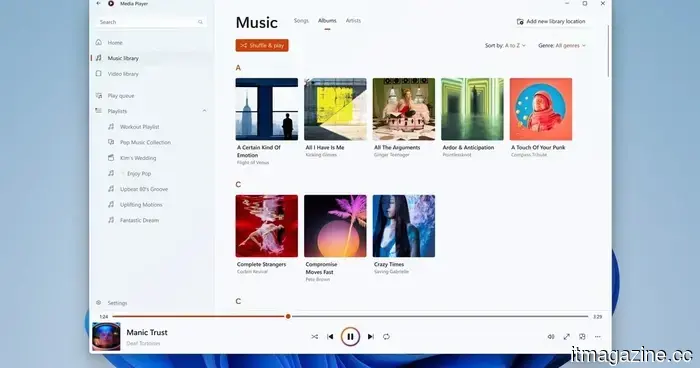
The modern Media Player in Windows 11 is somehow inferior to the version that was released 17 years ago.
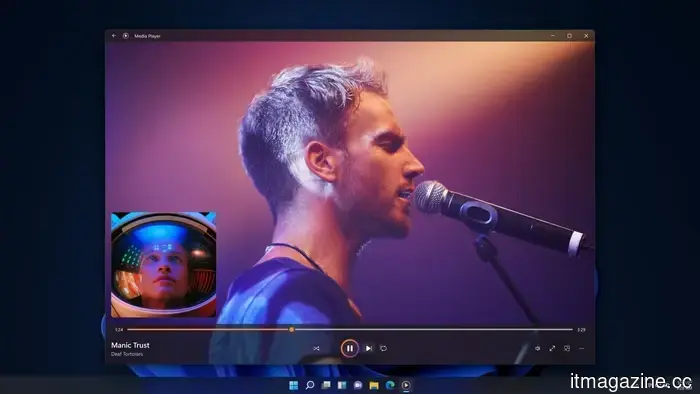
Microsoft has rolled out a new Insider Preview update for the modern Windows 11 Media Player. However, the application is receiving backlash after tests indicated that it consumes more memory and opens local video files more slowly than the classic Windows Media Player, which has been around for 17 years.
This update introduces several beneficial fixes, such as enhanced captions, more precise codec error messages, and improved file recognition. Nonetheless, the primary grievances revolve around increased RAM usage and the need for paid codec support for certain popular video formats. Currently, this update is not accessible to all users. Media Player version 11.2605.14.0 has only been released in Experimental Insider builds as part of Microsoft's June 12 Insider Preview updates.
What’s new in Media Player?
The update features several minor but useful enhancements. Caption styling now adheres to the Windows system caption settings, allowing users to modify font size, color, and background through the operating system. Additionally, Media Player displays an indexing banner when scanning a new media library, which provides clarity on why some songs or videos may not appear immediately.
Microsoft has improved file recognition to minimize playback errors, provided clearer messages for missing codecs, disabled unnamed playlists, resolved a crash associated with editing the play queue, and addressed some visual bugs. These are valuable updates, particularly for an application that serves as the default media player on Windows 11.
Why are users unhappy?
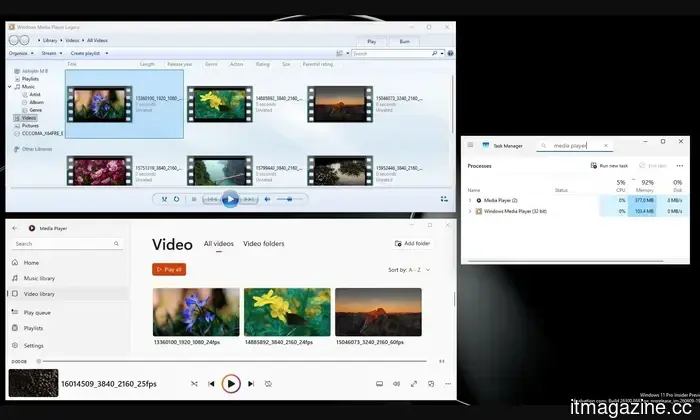
The issue is that these improvements fail to tackle the main concerns. As reported by Windows Latest, the modern Media Player consumes approximately 377MB of RAM while idle, compared to around 103.4MB for the older Windows Media Player. Additionally, the newer app took longer to open a local video file during testing.
For contemporary software, this is a concerning outcome. Opening and playing a local video should be among the simplest tasks for a media player. If Microsoft’s latest app is slower than the version that came with Windows 7 nearly 17 years ago, something is not functioning as it should.
The codec issue is another source of frustration. HEVC, or H.265, is prevalent on many smartphones, including iPhones and various Android devices. However, Windows users may have to acquire Microsoft’s paid HEVC Video Extensions app from the Store to play these files in Media Player, which costs $0.99.
There is some context surrounding this. HEVC is linked to patent licensing, requiring Microsoft to account for royalties. Nonetheless, the user experience is lacking. A user can record a video on a modern smartphone, transfer it to a Windows machine, and then be prompted to pay extra just to view it in Microsoft’s own media application. Fortunately, Windows users have alternatives; free options like VLC Media Player and MPV can play HEVC videos without necessitating Microsoft’s paid codec extension.
Additionally, Windows 11 version 24H2 has removed built-in AC-3 support, which could impact Dolby Digital audio playback. For now, this update demonstrates that Microsoft is making progress with Media Player, but the app must become faster, lighter, and less reliant on paid codec add-ons to gain user approval.
Other articles
 Apple's design studio has seen almost all of the designers from the Jony Ive period leave. The new CEO, John Ternus, claims he will address this issue.
Incoming Apple CEO John Ternus is getting ready for a significant overhaul of the design team, which has seen the departure of Ive, Hankey, Dye, and almost all of its senior designers over the past ten years.
Apple's design studio has seen almost all of the designers from the Jony Ive period leave. The new CEO, John Ternus, claims he will address this issue.
Incoming Apple CEO John Ternus is getting ready for a significant overhaul of the design team, which has seen the departure of Ive, Hankey, Dye, and almost all of its senior designers over the past ten years.
 A study reveals that almost 60% of TikTok videos presented to new users are low-quality AI-generated content.
A Kapwing analysis of 10,742 TikTok videos revealed that 59% of the content presented to new accounts consists of AI-generated material deemed low quality, which is three times more than what is found on YouTube Shorts.
A study reveals that almost 60% of TikTok videos presented to new users are low-quality AI-generated content.
A Kapwing analysis of 10,742 TikTok videos revealed that 59% of the content presented to new accounts consists of AI-generated material deemed low quality, which is three times more than what is found on YouTube Shorts.
 Microsoft's June update addressed 208 security vulnerabilities while simultaneously introducing a series of new bugs across all versions of Windows.
KB5094126 addressed 208 security vulnerabilities but brought about issues that impacted the Recycle Bin, BitLocker recovery, OneDrive, and overall system stability in all Windows versions.
Microsoft's June update addressed 208 security vulnerabilities while simultaneously introducing a series of new bugs across all versions of Windows.
KB5094126 addressed 208 security vulnerabilities but brought about issues that impacted the Recycle Bin, BitLocker recovery, OneDrive, and overall system stability in all Windows versions.
 AirPods didn't eliminate public life; they made it simpler to navigate.
AirPods are often criticized for contributing to social isolation, yet these small earbuds have also turned into a common means of making noisy public environments more bearable.
AirPods didn't eliminate public life; they made it simpler to navigate.
AirPods are often criticized for contributing to social isolation, yet these small earbuds have also turned into a common means of making noisy public environments more bearable.
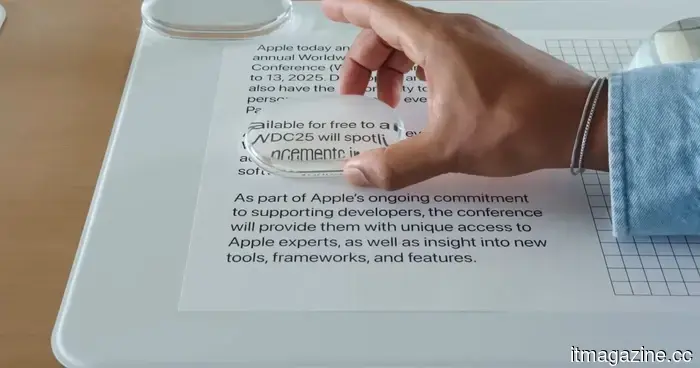 The Liquid Glass slider in iOS 27 appears straightforward, but it's actually more beneficial than I anticipated.
Having used iOS 27 on my iPhone for more than a week, I’ve discovered that the Liquid Glass slider is one of the most overlooked features of the update. Here’s how it functions and why you should give it a try.
The Liquid Glass slider in iOS 27 appears straightforward, but it's actually more beneficial than I anticipated.
Having used iOS 27 on my iPhone for more than a week, I’ve discovered that the Liquid Glass slider is one of the most overlooked features of the update. Here’s how it functions and why you should give it a try.
 Apple users are being targeted by a well-known tech support scam.
Following years of scammers pretending to be Microsoft support, reports indicate that Apple users are now experiencing a comparable surge of fraudulent tech support alerts.
Apple users are being targeted by a well-known tech support scam.
Following years of scammers pretending to be Microsoft support, reports indicate that Apple users are now experiencing a comparable surge of fraudulent tech support alerts.
The modern Media Player in Windows 11 is somehow inferior to the version that was released 17 years ago.
The modern Media Player for Windows 11 from Microsoft has undergone an Insider Preview update; however, tests indicate that it still consumes more memory and launches videos more slowly compared to the classic version from the Windows 7 era.