

You can now submit Codex tasks from your phone even if your Mac is locked.
OpenAI / X
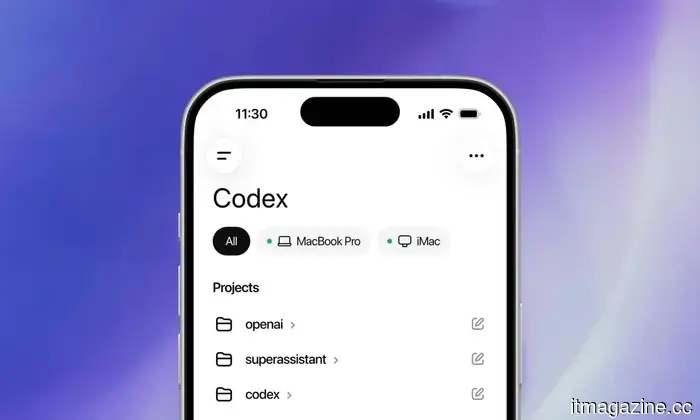
OpenAI’s Codex application for Mac has just received a significant upgrade, making it feel futuristic. You can now send tasks to Codex from your phone, allowing it to utilize apps on your Mac, even when the screen is off and the computer is locked.
One major drawback of AI agents like Claude Cowork or OpenAI Codex is that they require your Mac to be unlocked and operational to function. This presents a significant security concern that would deter most users from taking advantage of these features. With the latest update to Codex, OpenAI appears to have addressed this problem.
A post on X from OpenAI Developers showcased a locked Mac with an overlay stating, “Codex is Using Your Mac”.
How does it work?
To enable this feature, you must install the Computer Use plugin and provide the necessary permissions for it to operate. You can find the locked computer usage setting by navigating to Codex → Settings → Computer Use.
Now Codex can operate from anywhere, regardless of whether your Mac is unlocked. From your phone, Codex can safely access apps on your Mac, even when the screen is off and locked.
After activation, you can send tasks from your phone to your Mac, even in its locked state. When Codex receives a task that requires access after the Mac has locked, it will unlock the computer momentarily in the background while keeping the display secure.
If it detects any interaction with the keyboard or mouse, it will immediately relock the Mac and pause the automatic unlocking until you log in manually. This provides a useful safety feature if your computer is in a location accessed by others.
Should you be concerned about security?
OpenAI has implemented several safety measures. Each unlocking is brief and limited to the current Codex task. Additionally, Codex obscures the display while your desktop is briefly unlocked, preventing prying eyes from seeing your screen.
You maintain control throughout the process, as Codex requests permission before launching any new app, and you can cancel the task or regain control of your computer at any time. There’s also an “Always allow” option for apps you completely trust.
In terms of availability, this feature is not accessible in the European Economic Area, the UK, or Switzerland at launch. It also cannot automate Terminal applications, Codex itself, or any administrative system prompts.
OpenAI has integrated sufficient protective measures to satisfy the majority of users. Whether you choose to trust it for usage is entirely up to you.
Rachit is an experienced technology journalist with over seven years in the consumer technology sector.
Google, Meta, and Microsoft are acquiring worker data through covert monitoring tools, according to reports.
Employee surveillance has evolved into a data-centric business.
The shift to remote work has made employee monitoring software more acceptable. What began as a means of supervising remote workers is increasingly being normalized in office environments as well. A recent study from Northeastern University indicates that the data collected from these tools is being shared with major third parties, such as Google, Facebook, and Microsoft. David Choffnes, a professor at Northeastern’s Khoury College of Computer Sciences and a co-author of the study, pointed out that the findings highlight the inadequate privacy protections for workers. He emphasized that the concern extends beyond employer data collection to the sharing of this data with external entities.
Read more
Mini PCs are among the least exciting yet practical computers you can purchase.
Though they may lack glamour, they make the process of buying a computer feel less like committing to a lifestyle choice.
I’ve been considering purchasing a new device, which usually leads to unrealistic expectations. I'm wary of spending a lot on a laptop, especially since I know much of it would just occupy desk space, appearing portable. I also don't want to build a desktop computer, as that quickly becomes a hobby. Before I know it, I’m deliberating over cases, power supplies, cooling systems, GPUs, and other components that I only intended to consider briefly.
Thus, I found myself exploring mini PCs, arguably the most understated category in personal computing. These compact units sit discreetly beneath a monitor and operate quietly. Nobody sees one and thinks, “Finally, the future has arrived in a matte black finish.”
Read more
Microsoft will permit users to disable the floating Copilot button in the Office app.
Microsoft is responding to user complaints by allowing Office users to hide the floating Copilot button.
If you use Word, Excel, or PowerPoint, you’ve likely noticed the floating Copilot button that has been present in your documents since December 2025, located at the bottom-right corner of your screen. Starting in the last week of May 2026, an update will allow users to move it back to the ribbon where it originally belonged.
Read more





Other articles
 Berlin's Peec AI saw its revenue increase more than twofold to $10 million ARR within six months. Its solution assists brands in appearing in ChatGPT.
The GEO startup secured its Series A funding at a $4M ARR six months back. It is now monitoring $10M, with billboards placed outside competitor offices throughout Berlin.
Waymo's robotaxis continue to navigate into floodwaters. The software update was ineffective. Five cities are currently in lockdown.
A recall that took place two weeks ago was intended to resolve the issue. An unmanned Waymo became trapped in a flood in Atlanta on Wednesday. There is still no permanent solution available.
Berlin's Peec AI saw its revenue increase more than twofold to $10 million ARR within six months. Its solution assists brands in appearing in ChatGPT.
The GEO startup secured its Series A funding at a $4M ARR six months back. It is now monitoring $10M, with billboards placed outside competitor offices throughout Berlin.
Waymo's robotaxis continue to navigate into floodwaters. The software update was ineffective. Five cities are currently in lockdown.
A recall that took place two weeks ago was intended to resolve the issue. An unmanned Waymo became trapped in a flood in Atlanta on Wednesday. There is still no permanent solution available.
 Wireless earbuds might soon recognize you by your heartbeat.
Scientists have created a novel earbud authentication system capable of identifying users by detecting minute heartbeat vibrations within the ear canal. While the concept seems futuristic, it might be more feasible than one might think.
Wireless earbuds might soon recognize you by your heartbeat.
Scientists have created a novel earbud authentication system capable of identifying users by detecting minute heartbeat vibrations within the ear canal. While the concept seems futuristic, it might be more feasible than one might think.
 Moz Pro now monitors your brand within ChatGPT and Gemini | TNW Deals
The new AI Visibility feature from Moz Pro monitors your brand's presence in ChatGPT and Gemini responses, as well as your standing against competitors. Experience it for free.
Moz Pro now monitors your brand within ChatGPT and Gemini | TNW Deals
The new AI Visibility feature from Moz Pro monitors your brand's presence in ChatGPT and Gemini responses, as well as your standing against competitors. Experience it for free.
 The Moto Edge 70 Pro+ will feature the camera system that Motorola previously overlooked.
While the Moto Edge 70 Pro+ may not be completely innovative, its camera arrangement might be the enhancement that Edge 70 Pro purchasers have been seeking from the beginning.
The Moto Edge 70 Pro+ will feature the camera system that Motorola previously overlooked.
While the Moto Edge 70 Pro+ may not be completely innovative, its camera arrangement might be the enhancement that Edge 70 Pro purchasers have been seeking from the beginning.
 Corsair is now incorporating Chinese DRAM in its DDR5 memory kits. This could potentially lead to a decrease in memory prices.
CXMT chips have been noticed in Corsair Vengeance DDR5 modules, as Samsung, SK Hynix, and Micron focus more on AI memory rather than on consumer PCs.
Corsair is now incorporating Chinese DRAM in its DDR5 memory kits. This could potentially lead to a decrease in memory prices.
CXMT chips have been noticed in Corsair Vengeance DDR5 modules, as Samsung, SK Hynix, and Micron focus more on AI memory rather than on consumer PCs.
You can now submit Codex tasks from your phone even if your Mac is locked.
OpenAI's Codex is now able to operate applications on your Mac remotely from your phone, even if the screen is turned off and the Mac is locked. Here’s how it functions and what you should consider.