
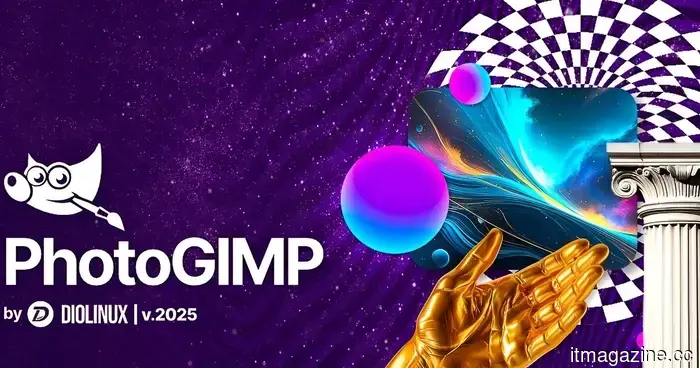
An open-source GIMP redesign offers a look similar to Photoshop without the expensive price tag.
This open-source Photoshop alternative begins with GIMP.
Transitioning from Photoshop to GIMP may seem like a significant change. Suddenly, everything is in different locations, and the user interface can feel unfamiliar. This is where PhotoGIMP comes into play. PhotoGIMP is a free, community-led modification for GIMP 3.0 and later that transforms the open-source image editor into a more recognizable format for Photoshop users.
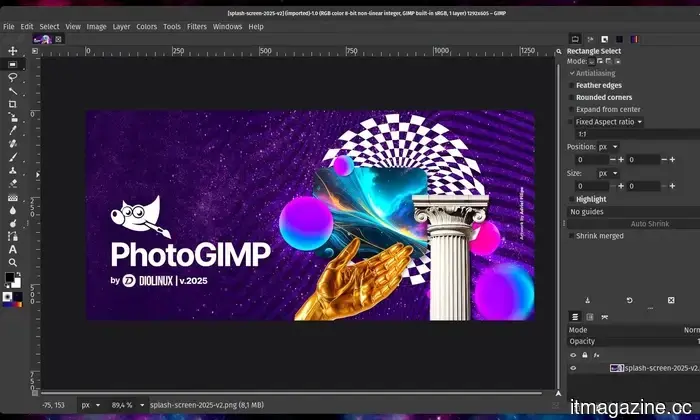
While it doesn't convert GIMP into Adobe Photoshop, the patch rearranges the layout, shortcuts, and app branding to align more closely with Photoshop. This way, newcomers won't feel disoriented from the very start.
Reasons why PhotoGIMP is beneficial for new users:
The most appealing aspect is the interface. PhotoGIMP restructures GIMP's tools to reflect the layout that Photoshop users are accustomed to, while also improving canvas space by modifying default settings. It also features a custom splash screen, a unique icon, and app name, along with a specific desktop launcher for Linux.
The keyboard shortcuts are another standout feature. PhotoGIMP can configure shortcuts to align with Adobe’s official Photoshop documentation for Windows, making basic editing feel more intuitive for users who are still familiar with Adobe's tools. This is particularly advantageous since GIMP has long been regarded as an excellent free alternative to Photoshop, though its interface may be daunting for those who are used to Photoshop’s workflow.
Free, open-source, and a bit DIY:
It's essential to note that PhotoGIMP is not a complete Photoshop clone. Rather, it is a patch that modifies GIMP’s configuration files. The project specifies that users need to first install GIMP, run it once to allow it to create configuration folders, close it, and then apply the PhotoGIMP files.
The project is compatible with Linux, Windows, and macOS, providing distinct installation instructions for each platform. Users are also encouraged to back up their existing GIMP settings beforehand, as PhotoGIMP overwrites configuration files such as shortcuts, tool arrangements, dock layout, session settings, templates, and theme adjustments.
PhotoGIMP doesn’t offer Adobe's cloud features, such as generative AI tools or complete Photoshop compatibility. Professional users might still encounter limitations based on their workflows. However, the enhanced accessibility of this free and open-source platform can be beneficial for many.
Vikhyaat Vivek is a tech journalist and reviewer with seven years of experience in consumer hardware coverage, focusing on...
Chuwi’s UniBook is a $449 laptop aiming for the MacBook Neo’s title with substance.
The MacBook Neo now has a strong Windows competitor.
In the budget category, Windows laptops generally excel in affordability. While some trade-offs exist, one of their most significant advantages has been accessibility. However, due to the ongoing memory shortage, price increases across various segments affected their value. The launch of the MacBook Neo has only intensified this situation, as Apple has become an unexpectedly viable option for those in search of a new entry-level notebook. Chuwi is now reintroducing Windows into the conversation with its new UniBook, a budget-friendly 14-inch laptop that has even managed to underprice the MacBook Neo.
Google’s Gemini Omni is an all-in-one content generator that aims to replace your entire studio.
Google's new Gemini Omni model, unveiled at I/O 2026, promises to put a complete AI video studio in your pocket, free for Shorts users and impressively capable for everyone else. Google has entered the video creation arena, providing everyone with a powerful content creation tool that requires no prior camera or editing knowledge. Introduced at Google I/O 2026, Gemini Omni represents the company’s most ambitious AI model to date. It not only generates video from text but also from various inputs: sketches, voice notes, shaky phone footage, or even a photo of your dog, turning it into a polished, coherent video.
Google Search will now inform you if an image is AI-generated and discuss it in detail.
Google’s SynthID expansion is making it easier to identify AI-generated content.
Google is broadening its SynthID AI watermarking system beyond AI labs and integrating it into everyday products used by people, such as Google Search, Chrome, Circle to Search, and Pixel devices. This initiative, announced during Google I/O 2026, is part of the company’s broader effort to assist users in identifying AI-generated or AI-modified content more easily as synthetic media spreads rapidly online. Google claims that users will soon be able to check if images contain AI-generated elements directly within Google’s ecosystem instead of depending on separate verification tools or third-party sites.




Other articles
 Apple is selling you faulty chips, and you’re willingly purchasing them.
Apple's more affordable devices might utilize chips that fell short of the top performance benchmarks, but this approach is less underhanded than it appears and significantly more intelligent than many consumers understand.
Apple is selling you faulty chips, and you’re willingly purchasing them.
Apple's more affordable devices might utilize chips that fell short of the top performance benchmarks, but this approach is less underhanded than it appears and significantly more intelligent than many consumers understand.
 The RAM crisis is set to worsen, and your new devices might bear the cost.
A recent forecast indicates that Nvidia’s Rubin AI platform might use more than 6 billion GB of LPDDR memory by 2027, which could strain supply chains for gadgets.
The RAM crisis is set to worsen, and your new devices might bear the cost.
A recent forecast indicates that Nvidia’s Rubin AI platform might use more than 6 billion GB of LPDDR memory by 2027, which could strain supply chains for gadgets.
 The RAM crisis is poised to worsen, and your new devices may bear the cost.
A recent prediction indicates that Nvidia’s Rubin AI platform may use more than 6 billion GB of LPDDR memory by 2027, straining supply chains for gadgets.
The RAM crisis is poised to worsen, and your new devices may bear the cost.
A recent prediction indicates that Nvidia’s Rubin AI platform may use more than 6 billion GB of LPDDR memory by 2027, straining supply chains for gadgets.
 Alexa+ can now generate AI podcasts on any subject, if you prefer not to listen to human-hosted podcasts.
Alexa+ can now generate personalized podcast-style episodes in just a few minutes, utilizing AI host voices and content from news publishers and various other sources.
Alexa+ can now generate AI podcasts on any subject, if you prefer not to listen to human-hosted podcasts.
Alexa+ can now generate personalized podcast-style episodes in just a few minutes, utilizing AI host voices and content from news publishers and various other sources.
 ICE is planning GPU compute futures in collaboration with its partner Ornn Index.
Intercontinental Exchange collaborates with Ornn to introduce cash-settled futures that monitor GPU computing expenses, shortly after CME Group revealed competing compute contracts.
ICE is planning GPU compute futures in collaboration with its partner Ornn Index.
Intercontinental Exchange collaborates with Ornn to introduce cash-settled futures that monitor GPU computing expenses, shortly after CME Group revealed competing compute contracts.
 LG has just revealed a 1000Hz gaming monitor that may provide a significant advantage in FPS games.
LG has introduced the UltraGear 25G590B, the first Full HD gaming monitor in the world to support a native 1000Hz refresh rate. Designed for competitive FPS gaming, this 24.5-inch display achieves a native refresh rate of 1000Hz at FHD resolution.
LG has just revealed a 1000Hz gaming monitor that may provide a significant advantage in FPS games.
LG has introduced the UltraGear 25G590B, the first Full HD gaming monitor in the world to support a native 1000Hz refresh rate. Designed for competitive FPS gaming, this 24.5-inch display achieves a native refresh rate of 1000Hz at FHD resolution.
An open-source GIMP redesign offers a look similar to Photoshop without the expensive price tag.
PhotoGIMP provides GIMP 3.0 with a layout reminiscent of Photoshop, incorporates familiar keyboard shortcuts, and offers a more streamlined workspace for those transitioning from Adobe's editor.