

Slack is adding so many features that you can count them on both hands and feet.
Slack is not merely a chat application; it is a cloud-based platform designed to unify your entire team in one location. Rather than dealing with an endless stream of emails, toggling between various project management tools, or pursuing individuals through direct messages, Slack integrates everything into a single, well-structured hub. Its increasing incorporation of AI adds an intriguing element, as Slackbot, once perceived as a basic assistant, is evolving into a more advanced entity. It can now send reminders, respond to frequently asked questions, automate minor tasks, and help teams keep track of their responsibilities without needing continuous communication.
What’s new in this update?
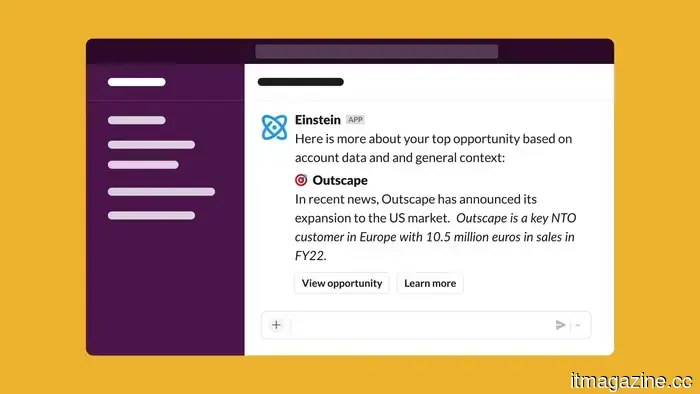
Slackbot now functions as an in-built meeting assistant, joining your calls, transcribing discussions, and quickly converting them into organized summaries with clear action points. As soon as a meeting concludes, you'll have notes, decisions, and next steps ready to go. It can also update aspects like deals or follow-ups in your CRM, ensuring that nothing gets overlooked.
Salesforce / Slack / Digital Trends
What is particularly notable is that Slackbot now follows your activities beyond the Slack app. It comprehends what you're doing across your desktop—whether you're viewing a document, a dashboard, or a conversation—and you can request it to summarize, draft responses, or highlight issues immediately. It already understands your work context, sparing you from having to reiterate everything from the beginning each time.
Your workflow has gained an intelligent assistant.
Slack is also rolling out reusable AI "skills" that simplify repetitive tasks. You can outline a task once with specified steps and outcomes, and Slackbot can execute it whenever necessary. The smart feature is that it can identify when a task aligns with a skill and apply it automatically. Over time, teams can cultivate a shared repository of these skills, making what one individual sets up beneficial for everyone. Another significant development is Slackbot’s integration with other tools, functioning as a single access point to your entire workplace ecosystem, encompassing Salesforce, Google Workspace, and additional applications. You don't need to determine which tool accomplishes what; simply ask, and Slackbot identifies the appropriate system and completes the task.
Digital Trends
For smaller teams, Slack is incorporating built-in customer management features. Slackbot can monitor conversations, grasp ongoing discussions in channels, and autonomously keep records like contacts and deals updated. For larger organizations already utilizing Salesforce, it effectively transforms Slack into a conversational control center where you can handle everything without needing to open another application. Furthermore, Slackbot is becoming more personalized, now accommodating voice input, allowing users to save and share prompts, and gradually learning your working style. The more you engage with it, the more adept it becomes at aligning with your preferences, workflows, and shortcuts. In summary, Slack is transforming Slackbot into an assistant that actively collaborates with you.
Other articles
 Australia claims that Meta, TikTok, and YouTube are not adhering to the ban on social media for children.
Australia's eSafety Commissioner has issued a warning of potential legal action against five platforms for not preventing users under the age of 16 from having accounts, just three months after the implementation of the world's first ban.
Australia claims that Meta, TikTok, and YouTube are not adhering to the ban on social media for children.
Australia's eSafety Commissioner has issued a warning of potential legal action against five platforms for not preventing users under the age of 16 from having accounts, just three months after the implementation of the world's first ban.
 March Madness Took Over My AI Experiment
(NOTE: This article is a continuation of a series exploring the use of AI to complete the NCAA brackets and evaluate its performance against years of human expertise. The original article reads as follows.) This marks the last installment in my series about leveraging AI for March Madness pools. Like many narratives, I had anticipated […]
March Madness Took Over My AI Experiment
(NOTE: This article is a continuation of a series exploring the use of AI to complete the NCAA brackets and evaluate its performance against years of human expertise. The original article reads as follows.) This marks the last installment in my series about leveraging AI for March Madness pools. Like many narratives, I had anticipated […]
 March Madness Took Over My AI Experiment
(NOTE: This article is a part of an ongoing series that chronicles an experiment utilizing AI to complete NCAA brackets and evaluate its performance against years of human expertise. The original article is as follows.) This marks the concluding entry in my series on employing AI for participating in March Madness pools. Like with many narratives, I had anticipated […]
March Madness Took Over My AI Experiment
(NOTE: This article is a part of an ongoing series that chronicles an experiment utilizing AI to complete NCAA brackets and evaluate its performance against years of human expertise. The original article is as follows.) This marks the concluding entry in my series on employing AI for participating in March Madness pools. Like with many narratives, I had anticipated […]
 As if doomscrolling on TikTok wasn't already concerning, it now offers an emoji game in direct messages.
TikTok has launched a hidden emoji game in direct messages worldwide, allowing users to challenge their friends without needing to exit the app.
As if doomscrolling on TikTok wasn't already concerning, it now offers an emoji game in direct messages.
TikTok has launched a hidden emoji game in direct messages worldwide, allowing users to challenge their friends without needing to exit the app.
 Nexchip from China has submitted an application for a Hong Kong stock listing as it speeds up its $5 billion chip expansion.
Nexchip Semiconductor, the third-largest foundry in China, has submitted an application for a dual listing in Hong Kong to raise funds for a $5.1 billion expansion of its fabrication facilities, driven by a rise in demand for mature-node chips.
Nexchip from China has submitted an application for a Hong Kong stock listing as it speeds up its $5 billion chip expansion.
Nexchip Semiconductor, the third-largest foundry in China, has submitted an application for a dual listing in Hong Kong to raise funds for a $5.1 billion expansion of its fabrication facilities, driven by a rise in demand for mature-node chips.
 Australia claims that Meta, TikTok, and YouTube are not adhering to the ban on social media for children.
Australia's eSafety Commissioner has issued a warning of potential legal action against five platforms for not preventing users under 16 years old from creating accounts, three months following the implementation of the world's inaugural ban.
Australia claims that Meta, TikTok, and YouTube are not adhering to the ban on social media for children.
Australia's eSafety Commissioner has issued a warning of potential legal action against five platforms for not preventing users under 16 years old from creating accounts, three months following the implementation of the world's inaugural ban.
Slack is adding so many features that you can count them on both hands and feet.
Your entire process is now fully automated (at last).