
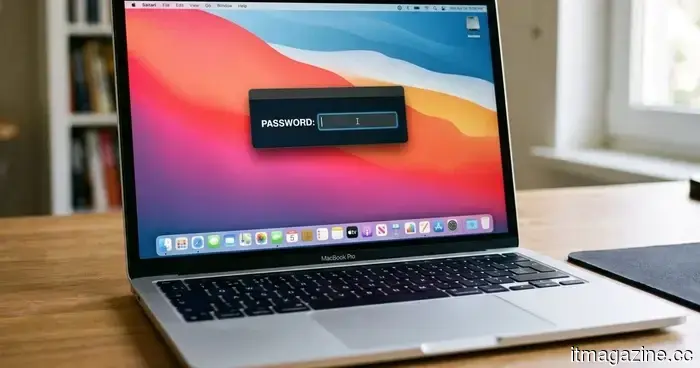
This new Mac malware prevents you from using your computer until you provide your password.
A recently identified strain of macOS malware is elevating social engineering tactics to a troubling degree. Rather than targeting a software flaw or discreetly stealing data, it simply restricts access to your Mac until you enter your login password.
Named ClickLock, this malware persistently shuts down critical macOS processes, disables notifications, presents authentic-looking Apple password prompts, and effectively entraps users in a cycle that only finishes when the right password is inputted. Upon doing so, it not only captures the password but also seeks to obtain browser data, cryptocurrency wallets, saved credentials, password managers, and more.
According to a report from BleepingComputer, researchers at Group-IB have noted that the malware has infected at least 100 systems in 33 countries since May. Alarmingly, when it was first submitted to VirusTotal in June, none of the security tools on the platform flagged it as malicious.
ClickLock doesn’t compromise your Mac—it compromises you.
In contrast to many contemporary malware campaigns that use zero-day vulnerabilities or privilege escalation tactics, ClickLock operates through psychological manipulation. The infection is thought to start with a ClickFix-style attack, where users are deceived into copying and pasting a command into Terminal under the pretext of completing a Cloudflare “human verification” task. While a phony verification progress bar distracts the victim, the malware discreetly downloads its payload.
Simultaneously, it disables keyboard interrupts, conceals the Terminal cursor, and suppresses macOS Notification Center alerts for nearly six hours, making it significantly more challenging for victims to notice any unusual activity.
The malware’s most alarming feature follows. It presents what seems to be a legitimate macOS password dialog, complete with the user’s actual account name and Apple branding. If the victim inputs the correct system password, ClickLock immediately verifies it and transmits the credentials to the attackers via Telegram.
If the user declines, the malware persists. Instead of relenting, it installs persistence mechanisms that activate after the next login. Once triggered, ClickLock starts terminating essential macOS processes every 210 milliseconds, affecting Finder, Dock, Terminal, Activity Monitor, Console, System Settings, Spotlight, and even well-known web browsers.
The outcome is a Mac that appears nearly entirely inoperable, displaying only the password prompt on screen. Group-IB reports that this loop can last over 83 hours, or until the victim finally relents.
It seeks much more than just your password.
The login password is merely the starting point. ClickLock also tries to deceive victims into granting approval for a legitimate Keychain access prompt, which allows permission to Chrome’s Safe Storage key. This key can later be utilized to decrypt saved passwords, cookies, and autofill data from Chromium-based browsers.
The malware’s data-extraction module targets a broad spectrum. It seeks browser profiles from Chrome, Firefox, Brave, Microsoft Edge, Opera, Vivaldi, Arc, and Chromium, capturing saved passwords, cookies, bookmarks, browsing sessions, local storage, and autofill details.
Users of cryptocurrency face an even higher threat. ClickLock looks for browser wallet extensions, desktop wallet files, encrypted wallet vaults, and cached wallet addresses across major blockchain systems, including Bitcoin, Ethereum-compatible chains, Solana, TRON, TON, and Stacks.
It also gathers FileZilla FTP configurations, shell history, basic system data, and public IP addresses, then compresses all this into ZIP files and uploads the stolen information via the Telegram Bot API. To ensure attackers have enduring access, ClickLock employs a modified version of the open-source GSocket tool, establishing a persistent backdoor for remote control of the compromised Mac. Unlike other malware components that erase themselves post-execution to limit forensic traces, this backdoor remains active within the system.
The stealth tactics do not stop there. Researchers indicate that the malware is hosted on compromised yet otherwise legitimate websites, helping it evade reputation-based security measures. Its payloads also self-delete after execution, leaving minimal traces. Nevertheless, Group-IB asserts that defenders can still detect suspicious activities by monitoring for recurrent password dialog boxes produced via osascript, continuous shut-downs of macOS processes, widespread access to browser profile directories, and unusual outbound connections to Telegram.
The most critical takeaway, however, is surprisingly straightforward. If a website prompts you to open Terminal and paste a command to prove your humanity, exit the page without hesitation. No reputable website, including Cloudflare, requires Terminal access for human verification. Moreover, if your Mac suddenly becomes inoperable and repeatedly requests your system password, resist the compulsion to comply. Instead, force a shutdown using the power button, restart in Safe Mode, and investigate the system before providing any credentials. In the case of ClickLock, your password won’t resolve the issue; it’s precisely what the attackers are hoping for.


Other articles
 A bug in AWS billing resulted in users receiving estimated charges as high as $2.5 trillion.
A pricing mistake in AWS Cost Explorer resulted in users receiving bills that spanned from billions to $2.5 trillion. One user who had charges of $0.19 received an estimated bill of $2.5 billion.
A bug in AWS billing resulted in users receiving estimated charges as high as $2.5 trillion.
A pricing mistake in AWS Cost Explorer resulted in users receiving bills that spanned from billions to $2.5 trillion. One user who had charges of $0.19 received an estimated bill of $2.5 billion.
 Apple is engaged in preliminary settlement discussions with the DOJ regarding its iPhone antitrust lawsuit.
Apple has proposed several settlement offers for the DOJ antitrust lawsuit of 2024. The antitrust chief from the Trump administration is advocating for a swift resolution of the cases passed down to them.
Apple is engaged in preliminary settlement discussions with the DOJ regarding its iPhone antitrust lawsuit.
Apple has proposed several settlement offers for the DOJ antitrust lawsuit of 2024. The antitrust chief from the Trump administration is advocating for a swift resolution of the cases passed down to them.
 Lenovo's latest gaming laptop is the first to include a 240Hz OLED display that is printed using inkjet technology.
Lenovo's latest Legion R9000P is the inaugural laptop to utilize an inkjet-printed OLED display, boasting a 240Hz refresh rate and more than 99% DCI-P3 coverage.
Lenovo's latest gaming laptop is the first to include a 240Hz OLED display that is printed using inkjet technology.
Lenovo's latest Legion R9000P is the inaugural laptop to utilize an inkjet-printed OLED display, boasting a 240Hz refresh rate and more than 99% DCI-P3 coverage.
 Microsoft will cease syncing OneDrive on older versions of Windows 10 starting next month.
As of August 15, OneDrive synchronization updates will cease for Windows 10 versions earlier than 22H2, which means there will be no additional fixes or security updates. Users can either utilize the web interface or consider upgrading to Windows 11.
Microsoft will cease syncing OneDrive on older versions of Windows 10 starting next month.
As of August 15, OneDrive synchronization updates will cease for Windows 10 versions earlier than 22H2, which means there will be no additional fixes or security updates. Users can either utilize the web interface or consider upgrading to Windows 11.
 Anthropic is in preliminary discussions to lease $10 billion in computing resources from Meta.
The agreement would come after Anthropic's $1.25 billion per month deal with SpaceX for the Colossus project. Meanwhile, Meta is developing a cloud business aimed at capitalizing on $145 billion in AI infrastructure expenditures.
Anthropic is in preliminary discussions to lease $10 billion in computing resources from Meta.
The agreement would come after Anthropic's $1.25 billion per month deal with SpaceX for the Colossus project. Meanwhile, Meta is developing a cloud business aimed at capitalizing on $145 billion in AI infrastructure expenditures.
 Red Magic's OLED gaming tablet, akin to the size of an iPad mini and featuring liquid cooling, is now available worldwide.
International customers will soon have the option to purchase Red Magic’s liquid-cooled OLED gaming tablet in two different memory configurations.
Red Magic's OLED gaming tablet, akin to the size of an iPad mini and featuring liquid cooling, is now available worldwide.
International customers will soon have the option to purchase Red Magic’s liquid-cooled OLED gaming tablet in two different memory configurations.
This new Mac malware prevents you from using your computer until you provide your password.
ClickLock is a new malware for macOS that persistently terminates system processes and deceives victims into providing their login passwords to capture sensitive information.