
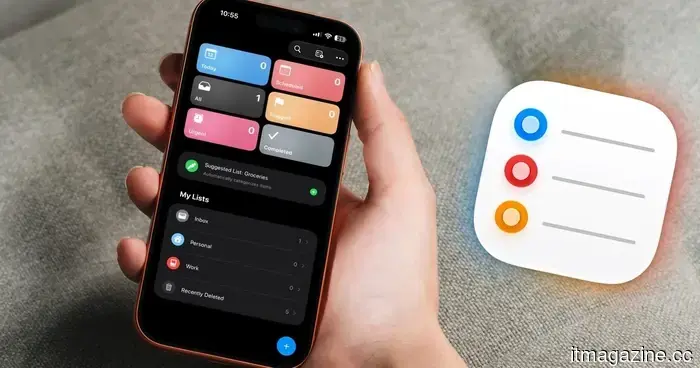
5 reasons I consistently return to Apple Reminders, even after investing in premium task management apps.
The App Store is brimming with premium task management apps, and like Things 3, Todoist, and OmniFocus, despite purchasing and trying several of them, I continually return to Apple Reminders.
To clarify, I still rely on OmniFocus for managing my projects. However, for daily tasks and quick entries, Apple Reminders remains my preferred choice. In this guide, I’ll outline the five main reasons why.
Siri simplifies task capture
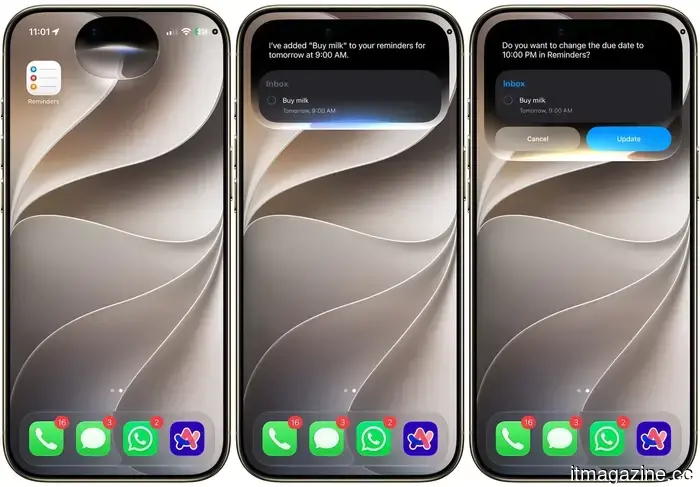
One of the primary reasons I stick with Apple Reminders is Siri’s ability to make task capture simple. No matter if I'm involved in a chore or out for a walk, as soon as I recall a task, I can just say, “Hey Siri, add this to my reminder,” and it gets done.
With the iOS 17 beta update I am currently testing, Siri's capabilities have improved even further. It now offers better language processing, allowing me to easily set a date and time. Moreover, if I hesitate while speaking or change my mind midway, Siri prompts me for clarification and sets the correct reminder.
This functionality is fantastic for quickly jotting down tasks that come to mind, which is why I never forget to note them down.
Intelligent reminders appear when needed
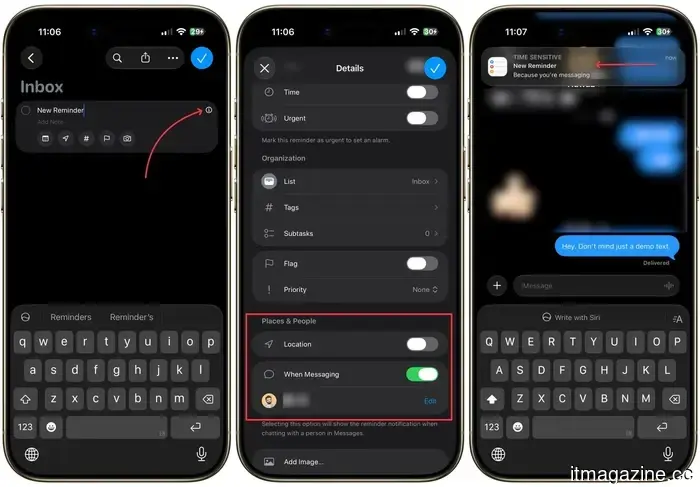
Apple Reminders features built-in location-based and message-based reminders, ensuring they show up exactly when I require them. For instance, if I want to remind myself to tell my mom something the next time I communicate with her, I can set a reminder that will automatically pop up while I’m texting her.
Similarly, location-based reminders make sure I don’t forget to pick up something or collect an important document when I reach a certain location. If you haven’t utilized this feature yet, I highly recommend trying it out. You can access it by tapping the (i) button next to a reminder.
Collaborative grocery shopping made easy
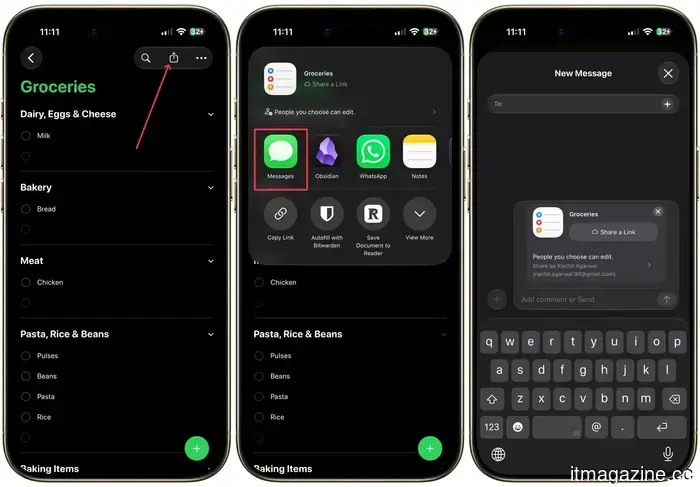
If you share a household with a partner or a roommate, this feature can save you from the hassle of calling and texting each time you go grocery shopping. All you need to do is create a grocery list, tap the share button in the top-right corner, and share it with your partner.
Both of you can then add items and check them off as they are purchased. This means you no longer have to check in with each other about what to buy. I’ve also created similar shared lists for household chores and other joint tasks. Trust me, this will save you considerable time and effort, making both of you happier.
Ensure important tasks aren’t overlooked
Our phones are flooded with notifications, making it easy to overlook a task reminder here and there, potentially causing some things to slip through the cracks. I want to avoid that with my essential tasks, and Apple Reminders has a solution for this issue as well.
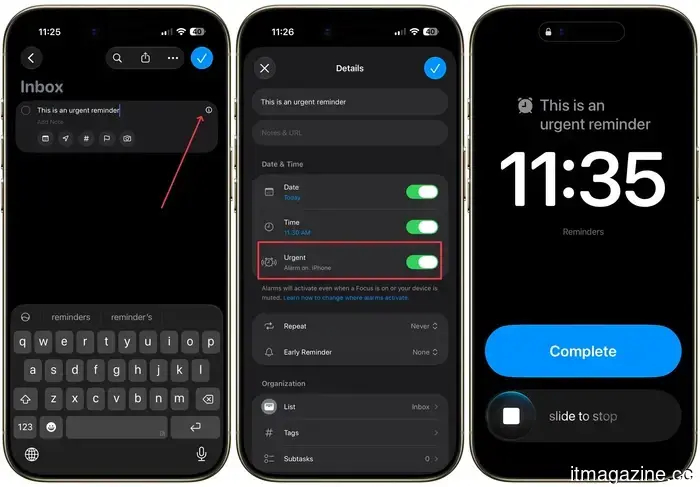
With the iOS 16.2 update, Apple Reminders introduced an alarm-style reminder feature, ensuring you never miss a crucial reminder. You can enable an alarm-style reminder by tapping the (i) button and switching on the “Urgent” reminder toggle.
Now, instead of receiving a gentle notification, your reminder will take over the entire iPhone screen similar to a daily alarm, ensuring you never forget that pressing task again.
Seamless integration with Notes, Safari, and Mail
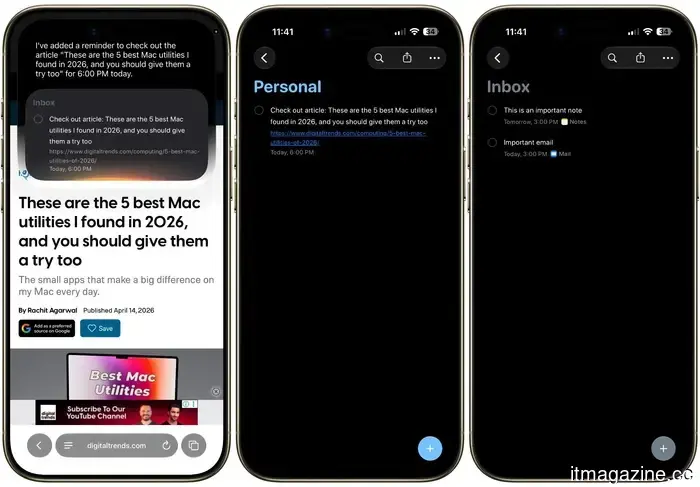
At times, I discover an email I need to respond to later, a webpage I want to revisit, or a note I need to finish. Apple Reminders’ seamless integration with Apple Notes, Safari, and Apple Mail guarantees I won’t forget these tasks.
With the email, note, or webpage open, I can easily ask Siri to remind me about it at a specific date and time, or simply drag and drop an email or note directly into Reminders. Apple Reminders will automatically generate a reminder with a direct link to the original email, note, or webpage, allowing me to resume right where I left off.
This means I no longer have to hunt for that email or note or save a website link manually. My reminders will already contain a link back to the original content, saving me both time and effort.
Why I keep returning to Apple Reminders
This does not imply that premium task managers aren't worth the investment. If you require substantial project management, OmniFocus remains my choice for that purpose, and I have no plans to replace it.
However, for everyday tasks, quick entries, intelligent reminders, and shared lists, Apple Reminders simply stays out of my way and allows me to proceed with my day. It’s free, integrated into every Apple device I own, and Apple continuously enhances it with every update.
If you dismissed Apple Reminders years ago as too simplistic, I encourage you to reconsider. Thanks to Siri enhancements, shared lists, urgent alerts, and robust app integration, it has quietly evolved into one of the most capable task managers on your iPhone.
Other articles
 What occurs when AI detectors do not succeed? Researchers suggest that we need to learn how to identify fake AI-generated faces.
AI detectors are facing challenges with increasingly convincing deepfakes. Researchers indicate that individuals can significantly enhance their skills in recognizing artificial AI faces by engaging in structured training and developing pattern recognition.
What occurs when AI detectors do not succeed? Researchers suggest that we need to learn how to identify fake AI-generated faces.
AI detectors are facing challenges with increasingly convincing deepfakes. Researchers indicate that individuals can significantly enhance their skills in recognizing artificial AI faces by engaging in structured training and developing pattern recognition.
 The founder of Zhipu advocates for open frontier AI.
Tang Jie states that the security of AI arises from transparency rather than obstacles, especially as Beijing considers limiting foreign access to China's top open models.
The founder of Zhipu advocates for open frontier AI.
Tang Jie states that the security of AI arises from transparency rather than obstacles, especially as Beijing considers limiting foreign access to China's top open models.
 The founder of Zhipu advocates for open frontier AI.
Tang Jie argues that AI security is derived from transparency rather than restrictions, while Beijing considers limiting foreign access to China's premier open models.
The founder of Zhipu advocates for open frontier AI.
Tang Jie argues that AI security is derived from transparency rather than restrictions, while Beijing considers limiting foreign access to China's premier open models.
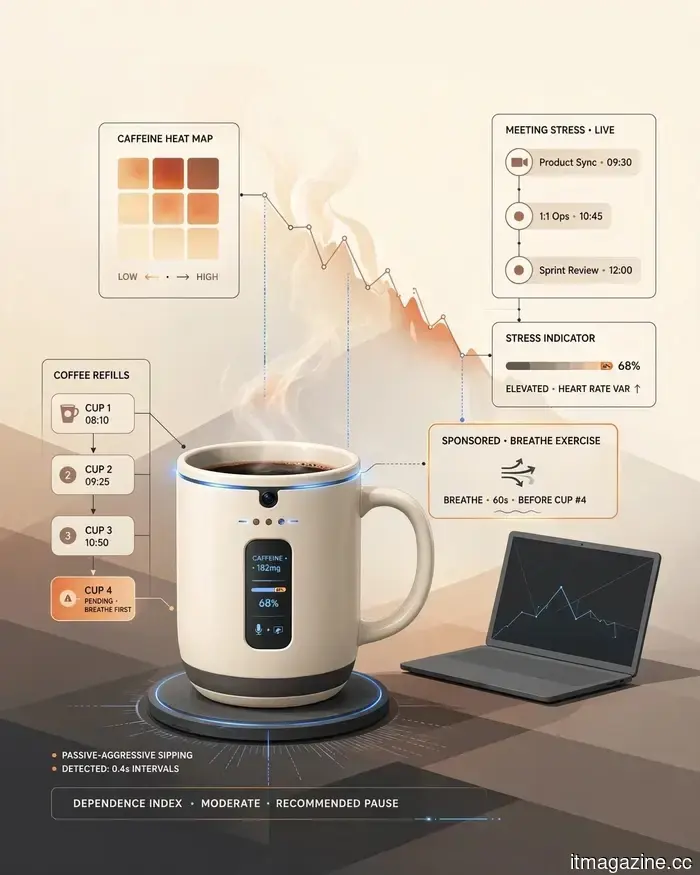 I attempted to create a parody of the most ridiculous AI products, but the tech industry outdid me.
I attempted to create AI devices that were too ridiculous for the tech sector. However, I soon discovered that toothbrushes, litter boxes, headphones, and various appliances had already surpassed my ideas.
I attempted to create a parody of the most ridiculous AI products, but the tech industry outdid me.
I attempted to create AI devices that were too ridiculous for the tech sector. However, I soon discovered that toothbrushes, litter boxes, headphones, and various appliances had already surpassed my ideas.
 Your upcoming song might soon feature an AI warning label, and the music industry fully supports this.
The music industry is urging Spotify and Apple Music to tag AI-generated songs, aiming to provide listeners with more transparency as the use of artificial intelligence in music creation grows.
Your upcoming song might soon feature an AI warning label, and the music industry fully supports this.
The music industry is urging Spotify and Apple Music to tag AI-generated songs, aiming to provide listeners with more transparency as the use of artificial intelligence in music creation grows.
 I invested a lot in a Copilot+ PC, yet I hardly ever use Microsoft's AI.
Although my Copilot+ PC is equipped with specialized AI hardware and comes with its own Copilot key, Microsoft's assistant has not significantly integrated into my everyday tasks.
I invested a lot in a Copilot+ PC, yet I hardly ever use Microsoft's AI.
Although my Copilot+ PC is equipped with specialized AI hardware and comes with its own Copilot key, Microsoft's assistant has not significantly integrated into my everyday tasks.
5 reasons I consistently return to Apple Reminders, even after investing in premium task management apps.
Even though I've invested in Things 3, Todoist, and OmniFocus, I find myself going back to Apple Reminders. Here are five reasons why this free app still outperforms premium task managers for daily use.