
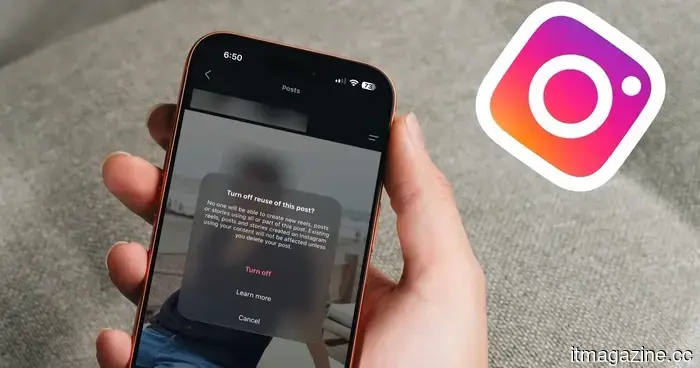
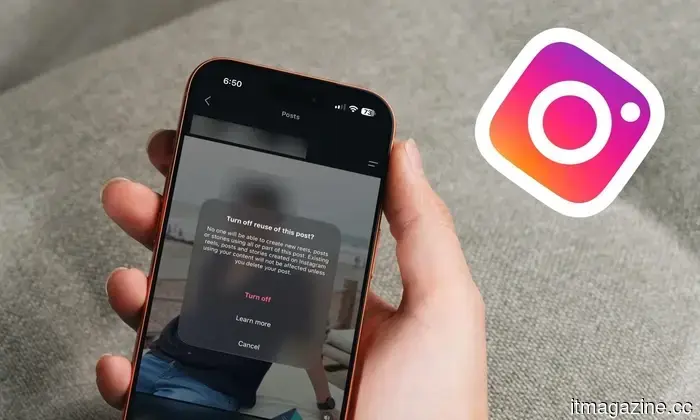
Instagram is allowing users to create AI-generated images of themselves. Here's how you can prevent it.
You share a selfie, a stranger comments, and suddenly there’s an “AI version” of you doing who knows what. A simple toggle can make it stop.
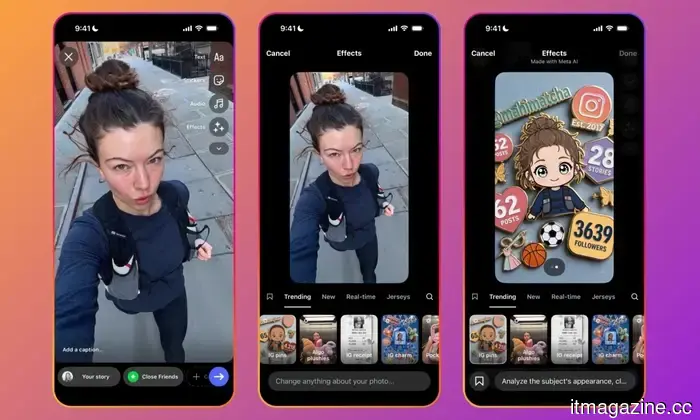
Instagram has recently introduced Muse AI, its own image and video generation tool. At first glance, it seems like a valuable resource for creators to manifest their creativity. However, beneath the surface, there’s a concerning detail all Instagram users should be aware of.
Even if you’re indifferent to the increase of AI-generated content this may cause, you should be concerned that your images and videos might be used by someone else for such purposes. Yes, that’s correct. Through Muse AI, anyone can leverage your Instagram photos and videos to generate AI-driven content.
The truly alarming aspect of this feature is that Meta didn’t inform you about it, and you’re automatically opted into it. In this guide, I will clarify how this feature functions and how you can disable it on your account to prevent others from creating AI images and videos using your content.
Quick guide: How to prevent others from creating AI images of you on Instagram
Here’s a brief outline of the steps to stop other Instagram users from generating AI images resembling you.
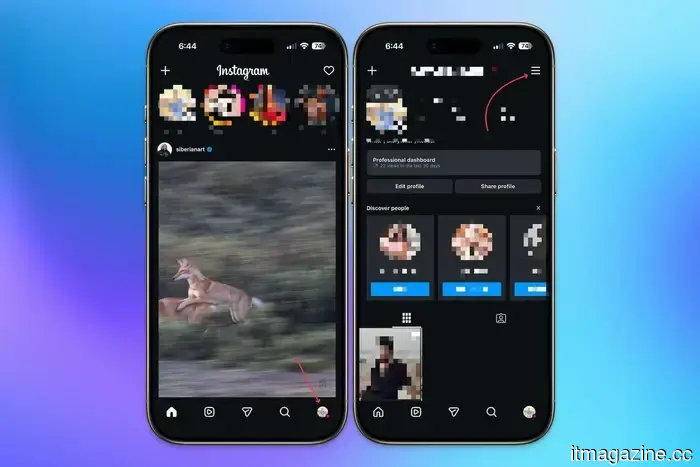
1. Open Instagram and navigate to your profile.
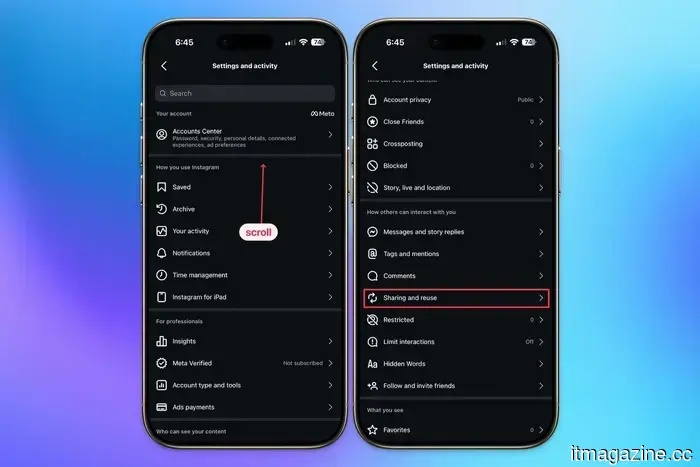
2. Click on the hamburger menu and select “Sharing and reuse.”
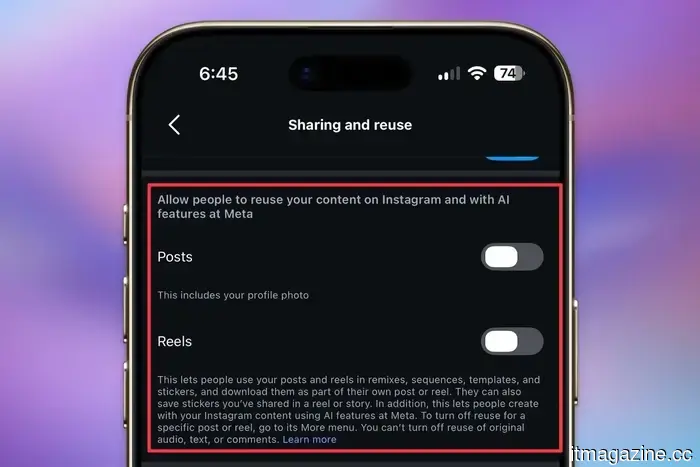
3. In the section allowing others to reuse your content, turn off the toggle for Posts and Reels.
Why Muse AI presents a looming privacy issue
If your profile is public, anyone has the potential to utilize Muse AI to create images and videos referencing your photos. They merely need to tag your profile in the prompt using @, and the AI will utilize your content to generate an image.
While this process isn’t inherently bad and could lead to interesting collaborations, a platform with over 3 billion active users could easily attract numerous malicious actors who might create misleading or harmful images of others.
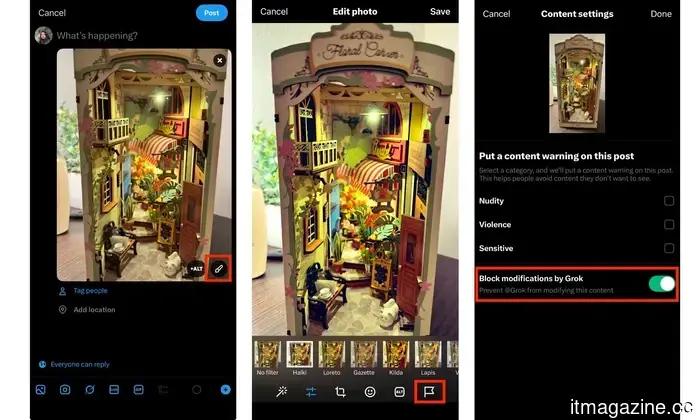
Recently, X faced significant backlash after being inundated with non-consensual adult content generated using Grok. Users were exploiting it to produce sexualized images of girls, including minors, which overwhelmed the platform.
It became such a concern that X had to impose a paywall and implement restrictions on Grok’s image generation to prevent users from altering your photos. Yet, Instagram has enabled its 3 billion users to engage in similar behavior without restrictions or paywalls, which doesn't seem promising.
How can you safeguard yourself?
As large corporations often prioritize their interests over user concerns, it’s crucial for us to take measures to protect ourselves. By default, if your profile is public, anyone can use your images and videos to create AI-generated representations of you. However, there’s an option to disable this setting.
Step 1: Open the Instagram app on your device, navigate to your profile, and tap the hamburger menu in the upper-right corner to access settings.
Step 2: Scroll to the “How others can interact with you” section and select the “Sharing and reuse” setting.
Step 3: Locate the “Allow people to reuse your content on Instagram and with AI features at Meta” option and turn off the toggle for both Posts and Reels.
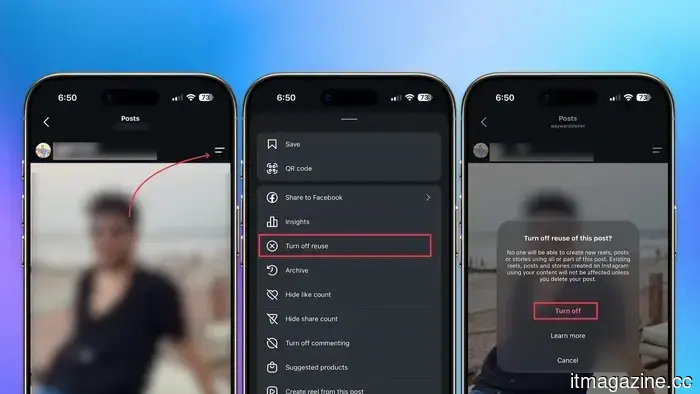
Step 4: If you wish to disable it for specific posts only, access the post menu, tap “Turn off reuse,” and confirm.
This is how you can not only safeguard your content’s intellectual property but also prevent the creation of non-consensual images of you. With the rise of generative AI, sharing your photos and videos online has become riskier, and it’s essential to take precautions. Changing this setting takes less than a minute, so there’s truly no justification for leaving it enabled and hoping for the best.
Rachit is an experienced tech journalist with over a decade of expertise covering the consumer technology arena.
This app transforms your text and voice messages into animated AI characters.
Pixi Garden aims to enhance messaging by converting your texts into animated AI performances.
If you ever felt your text messages lacked flair, you might want to explore this new application. Instead of sending a monotonous text or voice message, Pixi Garden lets you dispatch animated AI characters that convey your message with flair.
What is Pixi Garden?
Meta’s addictive design for Instagram and Facebook might lead to hefty fines and a mandatory redesign.
Meta is facing serious repercussions from the European Union regarding the addictive nature of its apps, which could result in significant financial penalties. The European Commission announced today that Meta violated the Digital Services Act, a regulation that necessitates large online platforms to evaluate and mitigate risks associated with their design.
The Commission's initial findings specifically highlighted features of Instagram and Facebook like infinite scrolling, autoplay, push notifications, and personalized recommendations—elements that keep users engaged for extended periods.
This photo could provide your first real glimpse of the Galaxy Z Fold 8.
A Reddit post allegedly showcases Samsung's wider foldable device prior to the Unpacked event on July 22.
Samsung's upcoming foldable devices have been


Other articles
 Tingyu Su emphasizes the importance of considering the founding designer as a strategic hire right from the beginning of the company's development for AI startups.
Tingyu Su, the founding designer of the healthcare AI startup Youlify, points out that as AI simplifies software development, the role of the founding designer becomes essential. This individual plays a vital strategic role by linking product development, branding, and customer experience right from the start.
Tingyu Su emphasizes the importance of considering the founding designer as a strategic hire right from the beginning of the company's development for AI startups.
Tingyu Su, the founding designer of the healthcare AI startup Youlify, points out that as AI simplifies software development, the role of the founding designer becomes essential. This individual plays a vital strategic role by linking product development, branding, and customer experience right from the start.
 Your YouTube playlists can now be transformed into real TV shows, but there's a caveat you should be aware of.
YouTube Shows allows YPP creators to arrange videos into seasons and episodes, transform playlists into organized series, and enable the "Continue Watching" feature.
Your YouTube playlists can now be transformed into real TV shows, but there's a caveat you should be aware of.
YouTube Shows allows YPP creators to arrange videos into seasons and episodes, transform playlists into organized series, and enable the "Continue Watching" feature.
 This image could be your first genuine glimpse of the Galaxy Z Fold 8.
A photo being shared on Reddit purportedly displays Samsung's Galaxy Z Fold 8, Fold 8 Ultra, and Flip 8 in real life, weeks before the Unpacked event scheduled for July 22.
This image could be your first genuine glimpse of the Galaxy Z Fold 8.
A photo being shared on Reddit purportedly displays Samsung's Galaxy Z Fold 8, Fold 8 Ultra, and Flip 8 in real life, weeks before the Unpacked event scheduled for July 22.
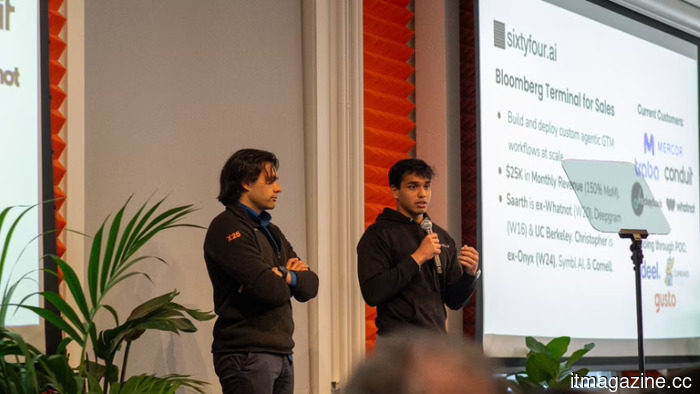 The Eval Stack: Demonstrating the agents' correctness rather than just asserting it.
Saarth Shah, the CEO of Sixtyfour, describes how his company developed AI research agents focused on strict evaluation systems instead of solely relying on the fluency of language models. They established a verification infrastructure that demonstrates accuracy through graded benchmarks and referenced sources.
The Eval Stack: Demonstrating the agents' correctness rather than just asserting it.
Saarth Shah, the CEO of Sixtyfour, describes how his company developed AI research agents focused on strict evaluation systems instead of solely relying on the fluency of language models. They established a verification infrastructure that demonstrates accuracy through graded benchmarks and referenced sources.
 Europe's effort to reduce bureaucracy has satisfied hardly anyone.
The EU's push for deregulation is undermining the GDPR and postponing the AI Act, while industry representatives claim it's moving too slowly, and digital rights organizations argue that it's overly ambitious.
Europe's effort to reduce bureaucracy has satisfied hardly anyone.
The EU's push for deregulation is undermining the GDPR and postponing the AI Act, while industry representatives claim it's moving too slowly, and digital rights organizations argue that it's overly ambitious.
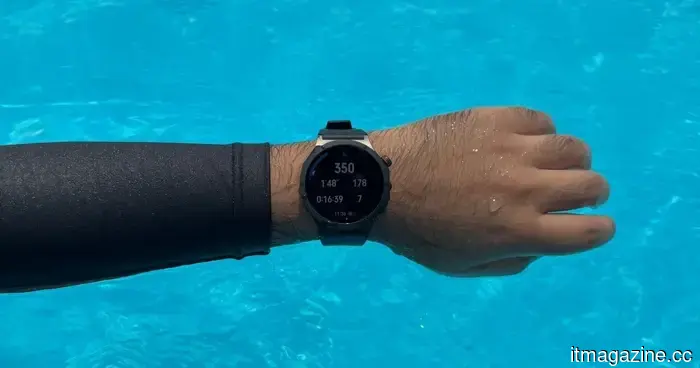 I brought this Oppo smartwatch for a swim, and it recorded everything except for my excuses.
The Oppo Watch X3 tracked all aspects of my 1,100-meter swim, capturing my strokes, pace, heart rate, changes in technique, and even a long pause for conversation.
I brought this Oppo smartwatch for a swim, and it recorded everything except for my excuses.
The Oppo Watch X3 tracked all aspects of my 1,100-meter swim, capturing my strokes, pace, heart rate, changes in technique, and even a long pause for conversation.
Instagram is allowing users to create AI-generated images of themselves. Here's how you can prevent it.
Instagram's new Muse AI allows individuals to utilize your photos to create AI-generated images and videos, and you are automatically opted in. Here’s how to locate the setting and disable it to prevent others from using your likeness without your permission.