

A bug in Windows 11 could be silently consuming hundreds of gigabytes of your storage space.
Microsoft has released a fix for the storage issue affecting Windows 11.
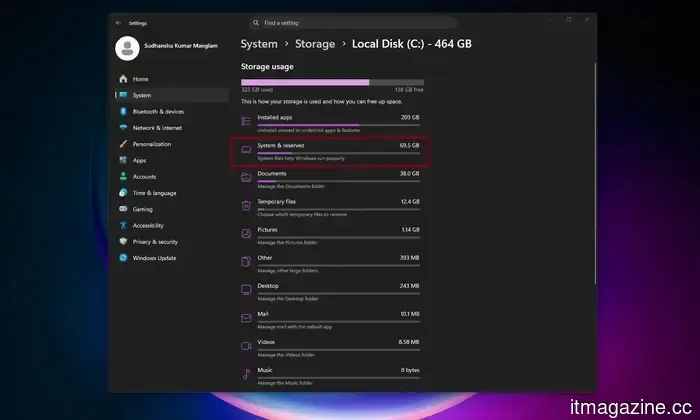
If your Windows 11 computer suddenly shows low storage, the source might not be your downloads folder or game library. According to Windows Latest, a bug associated with a Windows system file can silently consume a significant amount of space on the system drive, potentially tens or hundreds of gigabytes.
The problematic file is named CapabilityAccessManager.db-wal, located in the Capability Access Manager folder within Windows. Windows Latest indicates that the issue may manifest as unusually high usage of “System files” in Windows 11’s storage summary, even though the Settings app does not clearly indicate the file causing the problem. In various reported instances, users found it ballooning to 200GB or more.
What is consuming the storage?
The Capability Access Manager relates to app permissions and privacy activities in Windows 11. Essentially, it helps manage access requests for features like the camera, microphone, location, and screen capture.
The issue seems to stem from the write-ahead log file associated with this database. While log files like this can grow temporarily, they should not continually expand to consume the entire C drive. According to Windows Latest, the file may be logging repeated events and failing to compact as it should, leading to unexpected storage loss without a clear reason.
How to check and resolve the issue?
A good starting point is in Settings. Go to System, then Storage, click on Show more categories, and select System & reserved. If the System files show high usage in gigabytes, your PC may be affected. You can check the size of your CapabilityAccessManager.db-wal file directly, but it involves a few steps. First, you should boot your PC in safe mode and navigate to Local Disc (C) > Program Data (commonly hidden) > Microsoft > Windows > CapabilityAccessManager.
Microsoft has not provided a comprehensive public explanation of the bug, but it did state in the release notes for Windows 11 KB5095093 that the update enhances disk space management for the CapabilityAccessManager.db-wal file.
The safest solution is to install KB5095093 via Windows Update, or wait for the July 2026 Patch Tuesday release when the same fix is anticipated to be more broadly available. If your drive is already full, it’s advisable to install Microsoft’s update first instead of manually deleting the CapabilityAccessManager.db-wal file. This is a protected Windows system file, and altering or deleting it while Windows is operating may lead to further issues. Some Reddit users have reported losing WiFi functionality after deleting CapabilityAccessManager.db-wal.






Other articles
 The price increase for Google's Pixel 11 might be presented as a storage enhancement.
A recent leak indicates that the Pixel 11 series might see a price increase of 100 euros, although the regular and Pro models may alleviate this with 256GB of base storage.
The price increase for Google's Pixel 11 might be presented as a storage enhancement.
A recent leak indicates that the Pixel 11 series might see a price increase of 100 euros, although the regular and Pro models may alleviate this with 256GB of base storage.
 Are your iPhone shortcuts vanishing silently? iOS 27 has introduced a method to restore them.
If you've noticed a sudden reduction in your iPhone Shortcuts library without any clear reason, the new Restore button in iOS 27 clarifies the issue and resolves it.
Are your iPhone shortcuts vanishing silently? iOS 27 has introduced a method to restore them.
If you've noticed a sudden reduction in your iPhone Shortcuts library without any clear reason, the new Restore button in iOS 27 clarifies the issue and resolves it.
 Sources indicate that DeepSeek has initiated the development of its own AI chips to reduce dependence on NVIDIA.
In recent years, as generative AI has evolved from model training to large-scale inference, more AI model developers have shifted their focus.
Sources indicate that DeepSeek has initiated the development of its own AI chips to reduce dependence on NVIDIA.
In recent years, as generative AI has evolved from model training to large-scale inference, more AI model developers have shifted their focus.
 You can now install Windows on the Steam Machine, for reasons only you comprehend.
Valve has launched official Windows drivers for the Steam Machine, simplifying the process of installing Microsoft's operating system, although SteamOS still seems to provide superior gaming performance.
You can now install Windows on the Steam Machine, for reasons only you comprehend.
Valve has launched official Windows drivers for the Steam Machine, simplifying the process of installing Microsoft's operating system, although SteamOS still seems to provide superior gaming performance.
 Meta's latest image and video AI tools enable you to transform Instagram into your personal creative mood board.
With Muse Image now live and Muse Video in preview, Meta has officially ended its collaboration with Midjourney and Black Forest Labs for its creative AI.
Meta's latest image and video AI tools enable you to transform Instagram into your personal creative mood board.
With Muse Image now live and Muse Video in preview, Meta has officially ended its collaboration with Midjourney and Black Forest Labs for its creative AI.
 The era of affordable Chinese AI models may be coming to an end as the government considers implementing restrictions akin to those in the United States.
Chinese authorities have allegedly talked about restricting foreign access to the nation's most sophisticated closed and open-weight AI models due to concerns over national security.
The era of affordable Chinese AI models may be coming to an end as the government considers implementing restrictions akin to those in the United States.
Chinese authorities have allegedly talked about restricting foreign access to the nation's most sophisticated closed and open-weight AI models due to concerns over national security.
A bug in Windows 11 could be silently consuming hundreds of gigabytes of your storage space.
If system files are consuming hundreds of gigabytes on your Windows 11 computer, a bug related to CapabilityAccessManager.db-wal might be the cause.