

Locating photos has become significantly simpler with Siri AI in iOS 27, so I no longer need to scroll.
My camera roll has surpassed 8,000 photos, amassed by capturing random moments that I often forget later. The real issue arises when someone requests a specific image, like their portrait from last weekend or the food photos they snapped with my phone.
Finding those images typically involves scrolling through my seemingly endless camera roll. If the photo in question is a month or two old, I usually have to scroll past hundreds of other images, which quickly becomes tedious.
Siri AI is quite efficient in locating pictures.
Apple attempted to address this issue with natural-language photo search in iOS 18.1, but it always seemed like a feature that was almost perfect. With iOS 27, Siri AI bridges this gap by introducing voice search, allowing you to simply ask aloud and let it do the searching.
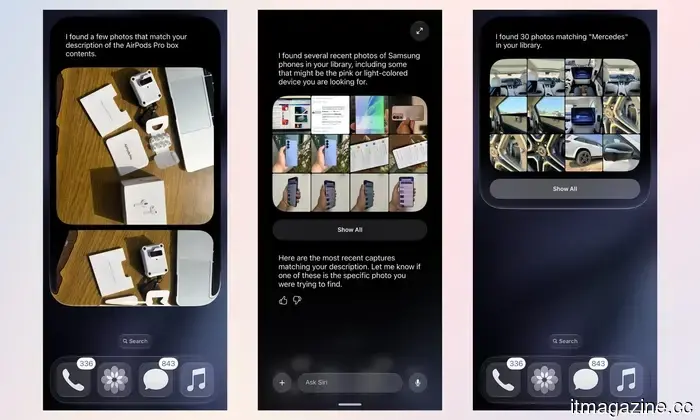
For well-defined items, natural-language voice search via Siri performs quite well. I asked Siri to show me a picture of the AirPods Pro box contents from January 2026, another of Samsung phones, and one for Mercedes, and it retrieved the correct images. All of these were at least a couple of months old.
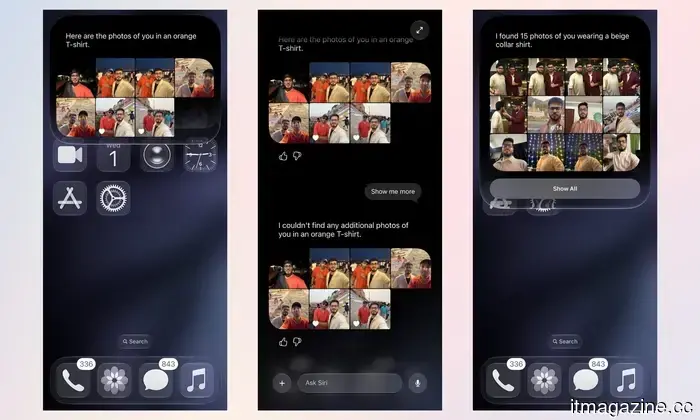
When discussing my favorite orange and beige shirts with a friend, instead of scrolling through the entire gallery to locate them, I just asked Siri to find the photos of me wearing them.
However, the results aren’t always spot-on. As evident, the initial results included pictures of my friend, with either of us in the orange or beige shirts. The photo I was searching for—the beige shirt—was the eighth result Siri provided. Yet, even so, it dated back to November 2025, and I couldn’t imagine opening the Photos app and scrolling through thousands of images to find it.
You can share the result or view it with all photos.
Tapping the picture expands it to full screen, giving me the option to share it via AirDrop or another application, or to view it in the Photos app, similar to how “Show in All Photos” operates for Memories or Featured Photos.
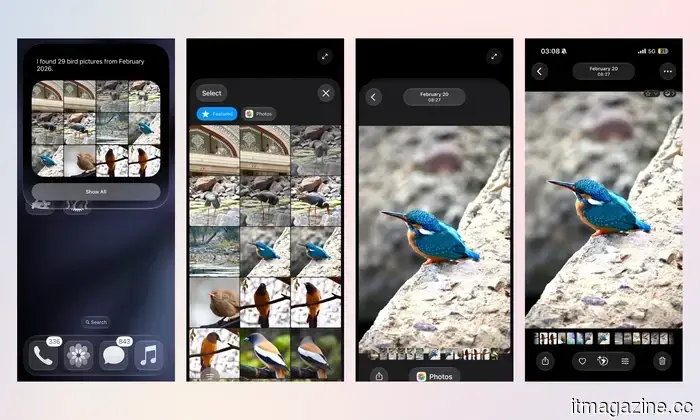
Recently, my sister asked me to send her the pictures of birds I took at a national park we visited a few months back. I quickly activated Siri, and it effortlessly fetched the required images.
I tapped “Show All” for a clearer view, selected one, and hit the Photos button at the bottom to dive immediately into my camera roll, where I could access all of them along with some great family pictures I had captured before and after.
However, it still has some rough edges.
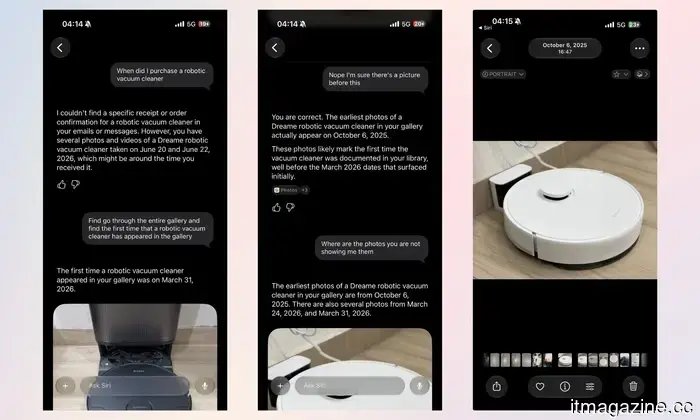
There were occasions when Siri AI didn’t perform well. For example, I inquired about when I first bought a robotic vacuum cleaner. It responded that there was no specific receipt or order confirmation, but that there were several pictures of it in my gallery.
That seemed reasonable. I then asked Siri to sift through the gallery to find the first picture I took of the robotic vacuum cleaner, and it showed me one dated March 31, 2026, despite there being multiple pictures from October 2025. It wasn’t until I pointed this out that Siri AI managed to display the correct images.
Siri may not be completely accurate yet, which, considering iOS 27’s beta testing phase, I can’t fault Apple for. Nevertheless, the natural language image search fulfills its purpose: helping you avoid frustrating scrolling, whether you're searching for that elusive photo or navigating through your gallery.

Other articles
 EU's tech chief and Tim Cook engage in 'constructive' discussions as Siri AI remains restricted in Europe.
On June 30, Henna Virkkunen and Tim Cook conducted a video call concerning Apple, the DMA, and the launch of a Siri AI that remains restricted on EU iPhones.
TikTok is considering an additional 300 job reductions at its Dublin location.
TikTok is considering approximately 300 job cuts at its Dublin location, which represents about 10% of the local workforce, a year following a comparable reduction.
EU's tech chief and Tim Cook engage in 'constructive' discussions as Siri AI remains restricted in Europe.
On June 30, Henna Virkkunen and Tim Cook conducted a video call concerning Apple, the DMA, and the launch of a Siri AI that remains restricted on EU iPhones.
TikTok is considering an additional 300 job reductions at its Dublin location.
TikTok is considering approximately 300 job cuts at its Dublin location, which represents about 10% of the local workforce, a year following a comparable reduction.
 Research indicates that platforms such as TikTok, Instagram, Snapchat, and YouTube are letting children down due to inadequate safety features.
A recent study evaluated 86 child safety features on TikTok, Instagram, Snapchat, and YouTube, revealing that over half were either ineffective, hidden, or completely absent.
Research indicates that platforms such as TikTok, Instagram, Snapchat, and YouTube are letting children down due to inadequate safety features.
A recent study evaluated 86 child safety features on TikTok, Instagram, Snapchat, and YouTube, revealing that over half were either ineffective, hidden, or completely absent.
 This LED sign priced at $249 aims to improve your work-life balance.
The Busy Bar display is set to be available for purchase in July. It appears to be incredibly efficient, but the price of $249 is quite steep.
This LED sign priced at $249 aims to improve your work-life balance.
The Busy Bar display is set to be available for purchase in July. It appears to be incredibly efficient, but the price of $249 is quite steep.
 This $249 LED sign aims to improve your work-life balance.
The Busy Bar display is set to hit the market in July. It appears to be incredibly efficient, but the price of $249 is simply too high.
This $249 LED sign aims to improve your work-life balance.
The Busy Bar display is set to hit the market in July. It appears to be incredibly efficient, but the price of $249 is simply too high.
 The UN's inaugural global panel on AI science cautions that the opportunity to regulate the technology is diminishing.
The UN’s Independent International Scientific Panel on AI reports that two nations possess 90% of the top computing power, and the opportunity to regulate AI is diminishing.
The UN's inaugural global panel on AI science cautions that the opportunity to regulate the technology is diminishing.
The UN’s Independent International Scientific Panel on AI reports that two nations possess 90% of the top computing power, and the opportunity to regulate AI is diminishing.
Locating photos has become significantly simpler with Siri AI in iOS 27, so I no longer need to scroll.
iOS 27 allows you to describe a photo using simple English, and Siri will locate it for you. I rigorously tested it on the developer beta, and it saves more time than you might think.