
If you request it while using Drive, Google will scan through your Gmail inbox.
Google is broadening the capabilities of Gemini within Workspace by enabling users to directly integrate Gmail conversations into Ask Gemini in Drive. This enhancement allows the AI assistant deeper access to emails, documents, and folders, creating a more cohesive workspace experience.
This feature is now generally available to eligible Google Workspace and Google AI subscribers and aims to assist users in posing more intricate inquiries while using Google Drive. Instead of having to alternate between Gmail and Drive to collect information, users can now input entire Gmail threads into Gemini along with files and folders to receive context-aware responses.
Gemini is transforming Drive into a more intelligent workplace assistant.
Previously, Ask Gemini in Drive primarily utilized files and folders for reference. With this new update, Gmail threads can also serve as sources, enabling Gemini to analyze email conversations, attached documents, and associated Drive files collectively. Google asserts that the aim is to offer “a complete view of business context” to facilitate more precise and valuable AI-generated answers.
According to the company, Ask Gemini in Drive is designed as an “immersive workspace” tailored for focused, multi-turn dialogues. This means users can request Gemini to summarize lengthy email exchanges, cross-reference information from documents and inbox threads, or swiftly highlight decisions hidden within various conversations.
The rollout occurs as technology companies are actively incorporating AI assistants into workplace software to minimize the time spent searching for information. Microsoft has been promoting similar functionalities through Copilot across Outlook and Office, while Google is progressively integrating Gemini throughout Workspace.
Convenience and privacy issues arise together.
For users, this update has the potential to make Drive a significantly more effective productivity hub. Rather than viewing Gmail and Drive as separate platforms, Gemini essentially amalgamates them into a single searchable knowledge base. This could enhance professionals' ability to manage projects more swiftly, particularly in environments where key details are often dispersed among documents and lengthy email threads.
At the same time, this feature may elicit new concerns about the extent of access AI systems should have to personal or sensitive workplace communications. Although Google states that the functionality only operates when users purposefully include Gmail threads as sources, the notion of an AI assistant sifting through inbox conversations may cause some users to feel uneasy.
Google indicates that the feature is enabled by default if Gemini for Workspace in Drive has already been activated by administrators. End users are also required to have Workspace smart features turned on to utilize Ask Gemini in Drive.
The rollout began on June 3, 2026, and is gradually expanding over a period of up to 15 days. This feature is available for Business Standard and Plus, Enterprise Standard and Plus, Google AI Pro and Ultra, AI Expanded Access, and specific Education plans.

Otros artículos
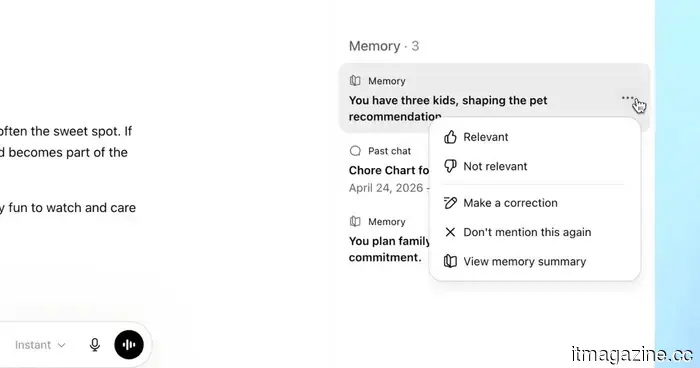 ChatGPT is improving its ability to recall details about your life, making your conversations feel more natural.
OpenAI is introducing a revamped memory system for ChatGPT that processes information from your chat history in the background and refreshes it over time, beginning with Plus and Pro users in the United States.
ChatGPT is improving its ability to recall details about your life, making your conversations feel more natural.
OpenAI is introducing a revamped memory system for ChatGPT that processes information from your chat history in the background and refreshes it over time, beginning with Plus and Pro users in the United States.
 U.S. officials have talked about obtaining government shares in AI companies.
According to NOTUS, senior U.S. officials have initiated preliminary discussions with AI companies regarding the government purchasing stakes, a concept that Sam Altman has suggested since 2025.
U.S. officials have talked about obtaining government shares in AI companies.
According to NOTUS, senior U.S. officials have initiated preliminary discussions with AI companies regarding the government purchasing stakes, a concept that Sam Altman has suggested since 2025.
 Oura discloses the two activities that its smart ring mistakenly interprets as being involved in unsanitary bed activities.
Oura CEO Tom Hale spoke with the WSJ to address inquiries about the smart ring, and his responses are both intriguing and amusing.
Oura discloses the two activities that its smart ring mistakenly interprets as being involved in unsanitary bed activities.
Oura CEO Tom Hale spoke with the WSJ to address inquiries about the smart ring, and his responses are both intriguing and amusing.
 Google will search through your Gmail inbox if you request it while using Drive.
Google is enhancing Ask Gemini in Drive by allowing users to incorporate Gmail threads as sources for AI-generated answers, summaries, and interlinked workplace insights.
Google will search through your Gmail inbox if you request it while using Drive.
Google is enhancing Ask Gemini in Drive by allowing users to incorporate Gmail threads as sources for AI-generated answers, summaries, and interlinked workplace insights.
 US officials have talked about acquiring government equity in AI companies.
According to NOTUS, senior officials in the US have had preliminary discussions with AI companies regarding the government's purchase of equity, a concept that Sam Altman has proposed since 2025.
US officials have talked about acquiring government equity in AI companies.
According to NOTUS, senior officials in the US have had preliminary discussions with AI companies regarding the government's purchase of equity, a concept that Sam Altman has proposed since 2025.
 Bowers & Wilkins unveils the revamped 800 Series Diamond D5 range at HIGH END Vienna.
Bowers & Wilkins has introduced its latest 800 Series Diamond D5 speakers, featuring enhanced acoustics, revamped cabinets, and premium finishes aimed at audiophiles and studio experts.
Bowers & Wilkins unveils the revamped 800 Series Diamond D5 range at HIGH END Vienna.
Bowers & Wilkins has introduced its latest 800 Series Diamond D5 speakers, featuring enhanced acoustics, revamped cabinets, and premium finishes aimed at audiophiles and studio experts.
If you request it while using Drive, Google will scan through your Gmail inbox.
Google is enhancing Ask Gemini in Drive by allowing users to incorporate Gmail threads as sources for AI-driven responses, summaries, and interconnected workplace insights.