

The X app now allows you to record reaction-style videos directly and express outrage about nearly anything.
Typing your response is a thing of the past. X wants you to record your reactions instead.
If you've spent time browsing Instagram Reels or TikToks, you’ve likely seen a format where a creator layers their video over the content they’re discussing. This style has gained popularity among creators as these videos frequently go viral.
X, a platform known for its occasional unnecessary outrage, aims to capitalize on the trend of reaction videos by enabling users to record them straight from the app. This feature allows creators to respond with video to X posts, providing them with an additional way to express their opinions.
Commentary is a crucial aspect of X, and often the most effective way to convey your thoughts is through video. Today, we're launching a new method for doing just that: React with Video! Tap the repost button to start recording using green screen, split screen, or… pic.twitter.com/iF3f8wctbK— Nikita Bier (@nikitabier) June 2, 2026
If you’ve ever felt that a text reply didn’t fully capture your outrage, this new feature may be perfect for you.
How does React with Video work?
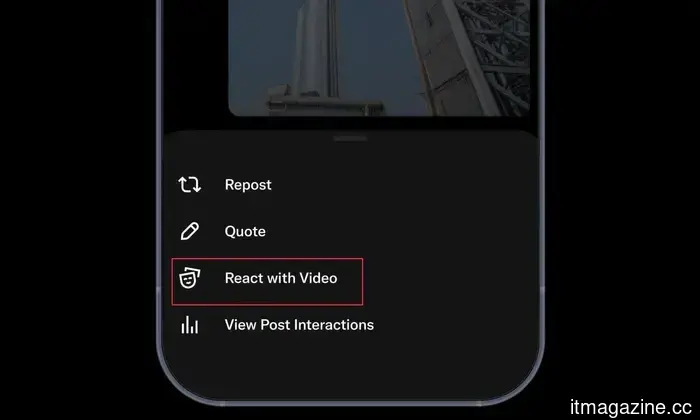
The “React with Video” feature can be found in the overlay menu when you click the Repost button on a post. Tapping it brings up the post in the background, with your video layered on top.
Nikita Bier / X
You can then press the record button to start sharing your thoughts. One nice feature is the option to pause the recording, giving you time to gather your thoughts. Once you finish recording, you can tap the checkmark button to preview your content.
Nikita Bier / X
If you’re satisfied with the outcome, you can post it as a reaction to the original post.
What options do you have when reacting with video?
It appears X has invested significant effort in creating this feature, offering users numerous customization choices. By default, your video is displayed as an overlay, with X automatically removing your background. You can resize and reposition the video anywhere on the screen.
Nikita Bier / X
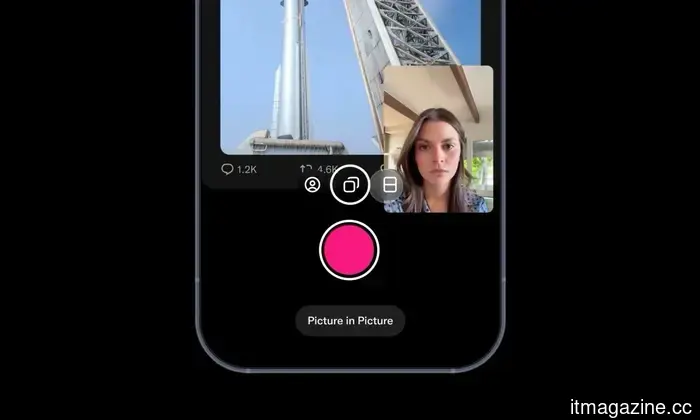
If the original post includes media, you have the option to make it full-screen and hide any text, which is useful if you’d prefer to emphasize the image over the text of the post. You can also present your video in various formats, including picture-in-picture and split-screen modes.
If you enjoy producing reaction videos, this feature will greatly simplify the process. As for why anyone would choose to invest time in such an activity, that's a question best answered by the individuals themselves.
Rachit is an experienced tech journalist, boasting over a decade of coverage in the consumer technology sector.






Other articles
 Taiwan unveils robotic patrol dogs that may protect its islands in the South China Sea.
Taiwan's military research institute showcased three Ghost Robotics robotic dogs, one of which is armed, that may eventually be utilized to patrol the Pratas and Itu Aba.
Taiwan unveils robotic patrol dogs that may protect its islands in the South China Sea.
Taiwan's military research institute showcased three Ghost Robotics robotic dogs, one of which is armed, that may eventually be utilized to patrol the Pratas and Itu Aba.
 Taiwan unveils robotic patrol dogs capable of securing its islands in the South China Sea.
Taiwan's military research institute showcased three robot dogs from Ghost Robotics, one of which is armed, that may eventually be used to patrol the Pratas and Itu Aba.
Taiwan unveils robotic patrol dogs capable of securing its islands in the South China Sea.
Taiwan's military research institute showcased three robot dogs from Ghost Robotics, one of which is armed, that may eventually be used to patrol the Pratas and Itu Aba.
 The Cherry XTRFY K63W Pro Compact is a wireless gaming keyboard that eliminates lag.
Cherry XTRFY's K63W Pro Compact introduces Ultra-Wideband technology along with an 8000 Hz polling rate to the realm of wireless gaming keyboards, set to release in the US in August at a price of $169.99.
The Cherry XTRFY K63W Pro Compact is a wireless gaming keyboard that eliminates lag.
Cherry XTRFY's K63W Pro Compact introduces Ultra-Wideband technology along with an 8000 Hz polling rate to the realm of wireless gaming keyboards, set to release in the US in August at a price of $169.99.
 The new MSI Claw 8 EX AI+ is pursuing portable gaming that matches console quality.
MSI unveiled the Claw 8 EX AI+ at Computex 2026. It is the first handheld device in the world to utilize Intel's Arc G3 Extreme chip, which is designed specifically for gaming on handhelds.
The new MSI Claw 8 EX AI+ is pursuing portable gaming that matches console quality.
MSI unveiled the Claw 8 EX AI+ at Computex 2026. It is the first handheld device in the world to utilize Intel's Arc G3 Extreme chip, which is designed specifically for gaming on handhelds.
 Amazon's Ring faces a lawsuit regarding its Familiar Faces facial-recognition technology.
A man from Virginia is taking legal action against Amazon regarding Ring's Familiar Faces feature, claiming it scans and retains the images of people's faces who are not authorized. He is requesting a minimum of $5 million in damages.
Amazon's Ring faces a lawsuit regarding its Familiar Faces facial-recognition technology.
A man from Virginia is taking legal action against Amazon regarding Ring's Familiar Faces feature, claiming it scans and retains the images of people's faces who are not authorized. He is requesting a minimum of $5 million in damages.
 Meta expands its 13+ teen content settings to a global level on Instagram, Facebook, and Messenger.
Meta is broadening its 13+ content settings inspired by movie ratings for Teen Accounts globally and is experimenting with a method to prevent teens from viewing the same content repeatedly.
Meta expands its 13+ teen content settings to a global level on Instagram, Facebook, and Messenger.
Meta is broadening its 13+ content settings inspired by movie ratings for Teen Accounts globally and is experimenting with a method to prevent teens from viewing the same content repeatedly.
The X app now allows you to record reaction-style videos directly and express outrage about nearly anything.
X has introduced React with Video, a new functionality that allows iOS users to reply to posts with recorded video reactions utilizing green screen, split screen, or picture-in-picture modes.