

6 actions Gemini Intelligence is set to take on your Android devices.
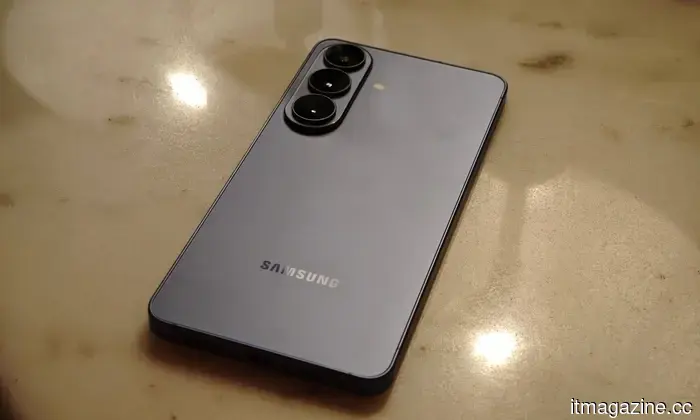
Google is introducing Gemini Intelligence to Android, enhancing its most advanced devices with the best features of Gemini. The company aims for you to complete your tasks throughout the day using Gemini, all while maintaining control and ensuring your data remains private. These features will initially be available on Samsung Galaxy and Google Pixel devices this summer, with plans to expand to other Android devices, including watches, cars, glasses, and laptops later this year.
Your assistant is becoming more proactive, requiring fewer prompts from you.
Google is clearly aiming to elevate Gemini beyond a typical question-answering assistant. With its Gemini Intelligence, the focus is on taking care of small, repetitive tasks that often consume your time. On devices like the Galaxy S26 and Pixel 10, Google has already been optimizing this feature within food delivery and ride-hailing apps. The objective is for your phone to manage the mundane details while you focus on what you truly want to accomplish.
What’s particularly intriguing is its applicability to real-world situations. Rather than switching between apps, Gemini can connect actions autonomously. It could locate your class syllabus in Gmail and automatically add necessary books to your cart, or help you secure a bike for a spin class without needing to navigate multiple screens. It also understands visual context, allowing items like a grocery list or travel brochure to become actionable. You can point your device at a note or photo, and it will transform that into a task, such as creating a shopping cart or finding a similar travel deal online. While you remain in control, the more tedious tasks are managed in the background, making it feel less like an assistant and more like a discreet operator working for you.
Chrome is set to become far more functional than just managing tabs for you.
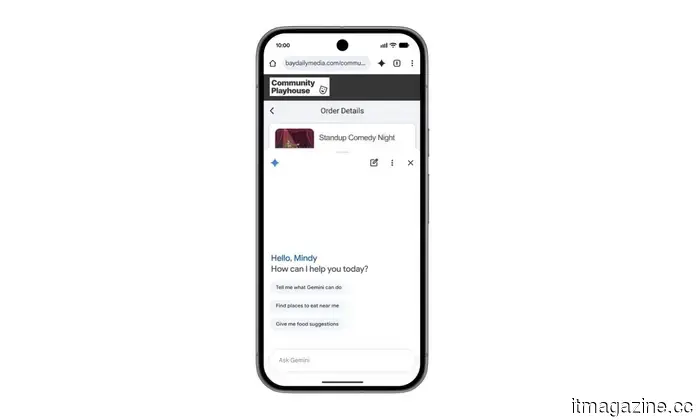
Beginning in late June, Android users will witness Chrome evolve into a more capable browser. With Gemini integrated into Chrome, it will go beyond merely opening tabs and endless scrolling. Instead, it can assist you in comprehending content, extracting key points, and even comparing information across different pages without requiring your manual intervention.
What truly distinguishes this development is Google's ambitious approach to creating a browser that acts on your behalf. With auto-browse, Chrome can take over some of the more monotonous aspects of online life, such as scheduling appointments or organizing parking reservations. This upgrade may initially seem overly convenient, but if executed correctly, it could significantly reduce the effort needed to accomplish simple tasks online.
Your phone is becoming significantly better at completing forms.
Autofill on Android is finally maturing. Previously a basic shortcut for names, emails, and passwords, it is now evolving into a more sophisticated tool powered by Gemini. Rather than merely recalling a few saved fields, your device can grasp context and pull relevant information across apps, including Chrome, to assist with those persistent text inputs you often find tedious.
The major benefit is its ability to handle something that frustrates everyone: filling out lengthy, complicated forms on a smartphone screen. Whether it’s address details, booking specifics, or repetitive sign-ups, Android can now utilize your connected apps to automatically fill in the details. Importantly, Google offers this Gemini-powered Autofill experience on an opt-in basis, meaning you decide when it activates, with the option to disable it at any time. This cautious approach is particularly important given its connection to personal data, but if it functions as promised, it could transform mobile form-filling into a much less cumbersome task.
From "ums" and "ahs" to surprisingly smooth messages.
Voice typing on Android has long been a feature that appears incredibly useful in theory but often falls short in practice. Gboard does a commendable job of converting speech to text, but natural human speech is rarely tidy. Rambler, a new feature powered by Gemini, aims to bridge the gap between how we speak and how we want our messages to appear.
Rather than requiring perfect speech, Rambler adopts a more accommodating approach. You can speak naturally, and it will intelligently extract meaningful segments, combine them, and present a polished message. It even supports multilingual conversations seamlessly, which feels very real-world. Switching between English, Hindi, or both mid-sentence is no longer an issue, as it understands context and tone rather than solely focusing on individual words. Google also assures that audio is processed in real-time for transcription and not stored, which should alleviate privacy concerns. If it functions as intended, it resembles having a patient editor integrated into your keyboard.
Your widgets are set to receive a smart makeover.
Android widgets have always generated mixed feelings among users, but Google is clearly working to change perceptions with Gemini Intelligence. With a feature called Create My Widget, widgets evolve beyond static information blocks. They transform into customizable elements that you can shape simply through natural language, which seems fittingly Android-centric given the incorporation of AI.
You can simply articulate your needs, and Gemini will generate a widget tailored to those specifications. It could provide weekly high-protein meal recommendations for your fitness goals or a simplified weather view focused only on wind speed and




Other articles
 Beijing showcased Huawei's hidden chip laboratory on national television just two days prior to Trump's arrival. The intended audience was not the Chinese public.
China unveiled Huawei's clandestine chip laboratory on prime-time television just days prior to Trump's visit to Beijing. This broadcast indicates that US export restrictions have strengthened, rather than weakened, China's aspirations in the semiconductor industry.
Beijing showcased Huawei's hidden chip laboratory on national television just two days prior to Trump's arrival. The intended audience was not the Chinese public.
China unveiled Huawei's clandestine chip laboratory on prime-time television just days prior to Trump's visit to Beijing. This broadcast indicates that US export restrictions have strengthened, rather than weakened, China's aspirations in the semiconductor industry.
 Former Tesla CFO Deepak Ahuja has joined Redwood Materials as the battery recycler shifts its focus to AI-driven energy infrastructure.
Deepak Ahuja, the CFO who led Tesla's IPO, is joining Redwood Materials as the company shifts its focus from battery recycling to supplying power for AI data centers using second-life EV batteries.
Former Tesla CFO Deepak Ahuja has joined Redwood Materials as the battery recycler shifts its focus to AI-driven energy infrastructure.
Deepak Ahuja, the CFO who led Tesla's IPO, is joining Redwood Materials as the company shifts its focus from battery recycling to supplying power for AI data centers using second-life EV batteries.
 Two days prior to Trump's arrival, Beijing aired a segment about Huawei's covert chip laboratory on national television. The audience for this message was not the Chinese public.
China displayed Huawei's clandestine chip laboratory on prime-time television just days before Trump's visit to Beijing. The airing indicates that US export restrictions have strengthened, rather than weakened, China's aspirations in the chip industry.
Two days prior to Trump's arrival, Beijing aired a segment about Huawei's covert chip laboratory on national television. The audience for this message was not the Chinese public.
China displayed Huawei's clandestine chip laboratory on prime-time television just days before Trump's visit to Beijing. The airing indicates that US export restrictions have strengthened, rather than weakened, China's aspirations in the chip industry.
 Google has just unveiled a new type of laptop that integrates Gemini throughout.
Google has officially announced Googlebooks, a new line of laptops centered on its Gemini AI assistant. Laptops from Acer, Asus, Dell, HP, and Lenovo are anticipated to launch this fall, but pricing and complete hardware specifications have yet to be revealed.
Google has just unveiled a new type of laptop that integrates Gemini throughout.
Google has officially announced Googlebooks, a new line of laptops centered on its Gemini AI assistant. Laptops from Acer, Asus, Dell, HP, and Lenovo are anticipated to launch this fall, but pricing and complete hardware specifications have yet to be revealed.
 Bristol Myers Squibb has entered into a $15.2 billion pharmaceutical agreement with China's Hengrui as it faces an impending patent expiration.
BMS is providing Hengrui with $15.2 billion for 13 developmental drugs in the fields of oncology and immunology. This agreement highlights how the patent expiration issues faced by major pharmaceutical companies have made Chinese innovation crucial.
Bristol Myers Squibb has entered into a $15.2 billion pharmaceutical agreement with China's Hengrui as it faces an impending patent expiration.
BMS is providing Hengrui with $15.2 billion for 13 developmental drugs in the fields of oncology and immunology. This agreement highlights how the patent expiration issues faced by major pharmaceutical companies have made Chinese innovation crucial.
 OpenAI acquires Tomoro as a foundational element of a $14 billion deployment firm.
Tomoro, the Edinburgh-based AI company established in partnership with OpenAI, is set to be the first acquisition of a $14 billion subsidiary that will place engineers within businesses. Accenture's shares dropped by 3%.
OpenAI acquires Tomoro as a foundational element of a $14 billion deployment firm.
Tomoro, the Edinburgh-based AI company established in partnership with OpenAI, is set to be the first acquisition of a $14 billion subsidiary that will place engineers within businesses. Accenture's shares dropped by 3%.
6 actions Gemini Intelligence is set to take on your Android devices.
Google is introducing these Gemini features to Android, broadening their availability across applications and devices to automate daily activities, streamline browsing, and enhance your phone's helpfulness while ensuring you remain in control.