
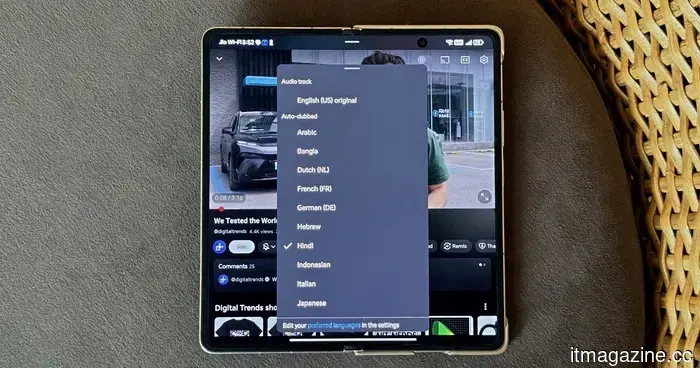
YouTube's auto-dubbing lacks one essential feature: a way to turn it off.
I have been a follower of MKBHD for many years. So much so that Marques’ voice has become a part of my viewing experience. Therefore, when a recent video started playing on my TV and I suddenly heard him speaking in Japanese, it took me a moment to understand what was going on.
This was not something I had activated. YouTube had somehow decided—likely because of the Japanese text on his T-shirt, but probably also due to my frequent viewing of anime with English subtitles—that I should be hearing a dubbed version in a language I didn’t understand. It didn't matter that the video was originally recorded in English and that I had watched hundreds of his videos in English without any issues. There was no alert, no prompt, and no clear guidance on how to switch back. It was just a different voice coming from a familiar face.
That scenario exemplifies the auto-dubbing experience for many viewers. The frustrating aspect isn’t that the feature exists; it's that viewers have almost no control over when it is applied.
Creators have a control switch. Viewers do not.
YouTube has, commendably, provided creators with significant control. A creator can disable auto-dubbing for their videos through YouTube Studio. This is a logical approach, recognizing that a creator’s voice represents their identity and that changing it requires permission. However, that reasoning does not extend to viewers. From the viewer's perspective, the only option is to manually switch the audio track for each video, one at a time, every single time. There isn’t a global setting, no “always play original audio” option, and no recollection of what you chose just a few minutes ago.
This inequality is odd. YouTube has determined that creators are entitled to a consistent, channel-level preference regarding their content, but viewers do not have the same consideration regarding their viewing experience. The platform that can remember your watch history down to the minute and knows which videos you rewatched or skipped after three seconds cannot retain the fact that you turned off a dubbed track yesterday.
Auto-dubbing does not impact all viewers in the same way. Multilingual users are often presented with auto-dubbed videos even if they understand the original language. Language learners who are studying through immersive content find that the authentic foreign audio is replaced with a translation, which is exactly the opposite of why they began watching the video. Expats who want to maintain fluency in a language they no longer use also face the same issue. In all these instances, YouTube’s system applies a language setting without any subtlety.
When users start seeking workarounds, something is amiss.
The workarounds people are employing tell the real story. They use browser extensions to enforce original audio, modified third-party applications to avoid auto-dubbing, and guides on Reddit that instruct users on how to disable the feature through the “Preferred languages” option (though comments on that thread indicate the setting doesn't always remain, as the platform sometimes reverts to dubbed audio for certain videos). Some are doing this out of principle, frustrated by the lack of control, while others have a more straightforward reason: the dubbed voices tend to be flat, robotic, and lacking in personality.
YouTube at least responded to the last grievance. Earlier this year, it launched an Expressive Speech update that utilizes Gemini to mimic the creator’s tone, pitch, and emotional delivery. The aim was to make dubs sound less like a monotone announcement, but the results have been mixed.
Even if the quality of the dubs improves as the technology advances, the absence of an off switch will remain a significant issue for many viewers. When a notable part of your user base is figuring out ways to circumvent a feature you introduced as an enhancement, that feature has an issue, and the problem isn’t the technology itself.
All it takes is one toggle.
Auto-dubbing isn’t inherently a bad concept. There are valid scenarios for it: a viewer who can’t read subtitles, someone watching in a second language needing extra support, or a casual viewer who simply prefers their native language without any strong attachment to the creator’s original voice. For these individuals, auto-dubbing represents a substantial improvement, and the platform should certainly provide it.
However, offering a feature and automatically defaulting to it are two different things. YouTube has created the infrastructure to translate global content but has neglected to check whether each viewer wishes to be translated. Assuming that everyone watching in a particular language wants the audio in that language may seem reasonable in a meeting, but in reality, it’s frustrating enough that related discussions can be found across all forums where YouTube users congregate.
The solution is straightforward. A single toggle in the account settings that allows users to disable the feature. One that applies to every video on the platform, including Shorts. Creators already have a version of this. Viewers should have theirs too.
Until that happens, auto-dubbing will seem less like a feature promoting
Other articles
 A Walmart leak reveals a growing Onn product lineup that includes a smart speaker compatible with Gemini.
A certification listing indicates that Walmart's Onn lineup is set to grow with the introduction of a Gemini-powered smart speaker that includes Matter support, Google Cast, and a 10W speaker.
A Walmart leak reveals a growing Onn product lineup that includes a smart speaker compatible with Gemini.
A certification listing indicates that Walmart's Onn lineup is set to grow with the introduction of a Gemini-powered smart speaker that includes Matter support, Google Cast, and a 10W speaker.
 iOS 27 enables users to generate personalized Wallet passes from any QR code, as Apple decides to stop waiting for developers.
Apple's iOS 27 introduces a "Create a Pass" feature that includes three templates. Following 14 years of anticipation for PassKit's adoption, Apple is now allowing users to create their own passes.
iOS 27 enables users to generate personalized Wallet passes from any QR code, as Apple decides to stop waiting for developers.
Apple's iOS 27 introduces a "Create a Pass" feature that includes three templates. Following 14 years of anticipation for PassKit's adoption, Apple is now allowing users to create their own passes.
 Denmark halts new grid connections due to AI data centers exceeding the capacity of the cleanest power grid in Europe.
Energinet has paused new grid agreements due to a flood of requests totaling 60 GW, while the grid only supports 7 GW. Major tech companies like Microsoft, Google, and Apple have spurred the expansion of data centers in Denmark, leading to this capacity issue.
Denmark halts new grid connections due to AI data centers exceeding the capacity of the cleanest power grid in Europe.
Energinet has paused new grid agreements due to a flood of requests totaling 60 GW, while the grid only supports 7 GW. Major tech companies like Microsoft, Google, and Apple have spurred the expansion of data centers in Denmark, leading to this capacity issue.
 Pinterest surpasses $1 billion in quarterly revenue as its AI-driven visual search boosts advertising growth beyond what social platforms can achieve.
Pinterest achieved $1.008 billion in revenue in Q1, alongside 631 million monthly active users. Performance+ AI advertisements generated 24% more conversions. The driving force behind growth is 80 billion visual searches each month, rather than social feeds.
Pinterest surpasses $1 billion in quarterly revenue as its AI-driven visual search boosts advertising growth beyond what social platforms can achieve.
Pinterest achieved $1.008 billion in revenue in Q1, alongside 631 million monthly active users. Performance+ AI advertisements generated 24% more conversions. The driving force behind growth is 80 billion visual searches each month, rather than social feeds.
 Pinterest surpasses $1 billion in quarterly revenue as AI-driven visual search stimulates advertising growth that social media platforms are unable to replicate.
In Q1, Pinterest reached $1.008 billion in revenue with 631 million monthly active users. The Performance+ AI advertising produced 24% greater conversions. The key driver of growth is 80 billion monthly visual searches, rather than social feeds.
Pinterest surpasses $1 billion in quarterly revenue as AI-driven visual search stimulates advertising growth that social media platforms are unable to replicate.
In Q1, Pinterest reached $1.008 billion in revenue with 631 million monthly active users. The Performance+ AI advertising produced 24% greater conversions. The key driver of growth is 80 billion monthly visual searches, rather than social feeds.
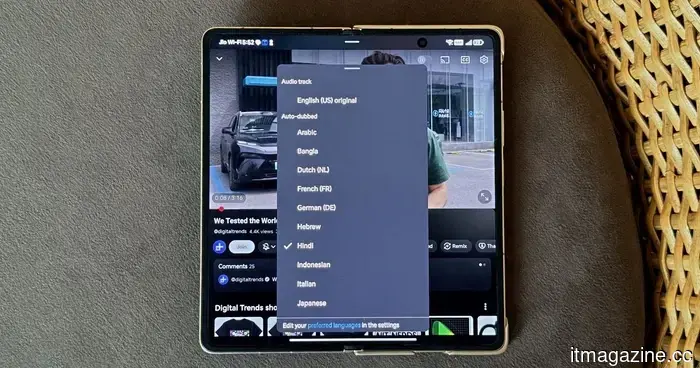 YouTube's auto-dubbing lacks a vital option: a way to turn it off.
I didn't request to listen to Marques Brownlee speaking Japanese. YouTube made that choice for me, and there's no universal way to disable it.
YouTube's auto-dubbing lacks a vital option: a way to turn it off.
I didn't request to listen to Marques Brownlee speaking Japanese. YouTube made that choice for me, and there's no universal way to disable it.
YouTube's auto-dubbing lacks one essential feature: a way to turn it off.
I didn't request to hear Marques Brownlee speaking Japanese; YouTube made that choice for me. There's no universal option to disable it.