

Dot is the Mac calendar application I wish I had discovered earlier in 2026.
I have always appreciated menu bar calendar applications. They allow me to view upcoming events, quickly add new ones, and consult my calendar without needing to switch between apps. It’s one of those minor enhancements to daily life that, once experienced, becomes hard to live without.
My journey with menu bar calendars began with Fantastical. It’s undeniably one of the top calendar applications for Mac. However, when Flexibits transitioned to a subscription model, I found it difficult to justify the cost for features I wasn't utilizing. So, I decided to move on.
Next, I tried Dato, which is a reliable app that served me well for quite a while. However, it lacked certain features and the pricing didn't seem appropriate. I was searching for something more modern, sleeker, and budget-friendly. That’s when I stumbled upon Dot.
Is Dot truly worth the switch?
Dot is a Mac calendar app that operates solely from the menu bar, and it delivers exactly what it promises without unnecessary extras. It syncs with iCloud, Google, Outlook, and Exchange by directly accessing your Mac’s built-in Calendar app, so there’s no need to create or log into a separate account.
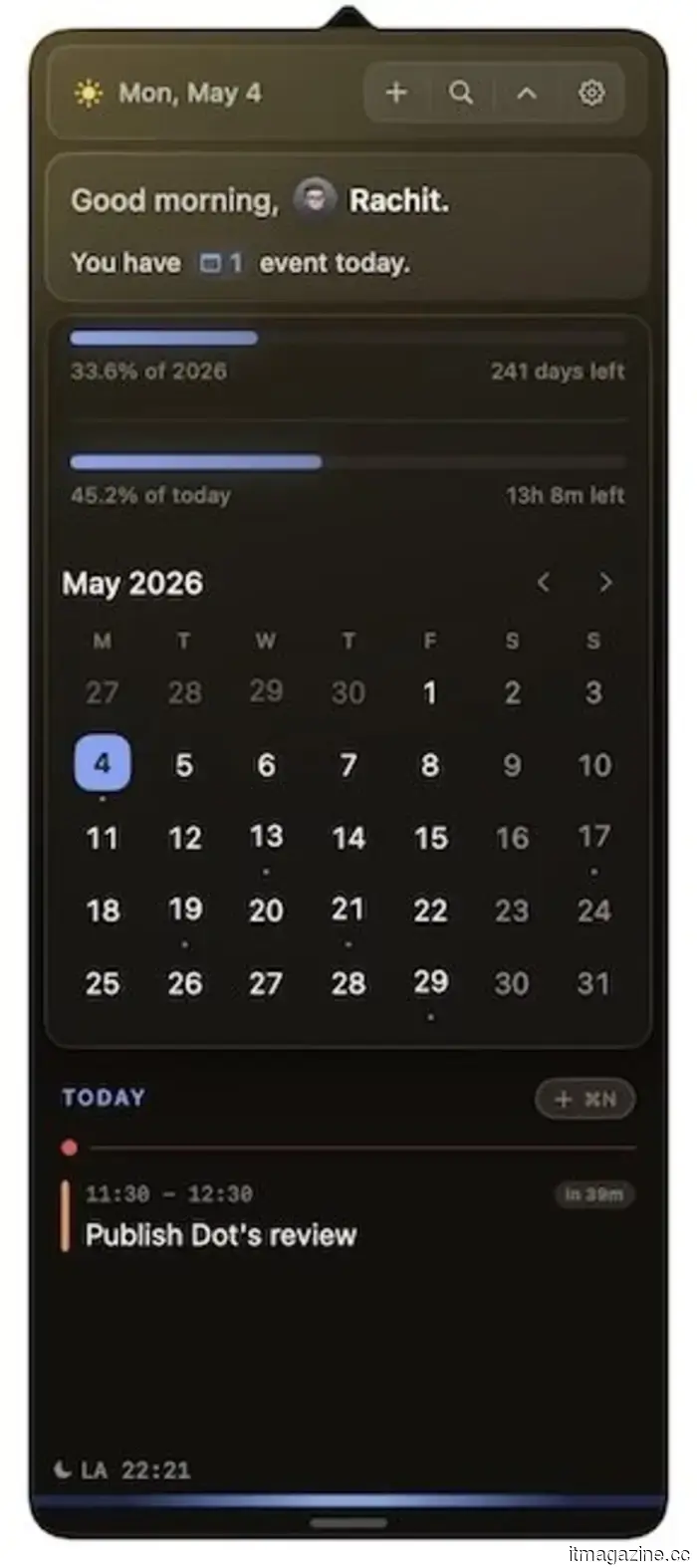
The interface is sleek and visually appealing. At the top, you can quickly see the number of events for the day, along with the date and a settings icon. Additionally, you can add progress bars showing how much time remains before the end of the day or year.
Right below, you find a monthly view with small dots indicating days with scheduled events, making it easy to quickly identify busy days. Scrolling down reveals a complete list of upcoming events.
Adding events is rapid and supports natural language input. For example, you can type “publish Dot’s review at 11:30 am” or “meeting with Sara at 2 PM,” and Dot takes care of the details. You can also jump to any date by pressing F and entering it, a small yet genuinely useful feature.
What sets Dot apart?
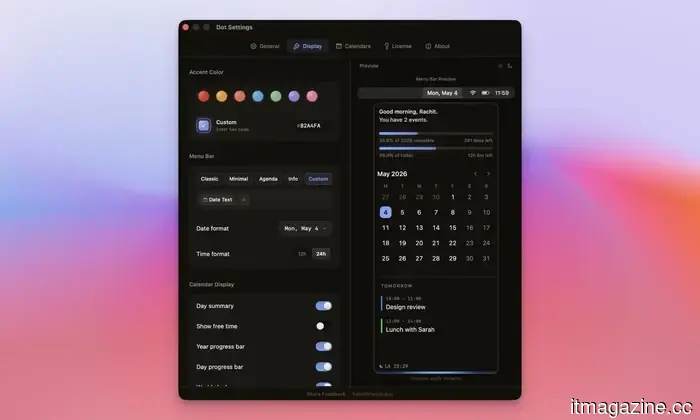
Several features give Dot an edge over its competitors. First is its customization options. You can modify the accent color, select what information appears on the calendar, and adjust how the calendar looks in the menu bar.
Meeting prep is another feature I greatly appreciate. When a video call is scheduled, Dot automatically pulls links from your invitation, eliminating the need to sift through your email just before the call. It also allows one-click joining for Zoom, Google Meet, Teams, and Webex, and includes a camera and mic preview so you can verify your setup before joining.
The Command Bar is another standout feature that I haven't encountered in other calendar apps. With a simple shortcut, I can create events, search my schedule, check world clocks, or copy my agenda for the day without interrupting whatever I am doing.
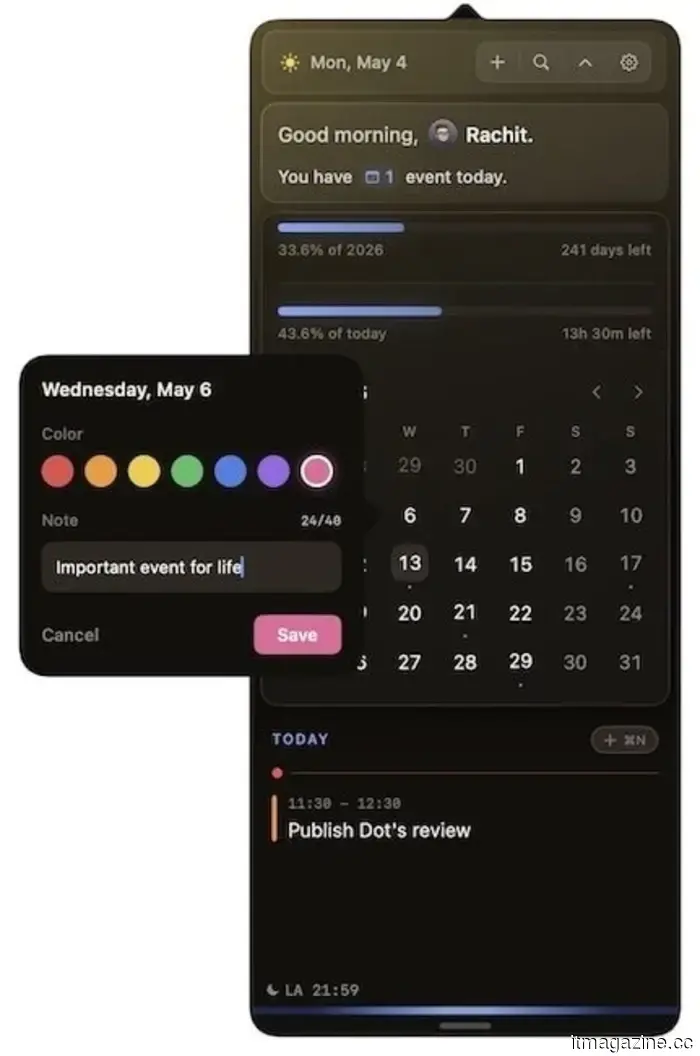
Dot also allows you to mark special dates by right-clicking any day, assigning it a title and color; it will then highlight with the label when hovered over. While simple, this feature is surprisingly helpful for marking crucial dates like deadlines, paydays, or trips.
And these are just a few of the features. Dot is one of my favorite Mac applications I discovered in 2026, and I strongly encourage you to take advantage of its 14-day trial to explore the app for yourself by visiting trydot.app.
If you enjoy it, you can buy it for a one-time fee of $14.99 (currently discounted to $9.99 with the launch code). There are no subscriptions, no accounts needed, and all your data remains on your Mac. For anyone weary of paying monthly fees for a calendar app, Dot provides a perfect solution.



Other articles
 I utilize AI on a daily basis — here are three reasons why I chose to pay for Claude instead of ChatGPT.
I sought out a more effective AI and ultimately transformed my work processes. What began as mere curiosity has evolved into a resource I depend on daily.
I utilize AI on a daily basis — here are three reasons why I chose to pay for Claude instead of ChatGPT.
I sought out a more effective AI and ultimately transformed my work processes. What began as mere curiosity has evolved into a resource I depend on daily.
 Won-Jin Lee assumes control of Samsung's TV division following a decline in profits.
Samsung has appointed Won-Jin Lee to lead its Visual Display division as the profit for Q1 from TVs decreased and TCL narrowed the gap to just one percentage point.
Won-Jin Lee assumes control of Samsung's TV division following a decline in profits.
Samsung has appointed Won-Jin Lee to lead its Visual Display division as the profit for Q1 from TVs decreased and TCL narrowed the gap to just one percentage point.
 Anthropic and Wall Street are creating a $1.5 billion pipeline for private equity.
Anthropic is completing a $1.5 billion joint venture with Blackstone, Hellman & Friedman, Goldman Sachs, and General Atlantic to implement Claude in portfolio companies of private equity.
Anthropic and Wall Street are creating a $1.5 billion pipeline for private equity.
Anthropic is completing a $1.5 billion joint venture with Blackstone, Hellman & Friedman, Goldman Sachs, and General Atlantic to implement Claude in portfolio companies of private equity.
 The wisest life decision I made was to delete Instagram, which brought peace to my troubled spirit.
I impulsively deleted Instagram, but what came next was significantly calmer. Amid the restlessness and the calmness, I rediscovered my focus, reclaimed my time, and uncovered a version of my life that genuinely felt like mine once more.
The wisest life decision I made was to delete Instagram, which brought peace to my troubled spirit.
I impulsively deleted Instagram, but what came next was significantly calmer. Amid the restlessness and the calmness, I rediscovered my focus, reclaimed my time, and uncovered a version of my life that genuinely felt like mine once more.
 Razer enhances the Blade 16 by offering options for 64GB RAM and RTX 5090.
Razer has unveiled new configurations for the Blade 16, now featuring up to 64GB of LPDDR5X RAM and an RTX 5090 GPU, elevating the gaming laptop to the level of a workstation.
Razer enhances the Blade 16 by offering options for 64GB RAM and RTX 5090.
Razer has unveiled new configurations for the Blade 16, now featuring up to 64GB of LPDDR5X RAM and an RTX 5090 GPU, elevating the gaming laptop to the level of a workstation.
 I utilize AI on a daily basis — here are three reasons I chose to pay for Claude instead of ChatGPT.
I set out to find a superior AI and ultimately transformed the way I approach my tasks. What began as a simple interest has evolved into something I depend on daily.
I utilize AI on a daily basis — here are three reasons I chose to pay for Claude instead of ChatGPT.
I set out to find a superior AI and ultimately transformed the way I approach my tasks. What began as a simple interest has evolved into something I depend on daily.
Dot is the Mac calendar application I wish I had discovered earlier in 2026.
I've always enjoyed using menu bar calendar applications. They allow me to quickly view upcoming events, add new ones effortlessly, and access my calendar from anywhere. Dot is the best one I've encountered.