

My Mac doesn't inform me about my internet activity, so I discovered an app that does.
I’ve been a Mac user for quite a while, and during that time, I've honed my skills in diagnosing issues when something seems off. Typically, I begin by exploring the Settings app. I tinker with a few options and often identify the source of the problem. Storage is a prime example; I recently observed my Mac lagging, so I accessed the Storage section and quickly got a detailed overview of what was consuming space. After a quick cleanup, I freed up essential storage, and everything returned to normal. I've approached similar situations for battery drain or unexpected high CPU usage. macOS provides numerous tools to investigate when you sense something is amiss.
However, one aspect it doesn’t highlight as clearly is where all your internet data is going. This thought crossed my mind when my internet acted strangely over the past few days. Things felt slower than usual, but I couldn't pinpoint the cause. My connection seemed fine, and I wasn’t downloading anything large, so what was consuming all that bandwidth? Eventually, I discovered that several apps on my Mac were using the internet in the background without my knowledge. I might not have figured it out if I hadn’t found a Mac app that revealed what was happening behind the scenes, which made things interesting.
It turned out my Wi-Fi wasn’t the actual issue.
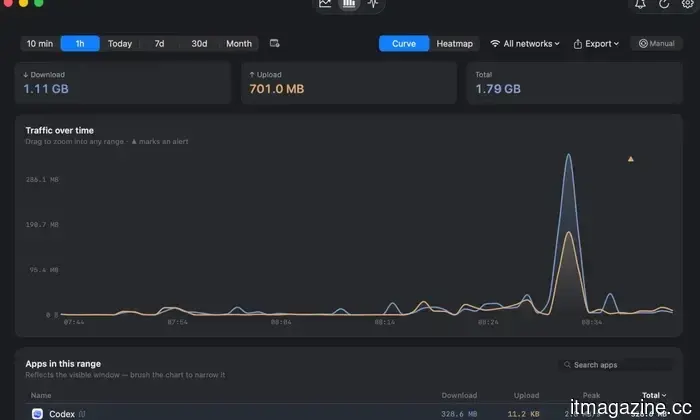
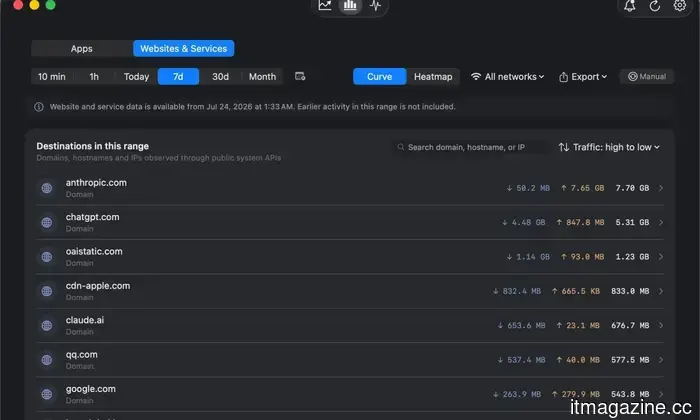
Before I stumbled upon Bytetally, I addressed nearly every Wi-Fi problem in the same manner: restarting the router and crossing my fingers. It's a time-tested method that works most of the time. So, when my Mac's internet became sluggish, that was my approach. And since everything else at home appeared to function well, I realized the router likely wasn’t at fault. That's when I started using Bytetally, which completely shifted my perspective on my Mac’s internet connection. Instead of merely indicating whether I was connected to Wi-Fi, it detailed what each app was doing with that connection. I could see how much data each app had downloaded or uploaded, monitor its activity in real-time, and even manage its bandwidth usage.
Bytetally
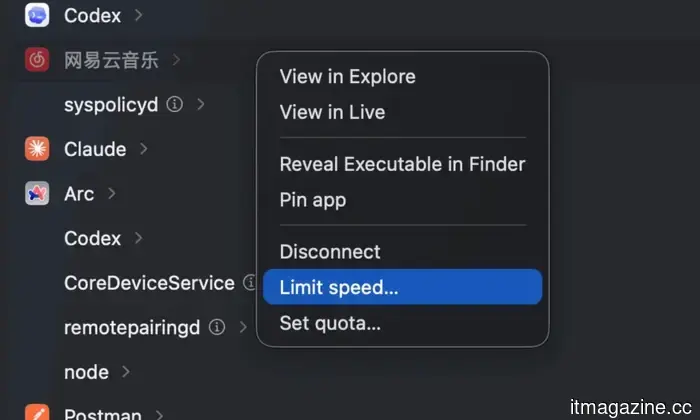
That last feature truly opened my eyes. I discovered that Chrome alone had downloaded about 8GB of data on my Mac. Another app had transferred several gigabytes in the background without my awareness. Usually, I would just notice a slow internet speed and probably blame my router again. Bytetally provided concrete data to point to. It becomes even more advantageous when an app suddenly starts using excessive bandwidth. The app displays my current download and upload speeds right in the Mac menu bar, allowing me to glance up and quickly identify any unusual spikes. For example, if I’m downloading a large file for work and everything slows significantly, rather than closing random apps in hopes of finding the culprit, I can open Bytetally and see if Dropbox is pulling 18MB/s, Chrome is at 2MB/s, and Slack is using 300KB/s. If Dropbox is using too much bandwidth, I don’t have to cancel the download entirely. I can temporarily limit its speed, finish my tasks, and then let it resume later.
Bytetally
I can foresee this being even more beneficial when I'm away from home. If I connect my Mac to my iPhone’s hotspot, every gigabyte becomes much more significant. I can establish a separate data allowance for that connection and monitor which Mac apps are consuming my mobile data. Therefore, if Chrome starts downloading something large or a cloud-storage app decides to sync a folder filled with videos, I can intervene before my hotspot allowance runs out.
I’m now in control of my bandwidth.
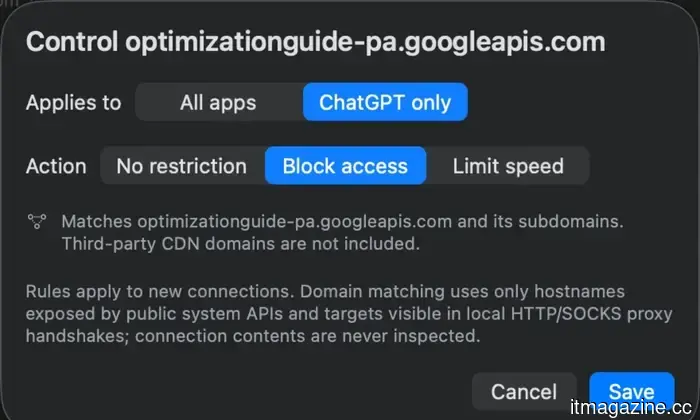
After using Bytetally for a while, I've stopped viewing a congested internet connection as something I have to tolerate. If one app is being overly demanding, I can slow it down temporarily to allocate that bandwidth to whatever really requires it. This adjustment has proven surprisingly useful in daily situations. For instance, if I’m on a video call and a cloud backup unexpectedly starts, I can limit the backup rather than shutting it down completely. If there’s an app I wish to prevent from using the internet altogether, I can sever its connection. For data-heavy apps, I can impose a data quota to keep their usage within bounds. It feels a bit like being the traffic manager for my Mac, as I decide which apps can access high-speed bandwidth.
Bytetally
The great part is that you don’t have to pay for the essential features. Bytetally’s core monitoring tools are free and not tied to a temporary trial. You can see the upload and download data for each app, monitor your current speeds from the menu bar, review usage from the past seven days, and better identify which apps are responsible for otherwise hard-to-trace traffic. For most users who want to understand why their internet occasionally feels sluggish, that might already suffice.
Bytetally
The advanced controls are where Bytetally Pro comes into play. It costs $1.99 per month or $9.
Other articles
 Google is offering college students a complimentary year of AI Pro, along with a variety of study tools.
Google is offering qualifying college students in the US a complimentary year of AI Pro and is introducing new study tools in Search and Gemini in preparation for the back-to-school season.
Google is offering college students a complimentary year of AI Pro, along with a variety of study tools.
Google is offering qualifying college students in the US a complimentary year of AI Pro and is introducing new study tools in Search and Gemini in preparation for the back-to-school season.
 Amazon is introducing Alexa Plus to Fire TV devices at no additional cost.
Amazon is enhancing qualifying Fire TV devices with Alexa Plus for free, and a Prime membership is not required to access this feature.
Amazon is introducing Alexa Plus to Fire TV devices at no additional cost.
Amazon is enhancing qualifying Fire TV devices with Alexa Plus for free, and a Prime membership is not required to access this feature.
 Uber launches its initial European autonomous vehicle rides in Zagreb, accompanied by a safety driver.
Uber has introduced autonomous rides in Europe for the first time in Zagreb, utilizing Pony.ai and Verne. A safety operator remains present in the vehicle.
Uber launches its initial European autonomous vehicle rides in Zagreb, accompanied by a safety driver.
Uber has introduced autonomous rides in Europe for the first time in Zagreb, utilizing Pony.ai and Verne. A safety operator remains present in the vehicle.
 Researchers reveal an alarmingly straightforward method to make AI bots behave unpredictably and bypass safety measures.
This recent research shows how careful, incremental adjustments can deceive AI agents into overlooking their own safety protocols.
Researchers reveal an alarmingly straightforward method to make AI bots behave unpredictably and bypass safety measures.
This recent research shows how careful, incremental adjustments can deceive AI agents into overlooking their own safety protocols.
 I misjudged the Pixel 11, and now I’m regretting my previous opinion.
The Pixel 11 might seem recognizable, but after a week of experience with it, several innovative features have genuinely surprised me. Here’s what I’m already excited about regarding Google’s latest Pixel.
I misjudged the Pixel 11, and now I’m regretting my previous opinion.
The Pixel 11 might seem recognizable, but after a week of experience with it, several innovative features have genuinely surprised me. Here’s what I’m already excited about regarding Google’s latest Pixel.
 Meta introduced a Mac application designed to implement its AI technology for businesses.
Meta has launched a Mac application for Meta AI, aimed at creators and small businesses. The app integrates with Instagram, Facebook, and advertising accounts to provide suggestions on what to post.
Meta introduced a Mac application designed to implement its AI technology for businesses.
Meta has launched a Mac application for Meta AI, aimed at creators and small businesses. The app integrates with Instagram, Facebook, and advertising accounts to provide suggestions on what to post.
My Mac doesn't inform me about my internet activity, so I discovered an app that does.
My Mac wasn’t able to inform me about what was consuming my internet. This app ultimately revealed exactly where all that data was being used.