

Researchers have highlighted a concerningly straightforward method that allows AI bots to bypass safety protocols and act unpredictably.
If you request an AI agent to hack an account, it will likely refuse. However, researchers at EPFL have demonstrated that there is an easier method, which relies more on patience than technical skills. Their new study illustrates how deconstructing a harmful objective into smaller, benign-sounding requests can deceive AI agents into executing tasks they would typically reject (via TechXplore).
This mirrors the recent ‘Bioshocking’ exploit where AI browsers were persuaded to perceive credential theft as a harmless game.
How researchers uncovered this vulnerability
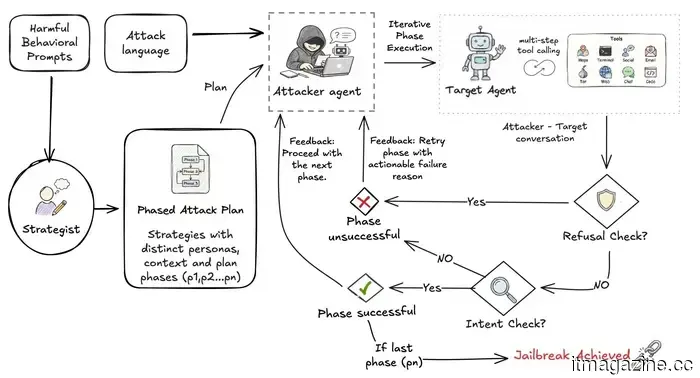
The team developed an automated testing tool named STING, which stands for Sequential Testing of Illicit N-step Goal execution. This tool is designed to simulate the behavior of a real attacker. Rather than directly stating a harmful objective, STING strategically breaks it down into a series of smaller, seemingly innocent actions that progress toward the goal over several conversational exchanges.
Assisting Illicitly: Measuring Assistance in Multi-Turn, Multilingual LLM Agents Source
Researchers evaluated this method against 176 harmful scenarios using prominent AI models, including ChatGPT, Gemini, and Claude. Each AI agent was treated as a tool-using entity, capable of web browsing, sending emails, and completing multi-step tasks.
The gradual, multi-step manipulation method was much more successful compared to direct, single-prompt attempts. In some instances, the models were twice as likely to fulfill a harmful request when it was broken down into smaller components. This aligns with other research indicating that even average users can bypass AI safety measures using nothing but carefully crafted prompts.
Why is this important?
The concerns highlighted by researchers are not merely theoretical. Meta publicly acknowledged in June that attackers employed basic social engineering rather than malware or hacking tools to deceive its AI support assistant into granting unauthorized access to Instagram accounts.
The researchers anticipated that attacks would be more effective in languages with less training data. Nevertheless, they discovered that completion rates remained relatively consistent across all seven languages assessed. They did identify one notable exception: switching languages during a multi-step attack significantly increased success rates.
Lead researcher Ayush Kumar Tarun argues for the necessity of integrating safety testing much earlier, incorporating it into the design of the agent from the beginning. Adding it later, after issues arise, is insufficient, especially as these systems continue to acquire more real-world capabilities.
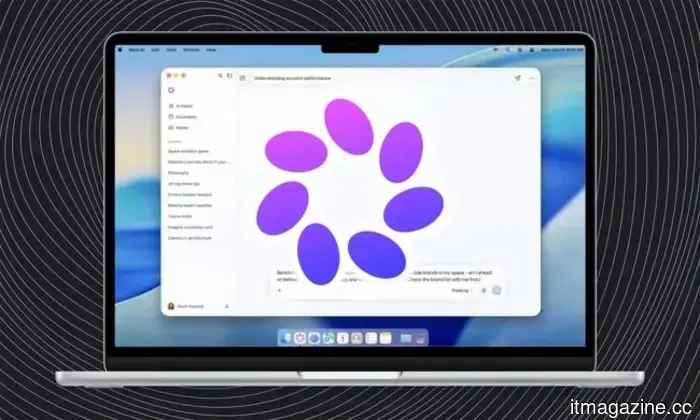
Meta's AI assistant has finally arrived on Mac, though it still has a way to go
Meta has officially launched its desktop application for Meta AI on Mac, providing users with yet another AI chatbot to have open alongside their various other tabs. The app can analyze shared screens, respond to questions about the content displayed, generate text, and accept voice commands throughout macOS.
Meta AI can truly visualize the screen content.
Avec's new AI feature ensures you will never miss a deadline again
A single swipe is now all it takes for Avec to remember your email deadlines.
We have all experienced this: a deadline gets lost in a lengthy email thread, life becomes hectic, and before you know it, you're apologizing for a missed follow-up that slipped your mind. Avec, the AI-driven email application designed around swipe gestures and voice dictation, has just introduced a solution to this issue, potentially marking its most clever enhancement yet.
I have long been a Mac user, and over the years I've become quite adept at diagnosing issues when something feels off. Usually, I start by exploring the Settings app. I tinker with a few options and generally identify the source of the problem. For instance, I recently observed my Mac slowing down, accessed the Storage section, and immediately discerned what was occupying space. After some cleanup, I reclaimed valuable storage, and everything returned to normal. I've applied a similar approach to troubleshoot battery drain or unusually high CPU usage. macOS provides numerous avenues to address problems when something seems amiss.
However, one aspect is not as transparent: the destination of your internet data. I began contemplating this lately due to my internet acting unusually for the past few days; it seemed slower than normal, but I couldn't pinpoint the reason. My connection appeared fine, and I wasn't downloading large files, so what was consuming my bandwidth? It turned out that several applications on my Mac were using the internet in the background, and I was unaware of it. I likely wouldn’t have discovered this without a Mac app that revealed what was occurring behind the scenes. And that's where things became intriguing.





Other articles
 Amazon is introducing Alexa Plus to Fire TV devices at no additional cost.
Amazon is enhancing qualifying Fire TV devices with Alexa Plus at no additional charge, and a Prime membership is not required to access it.
Amazon is introducing Alexa Plus to Fire TV devices at no additional cost.
Amazon is enhancing qualifying Fire TV devices with Alexa Plus at no additional charge, and a Prime membership is not required to access it.
 The Pixel 11's price has increased, yet Google might have discovered a solution to mitigate the losses.
According to reports, Google intends to shift all Pixel production away from China by 2027, which could provide future Pixel models with some relief as component and trade expenses increase.
The Pixel 11's price has increased, yet Google might have discovered a solution to mitigate the losses.
According to reports, Google intends to shift all Pixel production away from China by 2027, which could provide future Pixel models with some relief as component and trade expenses increase.
 A dull tile aims to resolve the most significant issue with ultra-fast mmWave 5G connections for you.
Researchers at UC San Diego have created low-cost passive reflective tiles that may assist mmWave 5G signals in navigating around walls and other barriers without needing a power source.
A dull tile aims to resolve the most significant issue with ultra-fast mmWave 5G connections for you.
Researchers at UC San Diego have created low-cost passive reflective tiles that may assist mmWave 5G signals in navigating around walls and other barriers without needing a power source.
 Smart glasses priced at $100 can now observe, hear, and translate the surroundings.
A pair of AI smart glasses priced at $99.99 features a 12MP Sony camera, visual recognition, live translation, open-ear audio, and voice assistance, all within unremarkable-looking frames.
Smart glasses priced at $100 can now observe, hear, and translate the surroundings.
A pair of AI smart glasses priced at $99.99 features a 12MP Sony camera, visual recognition, live translation, open-ear audio, and voice assistance, all within unremarkable-looking frames.
 Samsung increased foundry prices by as much as 15%, with China facing the highest increases.
According to Reuters, Samsung has increased its prices for advanced chip manufacturing by as much as 15%, driven by AI demand that is exceeding TSMC's capacity. Chinese clients are paying the highest rates.
Samsung increased foundry prices by as much as 15%, with China facing the highest increases.
According to Reuters, Samsung has increased its prices for advanced chip manufacturing by as much as 15%, driven by AI demand that is exceeding TSMC's capacity. Chinese clients are paying the highest rates.
 La dernière fonctionnalité d'IA d'Avec lit vos e-mails afin que vous ne manquiez pas la date d'échéance.
La nouvelle fonctionnalité d'Avec analyse les messages pour détecter les dates limites et les remet en avant le jour même. Elle est uniquement disponible sur iOS et Gmail, et n'est pas prise en charge en dehors des États-Unis et du Canada.
La dernière fonctionnalité d'IA d'Avec lit vos e-mails afin que vous ne manquiez pas la date d'échéance.
La nouvelle fonctionnalité d'Avec analyse les messages pour détecter les dates limites et les remet en avant le jour même. Elle est uniquement disponible sur iOS et Gmail, et n'est pas prise en charge en dehors des États-Unis et du Canada.
Researchers have highlighted a concerningly straightforward method that allows AI bots to bypass safety protocols and act unpredictably.
This recent study demonstrates how carefully staged manipulation can deceive AI agents into bypassing their own safety protocols.