
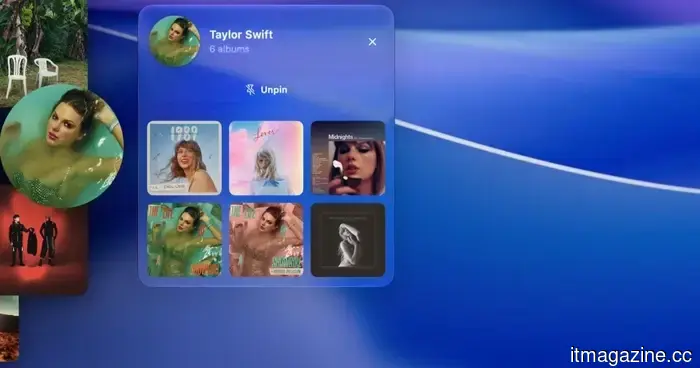
I used this music app for Mac, and I now hope that macOS would have it integrated by default.
I regularly use my spare time to search for intriguing Mac applications on Reddit, and I consistently discover new ones that are worth trying out. Some applications simplify certain aspects of macOS, while others quickly become indispensable tools I can't imagine living without. Recently, I found an app that integrates seamlessly into my work routine. When I'm engrossed in tasks that demand my full attention, I turn on my work playlist and let it play in the background. Music has essentially become a key part of my focus habits. This is exactly why Gramola piqued my interest. It's a straightforward Mac app, but it has significantly enhanced my music experience while working.
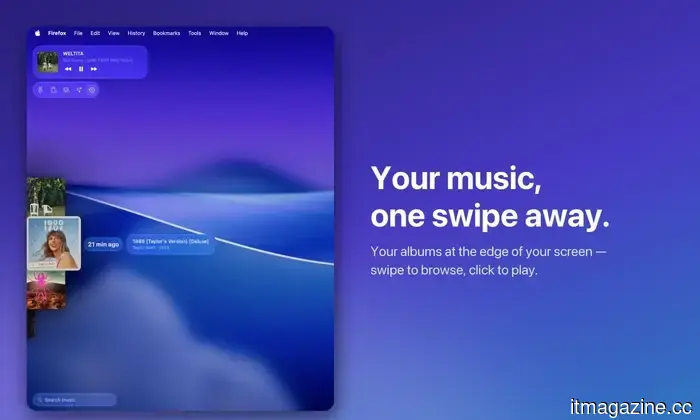
Accessing my music is now just a swipe away.
On a Mac, changing your music is not particularly challenging. If an unappealing song plays, you can open Apple Music or Spotify, select something new, press play, and return to your task. This process usually takes under a minute. However, the issue for me arises at that moment. If I’m in the middle of writing an article, deep in research, or racing against a deadline, I prefer not to leave my current screen. The second I open another app, scroll through albums, and search for the right song, I've disrupted my focus. Choosing a song can quickly turn into an extensive playlist browsing session.
Gramola
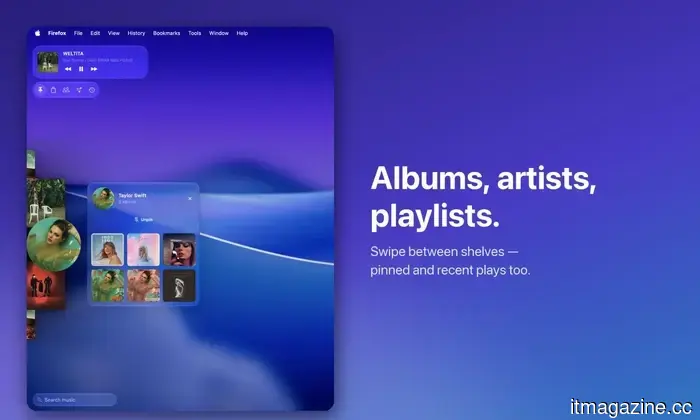
Gramola addresses this in a way that feels intuitive on a Mac. Instead of needing to launch my music app, I can simply push my cursor to the edge of the screen, and a shelf with my music appears over my current work. I select an album or song, move my cursor away, and Gramola disappears once more. The best analogy would be the macOS Dock. I keep mine hidden, so it only appears when I move my cursor towards the bottom of the screen. Gramola applies this concept to my music, remaining unobtrusive until I need it. After using it for a while, it feels like an inherent feature of macOS.
Gramola
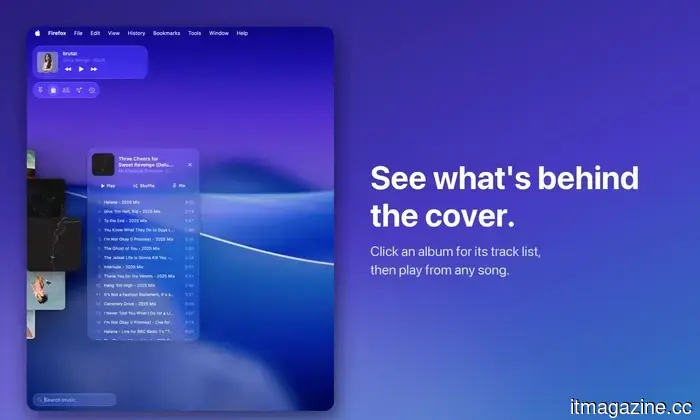
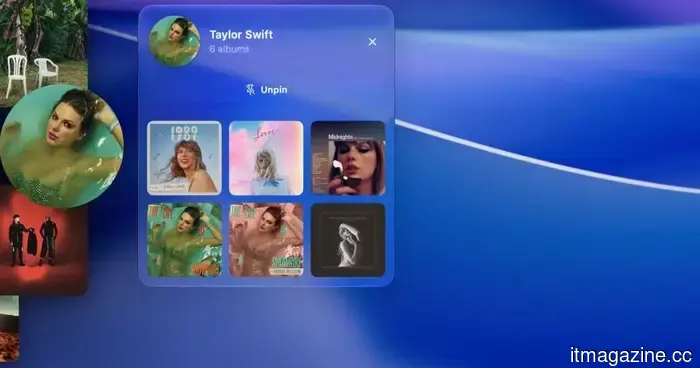
That little shelf is packed with features too. A two-finger swipe lets me navigate across five sections: albums, artists, playlists, pinned favorites, and recently played tracks. If I’m in the mood for an album, I can click on its artwork to view the full tracklist and start playing any song. The shelf even includes a mini player, providing basic playback controls within easy reach.
Gramola
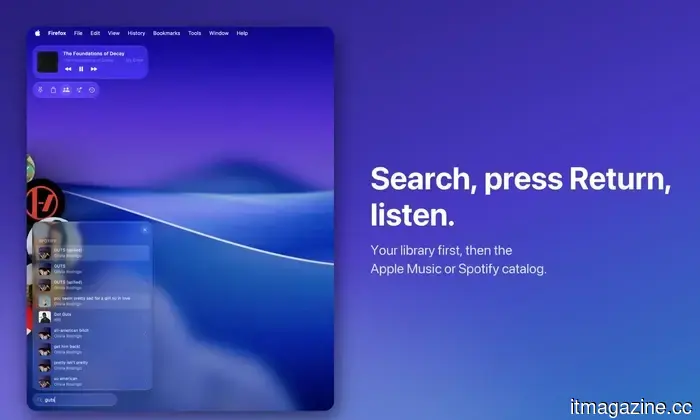
Search might be my favorite feature. While Gramola is open, I can start typing, or use a keyboard shortcut that brings it up with the search box selected. As I type, results from my library start showing up, followed by songs from Apple Music. So, if a random song suddenly comes to mind while I’m writing, I can search for it, press Return, and have it playing within seconds — without actually leaving my task. Gramola also feels remarkably integrated on the Mac. Built natively with SwiftUI and using the Liquid Glass design language introduced with macOS 26, it doesn’t resemble a clunky third-party utility overlaying the system. It offers plenty of customization options, allowing me to adjust it to suit my workflow.
Seven days to convince me
I attempted to find other Mac apps that replicate Gramola’s functionality, and to my surprise, there weren’t many. There are many music utilities available — mini players, menu bar controllers, and apps that provide quicker playback controls — but nothing I encountered operates quite the same way. It's essential to note that Gramola is not meant to replace Apple Music, Spotify, or YouTube Music. I continue using my regular music services as before. Gramola enhances that experience, providing a more efficient means of browsing and selecting what I wish to listen to. Think of it as a shortcut to my music, not just another streaming service. I can access an album, retrieve a playlist, or locate one of my locally stored tracks, and Gramola instructs my existing music app to start playing it.
Gramola
Gabriel Lopez Santana developed Gramola as a solo project in Spain, and it was launched this week. I'm currently testing the seven-day free trial, which allows me to determine whether it deserves a permanent place on my Mac, rather than becoming another app I install, use twice, and forget about. So far, I'm enjoying it. If I still feel this way after the trial ends, Gramola is available for a one-time cost of $9.99, rather than adding another subscription to my monthly expenses. It can be found in the App Store, and for an app that addresses a minor yet surprisingly common annoyance in my workday, that $9.99 might very well be worth it.
Other articles
 Google might have unintentionally revealed a new fitness tracker that includes a display.
Google's Pixel 11 commercials seem to reveal an unannounced fitness tracker that falls between the Fitbit Air and the Pixel Watch.
Google might have unintentionally revealed a new fitness tracker that includes a display.
Google's Pixel 11 commercials seem to reveal an unannounced fitness tracker that falls between the Fitbit Air and the Pixel Watch.
 Claude is becoming ambitious with watermarking, and I can sense the issues from far away.
Anthropic is working on the challenge of detecting AI-generated text, but a constant watermark might lead to a new issue if AI support is confused with AI authorship.
Claude is becoming ambitious with watermarking, and I can sense the issues from far away.
Anthropic is working on the challenge of detecting AI-generated text, but a constant watermark might lead to a new issue if AI support is confused with AI authorship.
 Meta vowed to put an end to unsettling AI glasses videos, yet they continue to appear frequently on Instagram.
Instagram announced that it would take a firmer stance against harassment captured with Meta’s AI glasses. However, a month later, it seems that many of those videos are still getting through.
Meta vowed to put an end to unsettling AI glasses videos, yet they continue to appear frequently on Instagram.
Instagram announced that it would take a firmer stance against harassment captured with Meta’s AI glasses. However, a month later, it seems that many of those videos are still getting through.
 Claude is becoming quite ambitious with watermarking, and I can sense the issues from far away.
Anthropic is working on the challenge of recognizing AI-generated text, but a continuous watermark might lead to another issue if AI support is confused with AI authorship.
Claude is becoming quite ambitious with watermarking, and I can sense the issues from far away.
Anthropic is working on the challenge of recognizing AI-generated text, but a continuous watermark might lead to another issue if AI support is confused with AI authorship.
 I used this music app for Mac, and now I hope macOS comes with it pre-installed.
Gramola allows me to access my music easily without distracting me from my work. This Mac app has significantly improved my daily listening experience.
I used this music app for Mac, and now I hope macOS comes with it pre-installed.
Gramola allows me to access my music easily without distracting me from my work. This Mac app has significantly improved my daily listening experience.
 AI companies might be acquiring old books, and I sincerely hope they aren't damaging them.
Booksellers in various countries are experiencing unexpected bulk orders for rare and out-of-print books, leading some to believe that AI companies may be responsible for the surge in purchases.
AI companies might be acquiring old books, and I sincerely hope they aren't damaging them.
Booksellers in various countries are experiencing unexpected bulk orders for rare and out-of-print books, leading some to believe that AI companies may be responsible for the surge in purchases.
I used this music app for Mac, and I now hope that macOS would have it integrated by default.
Gramola allows me to access my music easily while still staying focused on my work. This Mac app has noticeably improved my daily listening experience.