

Bid farewell to Chronicle. ChatGPT's new Computer History feature outperforms it.
You have control over what it remembers, and that's what makes this update genuinely beneficial.
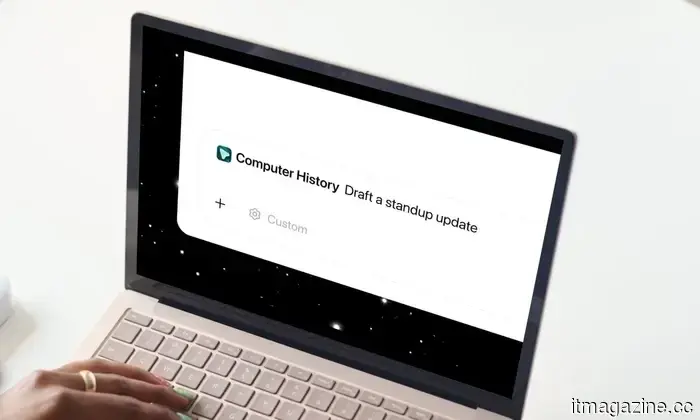
OpenAI has just introduced Computer History for the ChatGPT desktop app, and if you found Chronicle intriguing but somewhat overwhelming with screenshots, this update should provide some relief.
What is the function of Computer History?
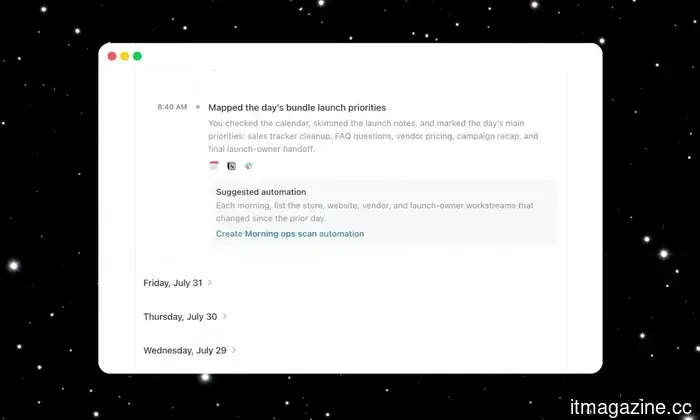
Unlike Chronicle, which captured screenshots, Computer History monitors your clicks, keystrokes, and app transitions through macOS’s accessibility system. It then converts this activity into text summaries and a scrollable timeline. You can think of it as ChatGPT discreetly taking notes on your daily activities to assist you later.
ChatGPT can now retain information about your activity across various apps and websites on your computer. With Computer History in the desktop app, future interactions become more tailored and require less context. pic.twitter.com/WHZPxPp31R— OpenAI (@OpenAI) August 13, 2026
After it’s activated, you can inquire with ChatGPT about what you were working on before your last break or where your proposal document is located. It will sift through your recent actions and guide you instead of making you recall your entire morning from memory.
If you often find yourself repeating the same task, Computer History can recognize this pattern and propose that you turn it into a skill or automation. You can simply review the suggestion and allow Codex to develop it for you.
How do you activate it, and is it truly private?
Computer History is disabled by default and remains that way until you choose to enable it. To turn it on, navigate to Settings → Integrations, and select Computer History to begin. You'll also need to activate Memories, as that allows ChatGPT to utilize this context across your conversations.
You can select precisely which apps and websites can contribute information, while private browsing will never be affected. Additionally, there is a shortcut in the menu bar to pause tracking whenever you want a break, as well as the option to delete your history whenever you choose.
OpenAI
If you're using a Business or Enterprise account, your administrator must grant access first, and you still need to opt in. Pro users can toggle it on through the settings.
In summary, this appears to be a solid privacy-oriented improvement over Chronicle, and I appreciate that OpenAI is giving users significant control over what information gets retained.
Rachit is an experienced tech journalist with over ten years in the consumer technology field.
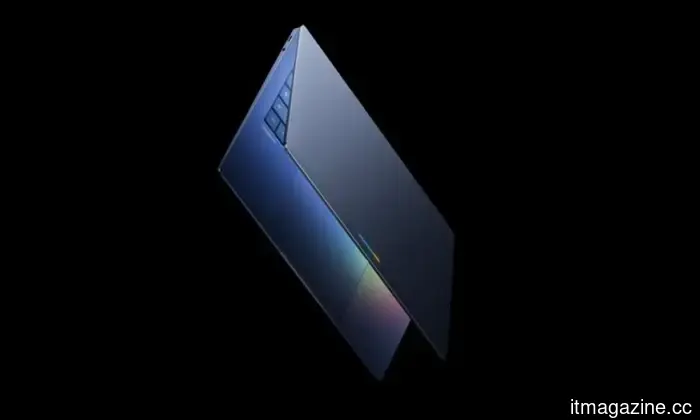
Googlebook may utilize older Snapdragon processors to create more cost-effective laptops.
Snapdragon X Plus and X Elite models might be in the works.
Google has confirmed that Googlebook will work with multiple chip manufacturers, and a recent leak may have disclosed the initial Snapdragon models being developed. New code references found by GbookHub allegedly connect two Googlebook designs, codenamed Annite and Pic, to Qualcomm’s Snapdragon X Plus X1P-42-100 processor. Both designs are also linked to a board platform known as Mica.
Read more
Google’s Gemini app introduces an option to disable AI watermarks, with certain exceptions.
Your AI creations no longer need a visible watermark.
If you've generated an image using Gemini and found the watermark frustrating, Google has finally reacted. Gemini is releasing a new feature called Media Watermarks, allowing you to toggle visible watermarks on or off for everything you create, including images made with Nano Banana, videos made with Omni, and music made with Lyria. Previously, that visible watermark was automatically applied without an option to disable it.
https://twitter.com/geminiapp/status/2088277477672255830?s=46
Read more
U.S. courts will now disclose government usage of spyware tools.
U.S. courts are set to start publicly reporting the frequency with which federal judges authorize the government's use of spyware and hacking tools to intercept real-time communications, providing the public with its first consistent view of how often these surveillance methods are employed. This change will begin with data compiled for the 2028 Wiretap Report, to be published in 2029. The Administrative Office of the U.S. Courts informed TechCrunch that the report will introduce a new category for “spyware/hacking” covering wiretaps conducted via hacking tools and spyware, known to federal authorities as network investigative techniques, or NITs.
Read more


Other articles
 SpaceX has finalized its $60 billion deal with Cursor, which had acquired a company the day prior.
The acquisition of Cursor by SpaceX was finalized on 14 August. Cursor claims it now has access to the world's largest fleet of GPUs, including more affordable models.
SpaceX has finalized its $60 billion deal with Cursor, which had acquired a company the day prior.
The acquisition of Cursor by SpaceX was finalized on 14 August. Cursor claims it now has access to the world's largest fleet of GPUs, including more affordable models.
 Tesla concluded Sweden's longest strike by purchasing out all of the remaining strikers.
The strike at Tesla Sweden concludes after 1,021 days. IF Metall reports that Tesla has bought out approximately 80 striking members, resulting in no one left to continue the strike.
Tesla concluded Sweden's longest strike by purchasing out all of the remaining strikers.
The strike at Tesla Sweden concludes after 1,021 days. IF Metall reports that Tesla has bought out approximately 80 striking members, resulting in no one left to continue the strike.
 Tesla resolved Sweden's longest strike by purchasing out all remaining strikers.
The strike at Tesla Sweden concludes after 1,021 days. IF Metall reports that Tesla has bought out approximately 80 members who were on strike, resulting in no remaining individuals to continue the protest.
Tesla resolved Sweden's longest strike by purchasing out all remaining strikers.
The strike at Tesla Sweden concludes after 1,021 days. IF Metall reports that Tesla has bought out approximately 80 members who were on strike, resulting in no remaining individuals to continue the protest.
 Trump's drone tariffs hit 100%, while Europe is limited to 15%.
Tariffs on drones over 25kg and on thermal imaging models have been set at 100% by Trump. The European Union's tariffs will be limited to 15%, while the United Kingdom's will be set at 10%, effective from September 3rd.
Trump's drone tariffs hit 100%, while Europe is limited to 15%.
Tariffs on drones over 25kg and on thermal imaging models have been set at 100% by Trump. The European Union's tariffs will be limited to 15%, while the United Kingdom's will be set at 10%, effective from September 3rd.
 Reports indicate that Samsung is utilizing Claude to accelerate its chip design process.
Samsung is said to be utilizing Anthropic's Claude Code to enhance chip design and verification processes.
Reports indicate that Samsung is utilizing Claude to accelerate its chip design process.
Samsung is said to be utilizing Anthropic's Claude Code to enhance chip design and verification processes.
 Samsung is said to be utilizing Claude to accelerate the chip design process.
Samsung is said to be utilizing Anthropic's Claude Code to enhance the speed of chip design and verification.
Samsung is said to be utilizing Claude to accelerate the chip design process.
Samsung is said to be utilizing Anthropic's Claude Code to enhance the speed of chip design and verification.
Bid farewell to Chronicle. ChatGPT's new Computer History feature outperforms it.
The desktop app for ChatGPT has introduced Computer History, a more private and screenshot-free enhancement of Chronicle that transforms your daily activities into a searchable timeline.