
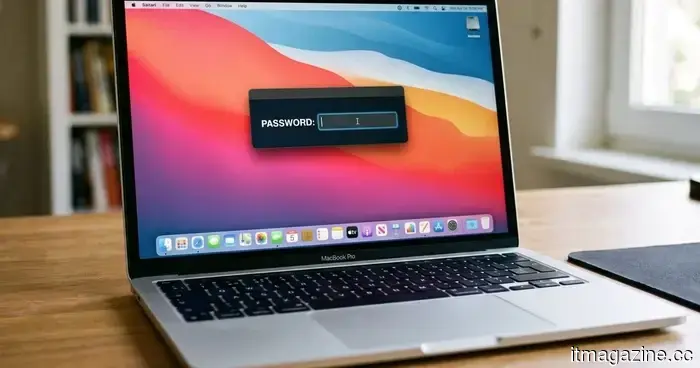
This new malware for Mac will prevent you from using your computer until you give up your password.
A recently discovered strain of macOS malware is advancing social engineering in a disturbing manner. Rather than taking advantage of software vulnerabilities or stealthily stealing data, it simply locks users out of their Macs, demanding their login password.
Called ClickLock, this malware consistently terminates essential macOS processes, turns off notifications, shows convincing Apple password prompts, and effectively ensnares users in a cycle that only breaks when the correct password is provided. Once the password is entered, it doesn't merely capture it; it also targets browser data, cryptocurrency wallets, saved credentials, password managers, and more.
Reports from BleepingComputer indicate that researchers at Group-IB believe the malware has already compromised at least 100 systems in 33 countries since May. Alarmingly, when it was first uploaded to VirusTotal in June, none of the security engines on the platform flagged it as harmful.
Rather than hacking your Mac, ClickLock hacks you.
Unlike many contemporary malware campaigns that use zero-day exploits or privilege escalation vulnerabilities, ClickLock relies on psychological manipulation. The infection is thought to kick off with a ClickFix-style attack, tricking users into copying and pasting a command into Terminal while pretending it's part of a Cloudflare “human verification” check. Meanwhile, a fake progress bar distracts the victim as the malware secretly downloads its payload in the background.
Simultaneously, it disables keyboard interrupts, hides the Terminal cursor, and suppresses macOS Notification Center alerts for nearly six hours, making it significantly harder for victims to notice any suspicious activity.
The malware’s most alarming feature follows. It presents what looks like a legitimate macOS password dialog, complete with the user’s actual account name and Apple branding. If the victim types in the correct password, ClickLock immediately verifies it and transmits the credentials to the attackers via Telegram.
If the user declines, the malware persists, installing mechanisms to reactivate after the next login. Once activated, ClickLock starts canceling important macOS processes every 210 milliseconds, including Finder, Dock, Terminal, Activity Monitor, Console, System Settings, Spotlight, and popular web browsers.
As a result, the Mac becomes nearly entirely unusable, with only the password prompt visible. According to Group-IB, this cycle can last for over 83 hours, or until the victim finally succumbs.
It seeks much more than just your password.
The login password is merely the start. ClickLock also tries to persuade victims into approving a genuine Keychain access prompt that allows permission to Chrome’s Safe Storage key, which can then be used to decrypt stored passwords, cookies, and autofill details from Chromium-based browsers.
The malware's data-stealing component casts a broad net, targeting browser profiles from Chrome, Firefox, Brave, Microsoft Edge, Opera, Vivaldi, Arc, and Chromium, collecting saved passwords, cookies, bookmarks, browsing sessions, local storage, and autofill information.
Cryptocurrency users are at an even greater risk. ClickLock searches for browser wallet extensions, desktop wallet files, encrypted wallet vaults, and cached wallet addresses across major blockchain platforms such as Bitcoin, Ethereum-compatible chains, Solana, TRON, TON, and Stacks.
It also gathers FileZilla FTP configurations, shell history, basic system information, and public IP addresses before compressing everything into ZIP archives and uploading the stolen data via the Telegram Bot API. To ensure that attackers maintain long-term access, ClickLock uses a modified version of the open-source GSocket tool, creating a persistent backdoor capable of remotely controlling the compromised Mac. Unlike other components of the malware that erase themselves after execution to limit forensic evidence, this backdoor remains active on the system.
The stealth tactics do not stop there. Researchers state that the malware is hosted on compromised but otherwise legitimate websites, enabling it to evade reputation-based security systems. Its payloads also remove themselves upon execution, leaving very few traces. Despite this, Group-IB asserts that monitoring for repeated password dialog boxes generated through osascript, continuous termination of macOS processes, mass access to browser profile folders, and unusual outbound connections to Telegram can help defenders identify suspicious behavior.
The most critical takeaway is surprisingly simple. If any website asks you to open Terminal and paste a command to verify you’re human, close the page immediately. No legitimate website, including Cloudflare, requires Terminal access for human verification. Moreover, if your Mac suddenly becomes unusable while repeatedly asking for your system password, resist the temptation to comply. Instead, force a shutdown using the power button, reboot in Safe Mode, and examine the system before entering any credentials. In the case of ClickLock, your password won’t resolve the issue—it's precisely what the attackers are waiting for.


Other articles
 Apple is engaged in preliminary settlement discussions with the DOJ regarding its iPhone antitrust case.
Apple has extended several proposals to settle the DOJ antitrust lawsuit for 2024. The antitrust head from the Trump administration is advocating for a swift resolution of inherited cases.
Apple is engaged in preliminary settlement discussions with the DOJ regarding its iPhone antitrust case.
Apple has extended several proposals to settle the DOJ antitrust lawsuit for 2024. The antitrust head from the Trump administration is advocating for a swift resolution of inherited cases.
 The Pentagon has halted 155 wind projects across 24 states, citing concerns that drones could use wind farms for concealment.
The year-long halt impacts 44GW of capacity and has resulted in $2 billion in losses for developers. The wind industry claims it is driven by political motives. A legal action is currently in progress.
The Pentagon has halted 155 wind projects across 24 states, citing concerns that drones could use wind farms for concealment.
The year-long halt impacts 44GW of capacity and has resulted in $2 billion in losses for developers. The wind industry claims it is driven by political motives. A legal action is currently in progress.
 Microsoft will cease syncing OneDrive on older versions of Windows 10 starting next month.
As of August 15, OneDrive synchronization updates will cease for Windows 10 versions earlier than 22H2, which means there will be no additional fixes or security updates. Users can either utilize the web interface or consider upgrading to Windows 11.
Microsoft will cease syncing OneDrive on older versions of Windows 10 starting next month.
As of August 15, OneDrive synchronization updates will cease for Windows 10 versions earlier than 22H2, which means there will be no additional fixes or security updates. Users can either utilize the web interface or consider upgrading to Windows 11.
 Apple is engaged in preliminary settlement discussions with the DOJ regarding its iPhone antitrust lawsuit.
Apple has proposed several settlement offers for the DOJ antitrust lawsuit of 2024. The antitrust chief from the Trump administration is advocating for a swift resolution of the cases passed down to them.
Apple is engaged in preliminary settlement discussions with the DOJ regarding its iPhone antitrust lawsuit.
Apple has proposed several settlement offers for the DOJ antitrust lawsuit of 2024. The antitrust chief from the Trump administration is advocating for a swift resolution of the cases passed down to them.
 A bug in AWS billing resulted in users receiving estimated charges as high as $2.5 trillion.
A pricing mistake in AWS Cost Explorer led to users receiving bills that ranged from billions up to $2.5 trillion. For instance, one user who had $0.19 in charges received an estimated bill of $2.5 billion.
A bug in AWS billing resulted in users receiving estimated charges as high as $2.5 trillion.
A pricing mistake in AWS Cost Explorer led to users receiving bills that ranged from billions up to $2.5 trillion. For instance, one user who had $0.19 in charges received an estimated bill of $2.5 billion.
 The next upgrade of Google's Gemini may not be released as soon as anticipated.
Google has allegedly postponed the release of Gemini 3.5 Pro due to the AI model not achieving its internal coding objectives, sparking worries about its speed in the AI competition.
The next upgrade of Google's Gemini may not be released as soon as anticipated.
Google has allegedly postponed the release of Gemini 3.5 Pro due to the AI model not achieving its internal coding objectives, sparking worries about its speed in the AI competition.
This new malware for Mac will prevent you from using your computer until you give up your password.
ClickLock is a new malware for macOS that persistently terminates system processes and deceives victims into providing their login passwords to steal confidential information.