

Claude Code now has the ability to browse the web without needing to open Chrome.
The desktop application now features an integrated browser that can access websites, click links, and engage with web applications.
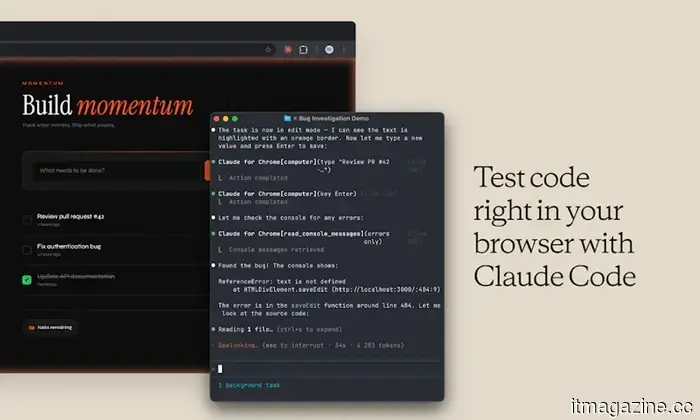
Developers often find themselves switching back and forth between their code editors, browser tabs, API documentation, GitHub issues, and design files. Anthropic believes that Claude Code should handle all of these tasks without requiring users to constantly change windows. The company has introduced a new in-app browser for Claude Code on desktop, enabling the AI coding assistant to visit websites, read documentation, review designs, and interact with web pages directly within the application.
A browser integrated into Claude Code
As per Anthropic’s documentation, the Browser pane operates as a fully tabbed browser positioned alongside a developer’s workspace. Claude can access documentation, issue trackers, internal web applications, or nearly any other site, reading the page content, clicking links, and interacting with elements similarly to how it does in local development environments.
Developers can open the browser by using Ctrl + Shift + B on Windows or Cmd + Shift + B on macOS. Additionally, external links shared during Claude conversations can be opened directly in the Browser pane or, if preferable, in the user's default browser. The browser also accommodates website logins, including Google OAuth pop-ups, which is advantageous for testing authenticated applications.
Security is paramount
Given that Claude can now engage with live websites, Anthropic has implemented several security measures. When Claude first tries to interact with a specific website, users are prompted to choose whether to Allow once, Always allow, or Deny that action. These permissions are managed per site and can be revoked later via the settings menu. Even after consent is given, Claude cannot create accounts, make purchases, or bypass CAPTCHAs without explicit user permission.
Claude Code Extension for Google Chrome by Claude / Anthropic
Anthropic differentiates the new Browser pane from its Claude in Chrome extension. The built-in browser utilizes a clean, isolated browser profile with no browsing history or saved logins, making it suitable for development and testing. Users looking to have Claude work with their existing browser sessions and logged-in accounts are still encouraged to use the Chrome extension instead.
While this update may seem minor, it alleviates one of the major frustrations in AI-assisted coding: the continuous need to copy links between a browser and the coding assistant. Rather than saying, “Here’s the documentation, go read it,” developers can now allow Claude to open the page itself, grasp the context, and continue working without leaving the desktop app. This reduces the number of open browser tabs, something developers can always use less of.
Varun is a seasoned technology journalist and editor with more than eight years in consumer tech media. His experience encompasses…
Apple is suing OpenAI for alleged trade secret theft in a high-profile lawsuit.
The lawsuit alleges that OpenAI hired Apple employees and acquired confidential information regarding unreleased products.
Over the last two years, Apple and OpenAI have been depicted as close AI allies. ChatGPT powers critical Apple Intelligence features, Siri can transfer complex queries to OpenAI, and together, the two companies have introduced generative AI to millions of Apple devices. However, this relationship has recently taken a dramatic turn.
What is Apple accusing OpenAI of?
Home robots have mastered walking; the challenge now is preventing them from damaging your glassware.
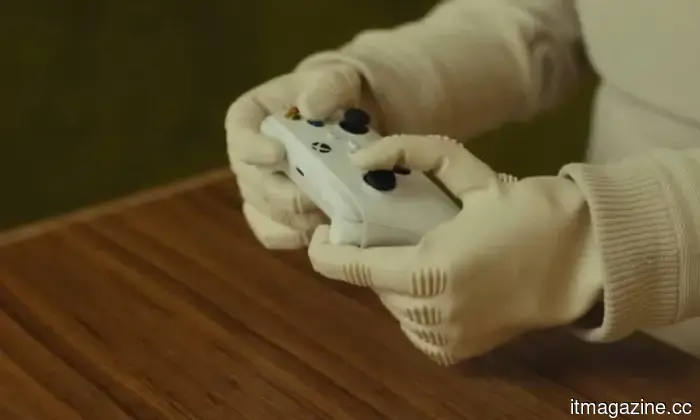
1X's NEO employs tactile sensing and force control to manage delicate objects, addressing a household task that humanoids still find difficult.
A robot might look impressive walking on a stage but still be ineffective in a kitchen. Successfully picking up a wet glass requires precision, quick corrections, and enough restraint to not grip too hard. 1X is tackling this issue with newly designed tendon-driven hands for NEO, its humanoid home robot.
1X claims each hand has 25 degrees of freedom, including 22 across the fingers and palm and three in the wrist. Its joints are designed to yield when under pressure rather than remain stiff, providing NEO a better ability to handle household items without treating every bump as a wrestling match.
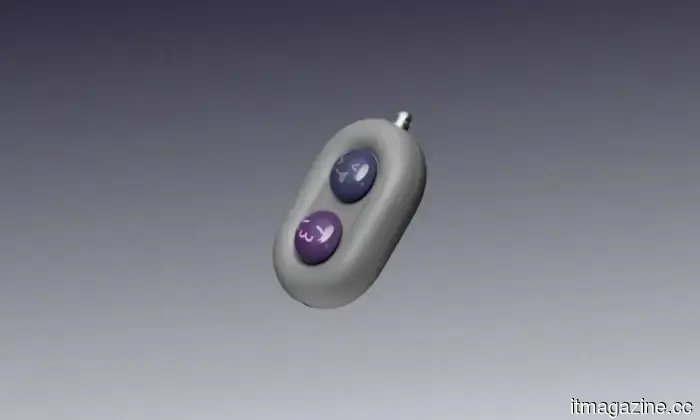
This compact device called Moodi could prevent thumb fatigue during prolonged reading sessions.
This small remote believes your finger deserves a break.
Digital reading has become more comfortable due to larger screens and e-paper technology, yet one annoyance persists: the need to constantly reach out to tap or swipe on every page. DuRoBo thinks it has the answer. The company has introduced Moodi, its first Bluetooth page-turning remote, designed to enhance reading, browsing, and media control across e-readers, tablets, and smartphones.
Unlike traditional page-turners focused solely on e-books, Moodi also serves as a compact Bluetooth remote for scrolling through articles, managing multimedia playback, and navigating long-form content. The device emphasizes ergonomic design to reduce repetitive hand motions during extended screen usage.



Other articles
 Apple is suing OpenAI for allegedly pilfering hardware designs, claiming that employees brought prototypes to
Apple alleges that OpenAI employed both current and former employees to obtain hardware secrets while developing a competitor to the iPhone. More than 400 former Apple employees are now part of OpenAI.
Apple is suing OpenAI for allegedly pilfering hardware designs, claiming that employees brought prototypes to
Apple alleges that OpenAI employed both current and former employees to obtain hardware secrets while developing a competitor to the iPhone. More than 400 former Apple employees are now part of OpenAI.
 Apple is filing a major lawsuit against OpenAI for allegedly stealing trade secrets.
Apple has filed a lawsuit against OpenAI, claiming that the company has conducted a scheme to obtain confidential product details via former employees, as both firms compete to develop advanced AI hardware.
Apple is filing a major lawsuit against OpenAI for allegedly stealing trade secrets.
Apple has filed a lawsuit against OpenAI, claiming that the company has conducted a scheme to obtain confidential product details via former employees, as both firms compete to develop advanced AI hardware.
 Apple has filed a lawsuit against OpenAI, claiming that its employees took hardware designs and brought prototypes to the company.
Apple asserts that OpenAI utilized current and former employees to acquire hardware secrets while developing a competitor to the iPhone. More than 400 former Apple employees are now employed at OpenAI.
Apple has filed a lawsuit against OpenAI, claiming that its employees took hardware designs and brought prototypes to the company.
Apple asserts that OpenAI utilized current and former employees to acquire hardware secrets while developing a competitor to the iPhone. More than 400 former Apple employees are now employed at OpenAI.
 The upcoming "flagship killer" is being developed by Motorola, but it might not arrive in the US in the near future.
With a 7,100mAh battery, magnetic charging similar to MagSafe, and a 7,000-nit QHD+ LTPO display, it boasts remarkable features, yet it's truly inaccessible to buyers in the US.
The upcoming "flagship killer" is being developed by Motorola, but it might not arrive in the US in the near future.
With a 7,100mAh battery, magnetic charging similar to MagSafe, and a 7,000-nit QHD+ LTPO display, it boasts remarkable features, yet it's truly inaccessible to buyers in the US.
 EU: Meta's autoplay feature and infinite scroll violate the DSA.
The EU released initial findings alleging that Facebook and Instagram have addictive designs, demanding that Meta disable autoplay and infinite scrolling, or risk facing fines as high as $12 billion.
EU: Meta's autoplay feature and infinite scroll violate the DSA.
The EU released initial findings alleging that Facebook and Instagram have addictive designs, demanding that Meta disable autoplay and infinite scrolling, or risk facing fines as high as $12 billion.
 Meta withdraws Muse Image AI following privacy concerns from Hollywood.
Meta's initial Muse Image model allowed users to create images based on public Instagram accounts by default. However, SAG-AFTRA, CAA, and actors opposed this, leading Meta to retract it within three days.
Meta withdraws Muse Image AI following privacy concerns from Hollywood.
Meta's initial Muse Image model allowed users to create images based on public Instagram accounts by default. However, SAG-AFTRA, CAA, and actors opposed this, leading Meta to retract it within three days.
Claude Code now has the ability to browse the web without needing to open Chrome.
Anthropic has incorporated an in-app browser into Claude Code on desktop, enabling the AI coding assistant to visit websites, access documentation, and engage with web pages right within the application.