
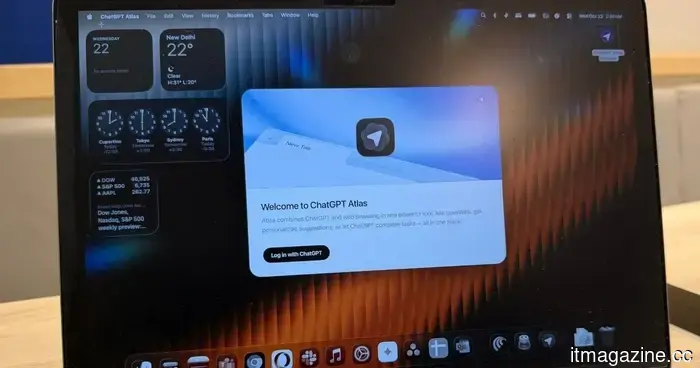
OpenAI is discontinuing the ChatGPT Atlas browser. I enjoyed it, but it was a challenging journey to succeed.
When OpenAI introduced its own web browser, there was significant skepticism about why an advanced AI lab would even venture into creating a browser. Nevertheless, the company proceeded to launch ChatGPT Atlas with a strong emphasis on integrated AI features. However, the browser’s aspirations are coming to an end, as it will be discontinued in September this year.
OpenAI has announced that it is phasing out the short-lived browser to focus on promoting the new ChatGPT desktop app, which already includes a built-in browser and a cloud browser for AI agents. With ChatGPT now being available as an extension for other browsers like Chrome, there is limited necessity for a dedicated browser project.
But why is this happening?
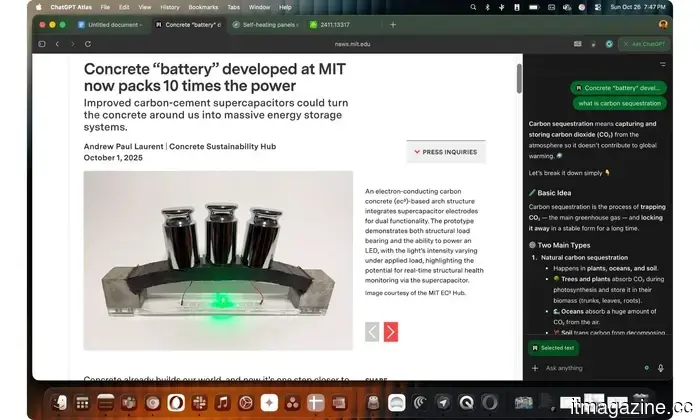
Assistant side panel in ChatGPT Atlas. Nadeem Sarwar / Digital Trends
“All these capabilities were developed based on insights gained from Atlas users who embraced a new browser experience. You taught us how agents can enhance browsing and working on the open web, and we are integrating these insights into our new products,” stated James Sung, an OpenAI executive in charge of the browsing project, in a post on X.
ChatGPT Atlas made its debut in October of last year, positioning ChatGPT at the core of the browsing experience. Its design is clean and instantly recognizable as it operates on the Chromium engine. Your extensions, bookmarks, history, and saved logins transfer seamlessly without any additional setup, resulting in a user experience akin to using a familiar browser.
The experience begins on the homepage, which features a single, unified search bar. The sidebar is where the true functionality lies. If you collapse the left pane, you’ll access all the ChatGPT tools you know, including Search, Library, custom GPTs, Codex, and your entire chat history. On the right side, a dedicated sidecar panel opens when you click the “Ask ChatGPT” button in the upper-right corner.
It was a pioneer
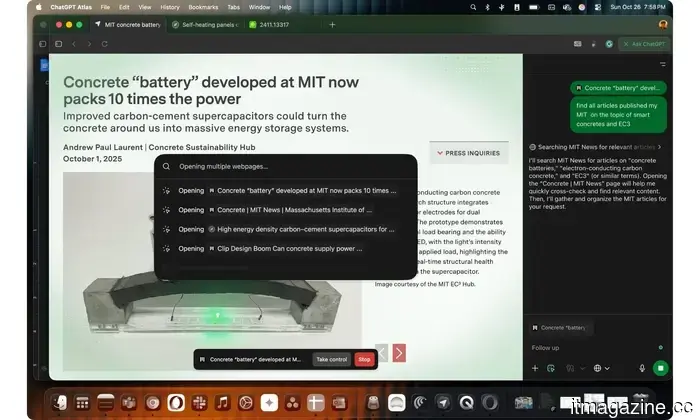
Agent Mode browsing the web on your behalf in ChatGPT Atlas. Nadeem Sarwar / Digital Trends
The side panel became my favorite feature of the AI browser, and similar functionality has since been fully adopted in Gemini for Chrome and Copilot for the Edge browser. Even minor players like Opera and Firefox have adopted this approach, sometimes with even more ambitious features. Perplexity also emerged as a key AI player with its own AI-centric browser, Comet.
Atlas included an agent mode capable of performing tasks autonomously on your behalf. However, the challenge for Atlas was always significant. Why choose Atlas when Chrome, built on the same foundation, offers a more comprehensive set of features? Furthermore, familiarity played a role, as Atlas aimed to innovate the web browser experience with advanced tools that required a learning curve.
Moreover, there were numerous security alerts and warnings that classified AI browsers like ChatGPT Atlas and Perplexity Comet as risky. It didn't help that Google drew inspiration (or copied) some of Atlas’s standout features, such as tab awareness and multi-tab actions, for Chrome, which diminished Atlas’s appeal. The endeavor lasted less than a year, but I appreciate OpenAI’s attempt to expand the potential of what browsers can achieve with AI integration.
Other articles
 If you're feeling exhausted from supervising ChatGPT, the new GPT-5.6 models could be the solution you need.
OpenAI has introduced GPT-5.6 Sol, Terra, and Luna, a new series of AI models designed to enhance workflow speed, reduce costs, and minimize the need for subsequent prompts.
If you're feeling exhausted from supervising ChatGPT, the new GPT-5.6 models could be the solution you need.
OpenAI has introduced GPT-5.6 Sol, Terra, and Luna, a new series of AI models designed to enhance workflow speed, reduce costs, and minimize the need for subsequent prompts.
 INIU SnapGo Air review: A multifunctional power bank that I don’t mind carrying with me daily.
I got fed up with oversized chargers, but INIU came to my aid. The SnapGo Air is a sleek, lightweight 10,000mAh magnetic power bank featuring fast Qi2.2 charging and an integrated cable that you'll actually want to take with you every day.
INIU SnapGo Air review: A multifunctional power bank that I don’t mind carrying with me daily.
I got fed up with oversized chargers, but INIU came to my aid. The SnapGo Air is a sleek, lightweight 10,000mAh magnetic power bank featuring fast Qi2.2 charging and an integrated cable that you'll actually want to take with you every day.
 What AI companies are seeking for their midterm millions
AI super PACs supported by OpenAI and a16z are inundating the 2026 midterm elections to prevent state AI regulations and penalize legislators who advocate for them.
What AI companies are seeking for their midterm millions
AI super PACs supported by OpenAI and a16z are inundating the 2026 midterm elections to prevent state AI regulations and penalize legislators who advocate for them.
 Musk: The SpaceX IPO created millions for thousands of employees.
Elon Musk states that SpaceX's record initial public offering probably turned thousands of employees, including welders, into millionaires, although a declining share price is putting that fortune to the test.
Musk: The SpaceX IPO created millions for thousands of employees.
Elon Musk states that SpaceX's record initial public offering probably turned thousands of employees, including welders, into millionaires, although a declining share price is putting that fortune to the test.
 What AI companies are seeking for their midterm gains
AI super PACs supported by OpenAI and a16z are inundating the 2026 midterm elections to thwart state AI regulations and penalize legislators who advocate for them.
What AI companies are seeking for their midterm gains
AI super PACs supported by OpenAI and a16z are inundating the 2026 midterm elections to thwart state AI regulations and penalize legislators who advocate for them.
 This AMD mini PC outperforms Valve’s Steam Machine, although it is significantly pricier.
A mini PC equipped with an AMD Ryzen AI Max+ 395 running SteamOS 3.8 surpassed Valve's Steam Machine in various games, but its considerably higher cost restricts its attractiveness.
This AMD mini PC outperforms Valve’s Steam Machine, although it is significantly pricier.
A mini PC equipped with an AMD Ryzen AI Max+ 395 running SteamOS 3.8 surpassed Valve's Steam Machine in various games, but its considerably higher cost restricts its attractiveness.
OpenAI is discontinuing the ChatGPT Atlas browser. I enjoyed it, but it was a challenging journey to succeed.
OpenAI is phasing out the ChatGPT Atlas browser less than a year after its launch, redirecting its attention to ChatGPT Work.