

What features contribute to a laptop's effectiveness for remote work?
This article is presented in collaboration with Dell.
The rise of remote and hybrid work has significantly altered expectations regarding laptops. Many professionals are no longer confined to a single desk for the entire day. Today's typical workflow includes morning calls on Zoom or Microsoft Teams, multiple browser tabs alongside Slack and email, and the necessity of moving seamlessly between home, the office, cafés, and even airports without losing productivity.
As a result of this shift, modern laptops designed for remote work must go beyond merely executing standard office tasks. They need to maintain responsiveness during multitasking, offer dependable battery life for all-day efficiency, and be portable enough for various hybrid work settings. The quality of the webcam, comfort of the display, and AI-assisted workflow optimization have also gained prominence due to the increased reliance on video meetings and cloud collaboration tools in daily routines.
Models like the Dell 16 Plus, Dell 14 Plus, XPS 14, and XPS 16 are designed with these evolving work practices in mind. Rather than solely concentrating on specifications, contemporary Dell devices prioritize flexibility in workflow, easy mobility, and consistent productivity across diverse environments.
What is essential in a remote work laptop today?
A quality remote work laptop can no longer be defined by a single characteristic. The nature of hybrid work places equal emphasis on flexibility as it does on performance. The best devices are those that can adapt effortlessly to evolving workflows throughout the day without hindering productivity.
Here are the key features that are crucial for a modern remote work laptop:
Battery Life
Remote workers frequently find themselves away from charging sources while traveling or working from cafés and coworking spaces. Reliable battery life is vital for maintaining productivity uninterrupted throughout the day.
Multitasking Performance
Modern work routines typically involve multiple applications running simultaneously. A laptop should be able to manage browser tabs, Slack, spreadsheets, cloud applications, presentations, and video calls concurrently without lagging.
Responsiveness
Experiencing delays during application switches or when joining meetings can quickly become frustrating. Improved responsiveness ensures that workflows remain smooth and consistent.
Portability
Hybrid work often requires moving between different locations. Lightweight devices with slimmer designs are easier to transport during commutes, travel, and adaptable work schedules.
Webcam and Audio Quality
Video conferencing has become a core element of remote work. Higher-quality webcams and clearer microphones enhance communication during continuous meetings.
Display Comfort
Extended work sessions can lead to fatigue. Displays that are comfortable with effective brightness management and clarity can help mitigate strain during long productivity periods.
AI-Assisted Workflows
AI-driven optimizations are increasingly beneficial for multitasking, battery management, and video call enhancements. Rather than manually adjusting system performance, modern AI-enabled laptops can automatically optimize workloads based on usage.
Devices like the Dell 16 Plus and Dell 14 Plus integrate seamlessly into these workflows by balancing portability, productivity, and mobility. The Dell Plus series concentrates on catering to modern hybrid work practices instead of merely emphasizing specifications. The XPS 14 similarly fits into premium productivity workflows, where users require greater multitasking flexibility alongside portability and comfort for lengthy work sessions.
The significance of multitasking and responsiveness in remote work
Remote work rarely occurs within a single application anymore. Most workers spend their day shifting between Microsoft Teams or Zoom calls, Slack communications, browser tabs, spreadsheets, presentations, and cloud collaboration tools.
Consequently, multitasking responsiveness has emerged as one of the most crucial elements of a productivity-focused laptop. A typical routine may include attending a video meeting while editing a presentation, responding to messages, and reviewing spreadsheets simultaneously. Even minor delays when switching between applications can disrupt concentration and reduce productivity.
Devices like the Dell 16 Plus are engineered to accommodate such multitasking-intensive workflows. Larger displays facilitate the visibility of multiple windows simultaneously, decreasing the need to frequently minimize or switch between applications.
The XPS 14 is ideally suited for environments where users require enhanced responsiveness along with portability. This is beneficial for professionals juggling productivity applications with heavier browser use, larger presentations, and more intensive multitasking scenarios.
Responsiveness also impacts meeting experiences. During a Teams or Zoom call, the laptop is managing the webcam feed, browser tabs, shared screens, cloud documents, and messaging apps at once. Devices that struggle under these conditions can create interruptions that hinder collaboration.
This is where AI-assisted optimization proves increasingly advantageous. Newer Dell AI PCs can dynamically allocate resources according to workload demands. Instead of manual settings adjustments, the system can prioritize active applications and enhance performance automatically.
This adaptability is vital, as remote work can be unpredictable. Activities may shift from quiet document editing to managing multiple collaborative tools in a large video meeting. A laptop that adjusts fluidly to these varying workflows delivers a more seamless remote work experience.
For professionals tackling even more demanding multitasking or productivity tasks, the XPS 16 can naturally integrate into complex hybrid work scenarios where additional screen space and workflow flexibility become advantageous.
The impact of battery life and portability on hybrid work
Hybrid work has made portability a key consideration for laptops today. Many professionals now
Altri articoli
 The new trailer for One Piece has arrived, but why is Netflix choosing to remake it at this time?
The first season of Netflix's One Piece remake adapts only 50 chapters of the manga, featuring the original voice of Luffy, Mayumi Tanaka, making a comeback.
The new trailer for One Piece has arrived, but why is Netflix choosing to remake it at this time?
The first season of Netflix's One Piece remake adapts only 50 chapters of the manga, featuring the original voice of Luffy, Mayumi Tanaka, making a comeback.
 Tissium secures €60M for nerve repair without sutures.
France's Tissium has secured €60M to introduce COAPTIUM CONNECT, the sole FDA-approved sutureless nerve repair system, into operating rooms across the United States.
Tissium secures €60M for nerve repair without sutures.
France's Tissium has secured €60M to introduce COAPTIUM CONNECT, the sole FDA-approved sutureless nerve repair system, into operating rooms across the United States.
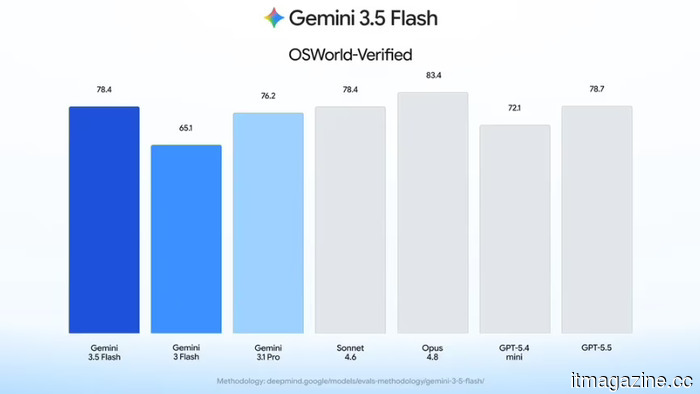 Gemini 3.5 Flash is now capable of viewing and managing your screen, and Google aims for businesses to place their confidence in it.
Google has integrated computer usage directly into Gemini 3.5 Flash, eliminating the standalone version and incorporating enterprise safety measures.
Gemini 3.5 Flash is now capable of viewing and managing your screen, and Google aims for businesses to place their confidence in it.
Google has integrated computer usage directly into Gemini 3.5 Flash, eliminating the standalone version and incorporating enterprise safety measures.
 EXCLUSIVE: Sam C. Wilson, a star of Masters of the Universe, discusses the film's striking visuals, action sequences, and practical effects.
In a special interview, Sam C. Wilson, the star of Masters of the Universe, shares insights about portraying the antagonist Trap-Jaw, the film's practical effects, stunt performance, and his collaboration with director Travis Knight.
EXCLUSIVE: Sam C. Wilson, a star of Masters of the Universe, discusses the film's striking visuals, action sequences, and practical effects.
In a special interview, Sam C. Wilson, the star of Masters of the Universe, shares insights about portraying the antagonist Trap-Jaw, the film's practical effects, stunt performance, and his collaboration with director Travis Knight.
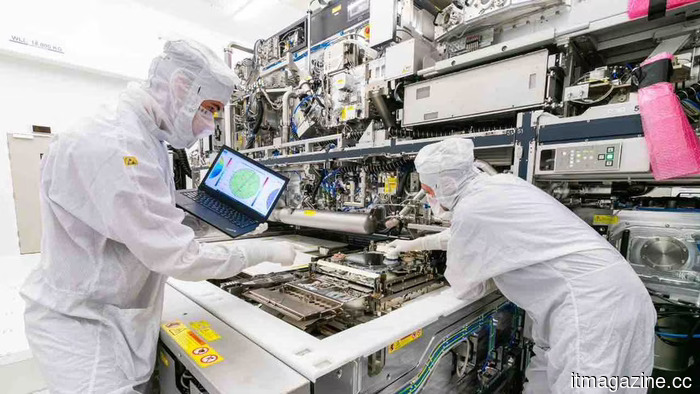 xLight EUV investment: $350 million funding targets ASML.
The xLight EUV gamble: the US-supported startup is seeking to raise $350 million to compete with ASML, while a Dutch company sets its sights on Nvidia.
xLight EUV investment: $350 million funding targets ASML.
The xLight EUV gamble: the US-supported startup is seeking to raise $350 million to compete with ASML, while a Dutch company sets its sights on Nvidia.
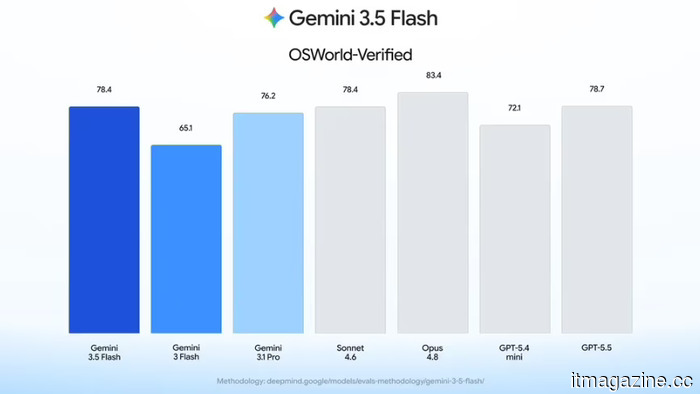 Gemini 3.5 Flash is now capable of viewing and managing your screen, and Google aims for businesses to have confidence in it.
Google has integrated computer usage into Gemini 3.5 Flash, moving away from the standalone model and incorporating enterprise safety measures.
Gemini 3.5 Flash is now capable of viewing and managing your screen, and Google aims for businesses to have confidence in it.
Google has integrated computer usage into Gemini 3.5 Flash, moving away from the standalone model and incorporating enterprise safety measures.
What features contribute to a laptop's effectiveness for remote work?
This article is presented in collaboration with Dell. The rise of remote and hybrid work has altered what individuals anticipate from a laptop. Many professionals no longer spend their entire day at a single desk. A standard work routine now includes morning Zoom or Microsoft Teams meetings, multiple browser tabs alongside Slack and email, and the need to move around.