
Forget about RTX filters. BenQ’s gaming monitor enhances visuals on its own.
I have spent several years adjusting in-game brightness sliders, GPU filters, HDR settings, and monitor configurations to enhance my experience with my favorite games. While I always prioritize the original vision of the creators, revisiting these games with new filters can bring a refreshing change to the ambiance.
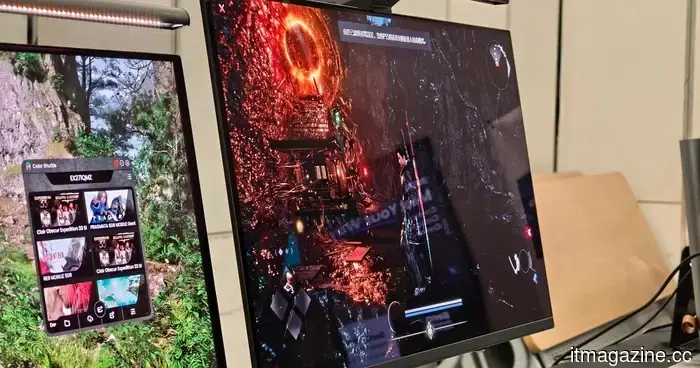
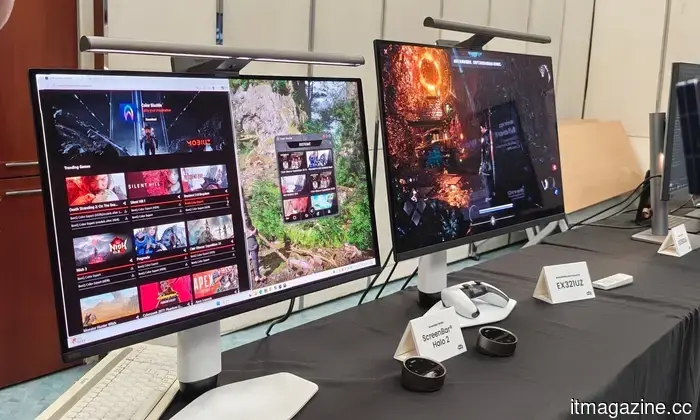
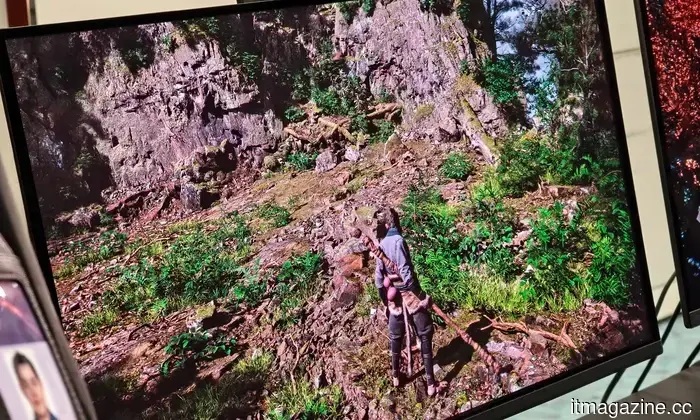
This is why I was especially impressed by BenQ's latest MOBIUZ gaming monitors. During a recent visit to BenQ’s headquarters in Taiwan, I had the opportunity to test the company's new AI-driven game filter technology, which was more intuitive than I anticipated. They are not merely attaching an “AI” label to a gaming display; instead, they offer personalized adjustments that alter your experience by utilizing BenQ’s game art database, which automatically optimizes brightness, contrast, and color balance to align with the game's visual style. Interestingly, this does not adversely affect your performance.
The filter is integrated within the monitor
Vikhyaat Vivek / Digital Trends
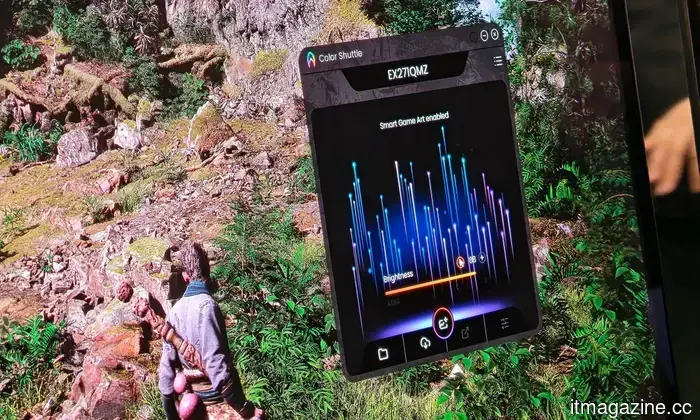
When using GPU-side filters, such as Nvidia’s Game Filters, your graphics card remains part of the post-processing chain. These tools can enhance a game’s sharpness, mood, or vibrance, but they may come with a performance drawback depending on your setup. BenQ adopts a different approach by transferring this task to the monitor itself. Its Smart Color feature functions through the Color Shuttle software and leverages an AI chipset along with BenQ’s MOBIUZ Game Color Database.
Instead of applying a filter at the GPU level to the rendered frames, it modifies the output of the monitor using game-specific visual profiles. In practice, you can enrich or balance a game's appearance without the concern of the filter consuming your frame rate. Given how valuable those additional frames are for many PC gamers, this visual filter ensures that you retain all of them.
More than just a collection of presets
Vikhyaat Vivek / Digital Trends
What I appreciated during the demonstration was that BenQ is not treating this like a traditional preset menu for FPS, RPG, or racing games. Such menus have been around for ages and often lean towards either being overly aggressive or too generic. Color Shuttle is developed around a game art database featuring over 120 profiles. BenQ claims it employs deep learning to comprehend color grading, lighting, and artistic direction across various game genres. Once Smart Color is activated, it can recognize the game you are playing and automatically switch to an appropriate profile.
You also have the option to adjust those settings manually, utilizing familiar BenQ features like Color Vibrance and Light Tuner to tailor the image to your preference. After all, what constitutes “better colors” is subjective; one player might want a horror game to be darker and more atmospheric, while another may seek enhanced shadow visibility. Yet another may desire a more cinematic feel in open-world games. BenQ’s system provides a solid foundation, allowing for further customization.
Community support
Vikhyaat Vivek / Digital Trends
One of the standout aspects of Color Shuttle is the cloud sharing functionality. You can save your custom presets, upload them, and share with other players. Others can then download these setups for their own compatible monitors, adding a social dimension to the feature. Imagine acquiring a profile for a specific game because another player has already optimized it for night scenes or other scenarios.
This also clarifies why an internet connection is essential. Color Shuttle links to BenQ’s Game Color Database, and the cloud aspect is used for saving and sharing profiles. The AI tuning isn’t the same as cloud gaming or streaming, but the ecosystem still relies on BenQ’s online database and community support.
Nevertheless, there are some constraints. Color Shuttle is currently available as an app for Windows 10/11, and console users must save presets to the monitor’s Gamer modes via a PC before applying them elsewhere. That said, I appreciate the direction BenQ is taking. Many AI gaming features can feel overly complicated or closely tied to high-end GPU upgrades. Smart Color may be more compact, yet it is also more functional.
Other articles
 China’s goal for green energy in AI data centers faces challenges with the power grid.
Beijing aims for renewable energy to provide 80% of the power for its AI data centres by 2030. However, forecasting and grid risk are posing challenges.
China’s goal for green energy in AI data centers faces challenges with the power grid.
Beijing aims for renewable energy to provide 80% of the power for its AI data centres by 2030. However, forecasting and grid risk are posing challenges.
 China's goal for green energy in AI data centers faces challenges with the power grid.
Beijing aims for renewable sources to provide 80% of the power for its AI data centres by 2030. However, challenges with forecasting and grid reliability are hindering progress.
China's goal for green energy in AI data centers faces challenges with the power grid.
Beijing aims for renewable sources to provide 80% of the power for its AI data centres by 2030. However, challenges with forecasting and grid reliability are hindering progress.
 Hackers have released facial recognition data associated with millions of visitors to Madison Square Garden.
A group of cybercriminals has released what it alleges to be millions of records obtained from Madison Square Garden Entertainment. The breach is garnering interest not only due to its magnitude but also because it contains facial recognition information, internal evaluations of threats, and comprehensive visitor profiles.
Hackers have released facial recognition data associated with millions of visitors to Madison Square Garden.
A group of cybercriminals has released what it alleges to be millions of records obtained from Madison Square Garden Entertainment. The breach is garnering interest not only due to its magnitude but also because it contains facial recognition information, internal evaluations of threats, and comprehensive visitor profiles.
 Isometric in London secures $40 million to validate the industrial sector using AI.
Isometric, based in London, has secured $40 million in a Series A funding round led by AVP to expand its AI certification platform throughout the broader industrial sector.
Isometric in London secures $40 million to validate the industrial sector using AI.
Isometric, based in London, has secured $40 million in a Series A funding round led by AVP to expand its AI certification platform throughout the broader industrial sector.
 Isometric, based in London, secures $40 million to validate the industrial economy using AI.
Isometric, based in London, has secured $40 million in Series A funding, led by AVP, to expand its AI certification platform throughout the broader industrial sector.
Isometric, based in London, secures $40 million to validate the industrial economy using AI.
Isometric, based in London, has secured $40 million in Series A funding, led by AVP, to expand its AI certification platform throughout the broader industrial sector.
 The self-sustaining shaking capsule demonstrates the potential for safe drinking water right at our fingertips.
Scientists have created a self-sustaining floating capsule that harnesses kinetic energy to identify contaminated water and purify it, eliminating the need for batteries or chemicals.
The self-sustaining shaking capsule demonstrates the potential for safe drinking water right at our fingertips.
Scientists have created a self-sustaining floating capsule that harnesses kinetic energy to identify contaminated water and purify it, eliminating the need for batteries or chemicals.
Forget about RTX filters. BenQ’s gaming monitor enhances visuals on its own.
BenQ's MOBIUZ gaming monitors leverage AI-driven Smart Color and Color Shuttle to automatically adjust game visuals on the display, featuring shareable presets without impacting GPU performance.