
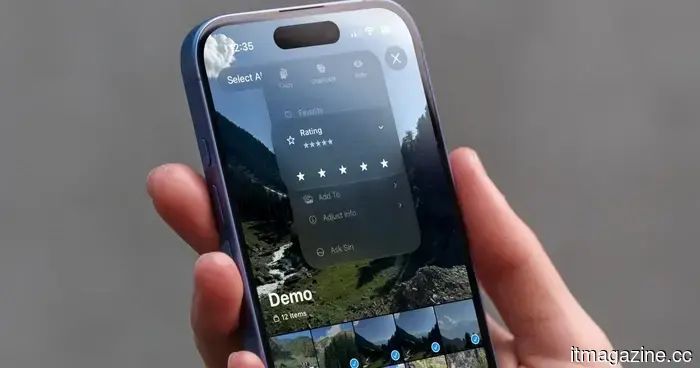
Apple has finally allowed me to rate my photos, and I can't get enough of it.
As a hobbyist photographer, I tend to capture several images of the same scene so I can select the best one later. The downside is that I end up sorting through hundreds of photos weekly. Adobe Lightroom and other popular photo editing software allow you to rate photos, making the process of filtering your images much easier. This is one of the reasons I continue to pay for Lightroom Classic.
While this method is effective for the pictures I take with my camera, it doesn’t apply to my iPhone photos since I rarely export them and they remain in my iCloud library. Therefore, I was thrilled to discover that the iOS 27 developer beta includes a hidden setting that introduces a similar feature to the iPhone Photos app.
How to activate and use the star rating feature
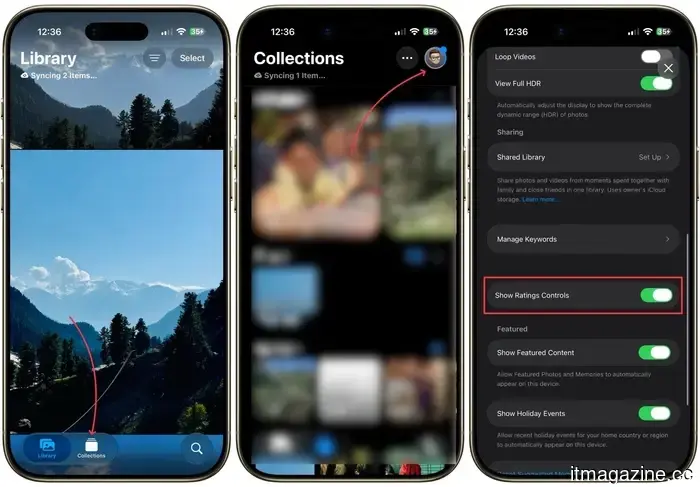
In the initial developer beta of iOS 27, this feature is disabled by default. To activate it, open the Photos app and navigate to the Collections tab. Next, tap the profile icon in the top-right corner, scroll down, and turn on the toggle for “Show Rating Controls.”
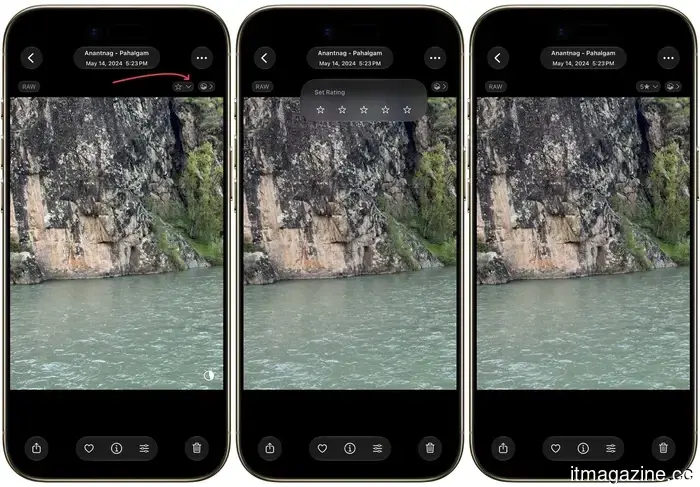
Once you activate this toggle, open any photo to find a star icon with a drop-down menu in the top-right corner. Tap it to expand and then rate the photo with 1 to 5 stars.
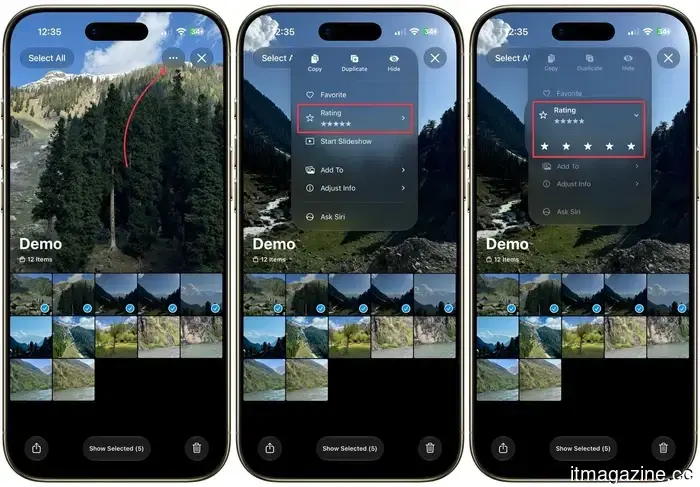
You can also rate multiple photos simultaneously. Just select all the photos you want to rate with the same star value, tap the three-dot menu, and use the Rating option to assign your ratings.
Honestly, this may be a minor feature, but it has significantly enhanced my photo sorting experience on the iPhone.
You've rated your photos; what’s next?
At this point, you might be wondering, "I have painstakingly rated my photos, but what's next?" Well, here’s the exciting part. You can filter your library based on the number of stars assigned to your photos.
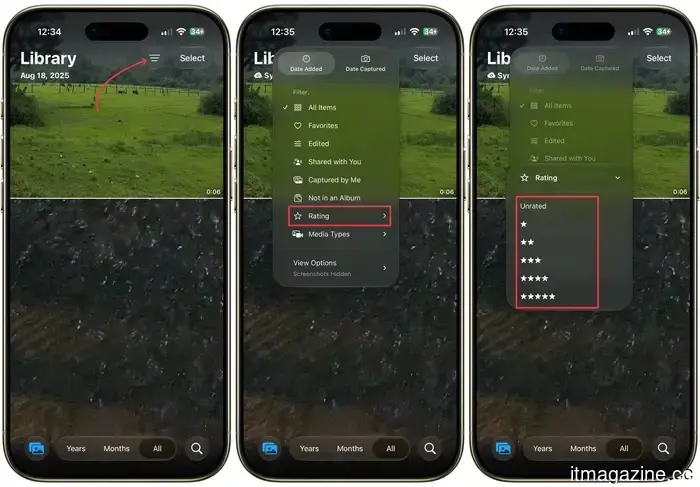
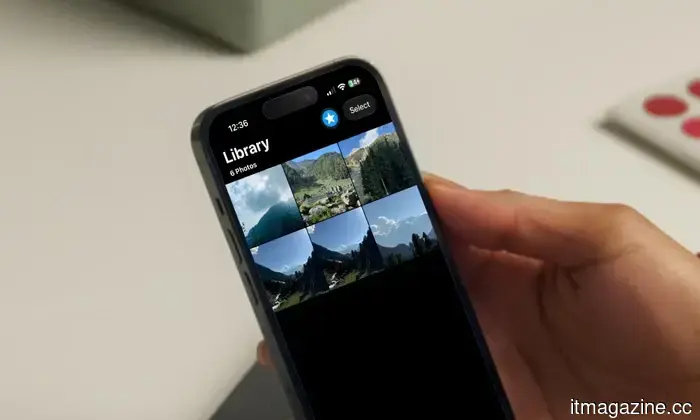
For instance, if I only want to see the top-rated photos that I marked with five stars, I can easily do that. To filter photos, go to the Library tab and tap the filter button in the top-right corner. Select the Rating option and choose the rating you want to filter by.
Since I selected five stars, it displays all the photos I have rated with five stars.
Why this simple feature matters to me
It may seem odd to be so enthusiastic about a star rating toggle, but for me, it addresses a problem I have dealt with for years. My iPhone library has often been cluttered with nearly identical shots, making it a challenge to identify the keepers.
I also appreciate that it aligns my iPhone workflow more closely with my Lightroom workflow. Now, I can rate my best iPhone pictures, filter them in seconds, and quickly locate the ones worth editing or sharing. If it remains available post-beta, it will undoubtedly become one of my favorite minor updates this year.
Other articles
 TCL QM8L Review: SQD Technology Accessible to Everyone
Immediate understanding: SQD without the price surprise When I evaluated the TCL X11L earlier this year, I deemed it the finest picture quality available in the Mini-LED category. However, at a cost of $7,999, it’s not a television that the average consumer will purchase. Introducing the QM8L, an excellent TV at a more budget-friendly price. TCL ceased to follow […]
TCL QM8L Review: SQD Technology Accessible to Everyone
Immediate understanding: SQD without the price surprise When I evaluated the TCL X11L earlier this year, I deemed it the finest picture quality available in the Mini-LED category. However, at a cost of $7,999, it’s not a television that the average consumer will purchase. Introducing the QM8L, an excellent TV at a more budget-friendly price. TCL ceased to follow […]
 The Galaxy S27 Pro could potentially adopt the best display feature from the Ultra model.
Samsung might extend its Privacy Display feature to additional smartphones, beginning with the speculated Galaxy S27 Pro.
The Galaxy S27 Pro could potentially adopt the best display feature from the Ultra model.
Samsung might extend its Privacy Display feature to additional smartphones, beginning with the speculated Galaxy S27 Pro.
 Getty Images skyrockets following an agreement with the very company it litigated against.
Getty Images' stock surged nearly 200% after the company reached an agreement to provide licensed images to ChatGPT, several years after it filed a lawsuit against AI image generators for using its collection without permission.
Getty Images skyrockets following an agreement with the very company it litigated against.
Getty Images' stock surged nearly 200% after the company reached an agreement to provide licensed images to ChatGPT, several years after it filed a lawsuit against AI image generators for using its collection without permission.
 Getty Images surges after reaching an agreement with the type of company it previously sued.
Getty Images' stock surged by about 200% after the company reached an agreement to provide licensed images to ChatGPT, several years after it filed a lawsuit against AI image generators for using its library without permission.
Getty Images surges after reaching an agreement with the type of company it previously sued.
Getty Images' stock surged by about 200% after the company reached an agreement to provide licensed images to ChatGPT, several years after it filed a lawsuit against AI image generators for using its library without permission.
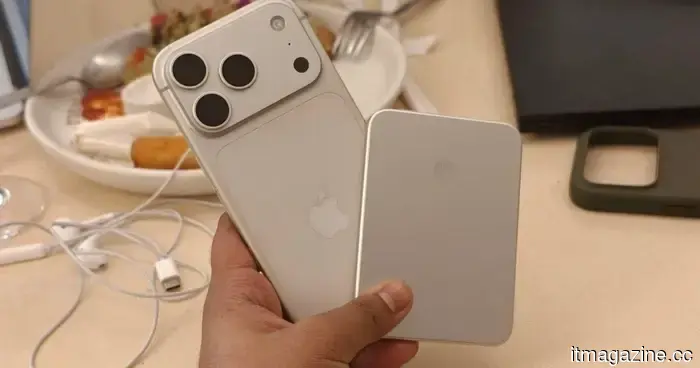 I swapped out expensive Apple accessories for Xiaomi products, and the results exceeded my expectations.
The Xiaomi UltraThin Magnetic Power Bank 5000 15W and the Redmi Buds 8 Pro present a surprisingly refined option compared to Apple’s more expensive battery pack and AirPods Pro.
I swapped out expensive Apple accessories for Xiaomi products, and the results exceeded my expectations.
The Xiaomi UltraThin Magnetic Power Bank 5000 15W and the Redmi Buds 8 Pro present a surprisingly refined option compared to Apple’s more expensive battery pack and AirPods Pro.
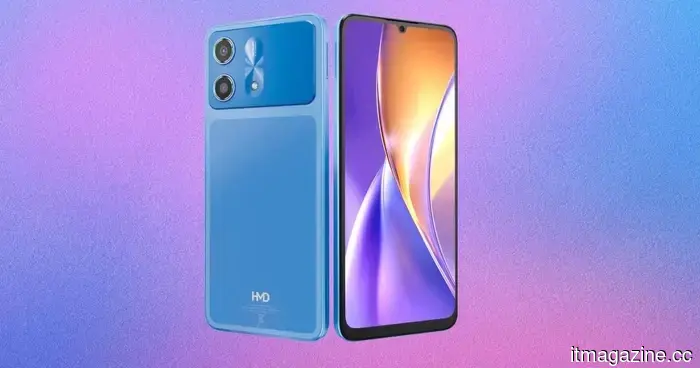 The upcoming phone from HMD has been leaked, and I’m weary of repeatedly encountering the same design that mimics the iPhone.
Leaked renders of the HMD Luma 2 reveal a device that closely resembles the iPhone 17 Pro, featuring a similar camera plateau and a rich blue color scheme.
The upcoming phone from HMD has been leaked, and I’m weary of repeatedly encountering the same design that mimics the iPhone.
Leaked renders of the HMD Luma 2 reveal a device that closely resembles the iPhone 17 Pro, featuring a similar camera plateau and a rich blue color scheme.
Apple has finally allowed me to rate my photos, and I can't get enough of it.
The iOS 27 developer beta includes a hidden star rating feature in the iPhone Photos app. Here's how to activate it, rate your images, and quickly filter your library to discover your top photos.