

Google Meet's AI note-taking feature now allows users to personalize their meeting notes and monitor decisions.
Google Meet has improved the way you can monitor the results of your meetings.
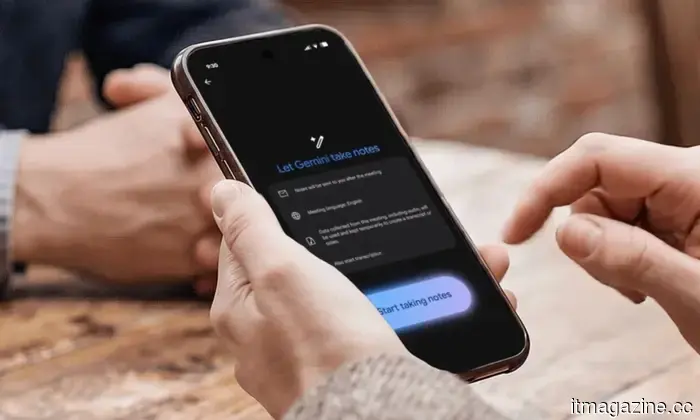
If you've ever participated in a Google Meet call and had difficulty recalling what was decided, Google has just made things simpler for you. The company has introduced a significant enhancement to its "Take notes for me" feature, providing you with greater control over what is recorded and facilitating the tracking of outcomes after meetings conclude.
Meeting notes have received a notable enhancement. 📝 You can now select specific sections (like Decisions or Next Steps) using the Take notes for me feature in Meet. Additionally, our new “Decisions” tracker enables you to categorize outcomes as Aligned or Needs Further Discussion, ensuring nothing is overlooked.
What are the updates in the “Take notes for me” feature?
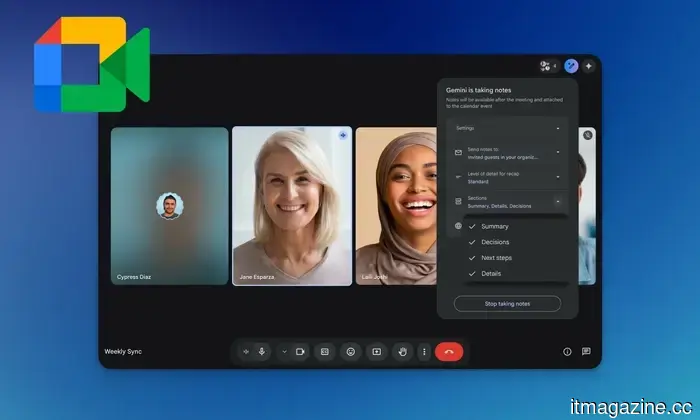
The most significant improvement is the ability to toggle specific sections of your meeting notes on or off during the call. From the in-call menu, you can select which of the four sections to include: Summary, Decisions, Next Steps, or Details. These toggles only impact your current meeting and do not alter your default settings for upcoming calls.
The Summary section has also been refined. It is now more concise and easier to scan, allowing you to quickly review the key points of a meeting without sifting through excessive text.
What about the new Decisions section and how can it assist you?
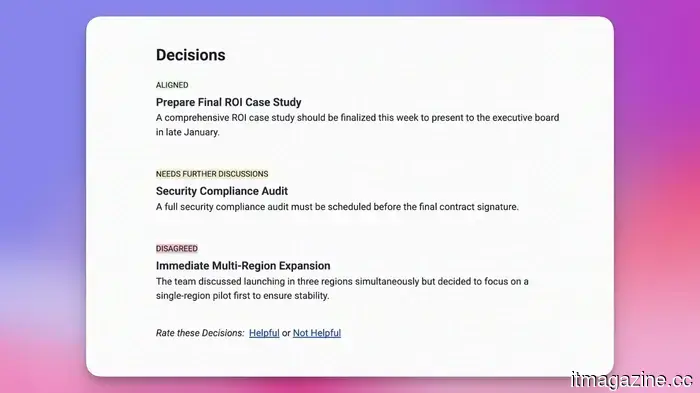
The Decisions section is the most intriguing aspect of this update. Instead of merely listing discussions, it clearly tracks the outcome of each decision with a status label. The labels include Aligned, Needs Further Discussion, Disagreed, and Shelved.
This means that instead of sifting through lengthy notes to determine outcomes, you receive a clear overview of what has been resolved and what still requires attention. Currently, the Decisions section is only offered in English, but additional languages are expected to follow.
This update is available for Enterprise Standard and Plus, Business Standard and Plus, Frontline Plus, and Google AI Pro for Education subscribers, as well as Google AI Pro and Ultra subscribers.
Manisha Priyadarshini is a tech and entertainment writer with over nine years of editorial experience.
The post-warranty graveyard is becoming crowded with functioning devices.
The hardware continues to work, but the issue arises as companies increasingly dictate when software ceases to be functional.
I begrudgingly upgraded from my Pixel 4a in late 2024, having clung to a phone that still felt like a phone for four years. Part of the reason was its size. The Pixel 4a was compact enough for easy use without requiring thumb gymnastics, a diminishing convenience as flagship models have evolved into pocket-tablets. That’s a discussion for another time. The more regrettable issue arose after my upgrade. In January 2025, Google initiated an automatic Android 13 update for Pixel 4a phones. According to Google’s support page, this update reduced the available battery capacity and negatively impacted charging performance on some affected devices. Reddit users had more pointed critiques; one post on r/Pixel4a noted that the battery suddenly dropped to “about 40% of its previous capacity” following the update.
Samsung may forgo a charging upgrade in the upcoming Galaxy Z Flip 8, yet again.
The next clamshell foldable from Samsung may bring familiar frustrations. Recent reports suggest that the Galaxy Z Flip 8 could maintain the same 25W wired charging speed as its predecessor, continuing a trend that has persisted for several generations. Recent leaks indicate that both the charging speed and battery capacity are expected to remain largely unchanged on the Galaxy Z Flip 8. If these reports are accurate, the device will still utilize a 4,300mAh battery with 25W wired charging—specifications that are becoming increasingly challenging to justify as competitors exceed them.
iOS 27 might alter how your muscle memory interacts with notifications on a phone.
Apple is reportedly working on a potentially game-changing update to notification functionality in iOS 27 and iPadOS 27. According to Mark Gurman from Bloomberg, incoming notifications currently slide in from the left side of the screen in internal versions of the software. While this may seem like a minor visual change, it appears to be part of a broader rethinking of navigation gestures—one that could require longtime iPhone users to relearn years of muscle memory.



Other articles
.jpg) 3 overlooked TV series on Hulu that you should binge-watch this weekend (June 5-7)
This weekend, we have three overlooked Hulu series that cover dark comedy, mind-bending sci-fi, and psychological thriller genres, all of which are worth checking out.
3 overlooked TV series on Hulu that you should binge-watch this weekend (June 5-7)
This weekend, we have three overlooked Hulu series that cover dark comedy, mind-bending sci-fi, and psychological thriller genres, all of which are worth checking out.
 Swiss startup GR3N has secured €15.5 million to construct the first-ever microwave-powered PET recycling facility.
GR3N has secured €15.5 million in Series B funding to establish a 40,000-ton microwave-assisted PET recycling facility in Spain. This technology reduces CO2 emissions by 80% and processes all types of PET waste.
Swiss startup GR3N has secured €15.5 million to construct the first-ever microwave-powered PET recycling facility.
GR3N has secured €15.5 million in Series B funding to establish a 40,000-ton microwave-assisted PET recycling facility in Spain. This technology reduces CO2 emissions by 80% and processes all types of PET waste.
 Apple might introduce the MacBook Ultra in two sizes featuring a unique OLED display.
Apple's MacBook Ultra may be launched in the third quarter of 2026, featuring a new hybrid OLED display, two size choices, and the most significant redesign of a MacBook in years.
Apple might introduce the MacBook Ultra in two sizes featuring a unique OLED display.
Apple's MacBook Ultra may be launched in the third quarter of 2026, featuring a new hybrid OLED display, two size choices, and the most significant redesign of a MacBook in years.
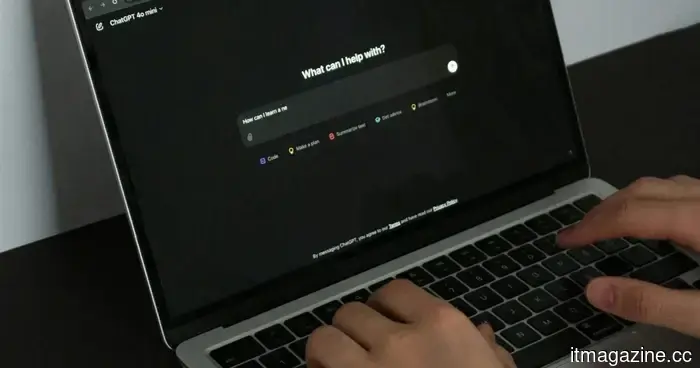 You can now directly send emails from ChatGPT on the web.
Thanks to a recent update to the platform's writing blocks feature, you can now create, edit, and send emails completely within ChatGPT on the web.
You can now directly send emails from ChatGPT on the web.
Thanks to a recent update to the platform's writing blocks feature, you can now create, edit, and send emails completely within ChatGPT on the web.
 The governor of the Bank of England has cautioned that artificial intelligence might require rationing due to energy constraints.
Andrew Bailey states that AI will soon surpass the available power, compelling governments to make choices between advancements in healthcare, defense, or other areas.
The governor of the Bank of England has cautioned that artificial intelligence might require rationing due to energy constraints.
Andrew Bailey states that AI will soon surpass the available power, compelling governments to make choices between advancements in healthcare, defense, or other areas.
 Chinese electric vehicles are entering the US market. Detroit's optimal strategy might be to collaborate with them.
Chinese electric vehicles are subject to 125% tariffs and a Senate ban, yet companies like BYD and Geely, among others, are discovering avenues into the market via Canada, Mexico, and collaborations with American car manufacturers.
Chinese electric vehicles are entering the US market. Detroit's optimal strategy might be to collaborate with them.
Chinese electric vehicles are subject to 125% tariffs and a Senate ban, yet companies like BYD and Geely, among others, are discovering avenues into the market via Canada, Mexico, and collaborations with American car manufacturers.
Google Meet's AI note-taking feature now allows users to personalize their meeting notes and monitor decisions.
The "Take notes for me" feature in Google Meet now allows you to toggle specific sections of notes and monitor meeting decisions using clear outcome labels.