

Copilot has undergone a redesign and aims to enhance functionality while maintaining a visually appealing appearance.
Microsoft is implementing a subtle yet significant redesign of Copilot, with a new emphasis on integrating it seamlessly into your workflow rather than simply enhancing its power.
Throughout Microsoft 365, Copilot is being redefined to lower visual clutter and enhance functionality. Rather than constantly vying for your attention, it is being developed to operate in the background when not needed and to engage only when it can provide assistance. Although this change may seem minor, it significantly affects how frequently you experience interruptions compared to receiving support in your daily tasks.
An improved Copilot that aligns with your intentions
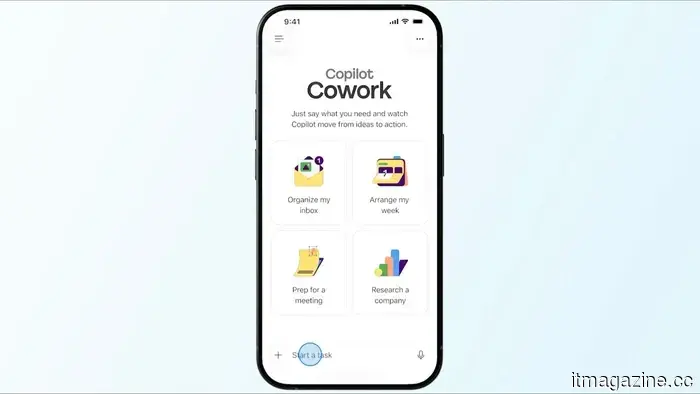
The Copilot application has been fundamentally redesigned with a straightforward concept in mind. Since work is often chaotic, non-linear, and continuously shifting among tasks, the interface should not function like a rigid chatbot interface. The most noticeable alteration is in the prompt area, which has transitioned from a static text box waiting for input to a flexible space where you can articulate, modify, and refine your requests. It feels more like shaping your thoughts before submission.
Microsoft
In addition, Copilot now displays tools and controls tailored to your current task. For simpler tasks, the interface remains minimalist, while more options emerge as complexity increases. This design choice minimizes clutter while still offering depth when required. Navigation has also been streamlined, with a collapsible side panel that accommodates chats, agents, and history without overwhelming the screen.
Microsoft is emphasizing progressive disclosure, a design principle where the interface initially appears simple and exposes more features as necessary. The outcome is a Copilot experience that feels more tranquil, even as its underlying capabilities expand.
Copilot is becoming more integrated into your actual work
The more significant transformation is occurring not only within the Copilot app but across Microsoft 365 as a whole. Copilot is no longer viewed as an independent assistant you activate on the side. It is evolving into a tool that follows you through various applications. A unified entry point now tracks users across Word, Excel, PowerPoint, and Outlook. Rather than requiring constant context switching, it recommends actions based on your current activities. For instance, while creating a presentation, it can assist in restructuring slides or refining content. In Excel, it can offer support when the data becomes overwhelming.
Shikhar Mehrotra / Digital Trends
This is where Microsoft’s initiative towards task-specific agents becomes crucial. Copilot is being divided into more specialized roles, including Designer, Researcher, and native assistants within Word, Excel, and PowerPoint. Each role is crafted to function like a collaborator capable of taking action directly in the document. The manner in which Copilot responds has also evolved, beginning with simple answers and gradually introducing structure. You might first receive a basic response, followed by formatting, suggestions, and additional actions if required. This approach reflects how individuals typically work, starting with rough ideas and refining them over time.
Beneath this lies Microsoft's context-aware system, which extracts information from emails, files, chats, and meetings. This system is designed to comprehend ongoing work instead of merely responding to isolated prompts. Consequently, Copilot is better equipped to handle scenarios like lengthy projects, performance evaluations, or team transitions, where context is more significant than solely addressing a single query. Microsoft has also mentioned performance enhancements, boasting faster load times and swifter responses, particularly for complex requests.
The broader transformation behind Copilot's redesign
Ultimately, Microsoft is redefining how Copilot integrates into the work process itself. The tool is being established as a layer closely connected to your workflow that intervenes when necessary. This requires careful balancing: if it is too present, it can become distracting; if it is too hidden, it risks becoming irrelevant. The current objective is to minimize the gap between intention and output, enabling you to transition from a rough concept to usable content without the need for frequent translations of your intent into prompts or navigating through different modes.
Solen Feyissa / Unsplash
There is also a noticeable shift in design philosophy. Microsoft is moving away from the perception of AI as simply a feature and is instead treating it as an outcome system. The focus has shifted from the appearance of the interface to whether the resulting output is useful, organized, and trustworthy enough to take action upon. In this regard, the redesign of Copilot emphasizes restraint; it aims to stay out of your way without disappearing entirely, which is arguably one of the most challenging design issues AI tools currently face.


Other articles
 Similar to humans, this robot can listen to music and is able to perform it after only two minutes of self-training.
USC's Musician Hand learned to play the piano by ear in just two minutes through a process resembling infant motor babbling.
Similar to humans, this robot can listen to music and is able to perform it after only two minutes of self-training.
USC's Musician Hand learned to play the piano by ear in just two minutes through a process resembling infant motor babbling.
 Tesla's main competitor introduces self-driving capabilities with comprehensive crash coverage at a significantly lower price.
BYD is promoting its God’s Eye assisted-driving system by offering a crash-cost coverage guarantee and a 12,000 yuan upgrade fee, which is lower than Tesla's assisted-driving package.
Tesla's main competitor introduces self-driving capabilities with comprehensive crash coverage at a significantly lower price.
BYD is promoting its God’s Eye assisted-driving system by offering a crash-cost coverage guarantee and a 12,000 yuan upgrade fee, which is lower than Tesla's assisted-driving package.
 ChargePoint partners with Powers Parts to provide charging solutions for transit electric buses.
ChargePoint and Powers Parts have teamed up to provide charging solutions and fleet telematics to transit agencies operating PhoenixEV buses, filling the service void created by Proterra's bankruptcy.
ChargePoint partners with Powers Parts to provide charging solutions for transit electric buses.
ChargePoint and Powers Parts have teamed up to provide charging solutions and fleet telematics to transit agencies operating PhoenixEV buses, filling the service void created by Proterra's bankruptcy.
 Halide Mark III introduces creative cinematic features to one of the top iPhone camera applications.
Halide Mark III has arrived, and it's a significant update. With new film-inspired Looks, an integrated Photo Lab for RAW editing, and a more streamlined design, it stands as the most comprehensive iPhone camera app to date.
Halide Mark III introduces creative cinematic features to one of the top iPhone camera applications.
Halide Mark III has arrived, and it's a significant update. With new film-inspired Looks, an integrated Photo Lab for RAW editing, and a more streamlined design, it stands as the most comprehensive iPhone camera app to date.
 In China, low-cost sodium batteries are already achieving performance levels comparable to those of Tesla.
A commercial sodium-ion battery developed in China is nearing performance levels similar to those of Tesla, utilizing more affordable materials and a double-aluminum structure that has the potential to compete with lithium-ion batteries in cost-sensitive electric vehicles and grid storage applications.
In China, low-cost sodium batteries are already achieving performance levels comparable to those of Tesla.
A commercial sodium-ion battery developed in China is nearing performance levels similar to those of Tesla, utilizing more affordable materials and a double-aluminum structure that has the potential to compete with lithium-ion batteries in cost-sensitive electric vehicles and grid storage applications.
 Copilot has been redesigned and aims to offer more functionality while maintaining an appealing appearance.
Microsoft is transforming Copilot to resemble a workspace that adjusts to your needs. The redesign emphasizes a more streamlined appearance, enhanced contextual awareness, and reduced disruptions while you are working.
Copilot has been redesigned and aims to offer more functionality while maintaining an appealing appearance.
Microsoft is transforming Copilot to resemble a workspace that adjusts to your needs. The redesign emphasizes a more streamlined appearance, enhanced contextual awareness, and reduced disruptions while you are working.
Copilot has undergone a redesign and aims to enhance functionality while maintaining a visually appealing appearance.
Microsoft is transforming Copilot to create a workspace that adjusts to your needs. The revamp emphasizes a cleaner interface, enhanced contextual awareness, and reduced disruptions during your work.