

I assigned Gemini to manage my Gmail, and it was quite enlightening.
My inbox is a mess on most days. It’s cluttered with everything — meeting invitations, marketing proposals, product press releases, crucial updates, and a constant flow of items that all seem urgent at the moment. When it accumulates like this, it quickly becomes overwhelming. I’ll admit that there are days when I avoid checking emails entirely because it feels like too much to handle, and I constantly worry about missing something important lost in the noise.
This is precisely where Gemini has made a difference for me. Its presence in my inbox acts like a safety net — helping me navigate through the chaos without feeling like I'm always playing catch-up.
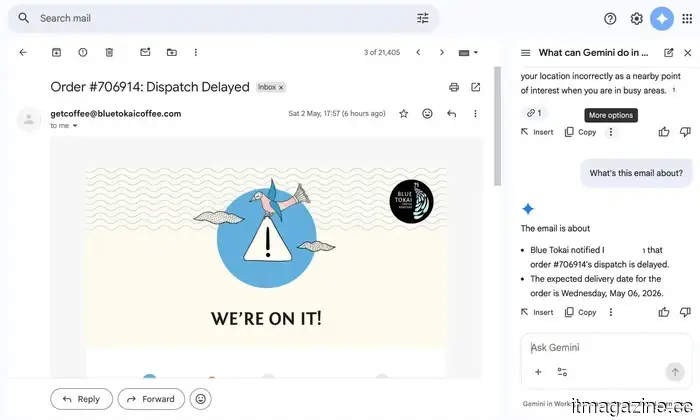
Gemini reads the details so I don’t have to.
The main stressors in my inbox are marketing proposals and product PR emails. They are filled with timelines, embargo information, launch notes, briefing calls, and various assets. All of this is significant, but it’s also the easiest to overlook if you're skimming through. These aren’t emails you can afford to glance at. That’s when I began to rely on Gemini. I typically ask it to summarize the important parts for me. It highlights critical dates, flags embargo deadlines, and identifies details that require my attention. Instead of sifting through lengthy paragraphs, I receive clear, concise highlights that I can quickly grasp.
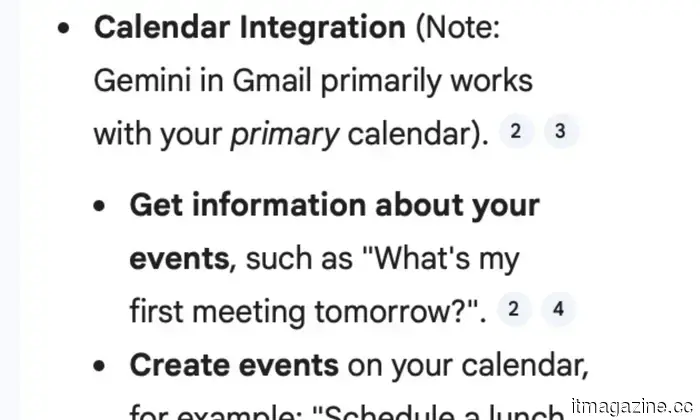
At first, I didn’t fully trust it. For the first few emails, I made it a point to double-check everything it summarized. I wanted to ensure it wasn't overlooking anything crucial. But as time passed, it consistently got everything right. The summaries were accurate and, more importantly, helpful. It often identified details that would have taken me much longer to locate myself. What impressed me was how it goes further. If a meeting is mentioned in an email, Gemini not only highlights it but also helps convert that into a calendar reminder with all the relevant information already filled out. This truly makes a difference on a hectic day.
Yes, all this can be done manually. But when you have an overflowing plate, spending time reading and deciphering lengthy emails can be draining. They are important, but they don't always require your full attention. With Gemini managing that initial review, I don’t feel trapped in my inbox. I can focus on the tasks that genuinely need my attention.
Now, my inbox responds back, and I’m not complaining about it.
The next significant challenge is responding to those endless email threads. You know the type — multiple people CC’d, replies stacked on replies, and within that is the one point you actually need to reply to. This used to consume a surprising amount of my time. Now, I let Gemini take care of the groundwork. My usual routine is straightforward — I first ask it to summarize the thread, so I understand the context without reading each message. Once I have that clarity, I ask it to draft a reply.
For instance, if I receive a product PR email asking for coverage with embargo information hidden in a lengthy thread, Gemini will first break it down for me. Then it might suggest a response acknowledging the pitch, requesting review units, or confirming embargo details. If it’s a meeting thread, it can draft a quick confirmation, request a reschedule, or even ask for further information depending on the context.
What’s interesting is that I seldom send those replies verbatim. I usually tweak them a bit, add my own thoughts, or adjust the tone based on who I'm addressing. However, the foundation often comes from Gemini. And this doesn’t feel robotic at all. The suggestions are well-articulated, sometimes even a bit witty when appropriate, and they sound natural enough that no one can really tell AI was involved.
There are occasions when I’m not entirely satisfied with the first suggestion. In those instances, I simply ask for alternatives, and Gemini provides various options for me to choose from. It’s like having all these choices presented to me. For me, that’s where this truly excels. I’m not spending time figuring out how to articulate every email from scratch. I’m merely refining and responding, which eliminates the repetitive aspects of communication.
All my tabs are now integrated into one system.
Beyond the obvious functionalities, Gemini has also proven surprisingly adept at connecting the dots for me. It doesn’t only look at a single email in isolation. It can extract context from older threads, delve into files on Google Drive, and even check my Calendar when necessary.
For example, let’s say I vaguely remember a brand sharing a media kit a few weeks back, but I can’t recall its location. Instead of manually searching through folders or endlessly scrolling in my inbox, I can simply ask Gemini. It locates the correct email, retrieves the attachment from Drive, and provides me exactly what I was seeking. Or if I’m trying to verify whether I’ve already set up a briefing call with someone, it can cross-check my Calendar and remind me of the details without making me bounce between applications.
So, I
Other articles
 I assigned Gemini to manage my Gmail, and it was an enlightening experience.
I didn't stop being concerned about privacy; I simply stopped allowing it to hinder me. Truly, my inbox has never seemed so much lighter.
I assigned Gemini to manage my Gmail, and it was an enlightening experience.
I didn't stop being concerned about privacy; I simply stopped allowing it to hinder me. Truly, my inbox has never seemed so much lighter.
 I assigned Gemini to handle my Gmail, and it was truly enlightening.
I didn't cease to be concerned about privacy; I simply refused to allow it to hinder my progress. In fact, my inbox has never felt as light as it does now.
I assigned Gemini to handle my Gmail, and it was truly enlightening.
I didn't cease to be concerned about privacy; I simply refused to allow it to hinder my progress. In fact, my inbox has never felt as light as it does now.
.jpg) This indie film boasting a 99% rating on Rotten Tomatoes is among the three underrated Hulu movies to check out this weekend (May 2-3).
These three films available on Hulu this weekend delve into what occurs when striving for something leads you to a point of no return.
This indie film boasting a 99% rating on Rotten Tomatoes is among the three underrated Hulu movies to check out this weekend (May 2-3).
These three films available on Hulu this weekend delve into what occurs when striving for something leads you to a point of no return.
 The idea of space data centers may seem far-fetched. What if we installed them on lampposts?
A company from the UK has reached an agreement with Katsina State in Nigeria to install 50,000 solar-powered smart lamp posts that will work together as a decentralized AI data center, operating independently of grid electricity.
The idea of space data centers may seem far-fetched. What if we installed them on lampposts?
A company from the UK has reached an agreement with Katsina State in Nigeria to install 50,000 solar-powered smart lamp posts that will work together as a decentralized AI data center, operating independently of grid electricity.
 U.S. tech giants are reducing their workforce to allocate more funds for AI, while China claims this practice is illegal in their country.
China is actively promoting the use of AI while also allowing courts to prevent companies from citing it as a reason for layoffs. Meanwhile, the US isn't even raising the issue.
U.S. tech giants are reducing their workforce to allocate more funds for AI, while China claims this practice is illegal in their country.
China is actively promoting the use of AI while also allowing courts to prevent companies from citing it as a reason for layoffs. Meanwhile, the US isn't even raising the issue.
 Netflix is finally launching proper theatrical releases, beginning with the upcoming “Narnia” film.
Netflix is set to give Greta Gerwig's Narnia: The Magician's Nephew a broad theatrical release, offering a complete 45-day exclusivity period—marking a first for the streaming service and indicating a significant development in its relationship with movie theaters.
Netflix is finally launching proper theatrical releases, beginning with the upcoming “Narnia” film.
Netflix is set to give Greta Gerwig's Narnia: The Magician's Nephew a broad theatrical release, offering a complete 45-day exclusivity period—marking a first for the streaming service and indicating a significant development in its relationship with movie theaters.
I assigned Gemini to manage my Gmail, and it was quite enlightening.
I didn’t stop being concerned about privacy; I just stopped allowing it to hinder me. Honestly, my inbox has never felt so free.