
I assigned Gemini to manage my Gmail, and it was an enlightening experience.
Most days, my inbox feels chaotic. It's filled with a mix of meeting invitations, marketing pitches, product PR, critical updates, and a continuous influx of items that all seem urgent at the time. When it accumulates like that, it can quickly become overwhelming. Honestly, there are days when I avoid opening my emails entirely because it feels like too much to handle, and there's always that lingering concern that I might overlook something important lost in the shuffle.
This is precisely where Gemini has made a difference for me. Having it integrated into my inbox feels like a safety net — it helps me navigate the chaos without the stress of constantly catching up.
Gemini sorts through the details so I don’t have to.
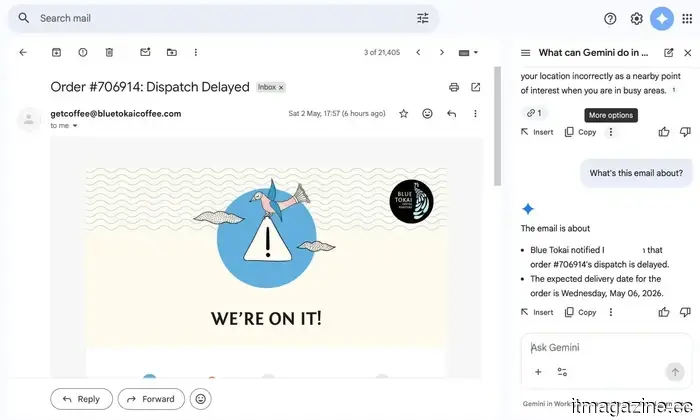
The main culprits in my inbox are the marketing pitches and product PR emails. They come loaded with timelines, embargo specifics, launch notes, briefing call details, and various assets. All of this information is significant, but it’s also the easiest to overlook if you’re just skimming. These emails require more than a cursory glance. This is where I began to rely on Gemini. I typically ask it to summarize and extract the key points for me. It highlights important dates, flags embargo times, and identifies details that actually need my attention. Rather than wading through lengthy paragraphs, I receive clear and concise pointers that I can quickly comprehend.
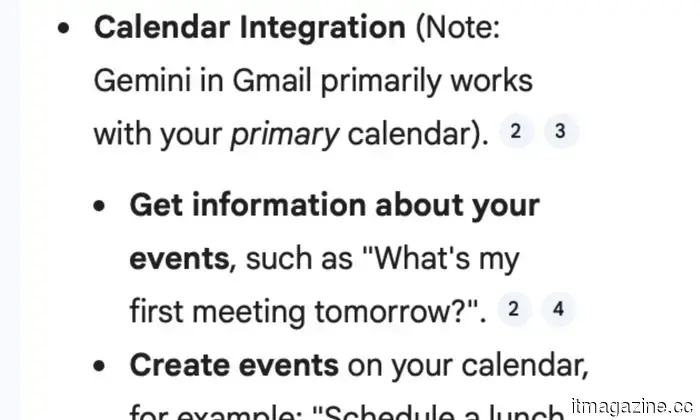
I was initially skeptical. For the first few emails, I made it a point to double-check everything it summarized, wanting to ensure nothing critical was missed. However, over time, Gemini proved reliable. The summaries were accurate and, more importantly, practical. It often identified details that would have taken me much longer to discover independently. What impressed me was how it goes a step beyond. If an email mentions a meeting, Gemini helps convert it into a calendar reminder, complete with all the necessary information filled in. This genuinely makes a difference on a busy day.
Sure, all of this could be done manually. But when you already have a lot to juggle, spending time deciphering long emails can be draining. They are important, but they often don’t require your full attention. With Gemini handling that first assessment, I don’t feel bogged down in my inbox. I can concentrate on the tasks that truly need my input.
My inbox responds now, and I have no complaints.
The next significant challenge is replying to those endless email threads. You know the type — multiple people CC’d, responses piled atop each other, and somewhere within is the single item you actually need to address. This used to consume a surprising amount of my time. Now, I let Gemini handle the preliminary work. My usual approach is straightforward — I first request a summary of the thread so I can grasp what’s happening without needing to read every single message. Once I have that understanding, I ask it to propose a reply.
For instance, if it’s a product PR email asking for coverage with embargo details hidden in a lengthy thread, Gemini will first break it down for me. Then it might suggest a response acknowledging the pitch, requesting review units, or confirming embargo timings. If it’s a meeting thread, it could draft a quick confirmation, propose a reschedule, or ask for more specifics depending on the context.
What’s interesting is that I rarely use those replies as they are. I usually modify them slightly, insert my views, or adjust the tone based on the recipient. But the foundation often comes from Gemini. This process doesn’t feel robotic at all. The suggestions are well-articulated, and sometimes even quite witty when appropriate, sounding natural enough that no one can really tell AI contributed to it.
There are also times when I don’t quite like the initial suggestion. In such instances, I simply ask for alternatives, and Gemini provides several different options to consider. For me, this is where it truly shines. I’m not spending time figuring out how to phrase every single email from scratch; instead, I’m refining and responding. It eliminates the repetitive aspects of communication.
All my tabs streamlined into one source.
Beyond the obvious benefits, Gemini has also proven remarkably adept at connecting the dots for me. It doesn’t merely analyze one email in isolation; it can extract context from older threads, delve into files on Google Drive, and even check my Calendar when necessary.
For example, if I vaguely recall a brand sharing a media kit a few weeks ago but can’t remember where to find it, I don’t have to search through folders or scroll endlessly in my inbox. I can just ask Gemini. It locates the right email, retrieves the attachment from Drive, and provides me with exactly what I need. Or if I’m trying to confirm whether I’ve already arranged a briefing call with someone, it can cross-reference my Calendar and remind me of the details without requiring me to jump between apps.
Thus, I’m not perpetually switching tabs, searching for keywords, or attempting to recall things from memory. Gemini stitches everything
Other articles
 Netflix is finally launching proper theatrical releases, beginning with the upcoming “Narnia” film.
Netflix is set to give Greta Gerwig's Narnia: The Magician's Nephew a broad theatrical release, offering a complete 45-day exclusivity period—marking a first for the streaming service and indicating a significant development in its relationship with movie theaters.
Netflix is finally launching proper theatrical releases, beginning with the upcoming “Narnia” film.
Netflix is set to give Greta Gerwig's Narnia: The Magician's Nephew a broad theatrical release, offering a complete 45-day exclusivity period—marking a first for the streaming service and indicating a significant development in its relationship with movie theaters.
 Netflix is set to begin legitimate theatrical releases, starting with the upcoming "Narnia" movie.
Netflix is providing Greta Gerwig's Narnia: The Magician's Nephew with a broad theatrical release, featuring a complete 45-day exclusivity period — a first for the streaming service and an indication that its relationship with theaters is evolving.
Netflix is set to begin legitimate theatrical releases, starting with the upcoming "Narnia" movie.
Netflix is providing Greta Gerwig's Narnia: The Magician's Nephew with a broad theatrical release, featuring a complete 45-day exclusivity period — a first for the streaming service and an indication that its relationship with theaters is evolving.
 AI has become exclusive? A study reveals that access is biased towards the wealthy, potentially creating a new social divide.
A recent study indicates that awareness and use of AI are more prevalent among wealthier populations, highlighting concerns about an increasing digital divide and unequal access to opportunities.
AI has become exclusive? A study reveals that access is biased towards the wealthy, potentially creating a new social divide.
A recent study indicates that awareness and use of AI are more prevalent among wealthier populations, highlighting concerns about an increasing digital divide and unequal access to opportunities.
 I assigned Gemini to manage my Gmail, and it was quite enlightening.
I didn’t stop being concerned about privacy; I just stopped allowing it to hinder me. Honestly, my inbox has never felt so free.
I assigned Gemini to manage my Gmail, and it was quite enlightening.
I didn’t stop being concerned about privacy; I just stopped allowing it to hinder me. Honestly, my inbox has never felt so free.
 Netflix is set to launch proper theatrical releases, beginning with the upcoming "Narnia" film.
Netflix is offering Greta Gerwig's Narnia: The Magician's Nephew a broad theatrical release, complete with a 45-day exclusive window — a first for the streaming service and an indication that its partnership with theaters is finally developing.
Netflix is set to launch proper theatrical releases, beginning with the upcoming "Narnia" film.
Netflix is offering Greta Gerwig's Narnia: The Magician's Nephew a broad theatrical release, complete with a 45-day exclusive window — a first for the streaming service and an indication that its partnership with theaters is finally developing.
 Is AI becoming elitist? Research indicates that access is tilted in favor of the wealthy, potentially creating a new social divide.
A recent study reveals that awareness and utilization of AI are more prevalent among affluent groups, highlighting worries about an expanding digital divide and unequal access to opportunities.
Is AI becoming elitist? Research indicates that access is tilted in favor of the wealthy, potentially creating a new social divide.
A recent study reveals that awareness and utilization of AI are more prevalent among affluent groups, highlighting worries about an expanding digital divide and unequal access to opportunities.
I assigned Gemini to manage my Gmail, and it was an enlightening experience.
I didn't stop being concerned about privacy; I simply stopped allowing it to hinder me. Truly, my inbox has never seemed so much lighter.