
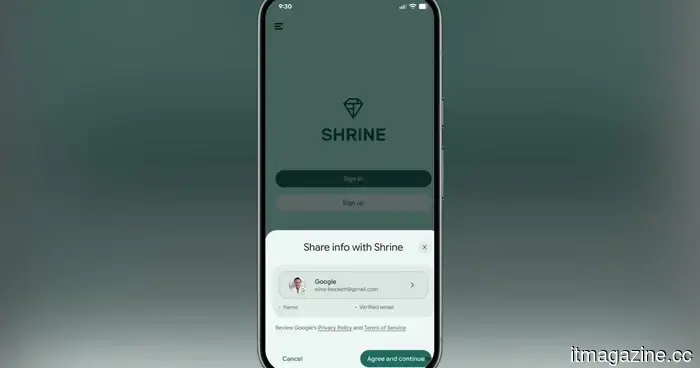
Google is simplifying the process of signing into apps by eliminating the need for OTPs or link complications.
Say goodbye to hunting through your inbox. Google's new API allows you to verify your email with just one tap.
If you’ve ever registered for an app and then spent time searching for a six-digit code lost in your inbox, you understand how frustrating that can be. I particularly dislike the magic sign-up links that some websites send, as they can fail to function if I'm not using Google Chrome as my default browser.
Fortunately, Google is addressing this with a new verified email credential for Android, which is a truly clever solution.
What’s wrong with OTPs?
The simple OTP has been essential for email verification for a long time, but it has significant drawbacks. You have to exit the app, check your inbox, locate the email, copy the code, and return to the app.
This lengthy process is not only inconvenient for users but also problematic for app developers. The number of steps can lead to users abandoning the app before sign-up is complete, resulting in potential users being lost before they even have a chance to try it.
iOS has tackled this problem by allowing users to sign in directly with their Apple accounts. Recently, it also added a feature to autofill OTPs from emails, akin to Android’s OTP autofill from messages.
Now, Google is also implementing a frictionless sign-up process that eliminates the need for users to switch between apps.
How does the new system function?
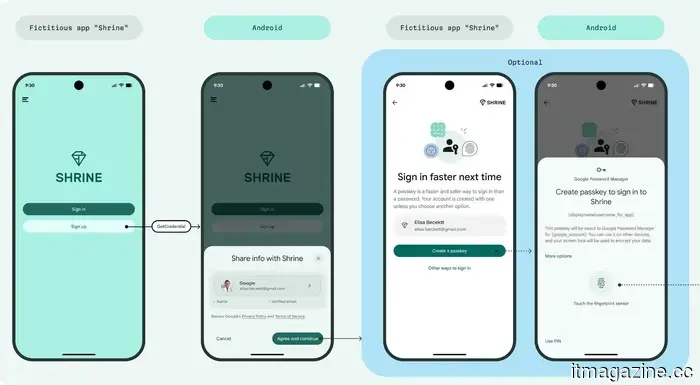
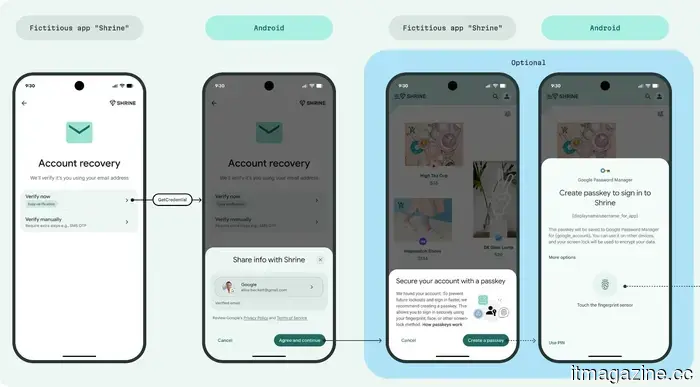
Google now provides a cryptographically verified email credential directly to Android devices via the Credential Manager API. When an app needs to verify your email, it can access that credential directly using the Credential Manager API.
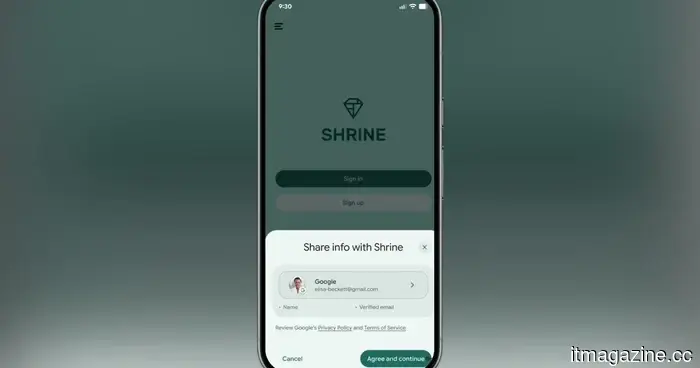
A small prompt will appear on your screen indicating what information is being requested. You simply tap to confirm, and the app receives your verified email. No app switching, no codes to deal with, and no waiting.
Google recommends pairing this with passkey creation, making the first sign-up the last time a user has to do anything manually.
This feature can also be utilized for account recovery and re-authentication for sensitive actions, like changing settings or updating profile information.
The best part is that this new feature is compatible with Android 9 and newer versions, which means you don't need the latest Android devices to benefit from this enhancement in user experience.
Are there any limitations?
Yes, there are some limitations. The feature currently only supports regular consumer Google Accounts, not Workspace accounts. It also only works with Gmail accounts, so it won't apply to third-party email accounts used to create your Google account.





Other articles
 Tesla sales and soaring gas prices: Interest in electric vehicles is increasing, yet the US market has contracted by 28% following the expiration of the tax credit.
Gas prices in the US exceeded $4 per gallon, and interest in electric vehicles reached levels not seen since 2026. However, overall electric vehicle sales declined by 28%, and Tesla fell short of its delivery projections. The tax credit had a greater impact than fuel prices.
Rilian secures $17.5 million to introduce agentic AI in sovereign defense.
Rilian has secured $17.5 million in funding led by 8VC to implement agentic AI in air-gapped defense and sovereign cloud settings.
Tesla sales and soaring gas prices: Interest in electric vehicles is increasing, yet the US market has contracted by 28% following the expiration of the tax credit.
Gas prices in the US exceeded $4 per gallon, and interest in electric vehicles reached levels not seen since 2026. However, overall electric vehicle sales declined by 28%, and Tesla fell short of its delivery projections. The tax credit had a greater impact than fuel prices.
Rilian secures $17.5 million to introduce agentic AI in sovereign defense.
Rilian has secured $17.5 million in funding led by 8VC to implement agentic AI in air-gapped defense and sovereign cloud settings.
 Volvo's parent company has created an elegant electric sedan priced at $14,300, which will unfortunately be unavailable to US consumers.
The Geely Galaxy A7 EV features a conventional design, boasts a claimed range of 550km, and is priced to compete with many rivals. However, this electric sedan launched in China seems destined to stay unattainable for buyers in the US.
Rilian secures $17.5 million to advance agentic AI for sovereign defense.
Rilian secures $17.5 million in funding, spearheaded by 8VC, to implement agentic AI in air-gapped defense and sovereign cloud settings.
Volvo's parent company has created an elegant electric sedan priced at $14,300, which will unfortunately be unavailable to US consumers.
The Geely Galaxy A7 EV features a conventional design, boasts a claimed range of 550km, and is priced to compete with many rivals. However, this electric sedan launched in China seems destined to stay unattainable for buyers in the US.
Rilian secures $17.5 million to advance agentic AI for sovereign defense.
Rilian secures $17.5 million in funding, spearheaded by 8VC, to implement agentic AI in air-gapped defense and sovereign cloud settings.
 SoftBank aims for a $10 billion margin loan secured by OpenAI shares at SOFR + 425 basis points as its leverage increases.
SoftBank is taking a $10 billion loan using its stake in OpenAI as collateral, with a spread nearly three times higher than its 2018 margin loan for Alibaba. S&P has downgraded its credit outlook to negative.
SoftBank aims for a $10 billion margin loan secured by OpenAI shares at SOFR + 425 basis points as its leverage increases.
SoftBank is taking a $10 billion loan using its stake in OpenAI as collateral, with a spread nearly three times higher than its 2018 margin loan for Alibaba. S&P has downgraded its credit outlook to negative.
 This stylish electric sedan is priced at less than $32,900 and surpasses Tesla with a range exceeding 770 miles.
The new Avatr sedan features a sophisticated design, is priced below $32,900, and offers a range-extending configuration that is estimated to achieve over 770 miles of CLTC driving.
This stylish electric sedan is priced at less than $32,900 and surpasses Tesla with a range exceeding 770 miles.
The new Avatr sedan features a sophisticated design, is priced below $32,900, and offers a range-extending configuration that is estimated to achieve over 770 miles of CLTC driving.
Google is simplifying the process of signing into apps by eliminating the need for OTPs or link complications.
Google now enables Android applications to confirm your email with just one tap, eliminating the need for OTP codes and searching through your inbox. Here’s an explanation of how the new Credential Manager API functions.