

You can now store and reuse Gemini prompts in Chrome using the new Skills feature.
Google has transformed your Gemini prompts into powerful one-click tools for your browser.
If you've ever found yourself inputting the same AI prompt into Gemini repeatedly across various tabs, you understand how cumbersome it can be. Google has addressed this inconvenience by introducing a new feature named Skills in Chrome. This feature allows you to save your most valuable Gemini prompts and execute them instantly with just a click.
What can you do with Skills in Chrome?
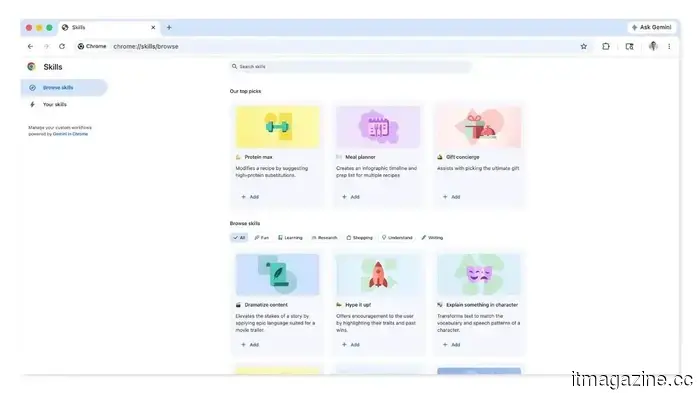
Skills enable your Gemini prompts to function as reusable one-click utilities. Once saved, a Skill remains accessible across all your desktop devices that are logged into the same Google account.
Early users have used them for tasks like calculating protein macros from recipe sites, creating side-by-side product specifications across different tabs, and scanning long documents to extract summaries.
Google is also introducing a pre-built Skills library filled with ready-to-use prompts for common tasks. You can utilize them as they are or adjust them to meet your requirements. Additionally, Skills include privacy safeguards; before performing sensitive actions such as sending an email or adding a calendar event, confirmation will be required.
How to use Skills in Google Chrome
Skills are being rolled out to desktop Chrome users with their language set to English-US. To save a Skill, open Gemini in Chrome and enter the prompt you wish to reuse. Once the conversation is saved in your chat history, you will have the option to directly save it as a Skill.
To execute it, type a forward slash ( / ) in the Gemini chat box and choose your saved Skill. Alternatively, you can use the plus sign ( + ) button to access Skills. To manage or edit them, type forward slash ( / ) and click the compass icon. To explore the pre-built library, find it within the same menu.
It's also important to mention that Google is testing a Projects feature for Gemini, which will allow you to organize AI chats into folders, similar to ChatGPT. However, this feature is currently available to a limited number of users and is not yet fully operational.
Manisha focuses on technology that integrates into everyday life, covering topics from smartphones and apps to gaming and streaming.
Microsoft introduces new safety measures to protect against remote desktop attacks
Microsoft has released one of the most useful security updates in recent memory. If you often handle Remote Desktop files in your work environment, this update is significant. The cumulative updates for both Windows 10 and Windows 11 released in April 2026 include new protections aimed at preventing attackers from exploiting RDP files to gain unauthorized access to your system.
The issue with RDP files
Google is extending Personal Intelligence to Gemini users worldwide, marking a significant development
Free users, your access to Personal Intelligence is on the horizon.
If you've been anticipating that Gemini will truly understand you, your wait is nearly over. Google’s Personal Intelligence, which debuted earlier this year for paid US subscribers, is now being rolled out globally.
What is Gemini Personal Intelligence and what can it offer?
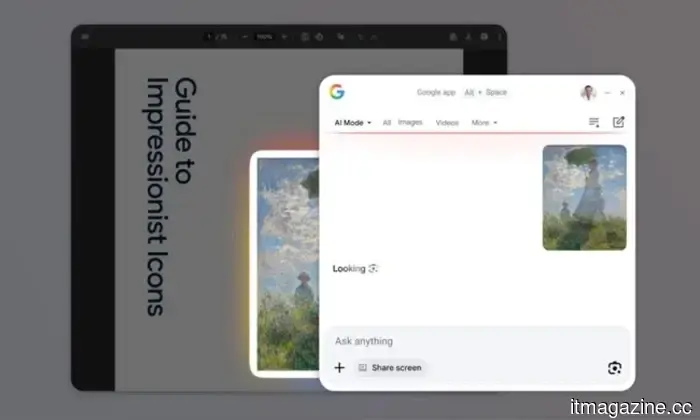
The Google app has just launched on Windows, designed to mimic the Spotlight feature found on Macs
One shortcut, every answer: Google is bringing its entire search capability to Windows without requiring you to open Chrome, heavily inspired by the Mac's Spotlight search.
Google has officially entered the Windows arena. The desktop Google app is now available globally in English for Windows users, moving past its experimental phase in Search Labs.
The browser tab we instinctively open for Google every few minutes now has a quicker, more efficient alternative right on the desktop.





Other articles
 Sony introduces the INZONE H6 Air open-back gaming headset and purple earbuds.
Sony has broadened its INZONE collection with the H6 Air headset featuring an open-back design, created for immersive gaming rather than competitive esports, in addition to translucent purple earbuds.
Sony introduces the INZONE H6 Air open-back gaming headset and purple earbuds.
Sony has broadened its INZONE collection with the H6 Air headset featuring an open-back design, created for immersive gaming rather than competitive esports, in addition to translucent purple earbuds.
 Sony unveils the INZONE H6 Air open-back gaming headset along with new purple earbuds.
Sony has broadened its INZONE collection with the H6 Air headset, featuring an open-back design optimized for immersive gaming rather than competitive esports, as well as translucent purple earbuds.
Sony unveils the INZONE H6 Air open-back gaming headset along with new purple earbuds.
Sony has broadened its INZONE collection with the H6 Air headset, featuring an open-back design optimized for immersive gaming rather than competitive esports, as well as translucent purple earbuds.
 Sony unveils the INZONE H6 Air open-back gaming headset along with purple earbuds.
Sony has broadened its INZONE collection with the open-back H6 Air headset designed for immersive gaming experiences, rather than competitive esports, along with translucent purple earbuds.
Sony unveils the INZONE H6 Air open-back gaming headset along with purple earbuds.
Sony has broadened its INZONE collection with the open-back H6 Air headset designed for immersive gaming experiences, rather than competitive esports, along with translucent purple earbuds.
 How Crypto Exchanges Pave the Path with Scalable and Resilient System Architecture
The digital asset market has expanded rapidly in recent years. Millions of individuals engage in daily trading, with activity surging within minutes during market fluctuations. This growth has compelled every crypto exchange to reevaluate its system architecture. Users now consider infrastructure not only when it fails. [...]
How Crypto Exchanges Pave the Path with Scalable and Resilient System Architecture
The digital asset market has expanded rapidly in recent years. Millions of individuals engage in daily trading, with activity surging within minutes during market fluctuations. This growth has compelled every crypto exchange to reevaluate its system architecture. Users now consider infrastructure not only when it fails. [...]
 Your upcoming earbuds might be able to translate text and recognize objects for you.
Researchers at the University of Washington have developed AI earbuds featuring cameras that analyze the environment while emphasizing privacy and utilizing on-device processing.
Your upcoming earbuds might be able to translate text and recognize objects for you.
Researchers at the University of Washington have developed AI earbuds featuring cameras that analyze the environment while emphasizing privacy and utilizing on-device processing.
 Your upcoming earbuds might be capable of translating text and recognizing objects for you.
Researchers at the University of Washington developed AI earbuds equipped with cameras that analyze the environment while focusing on privacy and processing information directly on the device.
Your upcoming earbuds might be capable of translating text and recognizing objects for you.
Researchers at the University of Washington developed AI earbuds equipped with cameras that analyze the environment while focusing on privacy and processing information directly on the device.
You can now store and reuse Gemini prompts in Chrome using the new Skills feature.
Google has introduced Skills in Chrome, a new functionality that allows users to save Gemini prompts as one-click tools that can be reused and executed across various tabs without the need to retype anything.