
Microsoft Copilot has rendered switching between browsers obsolete.
No more needing to switch between browsers. Copilot now opens links directly within the app.
If you have ever been in the middle of a conversation with Copilot, clicked on a link, and then spent several minutes trying to return to where you were, you fully understand how disruptive that can be. Each time you open a link, your browser launches, interrupting your workflow, and you suddenly find yourself managing tabs across two different applications.
This minor inconvenience can accumulate quickly, so I’m pleased that Microsoft is addressing this problem with an update to the Copilot app on Windows.
No more switching browsers
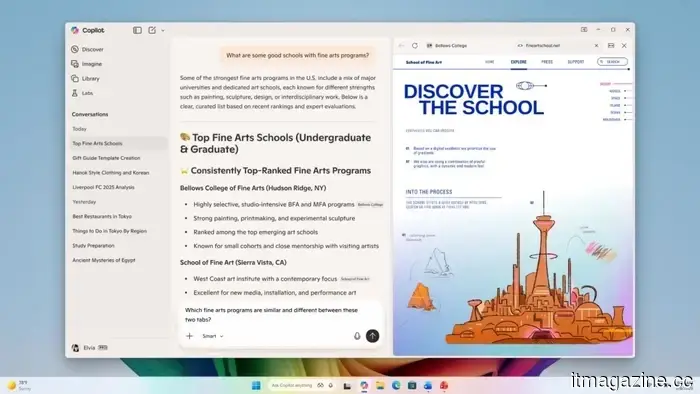
Links clicked within Copilot will now open in a side pane adjacent to your conversation, allowing you to keep everything organized in one spot. There’s no need for an additional browser window, no context switching, and no distractions from your thought process.
But Microsoft has taken it a step further. With your consent, Copilot can now analyze the context of the tabs opened during a conversation. If your research extends over multiple tabs, you can ask Copilot to summarize the information, compare details, or assist you in creating an initial draft. Your tabs are stored alongside the conversation, enabling you to continue right where you left off.
You can further enhance this by enabling password synchronization, simplifying your tasks without disrupting your flow.
More than just a browser improvement
The update also enhances the performance of the Copilot app, making it quicker and more dependable. Microsoft is adding additional features such as Podcasts and Study and Learn mode from Copilot.com.
Microsoft mentions it is temporarily removing some features to enhance the experience, but essential features will be reinstated before the updated app is generally released.
This small but significant change will boost your productivity and concentration. The update, version 146.0.3856.39 and above, is currently being rolled out to Windows Insider channels, with a gradual rollout to Insiders globally.
Rachit is an experienced tech journalist with over seven years of experience writing about consumer technology.
Google is preparing the Gemini AI app for Mac with Desktop Intelligence
The forthcoming app could allow Gemini to interact directly with Mac applications for more tailored responses.
Google is advancing its AI capabilities on desktop with a dedicated Gemini app for Mac now undergoing testing, which may introduce a significant new feature called Desktop Intelligence. As reported by Bloomberg, Google has begun private testing of an early version of the Gemini Mac app with select users. This initiative is part of a larger strategy to compete more effectively with desktop AI applications such as ChatGPT and Claude, which already provide native Mac experiences.
Currently, the app is in its early stages and does not include all intended features, but testing indicates Google is aiming for a release in the near future. For the time being, Mac users primarily interact with Gemini via the web, making a dedicated app potentially streamline the experience significantly.
Here’s your opportunity to turn chatbot frustration into real income.
If you've ever expressed frustration at an AI chatbot for failing to remember something you said, congratulations—you might be ready for a new job. A startup named Memvid is offering $800 for a single day's work where your only responsibility is to challenge AI. Yes, professionally.
The role is as chaotic as it sounds. You will spend eight hours communicating with chatbots, requesting they remember information, observing their errors, and subsequently posing more questions. Your job involves documenting every frustrating cycle and every detail or context forgotten by the AI.
Microsoft PowerToys update brings three key enhancements to your Windows PC.
Microsoft has released PowerToys v0.98.0, a significant update to the popular Windows productivity toolkit. The newest version features a redesigned Keyboard Manager, a new Command Palette Dock, and a much improved CursorWrap for users with multiple monitors.



Other articles
 If you develop Android applications using AI, Google's latest benchmark simplifies the process of selecting the appropriate model.
For Android app developers using AI for coding, selecting the appropriate model can be challenging. Not every model is created equal, and many lack specific training for Android development processes. To resolve this issue, Google has launched a new benchmark aimed at helping developers assess the performance of various AI models in real-world Android scenarios.
If you develop Android applications using AI, Google's latest benchmark simplifies the process of selecting the appropriate model.
For Android app developers using AI for coding, selecting the appropriate model can be challenging. Not every model is created equal, and many lack specific training for Android development processes. To resolve this issue, Google has launched a new benchmark aimed at helping developers assess the performance of various AI models in real-world Android scenarios.
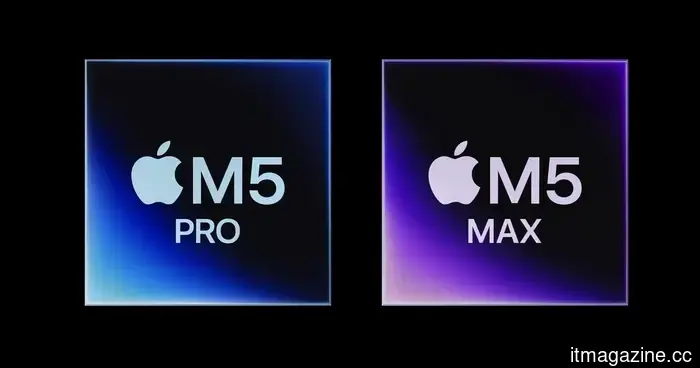 Tests indicate that the Apple M5 Max is outperforming AMD and establishing new performance records.
Apple's M5 Max has established a new performance benchmark, surpassing AMD's top model in single-core evaluations and even exceeding the multi-core performance of Apple's own M3 Ultra chip.
Tests indicate that the Apple M5 Max is outperforming AMD and establishing new performance records.
Apple's M5 Max has established a new performance benchmark, surpassing AMD's top model in single-core evaluations and even exceeding the multi-core performance of Apple's own M3 Ultra chip.
 T-Mobile 5G Home Internet's newest offer provides up to $300 in cashback.
If you have been thinking about transitioning from traditional cable, T-Mobile 5G Home Internet’s latest promotion could be the most persuasive reason to do so. The provider is giving new customers up to $300 back, depending on the selected plan. Along with an easy setup, unlimited data, and no-contract policy, this time-limited offer shines as one of the most straightforward and […]
T-Mobile 5G Home Internet's newest offer provides up to $300 in cashback.
If you have been thinking about transitioning from traditional cable, T-Mobile 5G Home Internet’s latest promotion could be the most persuasive reason to do so. The provider is giving new customers up to $300 back, depending on the selected plan. Along with an easy setup, unlimited data, and no-contract policy, this time-limited offer shines as one of the most straightforward and […]
 Roku has created an enjoyable interactive experience for finding your next favorite show.
Roku's latest game, Roklue, transforms channel browsing into an entertaining pop culture quiz, allowing you to assess your knowledge while discovering movies and shows to watch.
Roku has created an enjoyable interactive experience for finding your next favorite show.
Roku's latest game, Roklue, transforms channel browsing into an entertaining pop culture quiz, allowing you to assess your knowledge while discovering movies and shows to watch.
 Apple is endorsing Microsoft Office applications for the MacBook Neo, and the goal is clear.
Apple is adopting an unusual strategy with the promotional materials for its new MacBook Neo, indicating that attracting Windows users is more crucial for the company than maintaining a completely sealed ecosystem.
Apple is endorsing Microsoft Office applications for the MacBook Neo, and the goal is clear.
Apple is adopting an unusual strategy with the promotional materials for its new MacBook Neo, indicating that attracting Windows users is more crucial for the company than maintaining a completely sealed ecosystem.
 T-Mobile's latest promotion for 5G Home Internet offers up to $300 in rebates.
If you've been thinking about changing from conventional cable, T-Mobile 5G Home Internet's latest promotion could be the strongest incentive to do so. The provider is giving new customers up to $300 back, based on the plan selected. With an easy setup, unlimited data, and no contracts, this limited-time deal is among the most straightforward and [...]
T-Mobile's latest promotion for 5G Home Internet offers up to $300 in rebates.
If you've been thinking about changing from conventional cable, T-Mobile 5G Home Internet's latest promotion could be the strongest incentive to do so. The provider is giving new customers up to $300 back, based on the plan selected. With an easy setup, unlimited data, and no contracts, this limited-time deal is among the most straightforward and [...]
Microsoft Copilot has rendered switching between browsers obsolete.
Microsoft is enhancing Copilot on Windows by introducing a built-in side-pane browser, enabling users to open links, conduct research across tabs, and summarize information without exiting the application.