

The permission error on the Pixel Watch persists, but there is an unusual workaround.
It appears that the issue is not related to permissions but rather to notifications.
If you own a Pixel Watch, you may have noticed a persistent permission prompt featuring the Fitbit logo that persists on your wrist, requesting access to your sensor data and refusing to disappear despite repeated dismissals.
What’s particularly frustrating is that most users affected by this issue have already permitted all the access the watch could require. Everything is enabled, yet the notification continues to show up.
Several users on Reddit have also noted that the Health app is still capturing their sensor data without any issues, indicating that the error message may be misleading. Other users, however, have reported that their data has completely stopped syncing with their phones.
Is the watch model the culprit?
There’s no evident correlation tying the bug to a specific model. The initial user who reported the issue mentioned owning the watch for over two years, suggesting it could be a Pixel Watch 3 or an earlier version, but the complaints aren’t confined to any one generation.
What we do know is that the problem has surfaced only in the past few weeks. This timing has led many users to suspect a recent Google Health update, which seems to be the most plausible explanation at this time.
So how can it be resolved?
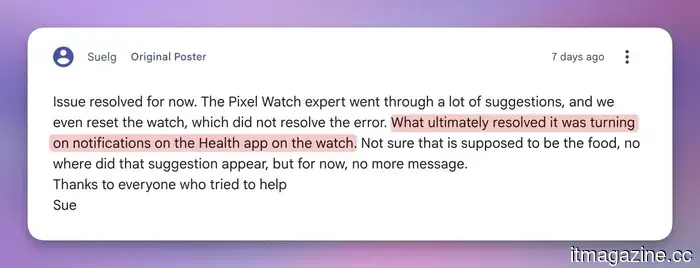
This is where it becomes peculiar. Factory resetting your watch will not resolve the issue, nor will any typical permission adjustments. A user named "Suelg" posted on the Google support forum that he went through the entire process of resetting his watch, but it didn’t resolve the problem.
What actually worked for him was enabling notifications for the Health app directly on the watch. While it’s an unusual fix, it has been confirmed by several users.
Google Support
If you are experiencing the same issue, try activating notifications for the Health app on your Pixel Watch, and the permission error should disappear. No one can clearly explain why enabling a notification resolves a sensor permission alert, but if it works, it works.




Other articles
 Pasqal's $2 billion Nasdaq wager is subject to a French veto.
Pasqal is set to go public on Nasdaq through a SPAC at a valuation of $2 billion, which equates to roughly 100 times its revenue. Its filings caution that quantum technology may not yield returns, and buyers can be vetted by France.
Pasqal's $2 billion Nasdaq wager is subject to a French veto.
Pasqal is set to go public on Nasdaq through a SPAC at a valuation of $2 billion, which equates to roughly 100 times its revenue. Its filings caution that quantum technology may not yield returns, and buyers can be vetted by France.
 xAI is operating 59 unauthorized gas turbines, which is double the amount it has acknowledged.
Emails from regulators indicate that xAI set up 59 unapproved gas turbines for Colossus 2. Approximately 94% of the Tennessee residents living within a five-mile radius of the site are Black.
xAI is operating 59 unauthorized gas turbines, which is double the amount it has acknowledged.
Emails from regulators indicate that xAI set up 59 unapproved gas turbines for Colossus 2. Approximately 94% of the Tennessee residents living within a five-mile radius of the site are Black.
 New York halts the approval of new data centers for a year, becoming the first state in the U.S. to take such action.
New York has enacted a one-year freeze on data centers that consume 50MW or more, marking the first statewide halt on AI development in the United States.
New York halts the approval of new data centers for a year, becoming the first state in the U.S. to take such action.
New York has enacted a one-year freeze on data centers that consume 50MW or more, marking the first statewide halt on AI development in the United States.
 Richard Sutton departs from Carmack to establish his own artificial intelligence laboratory.
Richard Sutton, regarded as the pioneer of reinforcement learning, has departed from John Carmack’s Keen to develop an AI that can learn in real time using approximately 20 watts of power.
Richard Sutton departs from Carmack to establish his own artificial intelligence laboratory.
Richard Sutton, regarded as the pioneer of reinforcement learning, has departed from John Carmack’s Keen to develop an AI that can learn in real time using approximately 20 watts of power.
 ECB selects 36 payment companies for the digital euro trial.
Deutsche Bank, UniCredit, Revolut, Stripe, and Adyen are included among 36 companies selected for the ECB's digital euro pilot, a year-long trial scheduled to commence in late 2027.
ECB selects 36 payment companies for the digital euro trial.
Deutsche Bank, UniCredit, Revolut, Stripe, and Adyen are included among 36 companies selected for the ECB's digital euro pilot, a year-long trial scheduled to commence in late 2027.
 Flex secures $70 million from Ryan Smith’s Halo fund to expand its AI private banking services worldwide.
Flex has secured $70 million in a Series B1 round, spearheaded by Ryan Smith’s Halo fund, and is introducing Flex Global, which includes stablecoin infrastructure and multi-currency accounts in over 100 countries.
Flex secures $70 million from Ryan Smith’s Halo fund to expand its AI private banking services worldwide.
Flex has secured $70 million in a Series B1 round, spearheaded by Ryan Smith’s Halo fund, and is introducing Flex Global, which includes stablecoin infrastructure and multi-currency accounts in over 100 countries.
The permission error on the Pixel Watch persists, but there is an unusual workaround.
Owners of the Pixel Watch are experiencing a persistent Fitbit permission error that remains even after performing a factory reset. Fortunately, one user has discovered a peculiar workaround that proves effective.