
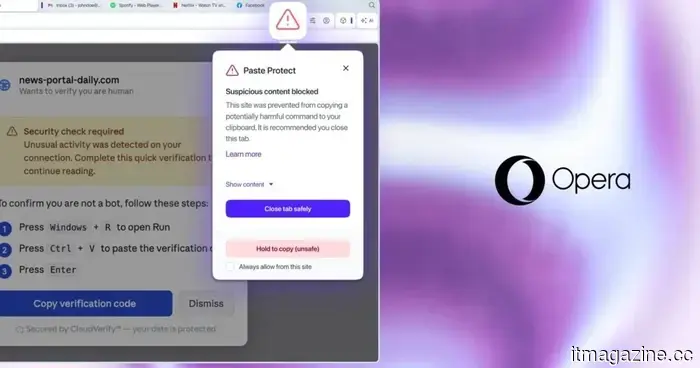
Opera’s new Paste Protect feature prevents clipboard attacks that your antivirus may not detect.
Most online scams are relatively easy to identify once you know what signs to look for. Indicators such as fake login pages, dubious attachments, or urgent requests for wire transfers are clear signs of a scam. However, ClickFix doesn’t fit this mold. It presents itself as a helpful tool and prompts you to perform a common task that few consider questioning.
This method was responsible for over 53 percent of malware loader incidents last year, according to the cybersecurity firm Huntress, and until now, no leading browser provided a built-in defense against it. Opera is addressing this issue with a new feature known as Paste Protect.
Why ClickFix bypasses your computer's current defenses
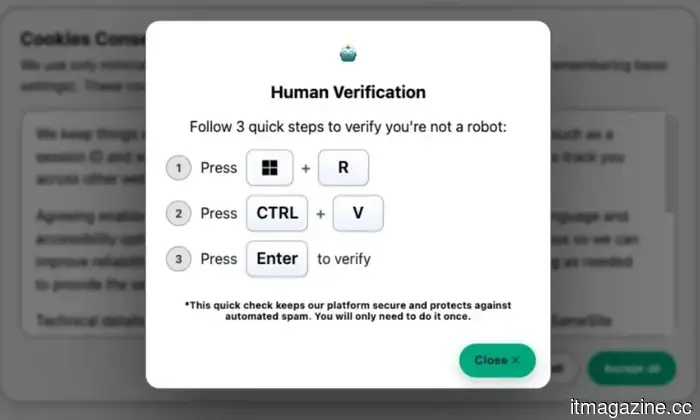
A typical ClickFix attack starts on a webpage that claims something has gone wrong, such as a video that won't play or a repeatedly failing CAPTCHA. The page guides you through a solution, which involves copying a command and executing it on your computer. This command can install malware, compromise saved passwords, or grant an attacker remote access to your device.
ClickFix attacks are particularly successful because you are the one executing these actions, rather than an external threat that antivirus software is designed to detect. A command you paste into the terminal does not match that profile, and most security tools do not scrutinize your clipboard.
Another exploit, known as clipboard hijacking, exploits the same vulnerability in a different manner. Instead of deceiving you into copying something harmful, it waits for you to copy something legitimate and silently replaces it. For example, if you copy a bank account number or a cryptocurrency wallet address and paste it somewhere, what gets pasted may actually belong to an attacker. Opera’s Paste Protect aims to defend against both types of attacks.
What Paste Protect actually does
In a blog post, Opera outlines that Paste Protect comprises two distinct components. The first, Hijack protection, has been part of Opera since 2021, monitoring your clipboard for unauthorized modifications made by external applications. If something attempts to replace what you've copied without your consent, it is caught before you paste it.
The newer addition is Injection protection, which examines clipboard content in real time and checks it against patterns commonly linked to malicious scripts on Windows, macOS, and Linux. If something is flagged, the copy action is halted immediately, and a warning pop-up appears explaining what was detected. A red icon is also displayed in the address bar, and you can expand the alert to view the first 120 characters of the blocked content.
Paste Protect is automatically enabled on the desktop version of Opera, so there’s no need to adjust any settings for protection against ClickFix attacks. If you’re a developer who frequently copies commands from trusted sources like GitHub, you can bypass the block with a five-second hold or permanently whitelist specific websites through the Privacy and Security section in Opera’s settings.
Currently, no other major browser offers comparable native protection. Chrome users can install third-party extensions like ClickFix Block for some level of security, but this requires prior knowledge of the potential threat. As of now, Paste Protect makes Opera the only major browser with built-in protection by default.
Other articles
 Samsung might discontinue restricting the Galaxy S26 Ultra’s anti-peeking display to the Galaxy S27 series.
A recent leak suggests that Samsung might introduce its Flex Magic Pixel privacy display technology across all models of the Galaxy S27 lineup, which encompasses the base, Plus, Pro, and Ultra versions.
Samsung might discontinue restricting the Galaxy S26 Ultra’s anti-peeking display to the Galaxy S27 series.
A recent leak suggests that Samsung might introduce its Flex Magic Pixel privacy display technology across all models of the Galaxy S27 lineup, which encompasses the base, Plus, Pro, and Ultra versions.
 Cloudflare sets a September deadline for AI crawlers to make payments.
Starting 15 September, Cloudflare will automatically prevent AI training bots from accessing ad-supported pages and will compensate publishers when their content contributes to an AI response.
Cloudflare sets a September deadline for AI crawlers to make payments.
Starting 15 September, Cloudflare will automatically prevent AI training bots from accessing ad-supported pages and will compensate publishers when their content contributes to an AI response.
 Getty abandons $3.7 billion merger with Shutterstock due to UK requirements.
Getty Images is ending its $3.7 billion merger with Shutterstock following the UK's CMA's insistence on a sale that Getty will not agree to, even though it has received antitrust approval in the US.
Getty abandons $3.7 billion merger with Shutterstock due to UK requirements.
Getty Images is ending its $3.7 billion merger with Shutterstock following the UK's CMA's insistence on a sale that Getty will not agree to, even though it has received antitrust approval in the US.
 Ford's second-quarter sales in the US decreased by 10.3% due to a 40.7% decline in electric vehicle sales and an aluminum shortage affecting F-Series trucks.
In the second quarter, Ford sold 549,200 vehicles, representing a decline of 10.3%. Sales of pure electric vehicles dropped by 40.7%. Sales of the F-Series decreased by 11% following two factory fires at its primary aluminum supplier.
Ford's second-quarter sales in the US decreased by 10.3% due to a 40.7% decline in electric vehicle sales and an aluminum shortage affecting F-Series trucks.
In the second quarter, Ford sold 549,200 vehicles, representing a decline of 10.3%. Sales of pure electric vehicles dropped by 40.7%. Sales of the F-Series decreased by 11% following two factory fires at its primary aluminum supplier.
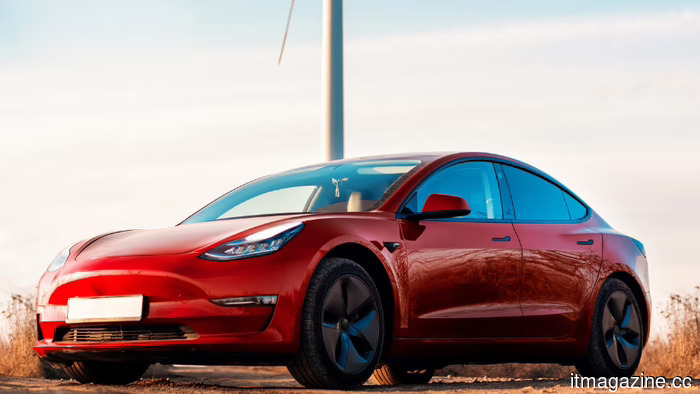 In the second quarter, Tesla delivered 480,126 vehicles, significantly surpassing Wall Street's expectation of 406,000.
In Q2 2026, Tesla surpassed delivery forecasts by 18%, achieving 480,126 deliveries. This represented a 25% increase compared to the previous year and a 34% rise from Q1, as the company seeks to recover.
In the second quarter, Tesla delivered 480,126 vehicles, significantly surpassing Wall Street's expectation of 406,000.
In Q2 2026, Tesla surpassed delivery forecasts by 18%, achieving 480,126 deliveries. This represented a 25% increase compared to the previous year and a 34% rise from Q1, as the company seeks to recover.
 An inexpensive Chinese AI model is catching up to Anthropic and OpenAI.
Z.ai's open-weight GLM-5.2 achieves a fourth-place ranking on a prominent benchmark and is significantly cheaper than Claude or GPT-5.5, as U.S. export restrictions alter the landscape of the AI competition.
An inexpensive Chinese AI model is catching up to Anthropic and OpenAI.
Z.ai's open-weight GLM-5.2 achieves a fourth-place ranking on a prominent benchmark and is significantly cheaper than Claude or GPT-5.5, as U.S. export restrictions alter the landscape of the AI competition.
Opera’s new Paste Protect feature prevents clipboard attacks that your antivirus may not detect.
Opera's new Paste Protect feature natively prevents ClickFix attacks in its desktop browser, positioning it as the first major browser to tackle a threat that antivirus software is not equipped to handle.