
Windows 11 introduces a useful upgrade that allows for simultaneous audio streaming on two devices.
Microsoft is currently previewing its Shared Audio feature for Windows 11, allowing one compatible PC to stream audio to two wireless devices simultaneously.
This feature is tailored for common scenarios, such as watching movies during flights, sharing music while studying, or enjoying audio together without the need to share a single pair of earbuds. To utilize this feature, users will require Bluetooth LE Audio accessories, as traditional Bluetooth headphones lack the necessary broadcast capability.
At this time, Shared Audio is available in preview mode on certain Copilot+ PCs equipped with compatible audio hardware and drivers. Microsoft has plans for a wider rollout to additional Windows 11 PCs, although a specific release date has not been announced.
How shared listening functions
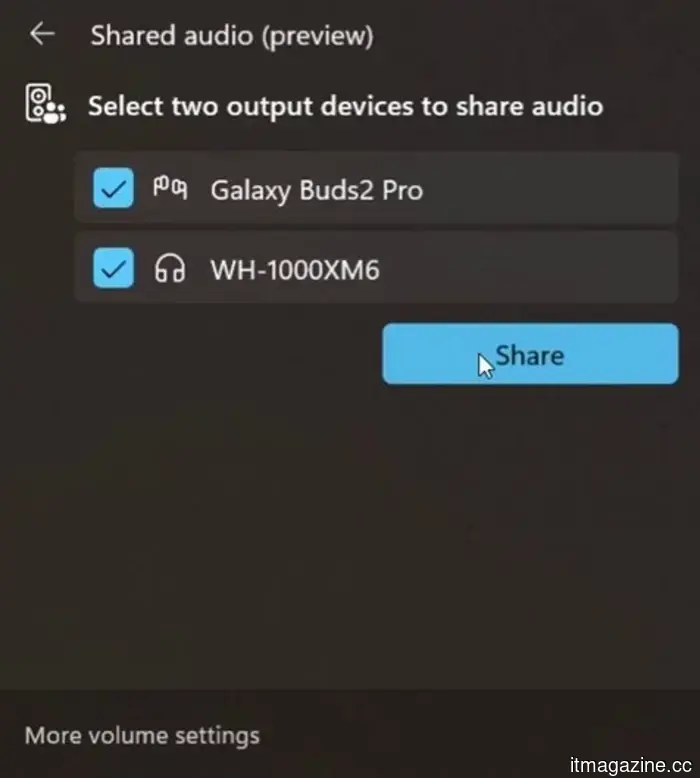
Shared Audio utilizes Bluetooth LE Audio technology to transmit a single audio stream from the PC to both connected output devices. Windows 11 incorporates a Quick Settings tile that allows users to select paired accessories and initiate the sharing session from the same interface.
Microsoft has presented a preview interface that features two connected devices in the Shared Audio window, along with a single control for starting the sharing process. This makes it more streamlined compared to navigating through traditional audio menus.
The current list of compatible accessories includes Samsung Galaxy Buds2 Pro, Galaxy Buds3, Galaxy Buds3 Pro, Sony WH-1000XM6, and recent LE Audio-compatible hearing aids from ReSound and Beltone. Traditional Bluetooth headphones are not supported.
Compatible devices
On the PC side, the requirements are more specific. Microsoft has listed several Surface Laptop and Surface Pro models featuring Qualcomm Snapdragon X chips as supported, but they must have the required Bluetooth and audio driver updates.
Additional machines on the preview list include 12-inch Surface Pro models, Samsung Galaxy Book4 Edge, Galaxy Book5 360, Galaxy Book5 Pro, and Galaxy Book5 Pro 360. The Shared Audio tile will not necessarily appear on every Windows 11 laptop after a standard update.
There is also a firmware requirement for headphones and earbuds. Microsoft advises users to check with the accessory manufacturer’s app to ensure that LE Audio is activated and that the latest firmware is installed. If compatible devices are not displayed, users may find success by removing and re-pairing them.
When users can access it
Shared Audio remains an Insider preview feature, so users should confirm their eligibility before looking for the setting. They will need a listed Windows 11 Copilot+ PC, the appropriate Insider build, current drivers, and two LE Audio accessories.
Once these conditions are met, the Shared Audio tile should appear in the Quick Settings. Microsoft has also been refining the preview by adding volume sliders for each accessory and a taskbar indicator during active sharing.
Most users are advised to wait for broader device support. Those with the appropriate hardware can currently test it through the Insider program, and the appearance of the Quick Settings tile is a clear indication that the PC is prepared.
Paulo Vargas is an English major turned reporter turned technical writer, whose career has consistently come back to…
Ugreen’s portable monitor is extremely sharp, stylish, and comes with a hefty price tag.
Portable monitors have become invaluable tools in modern technology. They accompany remote workers, enhance limited laptop displays, and can occasionally serve as gaming screens in hotel rooms. Most adhere to a common design: a standard Full HD panel, a foldable cover, and a price that usually remains under $250. Ugreen, however, has decided to break this mold.
The company's new AP16 portable monitor has officially launched in the U.S., introducing a feature set that resembles more of a high-end desktop display than a device meant to fit into a backpack. Its downside is the price tag of $350, which significantly exceeds that of many competing options.
Microsoft Edge will soon receive updates more frequently, but do not expect additional features.
Starting with Edge 152 on August 27, Microsoft will halve its release cycle, providing smaller yet more frequent updates for users on the Stable channel.
Microsoft is speeding up updates to its Edge browser, moving from a monthly to a biweekly release schedule. This change will be effective with Edge 152, scheduled for August 27, aligning its update frequency with that of Google Chrome.
More updates, not additional features.
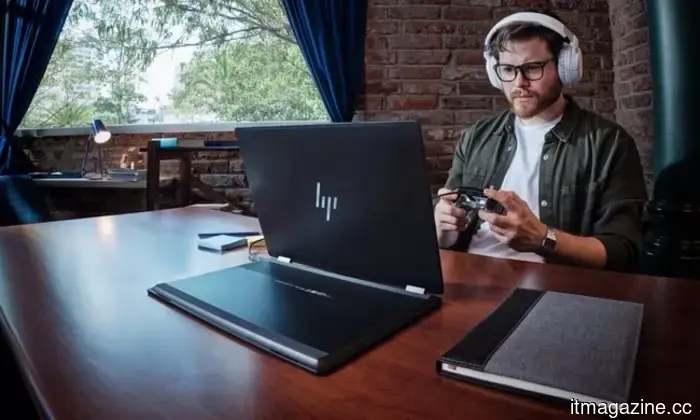
What makes a laptop suitable for both work and entertainment?
This post is brought to you in partnership with HP.
The HP OmniBook X Flip is engineered as an all-day AI PC, effortlessly transitioning from productivity tasks to entertainment without the need to switch devices.



Other articles
 China establishes a photonic computing laboratory to circumvent US chip restrictions.
A laboratory in Shanghai, supported by Jiao Tong University and the startup Lightelligence, is focused on developing light-based AI chips as China looks for alternatives to limited US semiconductors.
China establishes a photonic computing laboratory to circumvent US chip restrictions.
A laboratory in Shanghai, supported by Jiao Tong University and the startup Lightelligence, is focused on developing light-based AI chips as China looks for alternatives to limited US semiconductors.
 Firefox has a kill switch for its AI features, but only 1% of users have activated it.
The CEO of Mozilla states that only 1% of Firefox users have completely disabled AI. The browser now features BYO AI models, a built-in VPN that has garnered 1.5 million signups, and an upcoming redesign this fall.
Firefox has a kill switch for its AI features, but only 1% of users have activated it.
The CEO of Mozilla states that only 1% of Firefox users have completely disabled AI. The browser now features BYO AI models, a built-in VPN that has garnered 1.5 million signups, and an upcoming redesign this fall.
 Google has filed a lawsuit against a Chinese cybercrime group that utilized Gemini to create phishing websites and send out 2.5 million fraudulent messages.
Google has initiated a lawsuit against Outsider Enterprise, which utilized Gemini AI to create phishing code and dispatched 2.5 million fraudulent texts within a two-week period. The FBI is participating in the case.
Google has filed a lawsuit against a Chinese cybercrime group that utilized Gemini to create phishing websites and send out 2.5 million fraudulent messages.
Google has initiated a lawsuit against Outsider Enterprise, which utilized Gemini AI to create phishing code and dispatched 2.5 million fraudulent texts within a two-week period. The FBI is participating in the case.
 Five cloud security errors that originate at the architectural level.
Nodir Safarov, a Cloud Architect at SOTI Inc., highlights the five architectural shortcomings that contribute to the prevalent security vulnerabilities in enterprise cloud systems, ranging from the issues of post-deployment patching to configuration drift, along with the design principles that can avert these problems.
Five cloud security errors that originate at the architectural level.
Nodir Safarov, a Cloud Architect at SOTI Inc., highlights the five architectural shortcomings that contribute to the prevalent security vulnerabilities in enterprise cloud systems, ranging from the issues of post-deployment patching to configuration drift, along with the design principles that can avert these problems.
 Google is taking legal action against a Chinese cybercrime group that utilized Gemini to create phishing websites and dispatch 2.5 million fraudulent text messages.
Google has initiated legal action against Outsider Enterprise for utilizing Gemini AI to create phishing code and for dispatching 2.5 million scam messages over a two-week period. The FBI is also engaged in the matter.
Google is taking legal action against a Chinese cybercrime group that utilized Gemini to create phishing websites and dispatch 2.5 million fraudulent text messages.
Google has initiated legal action against Outsider Enterprise for utilizing Gemini AI to create phishing code and for dispatching 2.5 million scam messages over a two-week period. The FBI is also engaged in the matter.
 The head of the IMF cautions about advanced AI systems such as Mythos.
IMF chief Georgieva stated that Mythos is "only the start" and cautioned that the AI surge might lead to a collapse. She emphasized the need for immediate global collaboration on cybersecurity.
The head of the IMF cautions about advanced AI systems such as Mythos.
IMF chief Georgieva stated that Mythos is "only the start" and cautioned that the AI surge might lead to a collapse. She emphasized the need for immediate global collaboration on cybersecurity.
Windows 11 introduces a useful upgrade that allows for simultaneous audio streaming on two devices.
Windows 11 Shared Audio allows two users to listen from a single PC via Bluetooth LE Audio, but you'll require compatible Copilot+ hardware, updated drivers, and suitable accessories for the feature to be accessible.