

I attempted to blur a face on iOS 27, but my iPhone ended up providing a new one instead.
Apple introduced the Clean Up feature with the iOS 18.1 update, primarily designed to eliminate unwanted objects from images. It can also be utilized to obscure faces in photos—simply circle a face in the image, and it automatically blurs it. Apple refers to this as Identity protection.
With the launch of the iOS 27 update, Apple has enhanced the Clean Up feature, allowing it to tackle more intricate scenes. However, this improvement comes with a drawback. In the initial beta version, the face-hiding capability is malfunctioning. Instead, it produces results that are both humorous and concerning.
What occurs when you blur a face in iOS 27?
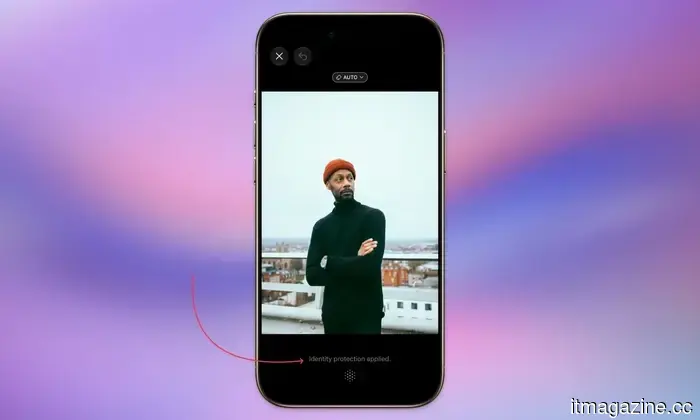
I stumbled upon this issue inadvertently while preparing a photo for posting and attempted to blur a face. I opened a photo, selected the Clean Up tool, and circled a face as usual. During my first few tries, the app misled me.
It stated that identity protection had been applied, but as shown in the screenshot, the face remained clearly visible. In an attempt to get it to work, I painted over the face with my finger. That’s when something strange occurred.
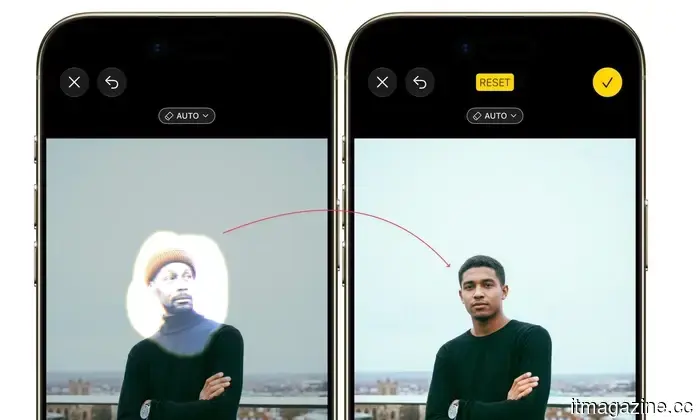
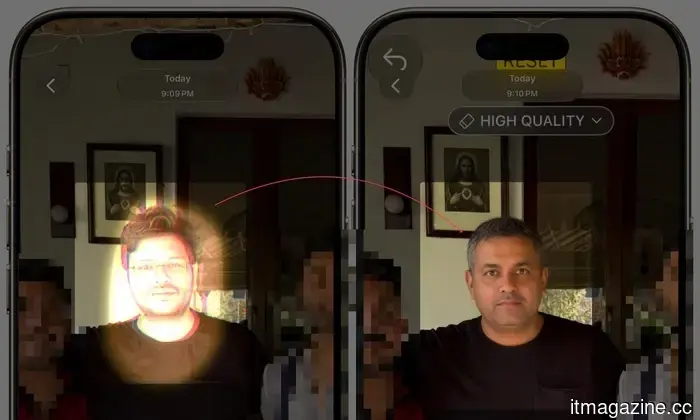
Instead of simply blurring or eliminating the face, the app generated an entirely new one. Yes, it provided the individual in the photo with a different face, and it executed this so convincingly that anyone I showed the picture to wouldn’t be able to discern that the original face had been substituted with an AI-generated version.
To ensure I wasn’t imagining things or encountering a rare glitch, I tried this with multiple images of different individuals, and the same outcome occurred each time. If I circled a face, it would incorrectly inform me that the face had been blurred; however, if I painted over it, it would create a completely new face.
I understand this is the first developer beta, so bugs are anticipated, but this is not just a glitch; it appears to be a case of AI hallucination. Since Apple is leveraging Gemini models to train its Apple Foundation Models, it seems to be inheriting some of the undesirable characteristics as well.
It’s widely known that many AI models, including Google Gemini, are prone to hallucinations, which might explain the situation here.
What should you do for the time being?
The positive news is that this is the initial developer beta, so there's a good chance Apple will resolve this before the public beta is released in July. If you depend on this feature for blurring faces, I recommend avoiding the beta and sticking with iOS 26 for now, where the blur function still operates as expected.
If you’re already using iOS 27 and need to obscure a face right now, your best option is to revert to the old method of using emojis to cover faces in photos. I’ve submitted feedback to Apple via the Feedback app, and I encourage you to do the same if you encounter this issue.
The more reports Apple receives early on, the better the chances of fixing this before the public release. A tool intended to safeguard people’s privacy shouldn’t be generating new identities instead, and I hope this is a hallucination that Apple resolves swiftly.
Other articles
 India's Avataar AI has introduced a video model priced at $0.005 per second, which is 27 times less expensive than competitors.
Avataar AI introduced Varya, an open-weight video model for India priced at $0.005 per second. It showcases Indian clothing, cuisine, and festivals that are often overlooked by Western models.
India's Avataar AI has introduced a video model priced at $0.005 per second, which is 27 times less expensive than competitors.
Avataar AI introduced Varya, an open-weight video model for India priced at $0.005 per second. It showcases Indian clothing, cuisine, and festivals that are often overlooked by Western models.
 SpaceX leased Colossus 1 to Anthropic due to difficulties in making the data center operate for Grok.
Bloomberg: SpaceX experienced latency problems and chip incompatibilities while linking Colossus 1 to its other data centers. It leased the facility to Anthropic for $1.25 billion per month.
SpaceX leased Colossus 1 to Anthropic due to difficulties in making the data center operate for Grok.
Bloomberg: SpaceX experienced latency problems and chip incompatibilities while linking Colossus 1 to its other data centers. It leased the facility to Anthropic for $1.25 billion per month.
 Five cloud security errors that originate at the architectural level.
Nodir Safarov, Cloud Architect at SOTI Inc., highlights five architectural shortcomings that contribute to prevalent security gaps in enterprise cloud environments, ranging from post-deployment patching to configuration drift, along with the design principles that help avoid these issues.
Five cloud security errors that originate at the architectural level.
Nodir Safarov, Cloud Architect at SOTI Inc., highlights five architectural shortcomings that contribute to prevalent security gaps in enterprise cloud environments, ranging from post-deployment patching to configuration drift, along with the design principles that help avoid these issues.
 Spotify is introducing editor-hosted videos for New Music Friday, allowing you to get to know the individuals responsible for the playlist.
Spotify's New Music Friday will now include short-form videos from its editorial team that highlight song selections and artist narratives. This will be available to both free and premium users in the US.
Spotify is introducing editor-hosted videos for New Music Friday, allowing you to get to know the individuals responsible for the playlist.
Spotify's New Music Friday will now include short-form videos from its editorial team that highlight song selections and artist narratives. This will be available to both free and premium users in the US.
 Eighty residents of Texas are filing a lawsuit against SpaceX, claiming that the rocket launches are actually damaging their homes.
A class-action lawsuit claims that the launches of SpaceX's Starship resulted in foundation cracks, broken pipes, and distorted floors in residences near Starbase. Housing prices have increased twofold.
Eighty residents of Texas are filing a lawsuit against SpaceX, claiming that the rocket launches are actually damaging their homes.
A class-action lawsuit claims that the launches of SpaceX's Starship resulted in foundation cracks, broken pipes, and distorted floors in residences near Starbase. Housing prices have increased twofold.
 Spotify is introducing editor-hosted videos to New Music Friday, allowing you to connect with the individuals behind the playlist.
Spotify's New Music Friday will now include short-form videos from its editorial team highlighting selections and artist narratives. This feature is being launched for both free and premium users in the US.
Spotify is introducing editor-hosted videos to New Music Friday, allowing you to connect with the individuals behind the playlist.
Spotify's New Music Friday will now include short-form videos from its editorial team highlighting selections and artist narratives. This feature is being launched for both free and premium users in the US.
I attempted to blur a face on iOS 27, but my iPhone ended up providing a new one instead.
Apple enhanced the Clean Up tool in iOS 27, but in doing so, it caused the hide faces feature to malfunction, resulting in behavior that is both amusing and somewhat concerning.