

iOS 27: All the information regarding the new features coming to your iPhone.
Apple has officially revealed iOS 27, and this year’s iPhone update is serving dual purposes. While most attention has been on the significant Siri AI release that Apple has been developing for years, there are numerous smaller polishing updates, design adjustments, and underlying changes as well. The company has implemented various minor quality-of-life enhancements that should enhance your interaction with your iPhone.
iOS updates can thrive or falter in the less exciting aspects, particularly whether your older iPhone remains usable after the new version is installed. Here’s a rundown of everything important that iOS 27 has to offer.
Siri AI is the primary upgrade
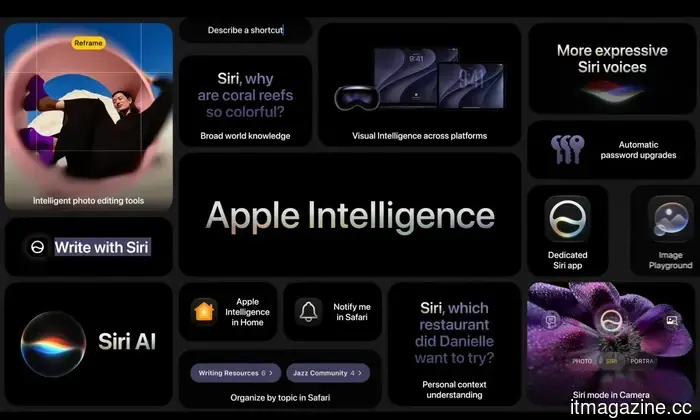
The standout feature of iOS 27 is Siri AI, Apple’s revamped assistant powered by the latest evolution of Apple Intelligence. Apple is promoting it as a significantly more capable Siri that can grasp personal context, identify what is displayed on your screen, answer more expansive queries by utilizing online information, and execute tasks across various applications.
In everyday usage, this means Siri should be able to retrieve an old email, extract details from Messages, browse through Photos, comprehend what you are seeing on-screen, and assist you within apps with less manual navigation. There’s also a new dedicated Siri app, providing a more AI chatbot-like experience. Users can revisit previous conversations or initiate new ones, with chat histories privately synchronized via iCloud.
Additionally, Siri introduces a new Camera mode, allowing you to aim your iPhone at an object and inquire about it using Visual Intelligence. After lagging behind other modern AI assistants for years, iOS 27 aims to reinstate Siri's relevance.
Apple Intelligence is seeing deeper app integration
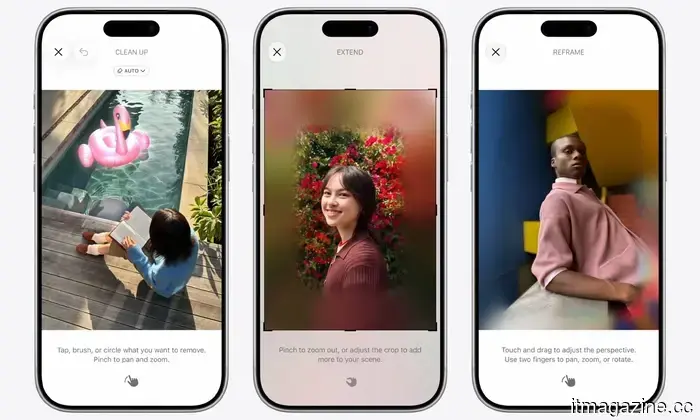
Siri AI is just one part of the larger Apple Intelligence initiative in iOS 27. AI features are being integrated across various applications including Photos, Safari, Messages, Mail, Passwords, Shortcuts, Home, and others. Photos is receiving an update called Spatial Reframing, enhancing photo composition post-capture. Clean Up is also getting improvements, while Image Playground will provide more versatile image generation options, featuring realistic styles. Some image generation capabilities may have daily limits due to reliance on server models, with expanded access available for certain iCloud+ users.
Safari will feature smarter tab management and a useful Notify Me function that tracks webpage changes, useful for monitoring product restocks, registration updates, price changes, and more. Messages will offer more intelligent contextual suggestions, while Passwords will assist in updating qualifying accounts faster. Furthermore, the Phone app is being enhanced with Call Context, which presents pertinent information from Mail or Messages during calls.
Shortcuts becomes more user-friendly
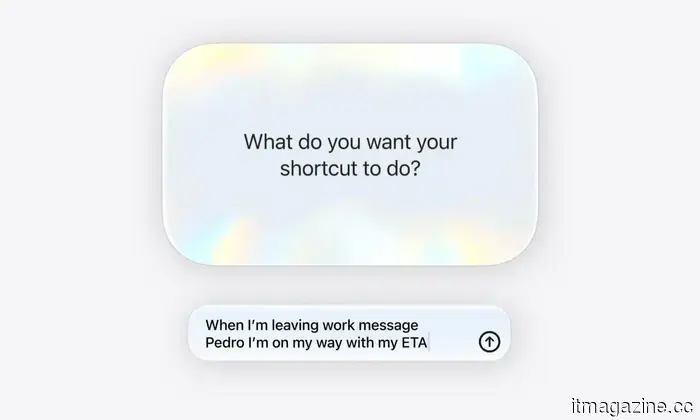
While Shortcuts has been a robust tool on the iPhone, it has historically been overlooked. The setup steps typically deter many users, which iOS 27 aims to address with Apple Intelligence. Instead of manually piecing together actions, users can articulate the desired automation in straightforward language. For instance, you can instruct it to message someone your estimated arrival time before leaving for work. Shortcuts will then compile the necessary steps utilizing location, Maps, and Messages.
This change may simplify the overall process, although complex shortcuts might still require manual adjustments. Apple has had automation capabilities for some time, but iOS 27 encourages casual users to give it a try.
Liquid Glass receives some refinements
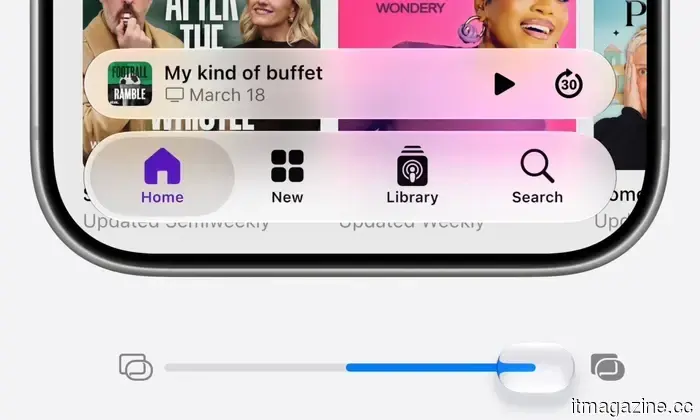
Apple initially introduced Liquid Glass with iOS 26, and iOS 27 does not replace it but rather enhances its usability. A significant modification is the new transparency slider, allowing users to adjust the Liquid Glass effect from completely clear to fully tinted. This adjustment can benefit those who appreciate the aesthetic but found certain aspects too cluttered or challenging to read. Additionally, Apple is refining icons with extra refraction layers and tidying up interface elements such as toolbars and sidebars. This is more of a refinement than a major visual overhaul.
Speed is a crucial aspect of the update
Apple is placing a strong emphasis on speed with iOS 27. The company claims that app launches are up to 30% faster, AirDrop transfers can be up to 80% quicker, and Photos will load images considerably faster after capture. Deeper system improvements are also included, such as an optimized CPU scheduler and better memory management for older iPhones. Given Apple’s past criticism for intentionally slowing down older iPhone performance with new software, this appears to be a positive development for old models.
New features are beneficial, but a device that opens apps and manages basic tasks more smoothly is easily noticeable in daily usage. Search functionality is also being revamped across different system components, including Spotlight, Photos, and Mail. Mail will implement a new ranking system aimed at prioritizing more relevant results, aiding users in locating receipts, boarding passes, or other essential documents that may be buried in an overflowing inbox.
Shared photos will be more accessible for Android and Windows users
iCloud Shared Albums are receiving a long-overdue enhancement for mixed-device groups. Android and Windows users will find it easier to


Other articles
 Your Technology, Your Style with JLab: The Case for Affordable Premium Audio
Whether it's for work calls, exercise, commuting, or leisurely breaks, each part of the day requires different performance from our audio equipment. JLab's newest collection is centered around the straightforward concept that personal technology should conform to our daily lives, rather than the reverse, all while making high-quality features accessible.
Your Technology, Your Style with JLab: The Case for Affordable Premium Audio
Whether it's for work calls, exercise, commuting, or leisurely breaks, each part of the day requires different performance from our audio equipment. JLab's newest collection is centered around the straightforward concept that personal technology should conform to our daily lives, rather than the reverse, all while making high-quality features accessible.
 The researcher that Microsoft threatened has just released a seventh Windows zero-day shortly after Patch Tuesday.
Chaotic Eclipse released RoguePlanet, a Windows Defender zero-day that provides SYSTEM access on fully updated systems, just hours after Microsoft's significant update featuring 200 fixes.
The researcher that Microsoft threatened has just released a seventh Windows zero-day shortly after Patch Tuesday.
Chaotic Eclipse released RoguePlanet, a Windows Defender zero-day that provides SYSTEM access on fully updated systems, just hours after Microsoft's significant update featuring 200 fixes.
 The trailer for Social Reckoning has been released, and Jeremy Strong seems like the ideal candidate to portray Mark Zuckerberg.
Aaron Sorkin makes a comeback with The Social Reckoning, a companion work to The Social Network, focusing on the Facebook whistleblower controversy, featuring Jeremy Strong in the role of Zuckerberg.
The trailer for Social Reckoning has been released, and Jeremy Strong seems like the ideal candidate to portray Mark Zuckerberg.
Aaron Sorkin makes a comeback with The Social Reckoning, a companion work to The Social Network, focusing on the Facebook whistleblower controversy, featuring Jeremy Strong in the role of Zuckerberg.
 Karp from Palantir suggests that Sanders will come to regret seeking just 50% of AI companies, indicating that full nationalization is on the horizon.
Palantir's CEO Alex Karp informed CNBC that within two years, full AI nationalization will become a widely accepted stance among the left. Both Trump and Sanders have already reached a consensus on 50%.
Karp from Palantir suggests that Sanders will come to regret seeking just 50% of AI companies, indicating that full nationalization is on the horizon.
Palantir's CEO Alex Karp informed CNBC that within two years, full AI nationalization will become a widely accepted stance among the left. Both Trump and Sanders have already reached a consensus on 50%.
 The White House proposes exchanging state AI preemption for federal online safety regulations in a new agreement with Congress.
The Trump administration is in talks to prevent state AI regulations in return for the passage of KOSA, the NO FAKES Act, and federal age verification measures. Free speech organizations are opposed to this.
The White House proposes exchanging state AI preemption for federal online safety regulations in a new agreement with Congress.
The Trump administration is in talks to prevent state AI regulations in return for the passage of KOSA, the NO FAKES Act, and federal age verification measures. Free speech organizations are opposed to this.
 Anthropic advocates for governments to possess the authority to prevent hazardous AI implementations.
Anthropic released two policy frameworks urging government powers to prevent risky AI models and to implement economic protections for workers at risk of displacement.
Anthropic advocates for governments to possess the authority to prevent hazardous AI implementations.
Anthropic released two policy frameworks urging government powers to prevent risky AI models and to implement economic protections for workers at risk of displacement.
iOS 27: All the information regarding the new features coming to your iPhone.
Apple's iOS 27 update introduces enhancements to Siri AI and Apple Intelligence, but the minor enhancements to Mail, AirDrop, Photos, Shortcuts, AirPods, and overall compatibility are equally important. Here’s a summary of everything disclosed about iOS 27.