

Android applications are now capable of monitoring your habits and location to provide task recommendations.
Contextual Suggestions refers to Android utilizing existing knowledge about user behavior, and the fact that many users may not discover the option to disable it is precisely why it warrants attention.
Google has discreetly activated a new feature on Android devices called Contextual Suggestions, which is enabled by default.
As its name suggests, it observes user actions, learns behaviors, and leverages this information to propose relevant suggestions or actions that users might take next through compatible applications.
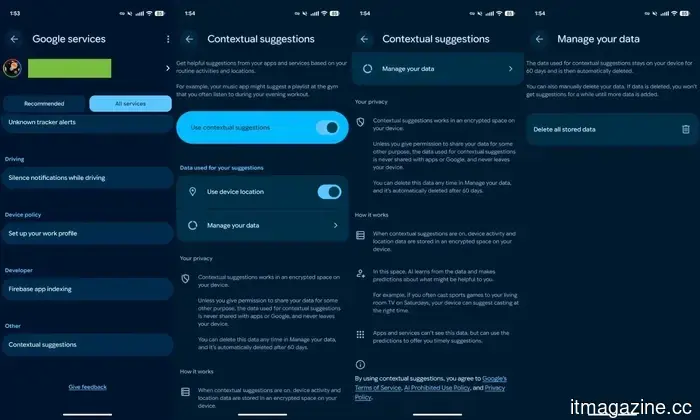
According to Google, Contextual Suggestions is a feature that taps into "your routine activities and locations" through the apps you use and anticipates what you might want to do next, displaying suggestions on the screen accordingly.
Google provides examples such as a music app recommending a playlist you typically listen to at the gym or your phone prompting you to cast a football game on your television on a Saturday evening. Google assures that the data used to generate these suggestions isn’t shared with apps or the company itself.
You can find the feature under Settings > [your name] > All Services > Other, which is a lengthy path for accessing it. However, users are offered three levels of control: they can completely deactivate the feature, disable just the location component, or erase all stored data through the "Manage your data" option.
Currently, Contextual Suggestions is not linked to a particular Android version. It is being rolled out through Google Play Services, allowing it to reach a broader audience than a standard operating system update.
As reported by 9To5Google, this feature is available on the Pixel 10 series, including the Pixel 10a running Android 16 (with Google Play Services version 26.18). It’s important to note that the Pixel 10a was not originally equipped with the Magic Cue feature, which the new Contextual Suggestions builds upon.
Moreover, this feature does not appear on older Pixel devices or the recently launched Android 17 Beta updates.
While I wouldn’t classify this feature as a significant privacy concern, I am somewhat surprised that Google chose an opt-out method rather than the more common opt-in approach, as this keeps the feature active for users who are unaware of it and may not wish to share their usage data.






Other articles
 Fanuc collaborates with Google to integrate Gemini AI and the Intrinsic platform into 1.1 million industrial robots.
Fanuc's stock reached an all-time high following its collaboration with Google to incorporate Gemini Enterprise and the Intrinsic robotics platform into its global industrial robot systems.
Fanuc collaborates with Google to integrate Gemini AI and the Intrinsic platform into 1.1 million industrial robots.
Fanuc's stock reached an all-time high following its collaboration with Google to incorporate Gemini Enterprise and the Intrinsic robotics platform into its global industrial robot systems.
 How Coinspaid emerged as one of the leading remote-first employers in Fintech.
Coinspaid developed a remote-first fintech culture centered around ownership, flexibility, learning, and fostering long-term employee growth within its global teams.
How Coinspaid emerged as one of the leading remote-first employers in Fintech.
Coinspaid developed a remote-first fintech culture centered around ownership, flexibility, learning, and fostering long-term employee growth within its global teams.
 How Coinspaid emerged as one of the leading remote-first employers in Fintech
Coinspaid established a remote-first fintech culture that emphasizes ownership, flexibility, learning, and the long-term development of employees within its global teams.
How Coinspaid emerged as one of the leading remote-first employers in Fintech
Coinspaid established a remote-first fintech culture that emphasizes ownership, flexibility, learning, and the long-term development of employees within its global teams.
 The CMA has initiated its fourth Strategic Market Status investigation concerning Microsoft.
The CMA has initiated its fourth Strategic Market Status investigation, focusing on Microsoft's business software, which encompasses cloud licensing and the defaults of Copilot.
The CMA has initiated its fourth Strategic Market Status investigation concerning Microsoft.
The CMA has initiated its fourth Strategic Market Status investigation, focusing on Microsoft's business software, which encompasses cloud licensing and the defaults of Copilot.
 I had my doubts regarding the Motorola Razr Fold, but it exceeded the limitations often associated with first-generation products quite impressively.
The Motorola Razr Fold might be the brand's initial foray into book-style foldables, yet its high-quality materials, robust hinge, and refined folding experience give it a sense of confidence that surpasses a typical first effort.
I had my doubts regarding the Motorola Razr Fold, but it exceeded the limitations often associated with first-generation products quite impressively.
The Motorola Razr Fold might be the brand's initial foray into book-style foldables, yet its high-quality materials, robust hinge, and refined folding experience give it a sense of confidence that surpasses a typical first effort.
 Recursive Superintelligence secures $650 million at a valuation of $4.65 billion to develop self-enhancing AI.
Former researchers from Meta and DeepMind have secured $650 million at a valuation of $4.65 billion for Recursive Superintelligence, a startup that believes AI has the potential to automate its own research processes.
Recursive Superintelligence secures $650 million at a valuation of $4.65 billion to develop self-enhancing AI.
Former researchers from Meta and DeepMind have secured $650 million at a valuation of $4.65 billion for Recursive Superintelligence, a startup that believes AI has the potential to automate its own research processes.
Android applications are now capable of monitoring your habits and location to provide task recommendations.
Your Android device has been subtly monitoring your Saturday activities, gym routine, and streaming preferences, and it has already determined what recommendations to make next.