

The Edge browser has a significant issue regarding password security, but Microsoft claims it is intentional.
A researcher has discovered that Microsoft Edge reveals all saved passwords in clear text memory during every session.
If you utilize Microsoft Edge to save your passwords, there is an important detail to consider. Each time you launch the browser, it decrypts all stored passwords and loads them into memory in clear text, where they remain for the duration of your session. This means that your passwords are left unprotected in your device’s memory, even if you don't visit any of the websites associated with them.
Security researcher Tom Rønning found this issue and reported it to Microsoft. However, the company stated that this behavior is intentional.
Microsoft Edge loads all saved passwords into memory in clear text, even when they are not in use. pic.twitter.com/ci0ZLEYFLB— Tom Jøran Sønstebyseter Rønning (@L1v1ng0ffTh3L4N) May 4, 2026
Edge is the sole Chromium-based browser that saves passwords in this way.
Microsoft Edge is built on Chromium, the same open-source foundation as Google Chrome. However, Chrome manages passwords quite differently, decrypting them only when needed, such as for autofill.
Additionally, Chrome employs a feature known as Application-Bound Encryption, which links decryption keys to an authenticated Chrome process, making it considerably more challenging for attackers to extract passwords from memory. Microsoft Edge does not have this feature.
Rønning examined several Chromium-based browsers and determined that Edge was the only one that loaded all saved passwords into memory at startup and left them exposed in clear text.
What is Microsoft’s response, and should there be concerns?
In a statement to CyberNews, Microsoft mentioned that this behavior is designed to facilitate quicker sign-ins, asserting that exploiting it would necessitate an attacker having administrative access to the device.
Security experts widely concur that having admin-level access essentially constitutes a full system compromise, regardless of the browser being used. Nevertheless, cybersecurity professionals caution that modern info-stealer malware specifically targets the gap between encrypted storage and runtime exposure, making the presence of clear text passwords in memory a genuine risk.
The consensus among security experts is clear: refrain from saving passwords in your browser and opt for a dedicated password manager instead.
Manisha Priyadarshini is a tech and entertainment writer with over nine years of editorial experience.
Kids are circumventing online age checks by drawing fake beards on their faces.
Children are finding humorous ways to bypass age verification checks online. A recent report from Internet Matters indicates that some kids are drawing facial hair on themselves to deceive age-estimation tools into believing they are older. One parent reported that their 12-year-old used an eyebrow pencil to draw a mustache and was mistakenly verified as 15.
Can drawing a fake beard truly fool online age checks?
Read more
Asus Zenbook S16 OLED review: A well-rounded ultrabook that plays it too safe.
I enjoyed the ZenBook S16, but it ultimately falls just short of greatness.
View at Best Buy
Quick Take
Google Search updates aim to make AI responses a starting point for users, rather than a dead end.
Five new features, including a Further Exploration section and inline link previews, are designed to encourage users to click through to websites from AI Mode and AI Overviews.
Google's AI-driven Search features have significantly transformed how we search for information. Now, instead of sifting through search results, most people read the AI Overview and move on. Google is attempting to change this with five updates to AI Mode and AI Overviews, which aim to highlight more links and provide users with additional motivation to visit the associated websites.
Further Exploration and inline links
Read more






Other articles
 Uber's Q1 2026 results showed a revenue shortfall, yet the stock soared by 10% due to a tenfold increase in autonomous trips, Uber One reaching 50 million members, and a 25% rise in bookings.
Uber fell short of Q1 revenue expectations by $90 million, yet its stock increased by 10%. Gross bookings reached $53.7 billion, with autonomous vehicle trips expanding tenfold, and Uber One gained 50 million members. The market perceives it as a platform rather than just a taxi application.
Uber's Q1 2026 results showed a revenue shortfall, yet the stock soared by 10% due to a tenfold increase in autonomous trips, Uber One reaching 50 million members, and a 25% rise in bookings.
Uber fell short of Q1 revenue expectations by $90 million, yet its stock increased by 10%. Gross bookings reached $53.7 billion, with autonomous vehicle trips expanding tenfold, and Uber One gained 50 million members. The market perceives it as a platform rather than just a taxi application.
 LG's next-generation Tandem OLED display technology is addressing several persistent issues faced by consumers.
LG Display's third-generation Tandem OLED extends panel lifespan, reduces power consumption by 18%, and achieves a peak brightness of 1,200 nits.
LG's next-generation Tandem OLED display technology is addressing several persistent issues faced by consumers.
LG Display's third-generation Tandem OLED extends panel lifespan, reduces power consumption by 18%, and achieves a peak brightness of 1,200 nits.
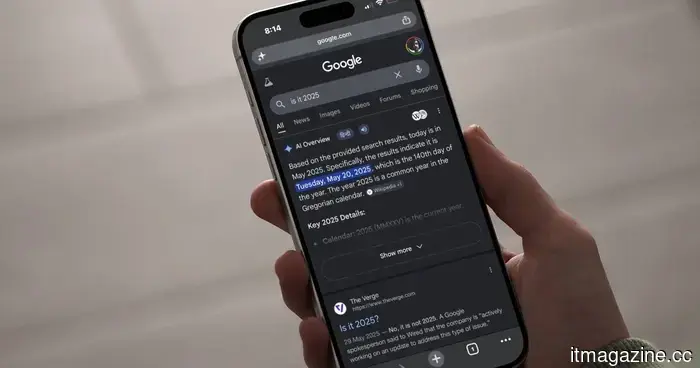 Google Search updates aim to transform AI responses into a launching pad for you, rather than a cul-de-sac.
Google is introducing five updates to AI Mode and AI Overviews in Search aimed at bringing more links to the forefront and providing users with additional incentives to click on the websites associated with them.
Google Search updates aim to transform AI responses into a launching pad for you, rather than a cul-de-sac.
Google is introducing five updates to AI Mode and AI Overviews in Search aimed at bringing more links to the forefront and providing users with additional incentives to click on the websites associated with them.
 Ethos secures $22.75 million in Series A funding to address the issues AI has caused in hiring.
Ethos, the London-based platform for matching AI experts, established by former DeepMind and McKinsey alumni, has secured $22.75 million in a Series A funding round.
Ethos secures $22.75 million in Series A funding to address the issues AI has caused in hiring.
Ethos, the London-based platform for matching AI experts, established by former DeepMind and McKinsey alumni, has secured $22.75 million in a Series A funding round.
 Anthropic has incorporated SpaceX's computing resources and increased the rate limits for the Opus API.
Anthropic has increased Claude Code's five-hour rate limits twofold and elevated Opus API rate limits, referring to a new computing agreement with SpaceX for Colossus 1.
Anthropic has incorporated SpaceX's computing resources and increased the rate limits for the Opus API.
Anthropic has increased Claude Code's five-hour rate limits twofold and elevated Opus API rate limits, referring to a new computing agreement with SpaceX for Colossus 1.
 Anthropic integrates SpaceX computing resources and increases the rate limits for the Opus API.
Anthropic has increased Claude Code's five-hour rate limits to double their previous amounts and has also raised the Opus API rate limits, attributing these changes to a new compute agreement with SpaceX for Colossus 1.
Anthropic integrates SpaceX computing resources and increases the rate limits for the Opus API.
Anthropic has increased Claude Code's five-hour rate limits to double their previous amounts and has also raised the Opus API rate limits, attributing these changes to a new compute agreement with SpaceX for Colossus 1.
The Edge browser has a significant issue regarding password security, but Microsoft claims it is intentional.
A security researcher discovered that Microsoft Edge loads all stored passwords into unencrypted memory upon startup, leaving them vulnerable for the duration of the session, even if they are not actively in use.