

Google Chrome is installing a 4 GB AI model on your device. Here’s how to disable it.
Chrome has decided that your storage is up for grabs without requiring your permission.
Rachit Agarwal / Digital Trends
Although Google Chrome remains the leading browser, it faces competition from a new generation of AI browsers like Perplexity Comet and Dia. To remain competitive, Google is incorporating new AI features into Chrome, which isn't necessarily a bad move, but this time it seems to have overstepped boundaries.
If you check your file manager, you might find a folder named “OptGuideOnDeviceModel.” If it’s there, it indicates that Chrome has been utilizing your storage as if it were its own server room. Within that folder is a file labeled “weights.bin,” approximately 4 GB in size, housing Gemini Nano, Google's AI model for on-device use.
Privacy expert Alexander Hanff uncovered and documented this behavior through macOS's filesystem event logs, which monitor all file creation and modification at the operating system level.
On a newly created Chrome profile that received no user input, the entire 4 GB model installed in less than 15 minutes while a tab was open and idle.
Was there any request for this?
No, there wasn't. In fact, Chrome does not seek permission to install the model; it initiates the download independently. The model automatically downloads once Chrome determines that your hardware meets its criteria, even before you have utilized any AI features.
And in the event you delete the file, Chrome will re-download it the next time it is opened. Hanff pointed out that "the user's deletion is treated as a temporary state to be rectified, not as a request to be honored."
The situation becomes even more intriguing. The most prominent AI feature in Chrome, the “AI Mode” button in the address bar, does not even utilize the local model. Instead, it directs your queries to Google Gemini servers. The on-device model supports lesser-known features like “Help me write” in text boxes and local scam detection.
What are the implications, and how can you disable it?
While this may seem like it only affects your device's storage, Hanff has stated that it has broader environmental consequences. He estimates that if 500 million devices received this download, the resulting bandwidth usage would equal approximately 30,000 tonnes of CO2 emissions, the equivalent of 6,500 cars operating for an entire year, and this is solely for the delivery, not actual usage.
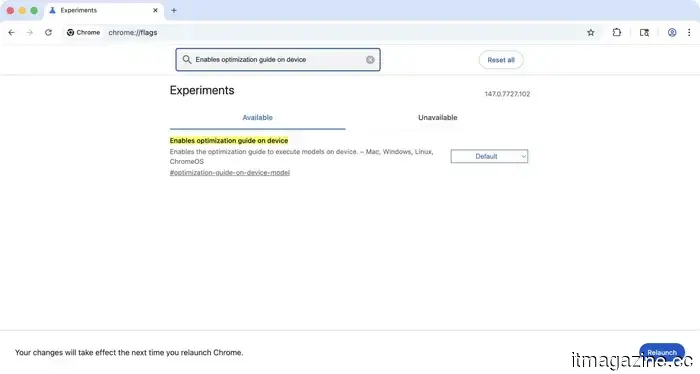
Google should make this download contingent on user confirmation. Currently, you can disable the download by navigating to “chrome://flags.” Look for “Enables optimization guide on device” and turn it off. Though it requires more steps than it ideally should, it is effective.
Rachit Agarwal / /d
This compact SSD enclosure features active cooling to maintain 80Gbps speeds for as long as needed.
Satechi's DotDisk addresses the thermal throttling issue common in most compact drive enclosures.
Large file transfers often start quickly but slow down significantly, typically due to thermal throttling. Satechi's new DotDisk SSD enclosure tackles this problem with a built-in microfan that keeps your drive cool during heavy use.
A built-in fan addresses the limitations of passive cooling.
Read more
Children are evading online age verification by drawing fake beards on their faces.
Kids are circumventing age checks in comically clever ways.
Drawing a fake beard may be the latest amusing loophole in online safety checks. A recent report from Internet Matters indicates that some children are applying facial hair to deceive facial age-estimation tools into thinking they are older. One parent noted that their 12-year-old used an eyebrow pencil to draw a moustache and was verified as being 15 years old.
Can a fake beard actually bypass online age checks?
Asus Zenbook S16 OLED review: A well-rounded ultrabook that plays it a bit too conservatively.
I enjoyed the ZenBook S16, but it ultimately falls just short of greatness.
View at Best Buy
Quick Take
Read more






Other articles
 Google Chrome is in the process of downloading a 4 GB AI model to your device. Here’s how you can disable it.
Google Chrome is discreetly downloading a 4 GB Gemini Nano model to your device without your permission. Here's an explanation of what it is, its location on your computer, and the steps you can take regarding it.
Google Chrome is in the process of downloading a 4 GB AI model to your device. Here’s how you can disable it.
Google Chrome is discreetly downloading a 4 GB Gemini Nano model to your device without your permission. Here's an explanation of what it is, its location on your computer, and the steps you can take regarding it.
 SpaceX submits a filing for a $55 billion semiconductor manufacturing facility in Texas.
SpaceX has submitted documentation for a $55 billion semiconductor fabrication plant in rural Texas, referred to internally as Terafab, adjacent to its existing packaging facility in Bastrop.
SpaceX submits a filing for a $55 billion semiconductor manufacturing facility in Texas.
SpaceX has submitted documentation for a $55 billion semiconductor fabrication plant in rural Texas, referred to internally as Terafab, adjacent to its existing packaging facility in Bastrop.
 Nvidia-Corning agreement: $500 million in warrants, the establishment of three new plants in the US, and the creation of 3,000 jobs.
NVIDIA has secured warrants for $500 million in Corning stock as part of a long-term collaboration, which will involve Corning constructing three new optical connectivity facilities in the United States.
Nvidia-Corning agreement: $500 million in warrants, the establishment of three new plants in the US, and the creation of 3,000 jobs.
NVIDIA has secured warrants for $500 million in Corning stock as part of a long-term collaboration, which will involve Corning constructing three new optical connectivity facilities in the United States.
 Valve’s sold-out Steam Controller has turned into a paradise for modders.
Valve has made the Steam Controller CAD files available under a Creative Commons license, allowing modders to design custom shells and accessories as supplies are running low.
Valve’s sold-out Steam Controller has turned into a paradise for modders.
Valve has made the Steam Controller CAD files available under a Creative Commons license, allowing modders to design custom shells and accessories as supplies are running low.
 SpaceX submits a proposal for a $55 billion semiconductor manufacturing facility in Texas.
SpaceX has submitted documents for a $55 billion semiconductor fabrication plant in rural Texas, referred to internally as Terafab, which will be located next to its current packaging facility in Bastrop.
SpaceX submits a proposal for a $55 billion semiconductor manufacturing facility in Texas.
SpaceX has submitted documents for a $55 billion semiconductor fabrication plant in rural Texas, referred to internally as Terafab, which will be located next to its current packaging facility in Bastrop.
 The sold-out Steam Controller from Valve has now turned into a playground for modders.
Valve has made Steam Controller CAD files available under a Creative Commons license, allowing modders to design custom shells and accessories as stock levels are low.
The sold-out Steam Controller from Valve has now turned into a playground for modders.
Valve has made Steam Controller CAD files available under a Creative Commons license, allowing modders to design custom shells and accessories as stock levels are low.
Google Chrome is installing a 4 GB AI model on your device. Here’s how to disable it.
Google Chrome is discreetly downloading a 4 GB Gemini Nano model to your device without your permission. Here's what it is, its location on your computer, and the steps you can take in response.