
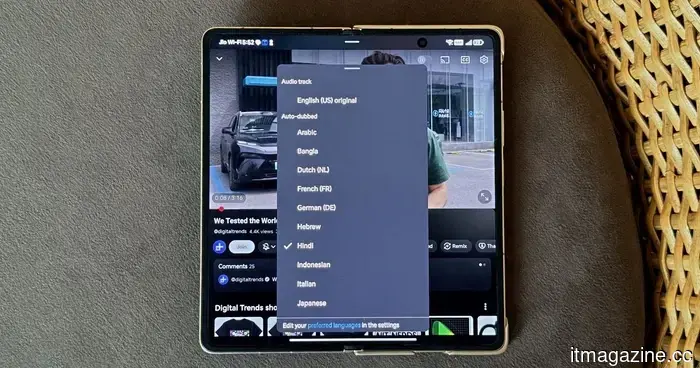
YouTube's auto-dubbing lacks a vital option: a way to turn it off.
I have been a fan of MKBHD for years. Long enough that Marques’ voice has become a part of my viewing experience. So, when I recently started a video on my TV and suddenly heard him speaking Japanese, it took me a moment to understand what was going on.
I hadn’t selected this option. YouTube had somehow decided—likely due to the Japanese text on his T-shirt and perhaps because I watch a lot of anime with English subtitles—that I should be listening to a dubbed version in a language I couldn’t understand. It didn’t matter that the video was originally in English or that I had watched countless videos of his in English without a problem. There was no warning, no prompt, and no clear way to revert back. Just a different voice emanating from a familiar face.
This is how auto-dubbing typically appears for many viewers. The frustrating aspect is not the existence of the feature itself, but rather that viewers have very little control over when it applies to them.
Creators have the ability to opt out, while viewers do not.
To its credit, YouTube has given creators significant control. A creator who wishes to disable auto-dubbing can do so in YouTube Studio. This is a reasonable approach as it respects a creator’s voice as an essential part of their identity and requires consent for any replacement. However, this rationale does not extend to viewers. For viewers, the only option is to manually change the audio track on each video individually, every single time. There isn’t a global setting. There’s no “always play original audio” option. No record of your choice from just five minutes ago.
This disparity is odd. YouTube seems to believe that creators are entitled to a persistent, channel-specific preference for their content, while viewers are not given the same consideration in their viewing experience. The platform that remembers your viewing history in detail, that knows which videos you’ve rewatched and which you stopped after just a few seconds, cannot recall that you switched a dubbed track off yesterday.
Auto-dubbing does not have the same impact on all viewers. Multilingual users frequently receive auto-dubbed videos even if they understand the original language. Language learners using immersive content have the actual foreign audio swapped out for a translation, which is the opposite of their purpose in watching the video. Expats striving to maintain fluency in a language they no longer live around face the same challenge. In each instance, YouTube’s system identifies a language setting and applies a rule without subtlety.
When users begin searching for workarounds, it indicates an issue.
The alternatives that people have turned to reveal the underlying problem. Browser extensions that enforce original audio. Modified third-party applications that circumvent auto-dubbing. Guides on Reddit outlining how users can disable the feature through the “Preferred languages” option (though comments on those threads suggest that this setting doesn’t always stick, with the platform reverting to dubbed audio for certain videos). Some are taking these measures out of principle, frustrated by the lack of control. Others simply find the dubbed voices to be flat, robotic, and lacking personality.
YouTube did acknowledge that last concern. Earlier this year, it introduced an Expressive Speech update that utilizes Gemini to mimic the creator’s tone, pitch, and emotional delivery. The intent was to ensure that dubs no longer sounded like robotic announcements, but the results have varied.
While the quality of dubs may improve as the technology advances, the absence of an off switch will remain a significant issue for many viewers. When a large segment of your user base is trying to navigate around a feature you implemented as an enhancement, there’s a fundamental problem, and it’s not the technology itself.
One toggle. That’s all that’s needed.
Auto-dubbing is not inherently a bad concept. There are valid scenarios: a viewer who cannot read subtitles, someone watching in a second language who desires assistance, or a casual viewer who simply prefers their native language and does not feel a strong connection to the creator’s original voice. For such individuals, auto-dubbing can be a valuable improvement, and the platform should certainly provide it.
However, introducing a feature and defaulting to it without notification are different actions. YouTube has created the necessary infrastructure to translate global content yet has overlooked asking whether each viewer prefers to be translated. The notion that everyone watching in a specific language wants the audio in that language seems reasonable in a meeting, but in practice, it’s frustrating enough that you can find related discussions across all the forums where YouTube users congregate.
The solution isn’t complicated. Just one toggle in the account settings allowing users to disable the feature. One that applies to all videos on the platform, including Shorts. Creators already enjoy this option. Viewers deserve the same.
Until that happens, auto-dubbing will feel less like an accessibility feature and more like a service that is overly confident in knowing what you want while being disinterested in any corrections.
Other articles
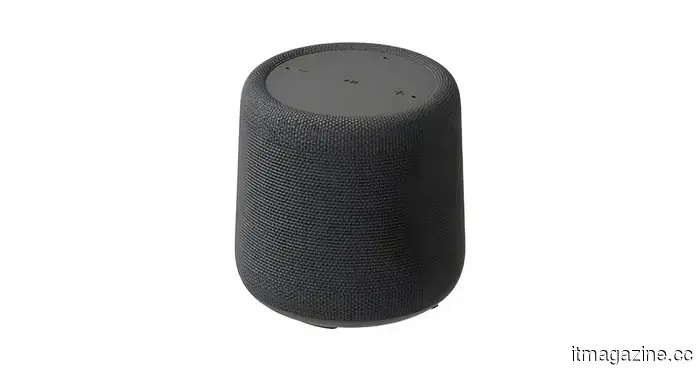 Walmart leak reveals an expanding Onn collection that includes a Gemini-compatible smart speaker.
A certification has revealed that Walmart's Onn lineup is set to expand with a Gemini-powered smart speaker that offers Matter support, Google Cast, and a 10W speaker.
Walmart leak reveals an expanding Onn collection that includes a Gemini-compatible smart speaker.
A certification has revealed that Walmart's Onn lineup is set to expand with a Gemini-powered smart speaker that offers Matter support, Google Cast, and a 10W speaker.
 Do you believe music is the most affected by sloppiness? AI has also greatly tainted podcasts.
A surge of AI-produced podcasts is rapidly spreading across audio platforms, with a Bloomberg report indicating that around 39% of new podcast feeds established in approximately nine days might have been created by machines.
Do you believe music is the most affected by sloppiness? AI has also greatly tainted podcasts.
A surge of AI-produced podcasts is rapidly spreading across audio platforms, with a Bloomberg report indicating that around 39% of new podcast feeds established in approximately nine days might have been created by machines.
 Pinterest surpasses $1 billion in quarterly revenue as AI-driven visual search fuels advertising expansion that other social platforms struggle to replicate.
Pinterest reached $1.008 billion in revenue for Q1, with 631 million monthly active users. Performance+ AI ads achieved a 24% increase in conversions. The key driver of growth is 80 billion monthly visual searches, rather than social feeds.
Pinterest surpasses $1 billion in quarterly revenue as AI-driven visual search fuels advertising expansion that other social platforms struggle to replicate.
Pinterest reached $1.008 billion in revenue for Q1, with 631 million monthly active users. Performance+ AI ads achieved a 24% increase in conversions. The key driver of growth is 80 billion monthly visual searches, rather than social feeds.
 Mission Space launches the fourth ZOHAR payload on HEX20's Maya-V1 as the space weather market reaches $1.4 billion.
Mission Space incorporates a fourth orbital sensor on HEX20's Maya-V1 rideshare, progressing towards a 24-satellite constellation aimed at real-time space weather forecasting.
Mission Space launches the fourth ZOHAR payload on HEX20's Maya-V1 as the space weather market reaches $1.4 billion.
Mission Space incorporates a fourth orbital sensor on HEX20's Maya-V1 rideshare, progressing towards a 24-satellite constellation aimed at real-time space weather forecasting.
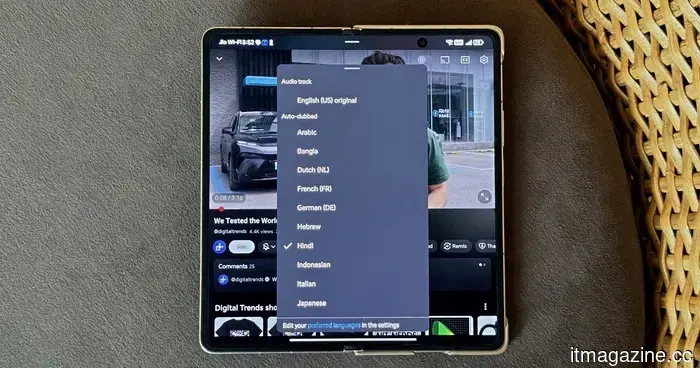 YouTube's auto-dubbing lacks one essential feature: a way to turn it off.
I didn't request to hear Marques Brownlee speaking Japanese; YouTube made that choice for me. There's no universal option to disable it.
YouTube's auto-dubbing lacks one essential feature: a way to turn it off.
I didn't request to hear Marques Brownlee speaking Japanese; YouTube made that choice for me. There's no universal option to disable it.
 Denmark halts new grid connections as AI data centers strain the cleanest power grid in Europe.
Energinet has suspended new grid agreements after receiving 60 GW of requests for a grid that can only support 7 GW. The expansion of data centers in Denmark has been propelled by Microsoft, Google, and Apple. As a result, the grid is unable to accommodate the demand.
Denmark halts new grid connections as AI data centers strain the cleanest power grid in Europe.
Energinet has suspended new grid agreements after receiving 60 GW of requests for a grid that can only support 7 GW. The expansion of data centers in Denmark has been propelled by Microsoft, Google, and Apple. As a result, the grid is unable to accommodate the demand.
YouTube's auto-dubbing lacks a vital option: a way to turn it off.
I didn't request to listen to Marques Brownlee speaking Japanese. YouTube made that choice for me, and there's no universal way to disable it.