

Google Photos introduces new editing features focused on delicate enhancements.
Google Photos has just made your camera roll feel as though it has a built-in makeup artist, with results that are pleasantly subtle.
Whether you're dealing with dark circles from a long night of work, an unexpected blemish, or something that could use a little extra brightness, Google Photos now has you covered.
The company has officially launched a new Touch Up suite within the Photos app editor, incorporating facial retouching tools into the app for the first time. Previously, these adjustments were only accessible through Google’s Camera app while capturing images.
What tools are available?
With the new Touch Up feature, which includes options for smoothing skin, whitening teeth, and brightening eyes, you can edit photos you’ve already taken directly within the same app. There’s no need to export it, open another app to edit, and then save it again.
The Touch Up feature offers various editing options: healing, smoothing, addressing under-eye circles, enhancing irises, teeth, eyebrows, and lips. Each option includes an intensity slider to adjust the strength of the effect applied to the image. The objective appears to be refinement rather than drastic transformation.
Can you edit individual people in a group photo?
Yes, and this is where the feature becomes particularly useful. Google’s AI can identify individual faces, allowing you to whiten one person’s teeth or smooth their skin in a group shot, without affecting anyone else in the frame.
Currently, the tool can support up to six faces in a photo. The rollout is gradual, and the Touch Up feature is now available on Android devices running Android 9.0 or later with a minimum of 4GB of RAM. For the more than one billion daily users of the Photos app, this makes it an effective all-in-one editing solution.
This update places the Google Photos app in direct competition with dedicated retouching apps like Facetune and Snapseed.
For over five years, Shikhar has been simplifying developments in the realm of consumer technology and sharing them…
Apple’s foldable device retains Camera Control, but one-handed photography on a large foldable could be challenging.
Apple has undergone significant engineering efforts to achieve this, but is it truly worth it?
The first foldable iPhone from Apple has been the focus of numerous leaks, with the latest coming from Weibo leaker Instant Digital. As reported by Notebookcheck, this leak indicates that the iPhone Fold will feature the Camera Control button, despite having a slimmer profile than the iPhone Air when opened.
This is no small challenge. Integrating the Camera Control button into such a thin device must have required extensive engineering by Apple. Yet, it seems the company deemed it worthwhile.
Apple is enhancing your iPhone's intelligence: Here’s what Apple Intelligence can do in iOS 27.
Apple has gradually expanded Apple Intelligence since its inception, and iOS 27 could represent the most ambitious update yet. Backend code uncovered by developer Nicolás Alvarez, later validated by MacRumors, suggests at least four new AI-driven features are on the way for system apps. Although this hasn’t been officially confirmed, the evidence is quite compelling.
Visual intelligence is improving.
Recent design leaks of the Xperia I VIII indicate that Sony appears to be clinging to outdated design elements.
Over the years, smartphone brands have progressively honed their skills. Devices in 2026 are notably sharper, smarter, and more refined than their predecessors. However, a recent look at the Sony Xperia 1 VIII suggests that Sony might be too rooted in the past, and not necessarily for the best. Here’s why I feel this way.
This design does not reflect the Sony we remember.







Other articles
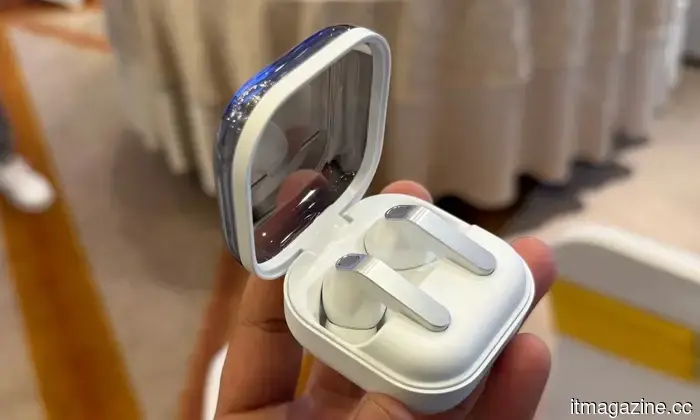 Samsung's upcoming Galaxy earbuds may surprise users with a design that features an earclip.
Icons leaked from the One UI firmware indicate that Samsung is working on the open-ear Galaxy Buds Able, a clip-style earphone designed to sit on the ear instead of being placed inside it.
Samsung's upcoming Galaxy earbuds may surprise users with a design that features an earclip.
Icons leaked from the One UI firmware indicate that Samsung is working on the open-ear Galaxy Buds Able, a clip-style earphone designed to sit on the ear instead of being placed inside it.
 Motorola has announced the launch date for a new series of Razr foldable smartphones.
Motorola has announced that April 29 will be the launch date for its Razr 2026 foldable series. A teaser video has showcased new color options, including a purple quilted finish, and sales in the US are anticipated to begin on May 21.
Motorola has announced the launch date for a new series of Razr foldable smartphones.
Motorola has announced that April 29 will be the launch date for its Razr 2026 foldable series. A teaser video has showcased new color options, including a purple quilted finish, and sales in the US are anticipated to begin on May 21.
 iQIYI’s AI Artist Library encounters escalating challenges as actors refuse to grant authorization.
On Monday, the Chinese streaming service iQIYI launched its AI Artist Library project with much excitement, asserting that over 100 artists had
iQIYI’s AI Artist Library encounters escalating challenges as actors refuse to grant authorization.
On Monday, the Chinese streaming service iQIYI launched its AI Artist Library project with much excitement, asserting that over 100 artists had
 The AI Artist Library of iQIYI is facing increasing challenges as actors refuse to grant authorization.
On Monday, the Chinese streaming service iQIYI launched its AI Artist Library project with much excitement, asserting that over 100 artists had
The AI Artist Library of iQIYI is facing increasing challenges as actors refuse to grant authorization.
On Monday, the Chinese streaming service iQIYI launched its AI Artist Library project with much excitement, asserting that over 100 artists had
 FTC resolves OkCupid data controversy without a fine.
Clarifai removed 3 million OkCupid user images and facial-recognition models following a settlement with the FTC, but critics argue that the penalty-free agreement was inadequate.
FTC resolves OkCupid data controversy without a fine.
Clarifai removed 3 million OkCupid user images and facial-recognition models following a settlement with the FTC, but critics argue that the penalty-free agreement was inadequate.
 Tim Cook resigns as CEO of Apple, transferring the position to hardware chief Ternus.
Apple will shift its leadership from Tim Cook to John Ternus, signaling a new era while ensuring continuity with Cook remaining as chairman.
Tim Cook resigns as CEO of Apple, transferring the position to hardware chief Ternus.
Apple will shift its leadership from Tim Cook to John Ternus, signaling a new era while ensuring continuity with Cook remaining as chairman.
Google Photos introduces new editing features focused on delicate enhancements.
For the first time, Google Photos allows users to enhance specific facial features after capturing a photo, utilizing AI-driven tools that function for each individual in group images without the need for extra apps or subscriptions.