

Android 17 is significantly enhancing location privacy.
Google
For years, managing location permissions on Android has been quite chaotic. You open an app, it requests your location, and then you're faced with a choice: While using the app? All the time? Exact? Approximate? Most users just select an option and move on, only partly aware that they might be sharing more information than necessary. With Android 17, this issue is finally addressed. The decision is now made at the precise moment it is required. This represents a significant shift.
The new location button simplifies the process
The new feature is referred to as the location button. Instead of granting an app perpetual access to your location, you now have a straightforward, dedicated button for it. For instance, if you want to find a nearby café, you press the button, the app retrieves your exact location at that time, does what it needs to do, and that’s the extent of it. This also lessens the frequency of those irritating permission pop-ups. Once you permit access for that specific action, the app won't keep asking you repeatedly.
9To5Google
If you sometimes wonder, "is something tracking me at this moment?", this upgrade will be comforting. Android 17 adds a persistent indicator that appears whenever an app, rather than the system, is utilizing your location. You can click it to quickly view which apps have recently accessed your location and revoke permissions right on the spot if anything seems off. Additionally, there’s a thoughtful enhancement in how approximate location operates. Previously, Android used a static grid to obscure your location, which wasn't always as protective as it could be, particularly in quieter areas. Privacy should not depend on your geographic location, and this finally feels like a positive advancement.
Permission prompts that no longer feel like a test
The previous permission dialogs could be very confusing. Android 17 features a fresh redesign that makes options like Precise versus Approximate location much clearer.
Unsplash
The update also recognizes an important truth: not every application needs to track you constantly. Sometimes, you simply want to share your location one time and get on with your day.
Shimul is a contributor at Digital Trends, with over five years of experience in the technology field.
Sony Xperia 1 VIII leak reveals a redesign that feels rather uninspired
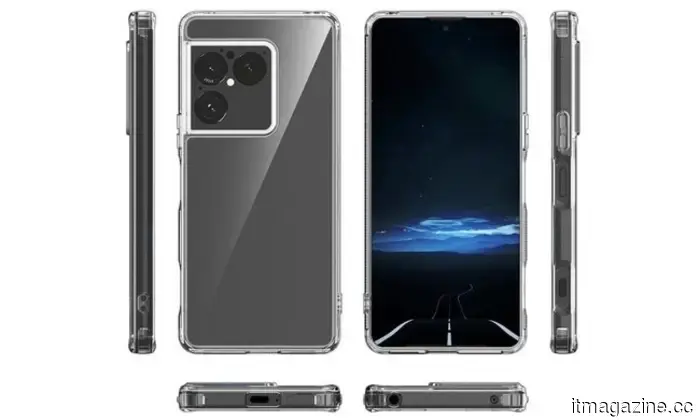
Sony's upcoming flagship may finally be undergoing a redesign, but not everyone seems impressed. Leaked images of the Xperia 1 VIII, shared by Weibo user Super_Freak_, indicate a noticeable design change, particularly around the camera. The most significant alteration is the shift from Sony's recognizable vertical camera strip to a square camera island that houses three sensors. Moreover, there's a new centered punch-hole selfie camera, replacing Sony’s long-established bezel-based front camera. On paper, these are substantial changes. However, in reality… it’s not entirely hitting the target.
WhatsApp is logging users out of a fake version created by a spyware developer
Meta alerts users after discovering a targeted spyware campaign.
WhatsApp is cautioning users about a more serious issue than a simple scam: a counterfeit version of the app that serves as spyware. According to recent reports from Italian newspaper La Repubblica and news agency ANSA, hundreds have been deceived into downloading a malicious clone of WhatsApp, designed to spy on them. This wasn’t a random incident. In a discussion with TechCrunch, Meta noted that the campaign was highly targeted, with victims being misled into installing the fake app through deceptive tactics. Once installed, the spyware could potentially access sensitive information and monitor user activity.
Google Pixel phones might soon prevent downgrading to a previous Android version
Your next Pixel may not allow you to revert to an older Android build.
Google could soon complicate the downgrade process for Pixel owners wanting to revert to prior Android versions. A new report indicates that an upcoming change may be implemented, expanding the anti-rollback protection feature, which serves as a security precaution against flashing devices with older software. The main purpose is to secure devices from previous software versions that may contain known vulnerabilities. This is the practical side of the story. However, it's also the more restrictive side, as it could diminish some flexibility for Pixel phones, particularly for enthusiasts who prefer to flash older builds for testing, troubleshooting, or simply avoiding a buggy release.





Other articles
 WhatsApp has alerted 200 users who downloaded a counterfeit app created by the Italian spyware company SIO.
WhatsApp has alerted nearly 200 users in Italy about their installation of a counterfeit version of the app that includes spyware created by SIO. The company intends to take legal action against the surveillance company.
WhatsApp has alerted 200 users who downloaded a counterfeit app created by the Italian spyware company SIO.
WhatsApp has alerted nearly 200 users in Italy about their installation of a counterfeit version of the app that includes spyware created by SIO. The company intends to take legal action against the surveillance company.
 Gmail has finally enabled the option to change your outdated usernames.
Google is finally implementing a feature that Gmail users have requested for years: the ability to change the actual username in their Gmail address. This is no longer just a preliminary rollout, as Google has announced that the feature is now accessible to all Google Account users in the US. However, it remains a limited release, […]
Gmail has finally enabled the option to change your outdated usernames.
Google is finally implementing a feature that Gmail users have requested for years: the ability to change the actual username in their Gmail address. This is no longer just a preliminary rollout, as Google has announced that the feature is now accessible to all Google Account users in the US. However, it remains a limited release, […]
 Apple made an unexpected move by reducing the price of the Studio Display XDR.
A sense of pricing rationality has joined the conversation.
Apple made an unexpected move by reducing the price of the Studio Display XDR.
A sense of pricing rationality has joined the conversation.
 Swiss finance minister brings criminal charges regarding abuse generated by Grok on X.
Karin Keller-Sutter, the former president of Switzerland, has initiated defamation proceedings after Grok was activated to produce sexist insults regarding her on X. This case may establish the first legal precedent concerning the liability of AI platforms.
Swiss finance minister brings criminal charges regarding abuse generated by Grok on X.
Karin Keller-Sutter, the former president of Switzerland, has initiated defamation proceedings after Grok was activated to produce sexist insults regarding her on X. This case may establish the first legal precedent concerning the liability of AI platforms.
 Garmin wearables can also assist you with birth control.
Each day in technology appears to surpass the previous one. Just when you believe you've encountered everything, a new development changes the entire dialogue. I came across news regarding Garmin collaborating with Natural Cycles, and I took a moment to think. Birth control, driven by your smartwatch? That's not something you anticipate reading in […]
Garmin wearables can also assist you with birth control.
Each day in technology appears to surpass the previous one. Just when you believe you've encountered everything, a new development changes the entire dialogue. I came across news regarding Garmin collaborating with Natural Cycles, and I took a moment to think. Birth control, driven by your smartwatch? That's not something you anticipate reading in […]
 Volvo's parent company has just announced a $15,000 extended-range electric vehicle, highlighting the significant value disparity in the US market.
Geely's latest Boyue EREV is priced starting at only $14,900 in China, highlighting once again that the most competitive pricing for electrified vehicles is taking place far from the U.S. market.
Volvo's parent company has just announced a $15,000 extended-range electric vehicle, highlighting the significant value disparity in the US market.
Geely's latest Boyue EREV is priced starting at only $14,900 in China, highlighting once again that the most competitive pricing for electrified vehicles is taking place far from the U.S. market.
Android 17 is significantly enhancing location privacy.
I appreciate the offer, but I don’t require a shadow!