
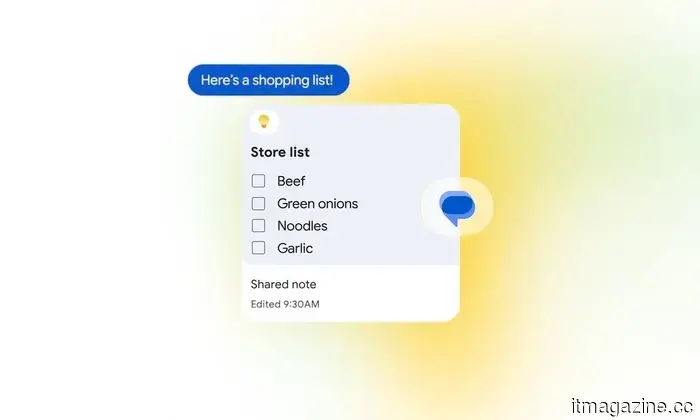
Google Messages now features integration with Google Keep, simplifying the management of group plans.
The new integration allows everyone involved in a Google Messages chat to view, edit, and contribute to the same Google Keep note.
Google Messages is receiving a beneficial update for those who have seen a straightforward plan become muddled with countless messages in a group chat.
As part of the September Android Drop, Google is incorporating Google Keep directly within Messages. Participants in a conversation can create a shared note or list that they can view, edit, and add to without leaving the chat. This integration starts rolling out today.
While it may seem like a minor enhancement, incorporating Keep into Messages could significantly enhance the utility of group chats for organizing tasks.
This feature might help reduce excessive scrolling in group chats.
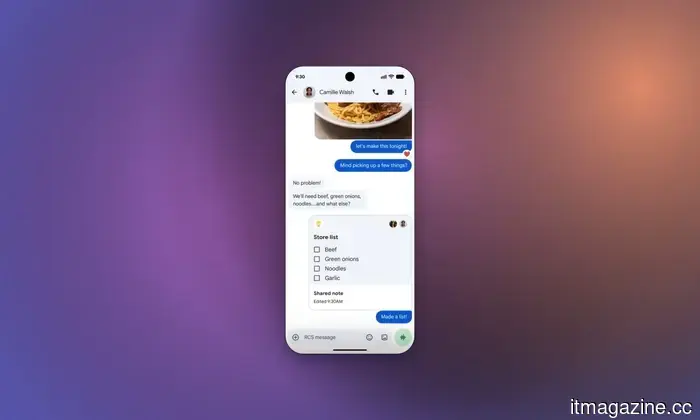
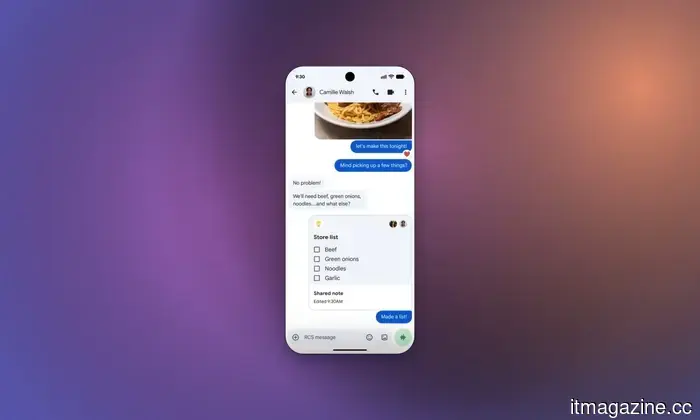
The new Google Keep integration can be accessed by tapping the + icon within Google Messages. Users can then create and add a shared note or list directly to the chat. All participants can view, modify, and add new items or check tasks off.
The obvious applications include grocery lists and vacation planning, but I can readily think of many other scenarios. Friends meeting up could maintain a mutual store-run list rather than sending multiple requests in the chat. A group planning a road trip might track stops, while those organizing a party could create a single checklist for food, drinks, and supplies.
A movie night is another fitting example. Everyone could contribute their suggestions to a shared list and then discuss the options when it's time to choose a film. Roommates might use this feature for shared household purchases, while families could keep a communal list of errands or tasks that need completion.
What's more, the list remains editable. If someone recalls something later, they can simply add it instead of having to search through previous messages to trace the planning process.
Google Messages is also becoming a bit more vibrant.
Although shared notes are the more practical addition, Google is also providing some new customization options for Messages.
The chat theme allows users to assign individual conversations their own backgrounds and colors. You can select a wallpaper or utilize one of your photos, with message bubbles automatically adjusting to match the theme. Their colors can also be customized separately.
Chat themes are available now, while the Google Keep integration is starting its rollout today. Both additions may differ significantly, but they each enhance Google Messages, making it feel more functional than just a simple texting platform.




Другие статьи
 Uber reduces its workforce by 10% and terminates operations in Nigeria and Uganda.
Uber is laying off 3,300 employees and withdrawing from Nigeria and Uganda. According to its memo, all individuals have been informed, except in cases where local protocols are in place, specifically referring to Europe.
Uber reduces its workforce by 10% and terminates operations in Nigeria and Uganda.
Uber is laying off 3,300 employees and withdrawing from Nigeria and Uganda. According to its memo, all individuals have been informed, except in cases where local protocols are in place, specifically referring to Europe.
 Coder introduces Agent Relay powered by SpaceXAI, utilizing Cursor’s cloud agents on the infrastructure of customers.
Coder's Agent Relay operates Cursor's cloud agents on the customer's infrastructure. Cursor continues to handle the inference, meaning that DORA's responsibilities remain in effect.
Coder introduces Agent Relay powered by SpaceXAI, utilizing Cursor’s cloud agents on the infrastructure of customers.
Coder's Agent Relay operates Cursor's cloud agents on the customer's infrastructure. Cursor continues to handle the inference, meaning that DORA's responsibilities remain in effect.
 Circular unveils Ring 3 Pro and Slim at IFA, featuring contactless payment options and haptic notifications.
Circular introduced its Ring 3 series at IFA, featuring NFC payments and an ECG. The clearance mentioned is from the FDA, while EU regulations require an additional CE mark.
Circular unveils Ring 3 Pro and Slim at IFA, featuring contactless payment options and haptic notifications.
Circular introduced its Ring 3 series at IFA, featuring NFC payments and an ECG. The clearance mentioned is from the FDA, while EU regulations require an additional CE mark.
 Huawei's high-end smartwatch collection has become significantly more luxurious thanks to an all-ceramic design combined with 18K gold details.
Today, Huawei announced a range of new wearables, highlighted by the high-end Watch 6 series, the adventure-oriented Watch GT 7 series, and a set of budget-friendly ANC earbuds.
Huawei's high-end smartwatch collection has become significantly more luxurious thanks to an all-ceramic design combined with 18K gold details.
Today, Huawei announced a range of new wearables, highlighted by the high-end Watch 6 series, the adventure-oriented Watch GT 7 series, and a set of budget-friendly ANC earbuds.
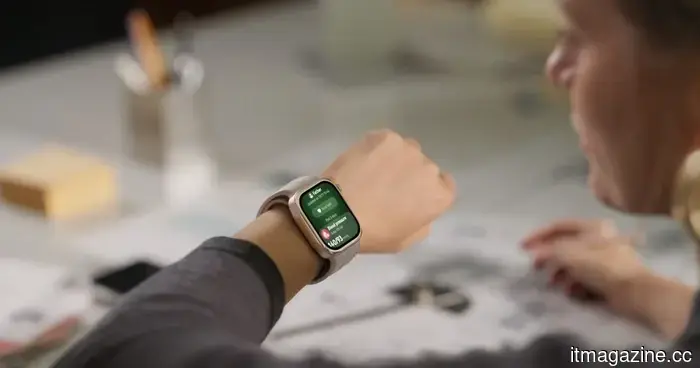 Huawei's latest Watch D3 offers medical-quality blood pressure monitoring right on your wrist.
Many smartwatches continue to estimate blood pressure by relying on measurements taken with an optical sensor. However, Huawei's recently introduced Watch D3 eliminates the need for estimation by incorporating an airbag within the strap to provide medical-grade readings.
Huawei's latest Watch D3 offers medical-quality blood pressure monitoring right on your wrist.
Many smartwatches continue to estimate blood pressure by relying on measurements taken with an optical sensor. However, Huawei's recently introduced Watch D3 eliminates the need for estimation by incorporating an airbag within the strap to provide medical-grade readings.
 Coder introduces Agent Relay alongside SpaceXAI, operating Cursor’s cloud agents on client infrastructure.
Coder's Agent Relay operates Cursor's cloud agents on the customer's infrastructure. However, Cursor continues to handle the inference, meaning that DORA's responsibilities still remain in effect.
Coder introduces Agent Relay alongside SpaceXAI, operating Cursor’s cloud agents on client infrastructure.
Coder's Agent Relay operates Cursor's cloud agents on the customer's infrastructure. However, Cursor continues to handle the inference, meaning that DORA's responsibilities still remain in effect.
Google Messages now features integration with Google Keep, simplifying the management of group plans.
Google Messages is introducing integration with Google Keep, enabling users to create and modify shared notes and lists without having to exit the conversation.