

Your hard drive is revealing your browsing habits, and websites are able to detect it.
A recently discovered attack known as FROST enables malicious websites to monitor your open tabs and applications by observing SSD activity.
Even if you take all the right precautions, your online behaviors might not be as private as you believe. As reported by Ars Technica, security researchers have revealed a new attack method that allows a malicious site to identify the other websites and applications you have open. There's no need to click on anything, download files, or provide permission; simply visiting the page suffices.
How do websites monitor your browsing activity through your hard drive?
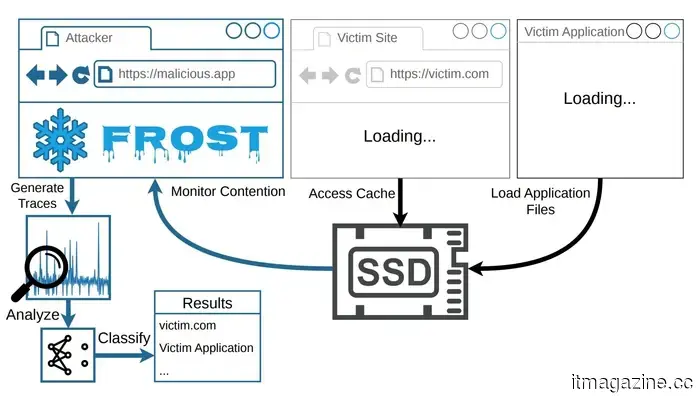
The technique is referred to as FROST, which stands for Fingerprinting Remotely using OPFS-based SSD Timing. Each website and application you use creates a distinct pattern of activity on your SSD, the storage component of your computer.
FROST takes advantage of a browser feature called the Origin Private File System (OPFS), which allows websites to store files on your local drive without prior consent.
FROST: Fingerprinting Remotely using OPFS-based SSD Timing
The attacker's page generates a large file on your drive and then listens for small speed variations that occur when your SSD is handling other tasks. These variations are analyzed by an AI model that has been trained to detect specific patterns associated with particular websites and applications.
The research indicated that the technique successfully identified visited websites with approximately 89% accuracy and recognized running apps with around 96% accuracy when tested on an Apple M2 Mac.
Moreover, the attack is effective across different browsers at the same time, meaning that visiting the attacker's page in Chrome could still reveal your activities in Safari.
No fix from browsers, but you can safeguard yourself.
Campaign Creators / Unsplash
Fortunately, FROST has not yet been detected outside of controlled environments, which is a relief. Additionally, it only operates while the malicious tab is open, so closing it halts the attack.
Google, Apple, and Mozilla have all been notified, but none has pledged to implement a solution. Currently, your best defense is to monitor your available disk space. An unexpected drop in storage should raise immediate concerns for investigation.
Proposed browser fixes include limiting the storage capacity that OPFS can utilize, but given the responses from browser developers, these adjustments may not arrive anytime soon.






Other articles
 The Xiaomi 17T Pro competes strongly with the iPhone 17, featuring Leica cameras and a large battery.
The Xiaomi 17T Pro is equipped with a 50MP Leica camera, features a 5x periscope zoom, is powered by the Dimensity 9500, and comes with a 7,000mAh battery.
The Xiaomi 17T Pro competes strongly with the iPhone 17, featuring Leica cameras and a large battery.
The Xiaomi 17T Pro is equipped with a 50MP Leica camera, features a 5x periscope zoom, is powered by the Dimensity 9500, and comes with a 7,000mAh battery.
 CRM and AI in 2026: Bitrix24 Copilot is Transforming SMEs into Businesses Enhanced by AI
AI-driven CRM platforms are transforming into operational ecosystems for small and medium-sized enterprises, with Bitrix24 Copilot at the forefront of this change by incorporating AI tools across sales, marketing, support, and collaboration.
CRM and AI in 2026: Bitrix24 Copilot is Transforming SMEs into Businesses Enhanced by AI
AI-driven CRM platforms are transforming into operational ecosystems for small and medium-sized enterprises, with Bitrix24 Copilot at the forefront of this change by incorporating AI tools across sales, marketing, support, and collaboration.
 CRM and AI in 2026: Bitrix24 Copilot is Transforming SMEs into AI-Powered Enterprises
AI-driven CRM platforms are transforming into operational ecosystems for small and medium enterprises, with Bitrix24 Copilot strategically placing itself at the heart of this transition by integrating AI tools throughout sales, marketing, support, and collaboration.
CRM and AI in 2026: Bitrix24 Copilot is Transforming SMEs into AI-Powered Enterprises
AI-driven CRM platforms are transforming into operational ecosystems for small and medium enterprises, with Bitrix24 Copilot strategically placing itself at the heart of this transition by integrating AI tools throughout sales, marketing, support, and collaboration.
Your hard drive is revealing your browsing habits, and websites are able to detect it.
Researchers have identified a new attack known as FROST, which enables harmful websites to monitor your browsing habits and launch applications by observing your SSD activity via your browser.