

Samsung’s One UI 8.5 has complicated the process of checking free storage, as it seems that math is now considered a feature.
One UI 8.5 has made things a bit more challenging for some users.
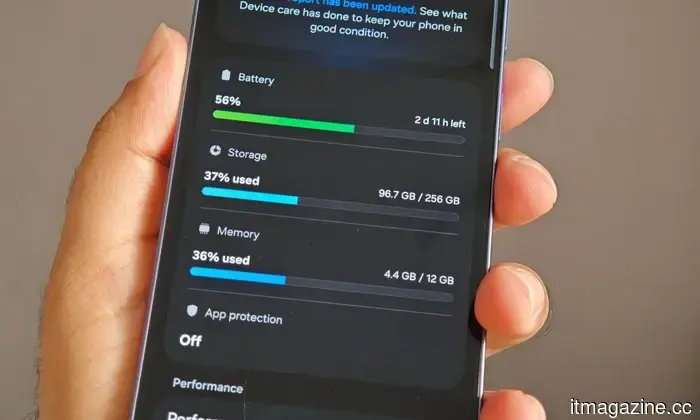
Samsung has implemented a minor adjustment in its latest significant software update for One UI, which has left Galaxy users feeling quite frustrated. The One UI 8.5 update has eliminated the available storage indicator from the Device Care menu. Consequently, users can now only view the total storage capacity and the amount of space currently in use, without a clear display of the remaining free space.
Reasons for user frustration
The previous version of One UI showed the exact amount of available space directly in the storage section, making it straightforward and quite helpful. Users could easily see all the essential information at a glance. Now, however, users must subtract the used storage from the total capacity to determine the available space.
Though this may seem like a minor issue, it can become increasingly bothersome for users with larger-capacity phones. Owners of 512GB and 1TB Galaxy devices have voiced their concerns about this change, as the previous interface allowed for quick checks of available storage. Reddit users have also compared One UI 8.0 and One UI 8.5, illustrating how the older version made the free-space metric clearer.
Now it's time for calculations
Unfortunately, this change isn’t something that can be adjusted in settings, and the alternatives aren’t very effective. Users can add a storage widget to their home screen for the same information; however, some have reported receiving inaccurate figures. For instance, an S25 Ultra owner indicated that the widget displayed 418GB free, while the System Monitor Edge panel showed only 389GB, and refreshing the widget did not resolve the discrepancy. The more dependable native option seems to be the System Monitor Edge panel, but even it requires additional swipes and menus to check a basic system statistic.
Effective storage management is fundamental maintenance for individuals who frequently shoot videos, install large games, and generally use a lot of storage. Thus, altering familiar utilities can taint users’ first experience with One UI 8.5. Samsung has not yet commented on whether the previous storage indicator will return in future updates, meaning users will have to deal with this change for the foreseeable future.





Other articles
 Europe's reliance on cloud services poses a political risk, in addition to being a technical issue.
Europe's reliance on external cloud services impacts not only its AI sovereignty but also its data sovereignty, leading to increased political vulnerability.
TikTok requests that Europe's highest court eliminate its gatekeeper designation.
On Tuesday, TikTok requested the Court of Justice to annul its designation as a DMA gatekeeper, marking the first challenge of this kind to be presented to the EU's highest court.
Europe's reliance on cloud services poses a political risk, in addition to being a technical issue.
Europe's reliance on external cloud services impacts not only its AI sovereignty but also its data sovereignty, leading to increased political vulnerability.
TikTok requests that Europe's highest court eliminate its gatekeeper designation.
On Tuesday, TikTok requested the Court of Justice to annul its designation as a DMA gatekeeper, marking the first challenge of this kind to be presented to the EU's highest court.
 Prime Video has just announced some disappointing news regarding Henry Cavill's live-action Voltron film.
Amazon has announced that Henry Cavill's live-action Voltron movie will bypass theaters and debut on Prime Video, leaving fans who anticipated a theatrical release feeling disappointed.
Prime Video has just announced some disappointing news regarding Henry Cavill's live-action Voltron film.
Amazon has announced that Henry Cavill's live-action Voltron movie will bypass theaters and debut on Prime Video, leaving fans who anticipated a theatrical release feeling disappointed.
 Meta loses case regarding payment to Italian publishers at the EU's highest court.
The CJEU has decided that Italy’s AGCOM can mandate Meta to reimburse publishers for news excerpts, representing a significant procedural victory for European publishers.
Meta loses case regarding payment to Italian publishers at the EU's highest court.
The CJEU has decided that Italy’s AGCOM can mandate Meta to reimburse publishers for news excerpts, representing a significant procedural victory for European publishers.
 Webidoo secures $25 million to develop an 'AI operating layer' aimed at small businesses.
Webidoo, which operates in Milan and Chicago, secured $25 million from Azimut Libera Impresa to enhance agentic AI for small and medium-sized businesses and to support acquisitions in the United States.
Webidoo secures $25 million to develop an 'AI operating layer' aimed at small businesses.
Webidoo, which operates in Milan and Chicago, secured $25 million from Azimut Libera Impresa to enhance agentic AI for small and medium-sized businesses and to support acquisitions in the United States.
Samsung’s One UI 8.5 has complicated the process of checking free storage, as it seems that math is now considered a feature.
One UI 8.5 has removed the clear display of available storage in Device Care, forcing Galaxy users to estimate their free space or depend on cumbersome alternatives.