

The AI feature in Chrome receives a significant enhancement to reduce the need for switching between tabs.
If you've ever found yourself delving deep into an online search, you know how it goes. You open one tab, click a link, then another tab, and suddenly you find yourself with 14 tabs open without any answers.
This experience was one of the factors that led me to switch to Arc Browser, which provides vertical tabs that are easier to manage. Interestingly, Google Chrome added this feature just a week ago. However, Google is not stopping there; they are rolling out a significant upgrade to AI Mode in Chrome to address this concern.
So, what has Google implemented to tackle tab disarray?
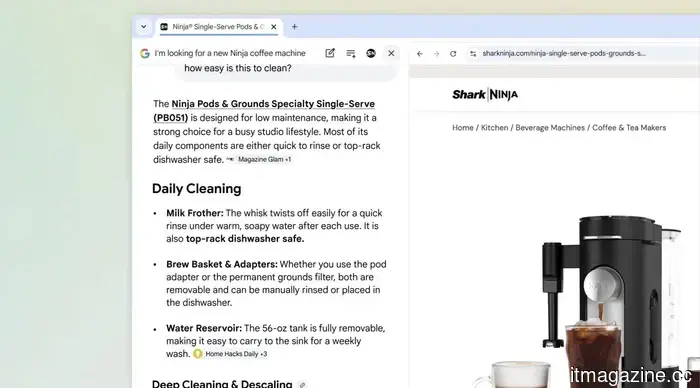
The major update is that when you click a link in AI Mode, it no longer takes you away from your initial search. Instead, the webpage opens alongside AI Mode, allowing you to explore the site while continuing to ask follow-up questions without losing your spot.
Google provided a shopping scenario to demonstrate this functionality. Imagine you're looking for a compact coffee maker that can brew a decent latte. You describe your requirements in AI Mode and start your search. Once you discover a model you like and click on the link, it opens on the right side instead of a new tab.
Now, you can inquire, “How easy is this to clean?” AI Mode will extract context from the page and provide a relevant answer. No need for a new tab or starting from scratch.
This feature is equally effective for research. For instance, if you're studying McLaren's racing teams, you can browse their official site while using AI Mode and keep asking questions in real-time.
I don't think this feature has been made available to everyone just yet. I attempted to replicate the process, but the links still opened in a new tab for me. So, if you don't see this feature immediately, it should roll out in the upcoming days.
What other enhancements come with this update?
Another significant addition is the ability to conduct searches across tabs, which I find particularly exciting. On both desktop and mobile, a new “plus” menu in the search box allows you to include your currently open tabs in your AI Mode search. You can combine tabs, images, and even PDFs.
Studying for an exam? You can add your class notes, lecture slides, and reading tabs to the search, then ask AI Mode to clarify something you’re struggling with. It will utilize all that context to provide a customized response.
Many AI browsers, like Perplexity Comet, have similar cross-tab search features, so it's great to see Google Chrome joining in on this functionality.
Other articles
 The upcoming Pixel phone may feature a luminous back, based on insights from Android 17’s code.
Google is developing a new feature named Pixel Glow that utilizes soft lights on the back of your device to alert you without illuminating the screen.
The upcoming Pixel phone may feature a luminous back, based on insights from Android 17’s code.
Google is developing a new feature named Pixel Glow that utilizes soft lights on the back of your device to alert you without illuminating the screen.
 Sequoia has raised $7 billion for its largest late-stage fund to date.
Sequoia Capital has secured approximately $7 billion for its expansion strategy fund, marking the first significant fundraising effort led by its new co-stewards, Alfred Lin and Pat Grady.
Sequoia has raised $7 billion for its largest late-stage fund to date.
Sequoia Capital has secured approximately $7 billion for its expansion strategy fund, marking the first significant fundraising effort led by its new co-stewards, Alfred Lin and Pat Grady.
 The AI feature in Chrome receives a significant enhancement to reduce the need for switching between tabs.
The AI Mode upgrade for Google Chrome allows you to browse websites and conduct searches simultaneously, enabling you to ask follow-up questions without having to lose your spot or open an additional tab.
The AI feature in Chrome receives a significant enhancement to reduce the need for switching between tabs.
The AI Mode upgrade for Google Chrome allows you to browse websites and conduct searches simultaneously, enabling you to ask follow-up questions without having to lose your spot or open an additional tab.
 AlixLabs secures €15 million in Series A funding.
AlixLabs has completed a €15M Series A funding round supported by Navigare, Industrifonden, Global Brain, and Stephen Industries to bring its APS™ to market.
AlixLabs secures €15 million in Series A funding.
AlixLabs has completed a €15M Series A funding round supported by Navigare, Industrifonden, Global Brain, and Stephen Industries to bring its APS™ to market.
 AlixLabs secures €15 million in Series A funding.
AlixLabs has successfully completed a €15M Series A funding round, supported by Navigare, Industrifonden, Global Brain, and Stephen Industries, to bring its APS™ to market.
AlixLabs secures €15 million in Series A funding.
AlixLabs has successfully completed a €15M Series A funding round, supported by Navigare, Industrifonden, Global Brain, and Stephen Industries, to bring its APS™ to market.
 Intel unveils the key technology that helps gaming laptops operate more quietly and remain cooler.
Intel's AI Quiet Plus isn't simply a new processor or a software update; it's a certification standard that leverages on-chip AI to actively control noise, heat, and battery longevity.
Intel unveils the key technology that helps gaming laptops operate more quietly and remain cooler.
Intel's AI Quiet Plus isn't simply a new processor or a software update; it's a certification standard that leverages on-chip AI to actively control noise, heat, and battery longevity.
The AI feature in Chrome receives a significant enhancement to reduce the need for switching between tabs.
The upgrade to Google's AI Mode for Chrome allows you to navigate websites while searching simultaneously, enabling you to pose follow-up questions without losing your spot or needing to open an additional tab.